








By: Editorial Team
Published: Gear & Production Insights
Main Facts: The BMPCC Revolution and the Reality of Out-of-the-Box Shooting
The Blackmagic Pocket Cinema Camera (BMPCC) series—with a particular focus on the iconic BMPCC 4K—has fundamentally disrupted the independent filmmaking landscape. By democratizing access to high-end digital cinema formats, internal RAW recording, and exceptional dynamic range at an unprecedented price point, these cameras have become the go-to tools for aspiring filmmakers, documentary crews, and indie production houses working on strict budgets.

However, transitioning from a traditional consumer mirrorless camera to a Blackmagic cinema camera requires a paradigm shift. Unlike hybrid mirrorless options from brands like Sony, Canon, or Panasonic, the BMPCC series is unapologetically designed as a dedicated cinema tool. Consequently, out of the box, the camera ships as a bare-bones core. It lacks internal mechanical image stabilization, continuous autofocus tracking, built-in optical low-pass filters (OLPF), and even standard external storage or comprehensive power solutions.
To hit the ground running, a filmmaker cannot simply buy the camera body and a lens; they must invest in an entire ecosystem of supporting hardware. This master guide consolidates essential pre-purchase research, technical setup configurations, audio engineering practices, and post-production workflows designed to help creators at any stage of their filmmaking journey maximize their equipment’s potential.

Chronology: From Unboxing to Professional Post-Production
Setting up a professional cinema rig is an iterative journey. Understanding the chronological phases of deployment ensures that filmmakers avoid costly mistakes and equipment damage.
Phase 1: Pre-Purchase and Infrastructure Planning
Before the camera even arrives, creators must establish a robust infrastructure. This includes designated storage solutions for equipment organization, dedicated battery charging stations, and high-speed media cards capable of handling high-bitrate data streams.

Phase 2: Rigging and Physical Protection
Once the camera is unboxed, the immediate priority is physical protection and ergonomics. Because BMPCC bodies feature a lightweight polymer composite structure with delicate input ports, rigging the camera inside a protective aluminum "cage" is non-negotiable. This phase also involves mounting external monitors, handles, and power distribution systems.
Phase 3: Field Calibration and Audio Integration
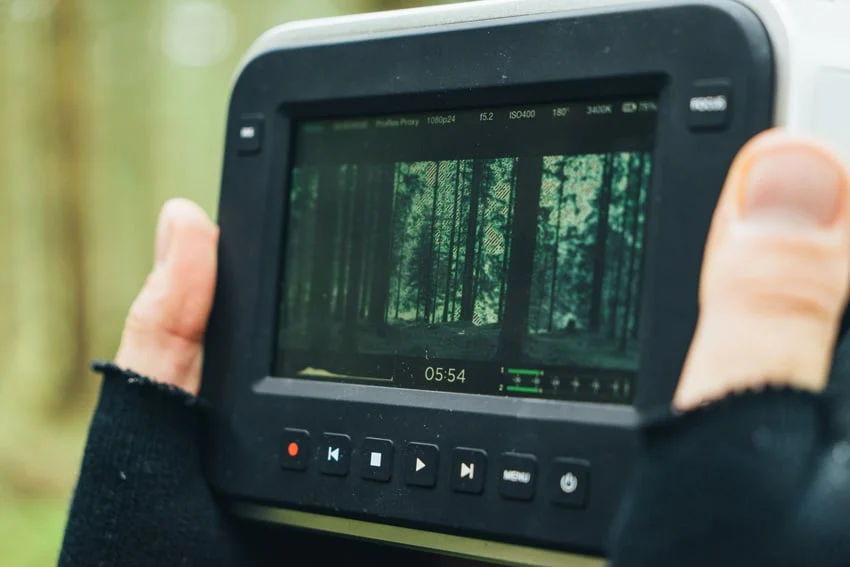
With the rig assembled, filmmakers must calibrate exposure tools (false color, zebras), focus assists, and audio inputs. This stage requires testing microphone preamps, setting up phantom power safely, and applying Look-Up Tables (LUTs) for real-time monitoring.

Phase 4: Production and Post-Production (DaVinci Resolve)
The final phase shifts from physical capture to digital manipulation. Utilizing the bundled DaVinci Resolve software, creators ingest footage, apply color grading pipelines, and execute final edits using specialized video templates and audio mastering tools.
Supporting Data: Essential Gear Categories and Technical Specifications
Building out a BMPCC 4K or 6K rig requires careful selection of components. The following technical breakdowns highlight what is required to transform a bare camera body into a professional cinema package.

1. Storage and Memory Management
The BMPCC series does not feature internal hard drives. Depending on the recording codec—ranging from Apple ProRes 422 HQ to Blackmagic RAW (BRAW) at varying compression ratios (3:1, 5:1, 8:1, 12:1)—data rates can skyrocket.
- CFast 2.0 and SD UHS-II Cards: Essential for internal recording of high-resolution files. Users must check Blackmagic’s approved media list to avoid dropped frames.
- External USB-C SSDs: Many filmmakers opt for drives like the Samsung T5 or T7, mounted directly to the camera cage. This offers a significantly lower cost-per-gigabyte ratio for long-form 4K recording sessions.
2. Power Solutions
The native LP-E6 style batteries supplied with early BMPCC models are notoriously short-lived, often lasting only 20 to 30 minutes under heavy 4K recording loads.

- External Power Rails: Creators frequently transition to Sony NP-F style battery plates, V-mount, or Gold-mount batteries via D-Tap cables.
- Rig Integration: Power distribution must be planned carefully so that battery plates do not obstruct shoulder mounts, gimbals, or tripod quick-release plates. Furthermore, switching power sources—such as drawing power from a motorized gimbal when flying the camera, then swapping to a V-mount battery for handheld work—requires modular cable management.
3. Physical Protection and Port Savers
- Camera Cages: A form-fitting aluminum cage shields the fragile camera body from impacts while providing dozens of 1/4"-20 and 3/8"-16 threaded mounting points for accessories.
- Port Savers and HDMI/USB-C Locks: Frequent plugging and unplugging of external monitors, power cables, and audio jacks can cause the internal ports to solder-crack off the motherboard. Utilizing right-angle adapters and cable clamp brackets permanently attached to the cage prevents catastrophic hardware failure.
4. Professional Audio Capture
While the BMPCC features surprisingly capable internal stereo microphones, professional productions demand external solutions.
- Input Options: The BMPCC 4K features both a standard 3.5mm microphone jack and a mini-XLR input with phantom power capabilities.
- Microphone Selection: Shotgun mics and wireless lavalier systems should be selected based on environmental needs. For outdoor shoots, a furry windscreen ("dead cat") is mandatory to eliminate wind clipping.
Official Recommendations and Expert Guidance
Industry professionals and technical documentation emphasize several critical best practices when operating Blackmagic cinema systems:

- The Golden Rule of Audio Power: Understanding power delivery to microphones is vital. Some mics are passive, some carry their own internal batteries, and others require external phantom power (+48V) supplied by the camera. Sending phantom power to an incompatible microphone or an already self-powered mic can permanently fry the internal circuitry of the microphone or damage the camera’s audio preamps. Always verify microphone power requirements before connecting.
- Investing in Glass and Support Tools: Do not compromise on support accessories. A reliable follow-focus system enables smooth manual focus pulls (crucial since continuous autofocus on the BMPCC is not designed for fast-paced narrative tracking). Additionally, matte boxes and neutral density (ND) filters are necessary to control exposure without sacrificing the shallow depth of field achieved by wide apertures in bright daylight.
- Color Science and LUT Management: Blackmagic cameras shoot in a flat, logarithmic color profile (Film mode) designed to maximize dynamic range. Because flat footage looks washed out on set, mastering the application of Look-Up Tables (LUTs) is essential. LUTs allow directors and cinematographers to preview a graded, contrast-rich image on the monitor while preserving the raw sensor data for post-production flexibility.
Implications for Independent Filmmakers
The implications of mastering the BMPCC workflow extend far beyond technical proficiency; they fundamentally alter the economic and creative boundaries of independent filmmaking.
By taking the time to thoroughly research, build, and calibrate a customized camera rig, indie filmmakers can achieve a cinematic look that rivals cameras costing three to four times as much. The bundled inclusion of DaVinci Resolve Studio bridges the gap between production and post-production, offering a professional end-to-end pipeline that handles editing, visual effects (Fusion), color correction, and audio post-production (Fairlight) under one roof.

However, the steep learning curve acts as a natural filter. Those who fail to respect the technical demands of external power management, data offloading, manual focus pulling, and audio engineering will likely experience frustration in the field. Conversely, filmmakers who embrace this user guide’s holistic approach will find themselves equipped with a powerful, reliable, and deeply cinematic tool capable of turning ambitious creative visions into professional-grade realities.