Fifteen years after its initial debut in 2011, AWS Elastic Beanstalk—a foundational pillar for developers deploying full-stack applications across Java, .NET, Python, Node.js, PHP, Ruby, and Go—has undergone a massive architectural reinvention. Marking a significant milestone in cloud-native infrastructure management, Amazon Web Services (AWS) has officially announced the general availability of Elastic Beanstalk Cluster Mode.
This next-generation deployment model allows development teams to bring their applications in any format—whether raw source code, Dockerfiles, or fully baked container images—while AWS assumes total operational responsibility for the underlying production environments throughout the application’s lifecycle. By marrying the simplicity of Beanstalk with the raw power of Amazon Elastic Kubernetes Service (Amazon EKS), AWS is aiming to remove the friction of modern microservices orchestration.
Main Facts: What is Elastic Beanstalk Cluster Mode?
At its core, Elastic Beanstalk Cluster Mode is designed for modern engineering organizations running expansive portfolios of applications. Instead of forcing teams to provision, secure, and operate each application in an isolated bubble, Cluster Mode allows multiple applications to share a unified, highly optimized infrastructure pool powered by Amazon EKS.
Key capabilities of the new Cluster Mode include:
- Unified Operational Baseline: Run anywhere from ten to a hundred applications through a single management plane, significantly lowering per-application infrastructure overhead as portfolios grow.
- Flexible Application Packaging: Deploy effortlessly using source code, Dockerfiles, or standard container images registered in Amazon Elastic Container Registry (Amazon ECR).
- AI-Powered Diagnostics: Leverage built-in AI analysis tools that diagnose environment health issues and automatically recommend or apply fixes.
- Modern CI/CD Integration: Utilize official GitHub Action workflows to drive zero-friction deployments via simple YAML configurations.
- Enterprise-Grade Security & Observability: Out-of-the-box OpenTelemetry-based observability, traffic-splitting deployments with automatic rollbacks, event-driven autoscaling, centralized secrets management via AWS Secrets Manager, and HTTPS enabled by default through AWS Certificate Manager.
Crucially, Elastic Beanstalk Standard Mode—which relies directly on Amazon Elastic Compute Cloud (EC2)—remains fully supported. Standard and Cluster Mode environments can run side-by-side within the exact same Elastic Beanstalk application tree, allowing teams to migrate workloads at their own pace with rigorous compatibility validation checks.
Chronology: Fifteen Years of Evolution to Kubernetes-Native Management
To understand the magnitude of this release, it is vital to trace the historical evolution of AWS Elastic Beanstalk and how it has continuously adapted to shifts in software architecture.
2011–2020: The PaaS Pioneer
When AWS launched Elastic Beanstalk in 2011, the platform revolutionized cloud deployments. By abstracting away the underlying provisioning of servers, load balancers, and scaling groups, developers could focus purely on business logic. For nearly a decade, standard EC2-backed Beanstalk environments served as the entry point for thousands of startups and enterprises moving monolithic and early multi-tier applications to the cloud.
2021–2025: Modernizing the Core Engine
Recognizing the industry-wide pivot toward containerization and microservices, AWS quietly began re-engineering the operational engine underneath Beanstalk. Over recent years, engineers introduced major upgrades, including advanced observability metrics, tighter integration with AWS Secrets Manager, and streamlined continuous integration pipelines. Early 2026 saw the introduction of AI-powered environment health analysis and native GitHub Actions support, setting the stage for a container-first future.

Late 2026: The Birth of Cluster Mode
Culminating these modernization efforts, AWS introduced Cluster Mode. By bridging the gap between traditional platform-as-a-service (PaaS) simplicity and Kubernetes-driven flexibility, AWS has transformed Beanstalk from a simple web app wrapper into an enterprise-grade multi-tenant orchestration layer.
Supporting Data & Technical Implementation
Implementing Cluster Mode is engineered to be seamless, whether executed via the AWS Management Console, the AWS Command Line Interface (CLI), the dedicated EB CLI, or standard AWS SDKs.
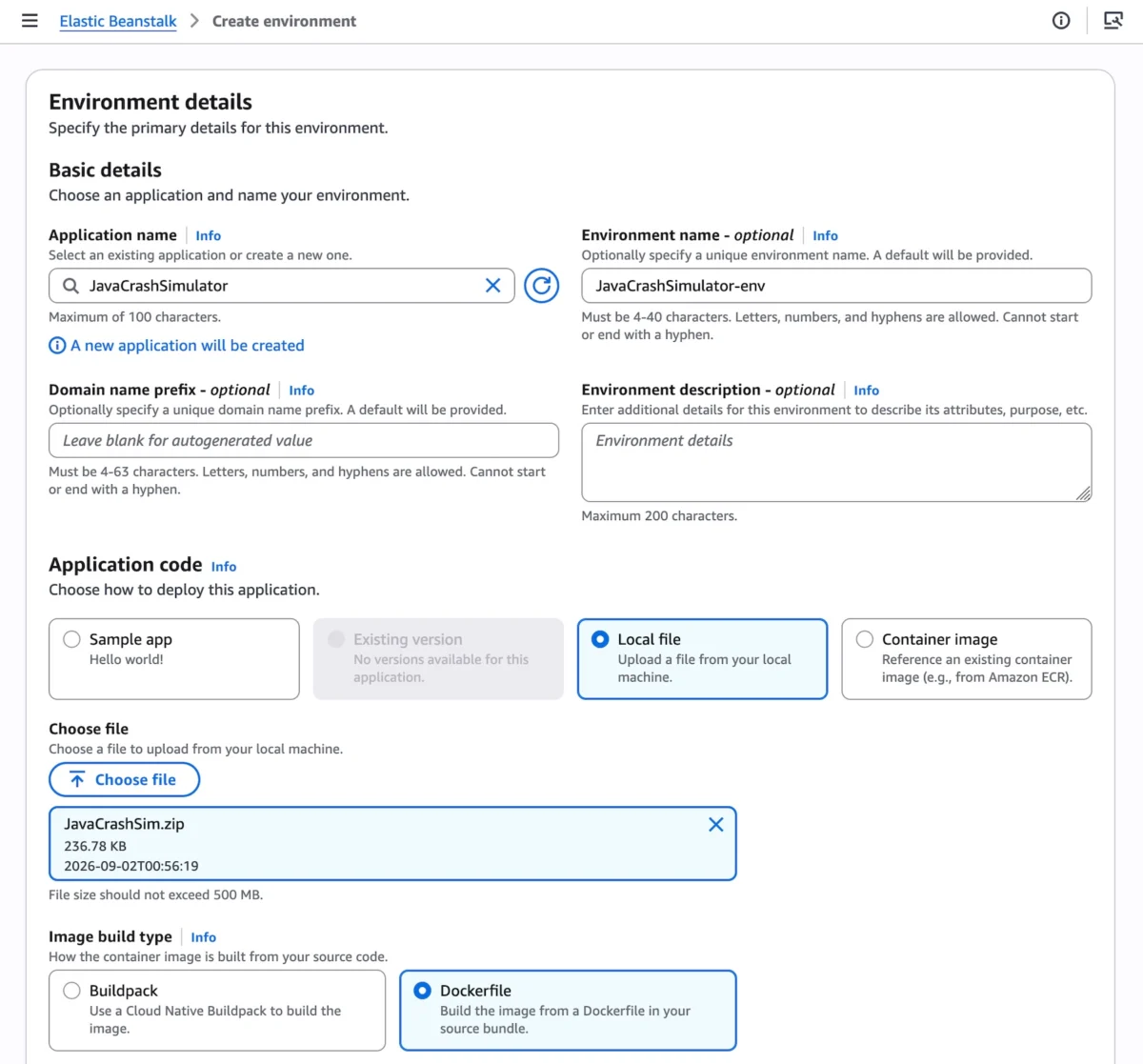
Getting Started via the Console
Navigating to the Elastic Beanstalk console allows developers to spin up a new environment by selecting Cluster under the Deployment type selector. Users can feed local source code, point to a Dockerfile, or supply an image URI. The initial provisioning of the underlying EKS cluster takes roughly ten minutes across designated subnets, while subsequent deployments execute rapidly by recycling the established cluster architecture.
Programmatic Deployment via AWS CLI
For organizations operating automated infrastructure-as-code (IaC) pipelines, deploying a multi-service microservice application to Kubernetes via Beanstalk is streamlined. For example, registering pre-built container images from Amazon ECR can be automated through shell scripts:

APP_NAME="my-microservice"

IMAGES=(
    "frontend-v1|public.ecr.aws/my-microservices/frontend:v1"
    "cartservice-v1|public.ecr.aws/my-microservices/cart:v1"
    "paymentservice-v1|public.ecr.aws/my-microservices/payment:v1"
    "shippingservice-v1|public.ecr.aws/my-microservices/shippingservice:v1"
)

for entry in "$IMAGES[@]"; do
    IFS='|' read -r label uri <<< "$entry"
    aws elasticbeanstalk create-application-version
        --application-name "$APP_NAME"
        --version-label "$label"
        --image-configuration "Source=Uri=$uri"
        --region "us-west-2"
    echo "Successfully Registered: $label"
done
Configuring Microservices with JSON Options
Individual microservices within the cluster can be finely tuned using option settings. For instance, a frontend service requiring public internet access via an Application Load Balancer (ALB) and custom HTTP health checks can be configured with a JSON namespace file (frontend-options.json):
[
    "Namespace": "aws:elasticbeanstalk:eks", "OptionName": "cluster-role", "Value": "arn:aws:iam::0123456789012:role/EksClusterRole",
    "Namespace": "aws:elasticbeanstalk:eks", "OptionName": "node-role", "Value": "arn:aws:iam::0123456789012:role/EksNodeRole",
    "Namespace": "aws:elasticbeanstalk:eks:environment", "OptionName": "observability-role", "Value": "arn:aws:iam::0123456789012:role/ObservabilityRole",
    "Namespace": "aws:elasticbeanstalk:eks:environment", "OptionName": "subnets", "Value": "subnet-1,subnet-2,subnet-3",
    "Namespace": "aws:elasticbeanstalk:eks:environment:autoscaling", "OptionName": "min-replica", "Value": "1",
    "Namespace": "aws:elasticbeanstalk:eks:environment:autoscaling", "OptionName": "max-replica", "Value": "2",
    "Namespace": "aws:elasticbeanstalk:eks:environment", "OptionName": "cpu", "Value": "0.5",
    "Namespace": "aws:elasticbeanstalk:eks:environment", "OptionName": "memory", "Value": "256Mi",
    "Namespace": "aws:elasticbeanstalk:eks:environment", "OptionName": "memory-limit", "Value": "512Mi",
    "Namespace": "aws:elasticbeanstalk:eks:environment", "OptionName": "service-port", "Value": "8080",
    "Namespace": "aws:elasticbeanstalk:eks:alb", "OptionName": "scheme", "Value": "internet-facing",
    "Namespace": "aws:elasticbeanstalk:eks:alb", "OptionName": "healthcheck-path", "Value": "/_healthz"
]
Finalizing the deployment requires executing a simple environment creation command:
aws elasticbeanstalk create-environment
    --application-name my-microservice
    --environment-name frontend
    --version-label frontend-v1
    --tier Name=Cluster,Type=EKS
    --option-settings file:///tmp/frontend-options.json
Pricing Model
AWS has structured Elastic Beanstalk Cluster Mode with developer accessibility in mind. There is no additional software charge for using Cluster Mode. Customers pay exclusively for the underlying AWS resources consumed by their architectures—including the EKS control plane fee, EKS Auto Mode compute resources, Amazon ECR storage, and Amazon CloudWatch telemetry. Note that Cluster Mode is not eligible for the AWS Free Tier.
Official Responses and Ecosystem Reactions
Industry reception has been overwhelmingly positive, particularly from DevOps engineers and platform architects who have historically grappled with the steep learning curve and operational overhead of raw Kubernetes configurations.

According to AWS spokespeople, the driving philosophy behind Cluster Mode is to give developers the structural advantages of Kubernetes without forcing them to become Kubernetes experts. By insulating product engineering teams from Helm charts, ingress controllers, and raw YAML manifests, AWS allows enterprises to accelerate time-to-market.
Furthermore, the introduction of the AWS MCP Server and developer plugins enables engineering teams to query APIs, search documentation, check regional feature availability, and troubleshoot deployment glitches directly within their preferred AI-assisted coding environments.
Strategic Implications for the Enterprise
The release of Elastic Beanstalk Cluster Mode has several far-reaching implications for modern software development and cloud financial management (FinOps):
- Democratizing Kubernetes: Organizations that previously avoided Kubernetes due to a lack of specialized cluster operators can now leverage EKS infrastructure transparently through Beanstalk’s familiar administrative interface.
- Optimized Resource Utilization: Multi-tenant resource sharing drastically cuts down idle compute waste. Instead of over-provisioning dedicated EC2 instances for minor internal services, portfolios of applications share dense, auto-scaling Kubernetes nodes.
- Pacing Migration Safely: Because Standard and Cluster modes operate side-by-side within unified application trees, engineering managers face zero forced migrations. Teams can refactor legacy monoliths or standard web apps into containerized microservices at their own velocity, backed by automated compatibility checks.
- Enhanced AI-Driven Operations: The integration of AI-powered health analysis reduces mean-time-to-resolution (MTTR) for production incidents, shifting infrastructure management from reactive firefighting to proactive, automated healing.
Availability
AWS Elastic Beanstalk Cluster Mode is generally available starting today across all AWS Regions where Elastic Beanstalk is currently supported. Developers can begin testing workloads immediately via the AWS Management Console, or connect with the community via AWS re:Post and standard AWS Support channels to provide feedback on this new paradigm in cloud application management.