










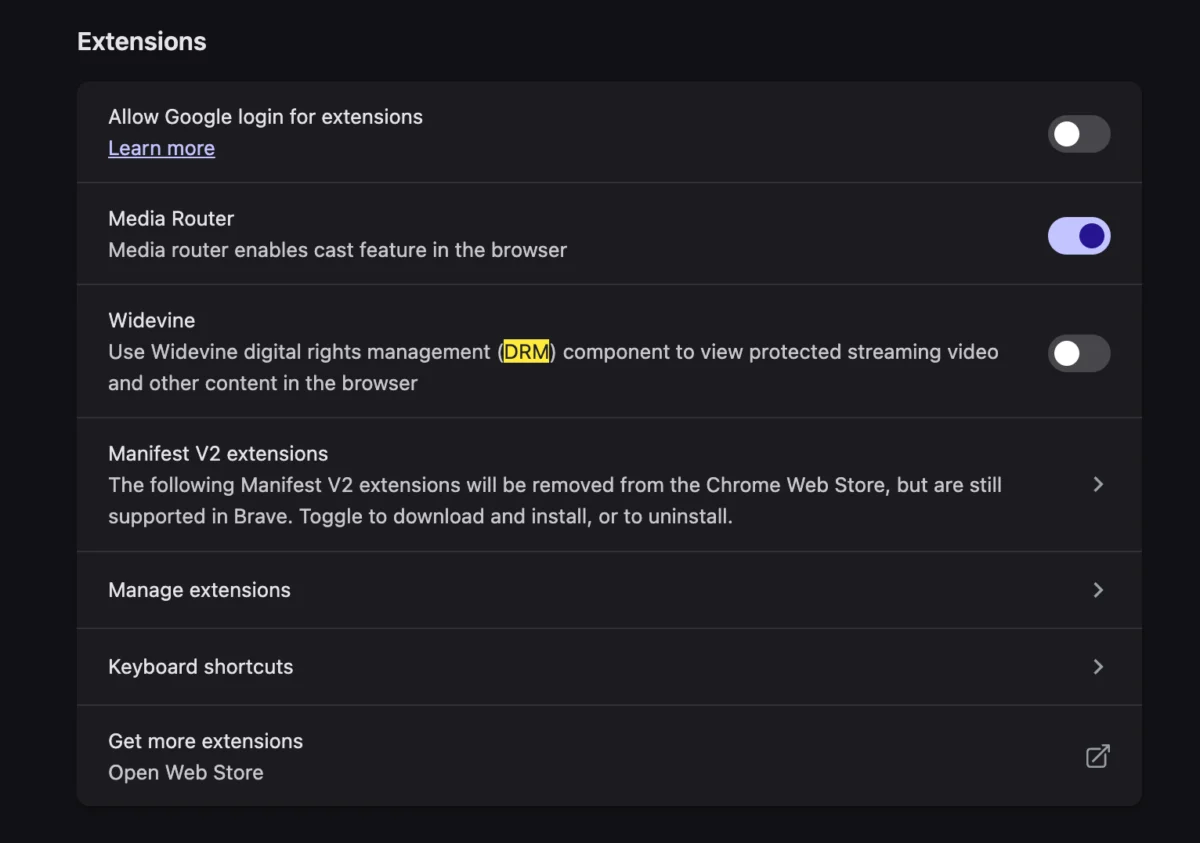
There is an undeniable, crisp satisfaction in unboxing a new computer. The pristine aesthetic, the absence of bloated legacy software, and the lightning-fast responsiveness of a fresh operating system installation represent a "blank slate" productivity dream. However, for many power users and casual consumers alike, this honeymoon period is frequently interrupted by the cold reality of modern digital rights management (DRM) and browser compatibility.
A common grievance emerging among users of high-end hardware—specifically the latest generation of MacBooks—is the sudden encounter with a cryptic error message when attempting to access streaming services like YouTube TV: "This video format is not supported." This frustrating barrier, which prevents users from accessing live media, is not necessarily a hardware failure or a sign of a defective machine. Rather, it is a symptom of the complex, behind-the-scenes negotiation between web browsers and proprietary content protection technologies.
Main Facts: Decoding the Error
At its core, the "This video format is not supported" error is a compatibility issue between the browser’s media engine and the DRM protocols required by the content provider. Major streaming platforms, including YouTube TV, Netflix, and Hulu, utilize encrypted media extensions (EME) to ensure that copyrighted content is not pirated.
The engine responsible for decrypting and rendering this protected content in many Chromium-based browsers (such as Chrome, Brave, and Vivaldi) is Google’s Widevine Content Decryption Module (CDM). When a user sets up a new machine, certain browser components—specifically those related to encrypted media—may not be enabled by default or may require a manual prompt to initialize for security reasons. The browser essentially tells the streaming server, "I cannot guarantee that I can decrypt this video securely," and the server responds by refusing to send the stream, triggering the error message.
Chronology of the User Experience
The typical path to this technical roadblock follows a predictable timeline:
- The Setup Phase: The user completes the initial setup of their new MacBook or high-performance laptop, installs their preferred browser, and logs into their Google or streaming accounts.
- The Trigger Event: Upon navigating to a live broadcast on YouTube TV, the player interface loads, but the video window remains black. Instead of the broadcast, a stark, gray-text error message appears: "This video format is not supported."
- The Troubleshooting Attempt: The user attempts standard fixes: clearing the browser cache, disabling ad-blockers, checking for OS updates, or restarting the hardware. None of these resolve the issue because the root cause lies within the browser’s internal plugin settings, not the network or the operating system.
- The Discovery: The user delves into the advanced settings or flags of their browser, discovering that the Widevine CDM—the digital bridge between the browser and the protected content—is either disabled, missing the latest security patch, or awaiting user permission to execute.
- The Resolution: Once the Widevine module is explicitly enabled or granted permission to run, the browser negotiates a successful "handshake" with the streaming server. The video feed populates, and the live stream commences immediately.
Supporting Data: The Role of Widevine and EME
To understand why this is happening, one must look at the evolution of web standards. In the early days of the internet, users were forced to install third-party plugins like Adobe Flash, Microsoft Silverlight, or QuickTime to view video content. These plugins were notorious for security vulnerabilities and system instability.

Today, the industry has transitioned to HTML5, which allows video playback directly within the browser. To protect copyrighted content, the Encrypted Media Extensions (EME) API was developed. This API allows the browser to communicate with a CDM, such as Widevine.
Key Technical Components:
- EME (Encrypted Media Extensions): The JavaScript API that allows the browser to interact with the DRM system.
- CDM (Content Decryption Module): The actual software module that performs the decryption. Widevine is the industry standard used by Google, Netflix, and Disney+.
- Security Sandboxing: Modern browsers sandbox these modules to prevent malicious code from accessing the user’s system while the video is being decrypted.
On new hardware, security policies often default to "Opt-In" for these modules. This prevents unauthorized scripts from running automatically, which is a significant security win but a functional annoyance for the end user.
Official Perspectives and Industry Standards
While individual browser developers rarely issue public statements regarding specific YouTube TV error messages, the consortium behind these technologies, the World Wide Web Consortium (W3C), maintains that EME is necessary for the survival of high-quality, professional streaming on the web.
Without these DRM protocols, major film studios and television networks would refuse to distribute their content via browser-based platforms. Consequently, while the "not supported" error feels like a bug, it is effectively a "feature" of the digital content ecosystem—a gatekeeper ensuring that the browser is a "trusted environment."
Browser vendors like Google and Mozilla have had to balance the tension between "Open Web" ideals and the commercial necessity of DRM. By bundling Widevine, they ensure users can access their content, but by keeping it behind permission prompts, they maintain a level of user autonomy over what code is allowed to execute on their hardware.
Implications for the Future of Media Consumption
The shift toward these protected environments has several long-term implications for the average computer user:

1. Increased Reliance on Browser-Native DRM
We are seeing the near-total extinction of external media plugins. While this makes the web safer and faster, it concentrates power in the hands of the companies that provide the CDM (Google/Widevine, Apple/FairPlay, Microsoft/PlayReady). If a user is on an unsupported platform or a browser that refuses to integrate these modules, they are effectively locked out of the modern media landscape.
2. Privacy vs. Accessibility
The Widevine module is, by design, a piece of software that must uniquely identify the user’s device to prevent the unauthorized sharing of keys. This creates a privacy trade-off: to enjoy high-definition content, users must allow their browser to pass device-specific identifiers to the streaming provider. For privacy-focused users, this is a point of significant contention.
3. The End of "Codec Hell"
As the article notes, the current process is "better than needing to install a codec like the good old days." In the early 2000s, users had to manually download and install proprietary codec packs (like K-Lite or DivX) to play various video formats. Today, the negotiation happens seamlessly—or nearly so—in the background. The "Not Supported" error is the only remaining friction point in an otherwise automated process.
4. Hardware-Level Verification
As we move toward even tighter security, hardware manufacturers are increasingly integrating DRM at the chip level. Modern processors now include "Trusted Execution Environments" (TEEs) that handle the decryption process. This means that, in the future, if your hardware doesn’t meet the specific security requirements of the streaming provider, you may not be able to watch content at all, regardless of what software you install.
Conclusion: Navigating the Modern Web
The "This video format is not supported" message on a brand-new MacBook is a stark reminder of the complexity hidden beneath the browser’s address bar. It serves as a microcosm of the modern internet: a space that is incredibly convenient, yet governed by layers of security and proprietary protocols that exist to protect the commercial interests of content creators.
For the user, the solution is simple: check your browser’s "Content Settings" or "Extensions" to ensure that the DRM modules are enabled. However, the underlying truth is that the browser has become a highly managed, proprietary environment. As we move forward, the ability to troubleshoot these "digital gatekeepers" will become as essential to computer literacy as knowing how to connect to a Wi-Fi network. By understanding the role of Widevine and the necessity of the EME handshake, users can quickly bypass these minor hurdles and return to the primary goal of their hardware: consuming the content they love, seamlessly and securely.



