








As artificial intelligence continues to bleed into the architecture of everyday web development, a new frontier of interoperability has emerged. The integration of OpenAI’s ChatGPT with self-hosted WordPress environments via the Model Context Protocol (MCP) marks a significant evolution in how creators manage their digital assets. By transforming a standard WordPress installation into an active MCP server, site administrators can grant AI assistants the ability to read, analyze, and—under strict authorization—modify site content directly through conversational prompts.
This comprehensive guide details the technical requirements, chronological integration workflow, security implications, and administrative governance necessary to securely connect ChatGPT to a WordPress site using the free Easy MCP AI plugin developed by Themeisle.
Main Facts: What You Need to Know
Connecting ChatGPT to a WordPress site requires managing a multi-layered ecosystem involving specific OpenAI account tiers, secure network tunneling for local environments, and robust authorization frameworks on the WordPress dashboard.
- The Core Requirements: To successfully link the two systems, an administrator must possess a compatible ChatGPT subscription tier supporting developer features, an HTTPS-accessible WordPress endpoint (or secure MCP tunnel), and the ability to configure custom MCP servers within ChatGPT’s interface.
- The Plugin Infrastructure: The bridge is facilitated by Easy MCP AI, a free, open-source WordPress plugin that eliminates the need for hosted relays, turning the website directly into an MCP server.
- Granular Permissions: Connection security relies on OAuth 2.1 authorization with PKCE (Proof Key for Code Exchange). Administrators dictate whether the AI operates under a strictly read-only profile or a full-access configuration, ensuring complete human oversight over destructive actions.
Chronology: The Evolution of MCP Integration
The capability for AI models to securely interface with external software libraries and content management systems has matured rapidly. Understanding the timeline of these developments clarifies the current state of UI labels and security protocols.
- Late 2025 (December 18): OpenAI updates its nomenclature, shifting terminology across its developer ecosystems from "Connectors" to "Apps," laying the groundwork for standardized remote server integrations.
- Early 2026 (July 9): Further refinement of the OpenAI dashboard sees the "App Directory" formally designated as the "Plugin Directory," standardizing how end-users discover and deploy custom tools.
- Mid 2026: The release of Easy MCP AI 2.0.1 introduces streamlined dashboard connection cards, automated OAuth client registration via Dynamic Client Registration (DCR), and advanced diagnostic logging to track every tool execution.
- Current Operations: Today, administrators navigate a unified workflow where ChatGPT initiates an authorization code flow with PKCE, prompting site owners to authenticate within WordPress and grant specific scopes of access before any AI-driven data exchange occurs.
Supporting Data: Plan Compatibility and Access Scenarios
Not all ChatGPT accounts are created equal when it comes to deploying custom developer tools. OpenAI’s pricing structure and help center documentation delineate distinct boundaries between basic consumer tiers and enterprise environments.

ChatGPT Plan Matrix for MCP Capabilities
| Plan Tier | Developer Mode (Beta) | Create & Share Plugins | Documented MCP Capabilities |
|---|---|---|---|
| Free | No | No | Not documented |
| Go | No | Yes | Not documented |
| Plus | Yes | Yes | Not documented |
| Pro | Yes | Yes | Read/fetch capabilities in developer mode |
| Business | Managed via Admin/Owner | Not on Individual Tab | Full MCP support including write actions (Beta) |
| Enterprise / Edu | Role-Controlled (Admin granted) | Not on Individual Tab | Full MCP support including write actions (Beta) |
Workspace Caveats: On Business plans, only designated administrators and owners possess the privileges required to toggle developer mode and deploy custom apps. On Enterprise and Edu architectures, administrators must explicitly grant role-based access before individual members can activate developer settings under Settings ➔ Apps ➔ Advanced Settings.
Furthermore, OpenAI’s infrastructure restricts MCP applications to web interfaces; mobile implementations do not currently support custom server integration.
Official Responses and Technical Specifications
When establishing the connection, the technical dialogue between ChatGPT and WordPress adheres to rigorous security standards.
Overcoming Network and HTTPS Barriers
ChatGPT exclusively communicates with remote MCP servers secured by Transport Layer Security (HTTPS). For developers operating on local environments or private staging servers, a public HTTPS endpoint is mandatory. This is typically achieved using a Secure MCP Tunnel driven by tunnel-client, an open-source agent maintained by OpenAI on GitHub.
On the WordPress side, Easy MCP AI enforces strict HTTPS compliance for OAuth routines on live production sites. Attempting to initiate discovery or registration over plain HTTP results in an immediate 403 Forbidden response with error texts such as:
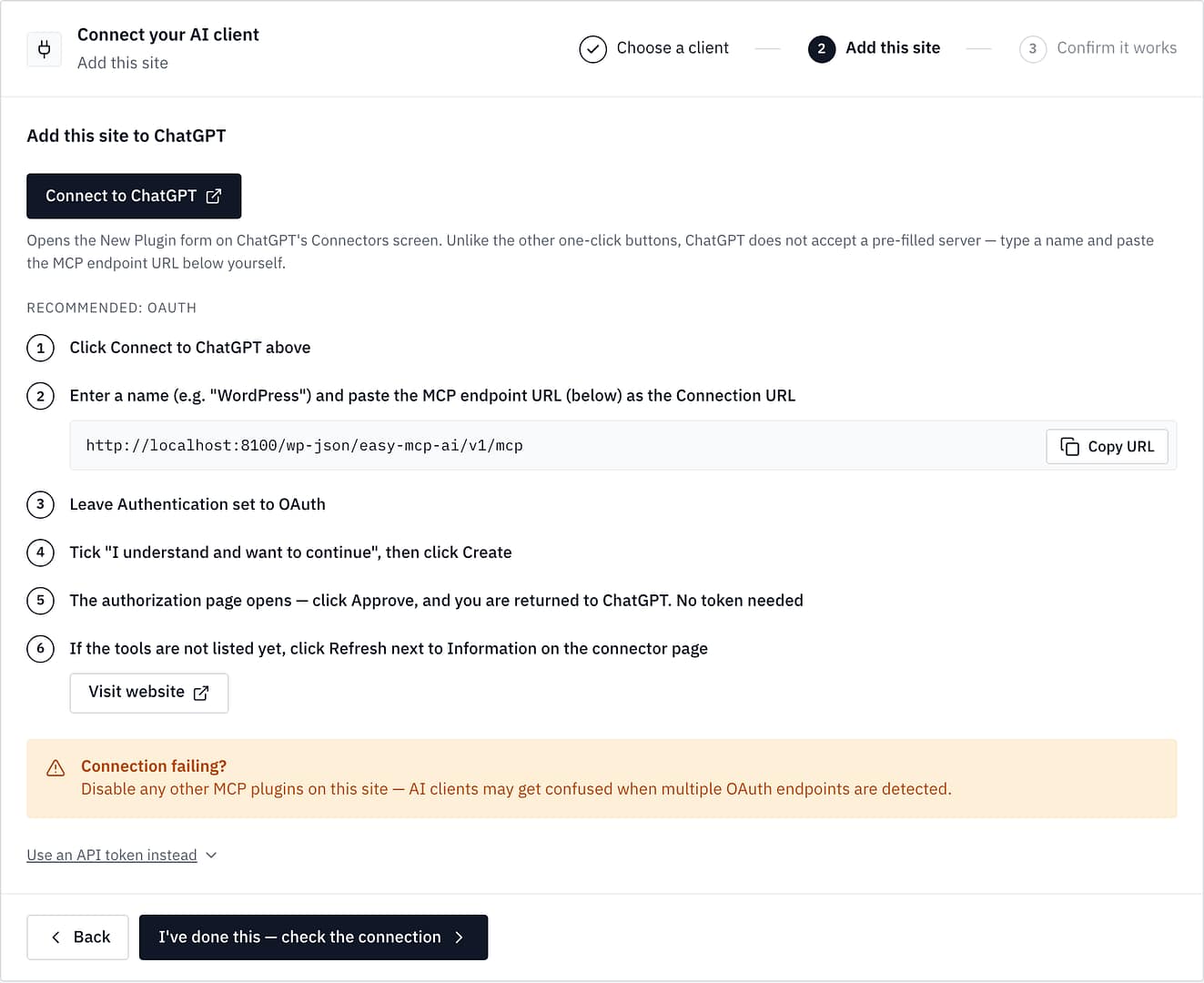
"OAuth metadata endpoints require HTTPS" or "HTTPS is required. This request reached PHP over plain HTTP."
The OAuth 2.1 Authorization Handshake
When ChatGPT connects to a WordPress site, it executes the OAuth 2.1 authorization code flow with PKCE (S256). Easy MCP AI utilizes Dynamic Client Registration (DCR) by default, enabling ChatGPT to dynamically register its own OAuth client with the WordPress database.
Upon redirection to the site’s approval page (Authorize Application), the administrator must sign in using a designated WordPress user account. The authorization prompt clearly outlines the boundaries:
"Will act on this site as [username] ([role]), and never beyond what that account can do."
Administrators are then presented with three primary access levels:
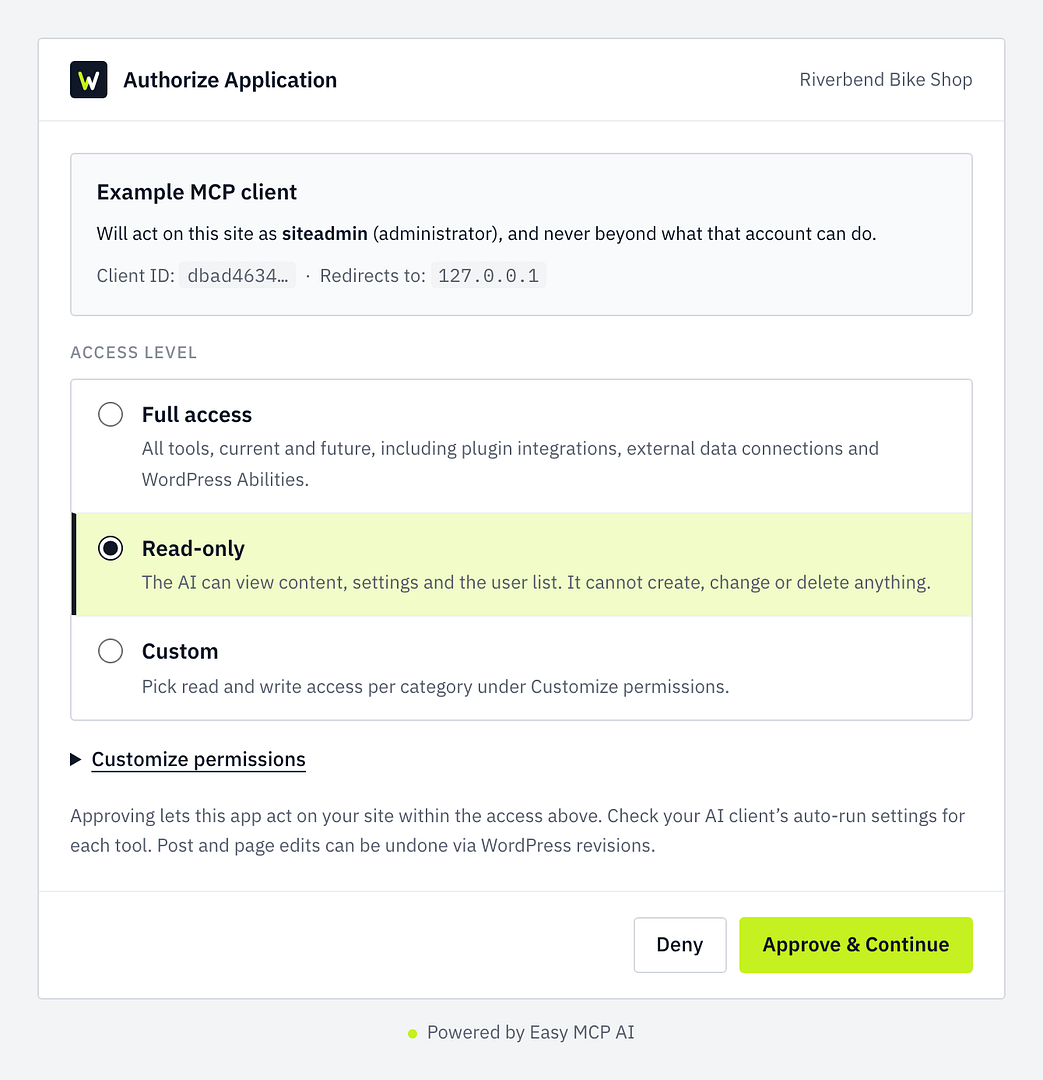
- Read-Only: The AI can view content, settings, and the user list, but is strictly blocked from creating, modifying, or deleting records.
- Full Access: Grants utilization of all core tools, including content creation, updates, and moderation utilities.
- Custom: Tailored tool selection based on specific site requirements.
Implications: Security, Risk Management, and Best Practices
While connecting an LLM to a live content management system opens up unprecedented efficiencies—such as automated drafting, data analysis, and conversational site management—it simultaneously introduces significant threat vectors.
The Threat of Prompt Injection
The foremost security concern in MCP deployments is indirect prompt injection. Because large language models process unstructured data, malicious actors could theoretically embed hidden instructions within public comment sections, contact form entries, or product reviews. If an AI agent operating with write-permissions reads this compromised text, it could be tricked into executing unintended commands on the WordPress backend.
The Open Worldwide Application Security Project (OWASP) consistently lists prompt injection as a primary risk in its LLM Top 10 vulnerabilities. OpenAI explicitly notes that safety annotations (such as readOnlyHint and destructiveHint) provided by server plugins assist ChatGPT in determining confirmation behavior, but they "do not replace authorization, validation, or confirmation in your server."
Recommended Mitigation Strategies
To maintain robust security hygiene when integrating ChatGPT with WordPress, administrators should adopt a defense-in-depth posture:
- Start with Read-Only Access: Never grant write or full-access permissions during initial deployment. Test the connection thoroughly using diagnostic prompts (such as
wp_get_site_settings) to verify read functionality without risking data integrity. - Leverage Site-Level Safeguards: Ensure that Easy MCP AI’s "Ask before destructive actions" setting is active. This pauses high-risk operations—such as item deletions, comment spam flagging, and database alterations—requiring explicit human confirmation within the WordPress backend.
- Audit Tool Activity: Regularly review the Activity Audit Log provided by Easy MCP AI to monitor every incoming tool call, ensuring complete visibility over what queries ChatGPT executes against your database.
- Isolate Riskier Tools: Utilize the plugin’s Advanced settings to keep inherently dangerous or experimental tools disabled by default, activating them only when a verified workflow demands it.
By balancing the immense productivity gains of AI-driven content management with rigorous authentication, careful scoping, and persistent monitoring, site administrators can safely harness the power of Model Context Protocol within their WordPress workflows.