







In a significant expansion of its artificial intelligence productivity suite, Google has announced a major upgrade to the Gemini experience. While "Gemini Notebooks" have existed as a feature within the Gemini app’s side panel since early 2026, Google is now elevating the tool to a full-fledged "Connected App." This integration allows users to interact with their organized collections of research, documents, and notes directly through natural language prompts, effectively turning the Gemini chatbot into a sophisticated personal knowledge manager.
This update represents a shift in how Google envisions the relationship between its generative AI models and the vast repositories of user data. By treating notebooks as a primary data source—akin to Google Drive, Gmail, or Google Photos—Google is reducing the friction between information gathering and information synthesis.
The Core Facts: What Has Changed?
The core of this update lies in the transition of Gemini Notebooks from a static, isolated side-panel feature to a dynamic, connected service. Previously, users had to navigate to the notebook interface to manage or view their stored information. Now, the Gemini app is empowered to act as a bridge.
Through the new Connected App integration, users can:
- Query Existing Notebooks: Using natural language, users can ask Gemini to summarize, search, or cross-reference information stored within specific notebooks.
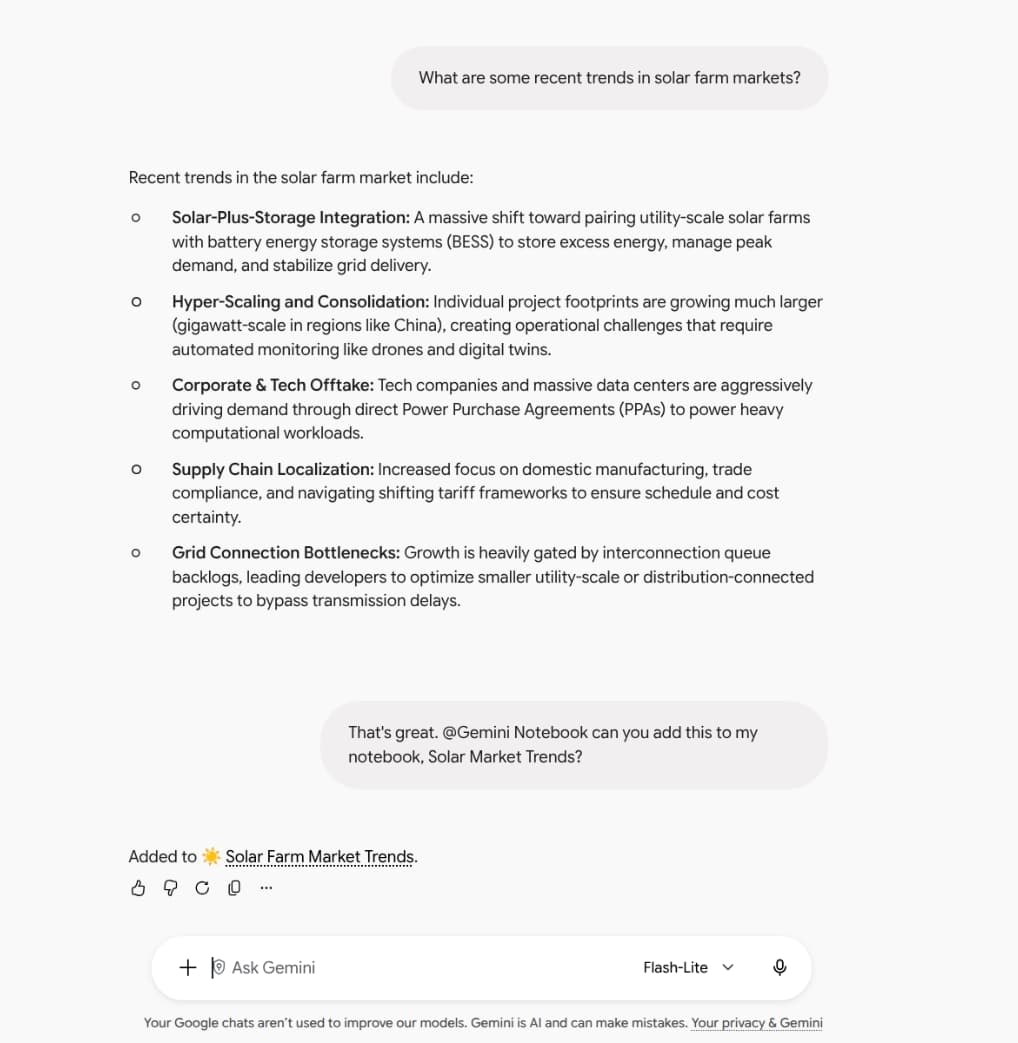
- Manage Content in Real-Time: Users can instruct the Gemini interface to "create a new notebook," "add this source to my research folder," or "save these points to my project notes."
- Contextual Awareness: The Gemini app will now automatically detect when a user’s prompt is relevant to their stored notebooks. If a user asks a question about a topic they have previously documented, Gemini will proactively pull that information from the relevant notebook.
This functionality essentially turns the Gemini interface into a command-line-style dashboard for one’s digital library. Whether a student is managing research papers or a professional is organizing project specifications, the ability to "talk" to one’s notes is a marked improvement in workflow efficiency.
A Chronology of the Gemini Notebook Evolution
The journey of the Gemini Notebook feature reflects Google’s broader strategy of integrating AI into the fabric of the Google Workspace ecosystem.
Early 2026: The Foundation
The concept first gained traction in April 2026, when Google introduced the Gemini app side panel. This initial iteration provided a dedicated space for users to keep notes organized, but it functioned primarily as a viewer—a place to keep data handy while chatting with the AI. It was a tool for storage, not yet a tool for active collaboration.
Mid-2026: The Refinement Phase
Throughout the summer of 2026, Google quietly iterated on the back-end infrastructure of the Gemini app. The focus was on improving the "context window"—the amount of information the AI can process at once. This was a necessary prerequisite for the current update; for a chatbot to effectively manage multiple notebooks, it needs to be able to "read" and understand large datasets without losing the thread of the conversation.
October 2026: The Integration Launch
In October 2026, Google officially updated its Workspace environment to include the Connected App integration. This marked the shift from "passive storage" to "active interaction." The announcement, detailed via the Google Workspace Updates blog, clarified that this feature is not merely a plugin but a deep integration into the underlying Gemini engine.
Supporting Data and Accessibility
Google has been remarkably aggressive in its rollout strategy, ensuring that this feature reaches as many users as possible immediately. The update is currently available to:
- Google Workspace Customers: Enterprise and business users who rely on Google’s suite for professional productivity.
- Workspace Individual Subscribers: Freelancers and solopreneurs who utilize premium features.
- Personal Google Account Holders: The vast majority of the general public.
Global Rollout and Regional Nuances
One of the most interesting aspects of this release is the regional variance. The feature is enabled by default for users globally, reflecting Google’s confidence in the utility of the integration. However, in the European Economic Area (EEA), the feature is disabled by default.
This decision is clearly a nod to the stringent regulatory environment in Europe, specifically regarding AI data processing and the Digital Markets Act. By opting out by default in the EEA, Google allows users in those regions to manually enable the feature, thereby maintaining compliance with local privacy frameworks while still providing the option for those who want it.
Official Responses and Strategic Rationale
While Google has not held a grand press conference for this specific update, the company’s official communication through the Workspace Updates blog provides a clear window into their logic.
Google’s design philosophy here is "intent-based computing." Instead of forcing a user to manually open a document, read it, copy the relevant data, and paste it into a chat, Google wants the user to simply ask for the outcome. "Take actions on your notebooks from Gemini directly," the company stated, emphasizing that the goal is to make the AI an extension of the user’s cognitive process.
By allowing Gemini to "detect when to use the Gemini Notebook Connected App," Google is betting on the predictive capabilities of its LLMs (Large Language Models). The company is essentially trying to eliminate the "where is my file?" bottleneck that hampers most digital knowledge workers.
Implications: The Future of Personal Knowledge Management
The integration of Notebooks into the core Gemini app is not just a quality-of-life update; it has profound implications for how we interact with technology.
1. The Death of File Retrieval
For decades, the standard way to find information was to search for a file, open it, and scan for the relevant section. This is a linear, time-consuming process. With Gemini’s new capability, the workflow becomes non-linear. The AI serves as an indexer and a summarizer. The file itself becomes less important than the information contained within it.
2. AI as a Personal Knowledge Graph
Every user has a unique "knowledge graph"—a collection of emails, notes, photos, and documents that define their work and personal life. By connecting Gemini to these data silos, Google is building a personalized AI agent. The more a user utilizes Gemini Notebooks, the more "intelligent" and helpful their specific instance of Gemini becomes. It starts to recognize patterns, preferred styles of information, and long-term project goals.

3. The Competitive Landscape
This move puts immense pressure on standalone note-taking applications like Notion, Obsidian, and Evernote. While these apps offer specialized organizational tools, they lack the deep integration into the Google ecosystem that Gemini now enjoys. If a user can organize, search, and act on their notes within the same window where they draft emails and conduct research, the incentive to switch to a third-party application diminishes significantly.
4. Privacy and Security Concerns
As with any feature that allows AI to "read" personal documents, there are legitimate questions regarding data privacy. Google maintains that its existing Workspace privacy protections apply to these interactions. However, as the scope of AI integration grows, users will need to remain vigilant about what information they include in their notebooks. The convenience of "natural language querying" must be balanced against the need to keep sensitive data isolated from AI-training pipelines, depending on the user’s specific account settings.
Conclusion
The evolution of Gemini Notebooks into a core Connected App is a watershed moment for the Google ecosystem. It represents the maturation of generative AI from a "chat partner" into a "productivity partner."
By breaking down the walls between organized knowledge and generative interaction, Google has created a workflow that feels less like using software and more like collaborating with a highly efficient assistant. As the technology continues to evolve, the distinction between "searching for a file" and "asking a question" will likely continue to blur, setting the stage for an era of computing where our data is always accessible, always synthesizable, and always ready to be transformed into action.
For the everyday user, the takeaway is clear: the era of the manual filing system is coming to a close. In its place, Google is offering a fluid, conversational interface where our digital lives are no longer stored—they are active.