SEATTLE — In an era where modern cloud architectures scale into thousands of microservices, distributed systems, and autonomous generative AI agents, engineering teams have increasingly found themselves drowning in data. The traditional approach to monitoring—piecing together fragmented logs, custom metrics, and rigid static dashboards across multiple windows—often turns incident response into a high-stakes guessing game.
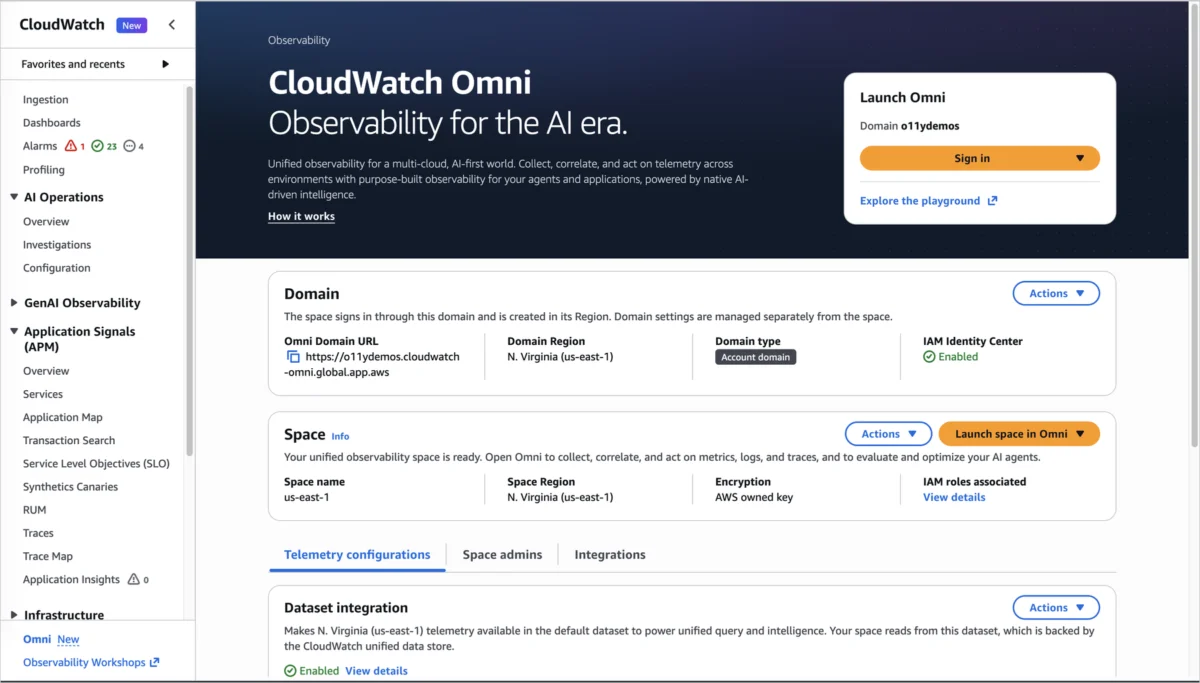
To combat this "observability fatigue," Amazon Web Services (AWS) has officially launched Amazon CloudWatch Omni, a revolutionary, AI-powered observability platform designed to unify application monitoring, infrastructure health, and generative AI agent tracking into a single, collaborative experience.
Built on open standards like OpenTelemetry and fortified by the autonomous capabilities of the Amazon DevOps Agent, Omni aims to fundamentally transform how cross-functional engineering teams detect, investigate, and resolve system failures.
Main Facts: What is Amazon CloudWatch Omni?
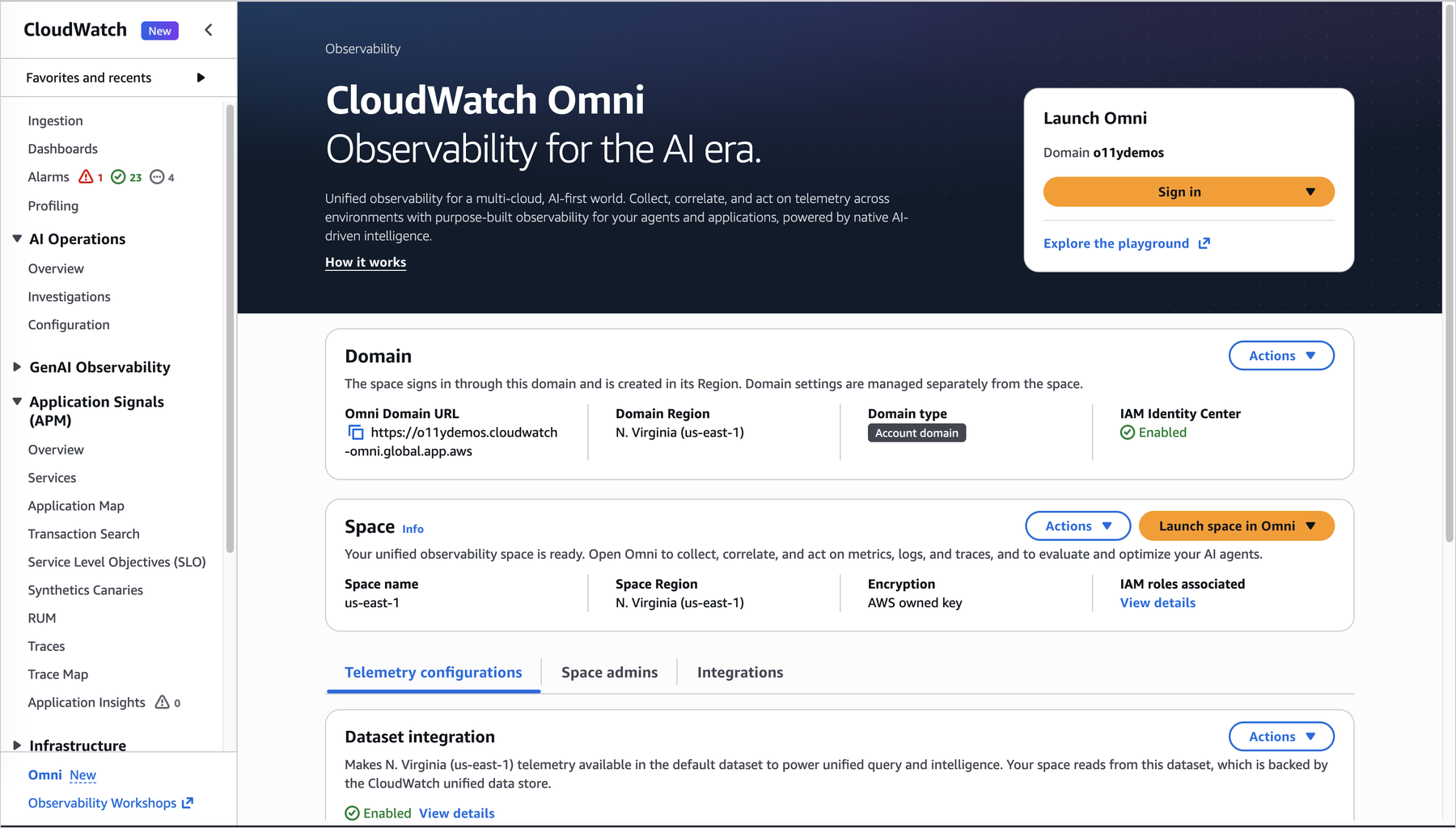
Amazon CloudWatch Omni is an enterprise-grade observability solution that shifts the paradigm from monitoring isolated infrastructure components to tracking cohesive, end-to-end applications. Accessible via a dedicated organization-specific URL, Omni operates independently of the AWS Management Console, allowing broader teams—including software developers, site reliability engineers (SREs), database administrators, and technical managers—to collaborate within a shared workspace.

Key pillars of the new platform include:
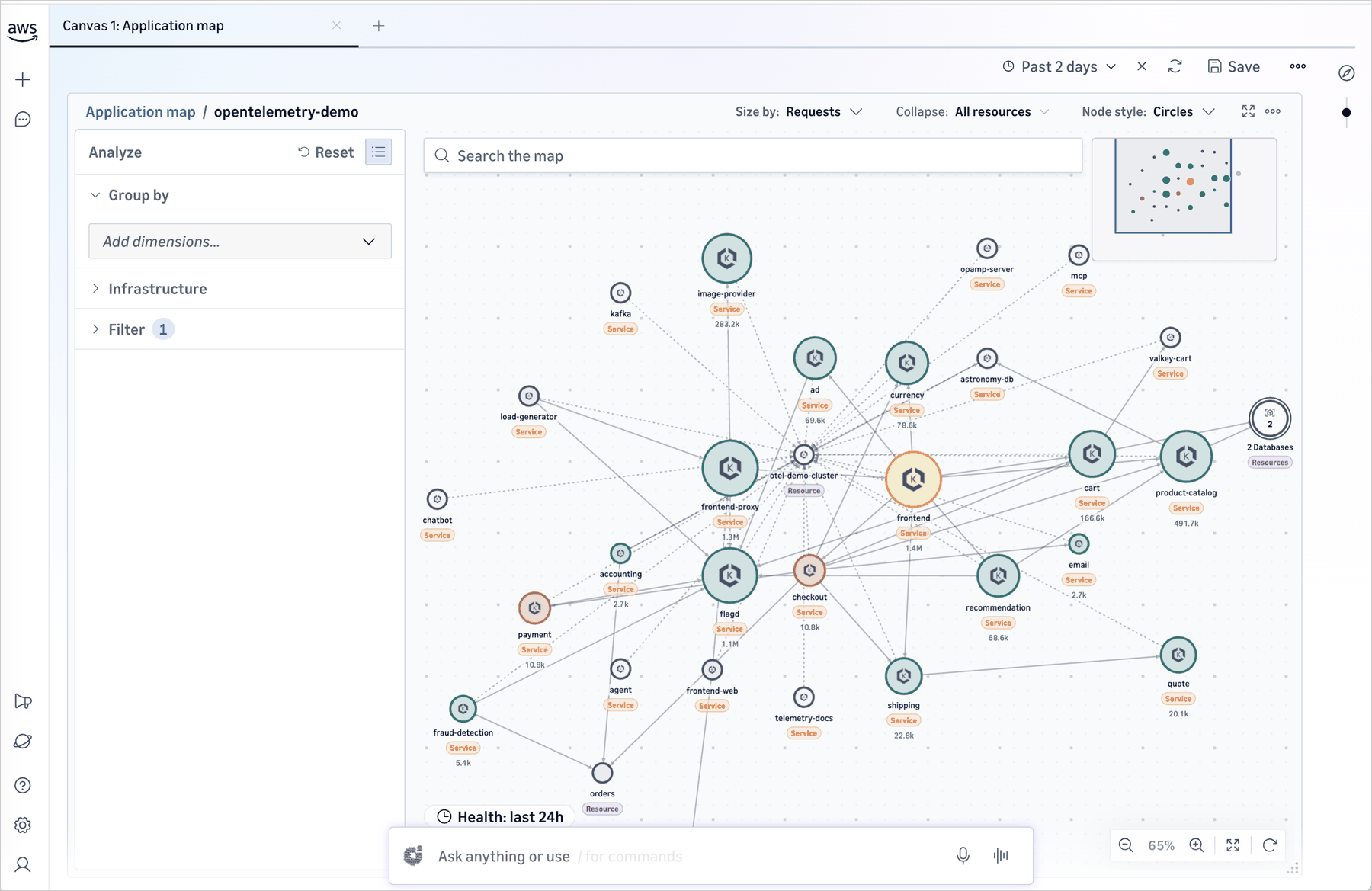
- Application-Centric Organization: Instead of forcing engineers to manually build and maintain dashboards for individual AWS resources, Omni automatically discovers services from existing telemetry and AWS Config data, mapping dynamic application topologies and service dependencies in real time.
- OpenTelemetry-Native: Omni leverages OpenTelemetry out of the box. Telemetry data already streaming into CloudWatch appears immediately without requiring reconfiguration, while external workloads route data effortlessly via OpenTelemetry Protocol (OTLP) endpoints.
- Unified Enterprise Access: Users authenticate securely via enterprise Single Sign-On (SSO) through AWS IAM Identity Center—supporting identity providers such as Okta and Microsoft Entra ID—without needing direct AWS Console credentials.
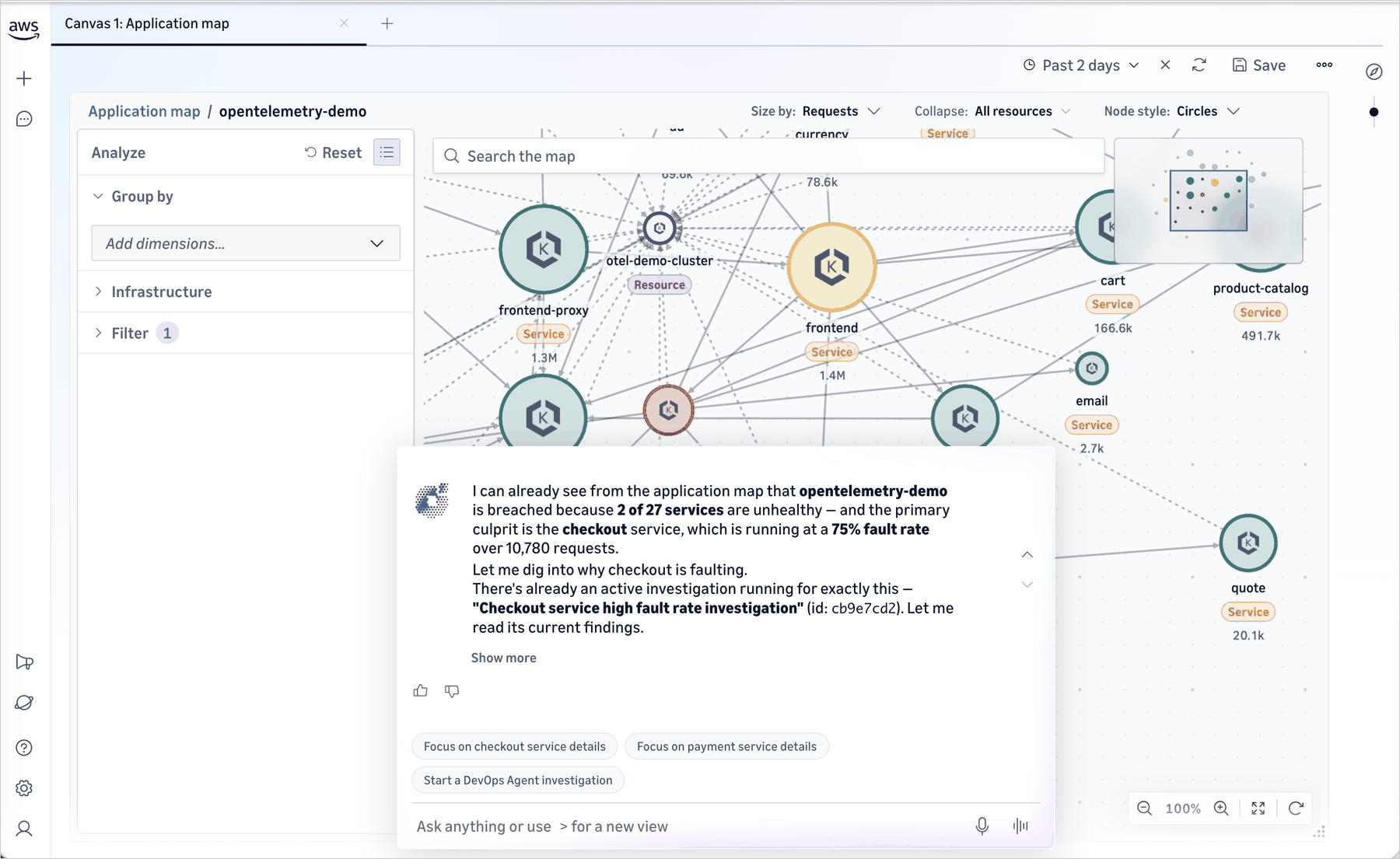
- Autonomous AI Investigation: Integrated directly into investigation workspaces, the Amazon DevOps Agent acts as an active team member, correlating signals, analyzing system topologies, pinpointing root causes in plain English, and generating comprehensive incident histories automatically.
- Dual Observability Experience: Omni provides comprehensive visibility for traditional distributed applications alongside purpose-built monitoring and evaluation frameworks for generative AI and agentic workloads.
Chronology: The Evolution Toward Autonomous Observability
The release of CloudWatch Omni represents the culmination of years of iterative development at AWS focused on reducing operational toil and embedding machine learning deep into the developer toolchain.
- The Pre-Omni Era: For years, engineering organizations relied on traditional CloudWatch dashboards, CloudWatch ServiceLens, and X-Ray traces. While powerful, these tools often required heavy manual curation. When an outage occurred, engineers spent valuable minutes context-switching between tools and translating Slack threads into mental models of the failure.
- The Rise of OpenTelemetry and AI: As microservices gave way to complex distributed workloads and agentic AI systems powered by large language models, the volume of telemetry data exploded. Traditional alerting thresholds could no longer keep pace with dynamic systems.
- Early 2026 (Agent Observability Preview): AWS laid the groundwork for advanced AI monitoring by introducing specialized observability capabilities tailored for generative AI and multi-agent systems.
- Current Launch (September 2026): AWS formally introduces CloudWatch Omni, bridging application observability and generative AI workload tracking into a unified platform. Simultaneously, enterprise identity integration (via IAM Identity Center) and the Amazon DevOps Agent are brought together into collaborative environments known as "Spaces."
Supporting Data & Operational Mechanics: Inside an Investigation Session
To understand the practical impact of CloudWatch Omni, consider a typical high-pressure incident scenario within a modern e-commerce enterprise:
- The Trigger: An automated alarm fires, signaling an anomalous spike in error rates within the core checkout microservice.
- Automated Context Loading: Rather than requiring an SRE to open multiple query tabs, CloudWatch Omni instantly initializes a dedicated investigation session. It pre-loads the service topology, highlights correlated telemetry anomalies (such as a recent deployment 10 minutes prior), and displays rising latency from a downstream payment API.
- AI-Driven Correlation: The Amazon DevOps Agent reviews the telemetry in real time, tracing the root-cause path across the dependency graph and noting a recent configuration shift within the payment provider’s API gateway.
- Cross-Team Collaboration: The on-call SRE pulls in a database or payments engineer by sharing the secure Omni workspace URL. The incoming specialist joins the session with complete, uncorrupted historical context already rendered on their screen.
- Resolution and Automated Reporting: Once the configuration rollback is completed and service health is restored, Omni captures the entire investigation trajectory. The system automatically preserves the incident history, eliminating the administrative overhead of writing separate manual post-mortem reports.
[ Alarm: Checkout Error Spike ]
          │
          ▼
[ CloudWatch Omni Session Initialized ]
          │
          ├──> Automatically maps service dependencies
          ├──> Surfaces correlated deployment & downstream API latency
          └──> Amazon DevOps Agent identifies root cause (API Gateway config change)
          │
          ▼
[ Cross-Functional Collaboration via Enterprise SSO Workspace ]
          │
          ▼
[ Resolution & Automated Incident History Generation ]
Official Perspectives and Industry Implications
Industry analysts note that CloudWatch Omni addresses a critical human bottleneck in modern software engineering: communication silos.
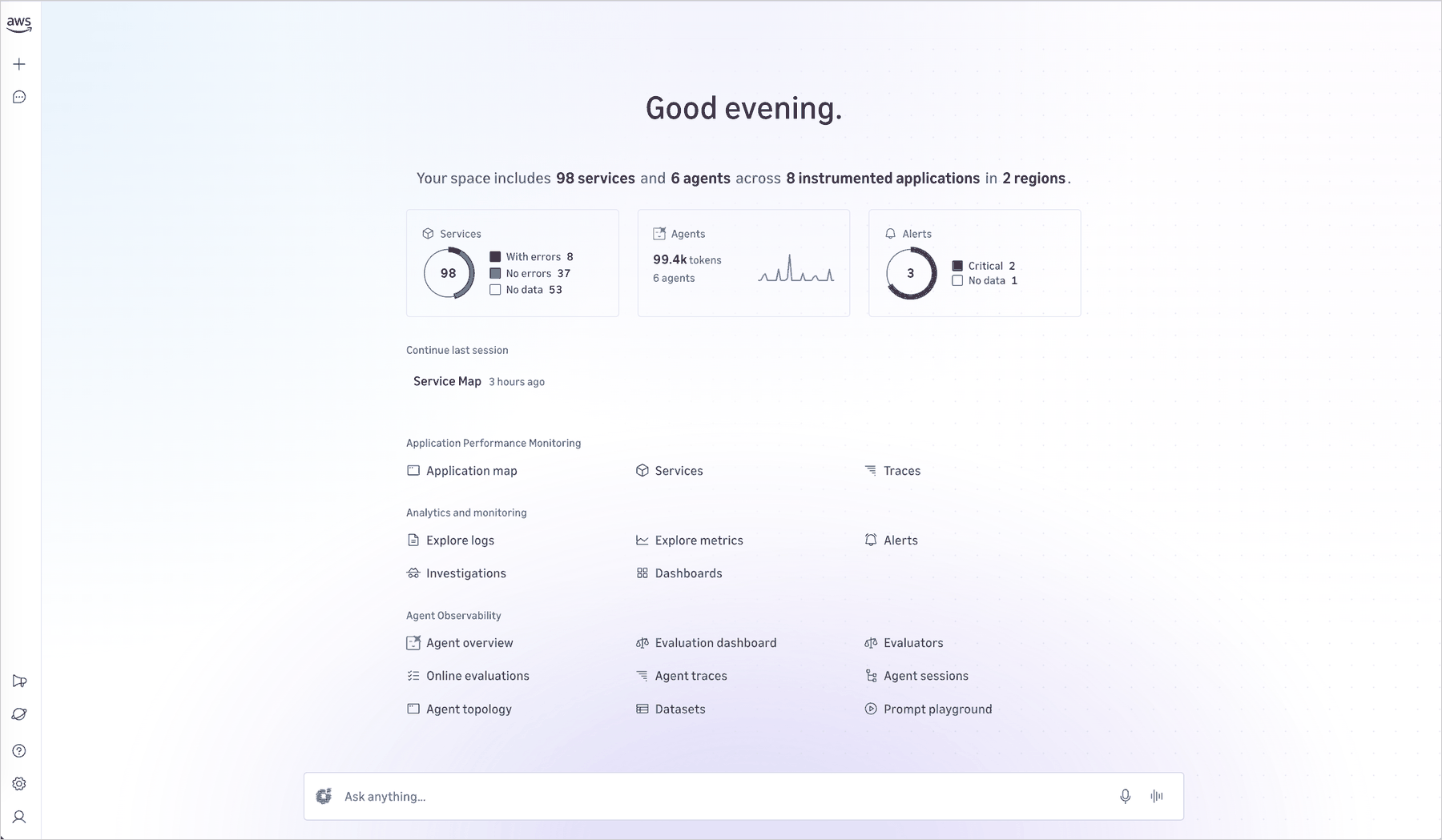
According to product leadership at AWS, engineering teams have historically spent an unsustainable amount of time maintaining dashboards, tuning volatile thresholds, and losing critical troubleshooting context across disparate communication channels. By centralizing telemetry around applications rather than infrastructure metrics, Omni bridges the gap between disparate technical disciplines.
Furthermore, the integration of the Amazon DevOps Agent signals a broader industry shift from reactive monitoring to proactive, AI-assisted remediation. By grounding AI suggestions directly in authentic, real-time OpenTelemetry data rather than generalized training models, AWS has engineered a trustworthy assistant capable of operating securely within enterprise governance boundaries.
Implications for Enterprise Engineering Teams
The deployment of CloudWatch Omni carries several immediate and long-term implications for organizations operating in the cloud:
- Reduced Cognitive Load: Teams can transition from maintaining static, brittle dashboards to declaring high-level availability targets and latency budgets. The system dynamically adapts its alarms and topology maps as the application architecture evolves.
- Streamlined Onboarding and Escalation: Because Omni does not require AWS Management Console access, non-developer stakeholders—such as product managers, QA specialists, and support leads—can safely access read-only or collaborative views during incidents without risking unintended infrastructure modifications.
- Seamless Multi-Environment Telemetry: Organizations running hybrid or multi-cloud infrastructures can leverage Omni’s OpenTelemetry connectors to ingest external telemetry alongside native AWS data, ensuring a unified "single pane of glass" for all digital services.
- Readiness for Generative AI: As companies rapidly deploy autonomous AI agents and LLM-backed features, Omni provides the specialized tracing and evaluation tools required to keep these non-deterministic systems transparent, reliable, and compliant.
Getting Started with CloudWatch Omni
CloudWatch Omni is generally available now. Existing Amazon CloudWatch customers can begin exploring the platform immediately without altering their underlying telemetry pipelines.
- For Existing CloudWatch Users: Navigate to the Amazon CloudWatch console and click "Try CloudWatch Omni." All existing logs, metrics, traces, and alarms will populate automatically, immediately enabling topology mapping and investigation sessions.
- For Organization-Wide Rollouts: System administrators can configure a dedicated domain, link their preferred identity provider (such as Okta or Microsoft Entra ID) via IAM Identity Center, and provision custom "Spaces" mapped to specific application teams and environments.
- For Extended Environments: Utilize OpenTelemetry Protocol (OTLP) endpoints and Omni connectors to funnel telemetry from non-AWS workloads directly into your organizational Spaces.
Pricing and regional availability details can be found on the official Amazon CloudWatch Pricing Page. Feedback and community troubleshooting are actively supported via AWS re:Post and standard AWS Support channels.