SEATTLE — Fifteen years after its initial debut in 2011 redefined how developers deploy full-stack applications in the cloud, Amazon Web Services (AWS) is once again transforming its foundational application management service. AWS has announced the general availability of AWS Elastic Beanstalk Cluster Mode, a major architectural evolution designed to meet the modern demands of microservices, multi-application portfolios, and containerized cloud-native development.
The newly redesigned service shifts the operational paradigm by combining Elastic Beanstalk’s legendary simplicity—where developers bring their source code, Dockerfiles, or pre-built container images while AWS handles the heavy lifting—with the robust, highly scalable infrastructure of Amazon Elastic Kubernetes Service (Amazon EKS).
By taking full operational responsibility for production environments across their lifecycle, AWS aims to free engineering teams from the burdens of infrastructure plumbing, letting them concentrate entirely on business logic and feature delivery.
Main Facts: What is Elastic Beanstalk Cluster Mode?
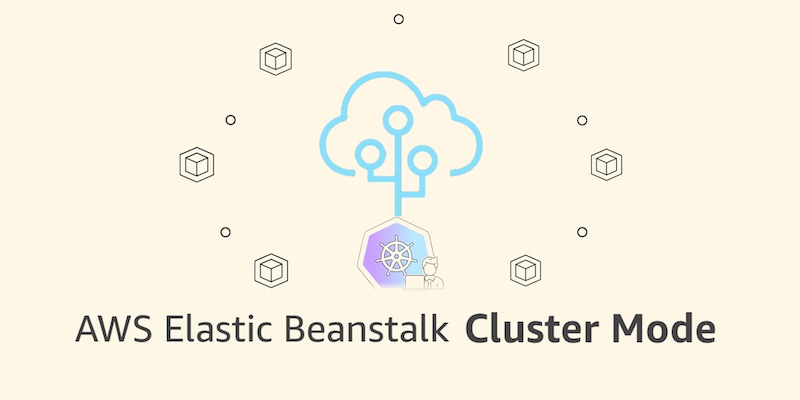
AWS Elastic Beanstalk Cluster Mode is a newly released deployment and operational tier within Elastic Beanstalk that abstracts away the complexities of Kubernetes management. While traditional Elastic Beanstalk provisioned isolated Amazon Elastic Compute Cloud (EC2) instances per application, Cluster Mode allows organizations to run multiple applications and microservices that share an underlying, unified infrastructure powered by Amazon EKS.
Key attributes of the new offering include:
- Unified Resource Pooling: Multiple applications share underlying EKS resources, significantly lowering per-application infrastructure costs as development portfolios grow.
- Full Lifecycle Management: AWS automatically provisions, scales, patches, monitors, and upgrades the workload infrastructure continuously for the life of the application.
- Flexible Workload Ingestion: Teams can deploy via source code, raw Dockerfiles, or packaged container images stored in Amazon Elastic Container Registry (Amazon ECR).
- Side-by-Side Compatibility: The classic Elastic Beanstalk Standard Mode (powered by EC2) remains fully supported, running side-by-side with Cluster Mode to allow gradual, risk-free workload migrations.
- No Additional Service Fee: AWS is not charging an extra management fee for Cluster Mode; customers pay only for the underlying AWS resources consumed (such as the EKS control plane, EKS Auto Mode compute, ECR, and CloudWatch).
Chronology: Fifteen Years of Continuous Evolution
To understand the magnitude of this release, it is helpful to trace the trajectory of AWS Elastic Beanstalk from its inception to the modern era of AI-driven, container-centric operations.
2011: The Inception of Simple Cloud Deployments
When AWS launched Elastic Beanstalk in 2011, its core value proposition was revolutionary for its time: developers writing code in Java, .NET, Python, Node.js, PHP, Ruby, or Go could upload their source files, and AWS would automatically handle capacity provisioning, load balancing, auto-scaling, and application health monitoring. It democratized cloud deployments, allowing small teams to operate like large engineering organizations without needing dedicated systems administrators.
2010s–Early 2020s: Maturation and Container Adoption
As the software industry shifted toward microservices and containerization, Elastic Beanstalk adapted by introducing Docker support and managed platform updates. However, managing sprawling portfolios of microservices often meant provisioning separate environments for each service, introducing configuration drift and resource inefficiencies.

2024–2026: The Operational Engine Rebuild
Recognizing the shifting tides of cloud architecture, AWS embarked on a multi-year engineering overhaul of Elastic Beanstalk’s operational foundation:
- April 2026: AWS introduced AI-powered environment analysis, bringing automated health diagnosis and self-healing recommendations directly to the service.
- February 2026: A new official GitHub Action enabled engineering teams to trigger production deployments straight from existing CI/CD pipelines utilizing simple YAML configurations.
- Mid-2026: AWS modernized the underlying infrastructure to natively support OpenTelemetry-based observability, advanced traffic-splitting deployments with automated rollbacks, event-driven autoscaling, centralized secrets management via AWS Secrets Manager, and HTTPS by default through AWS Certificate Manager.
- September 2026: The culmination of these updates arrives with the official launch of Elastic Beanstalk Cluster Mode, tying these modern observability and security primitives directly into Amazon EKS.
Supporting Data & Technical Implementation
Cluster Mode is architected specifically for enterprise teams and startups maintaining portfolios ranging from ten to over a hundred distinct applications. By centralizing workloads onto a shared EKS baseline, teams eliminate resource fragmentation.
Getting Started via the AWS Console
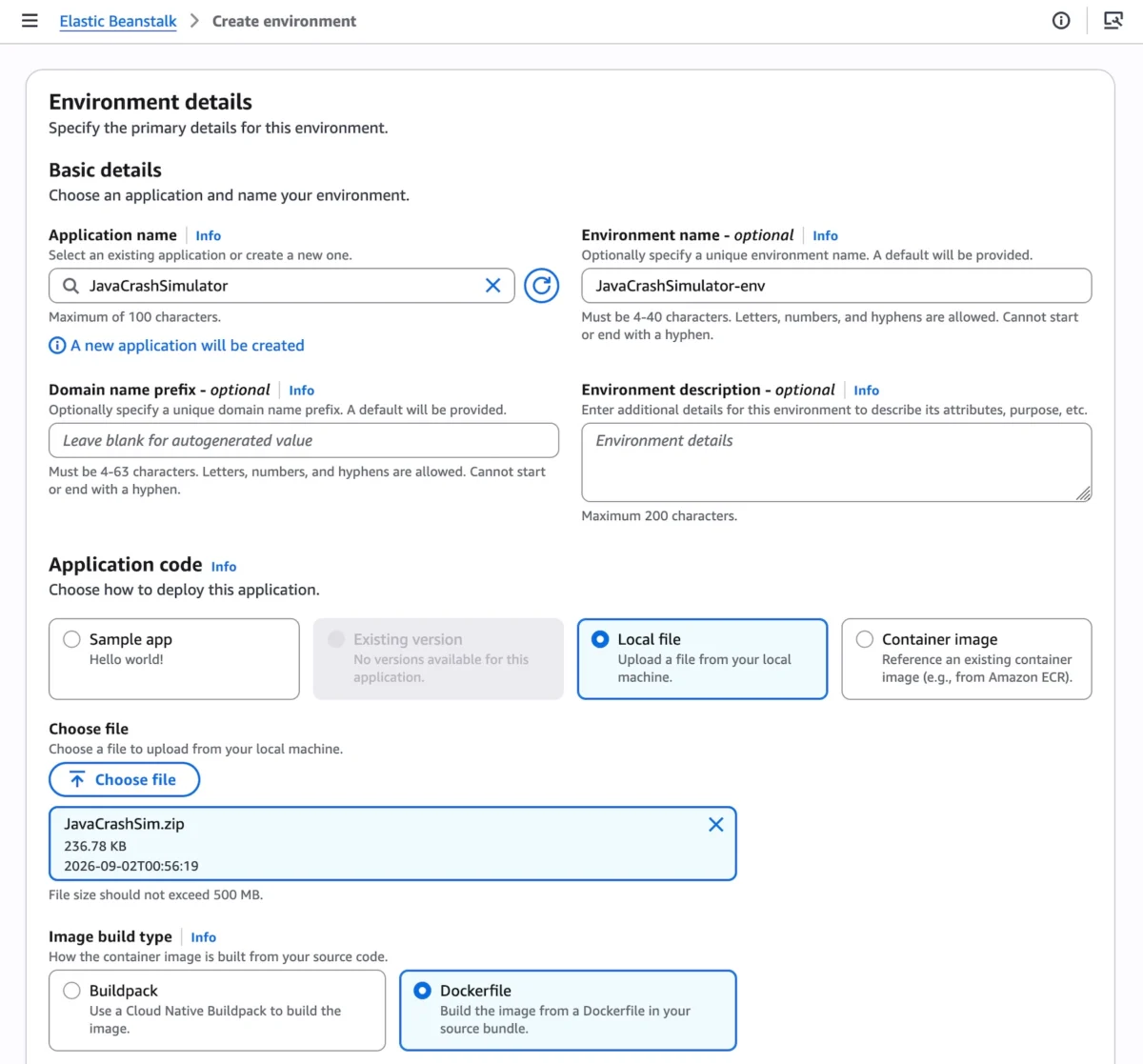
Developers can initialize a Cluster Mode environment directly through the AWS Elastic Beanstalk Console:
- Navigate to the Elastic Beanstalk Console and select Create New Environment.
- Under Deployment Type, choose Cluster.
- Provide application artifacts by uploading a local file, specifying container build options, or referencing images stored in Amazon ECR.
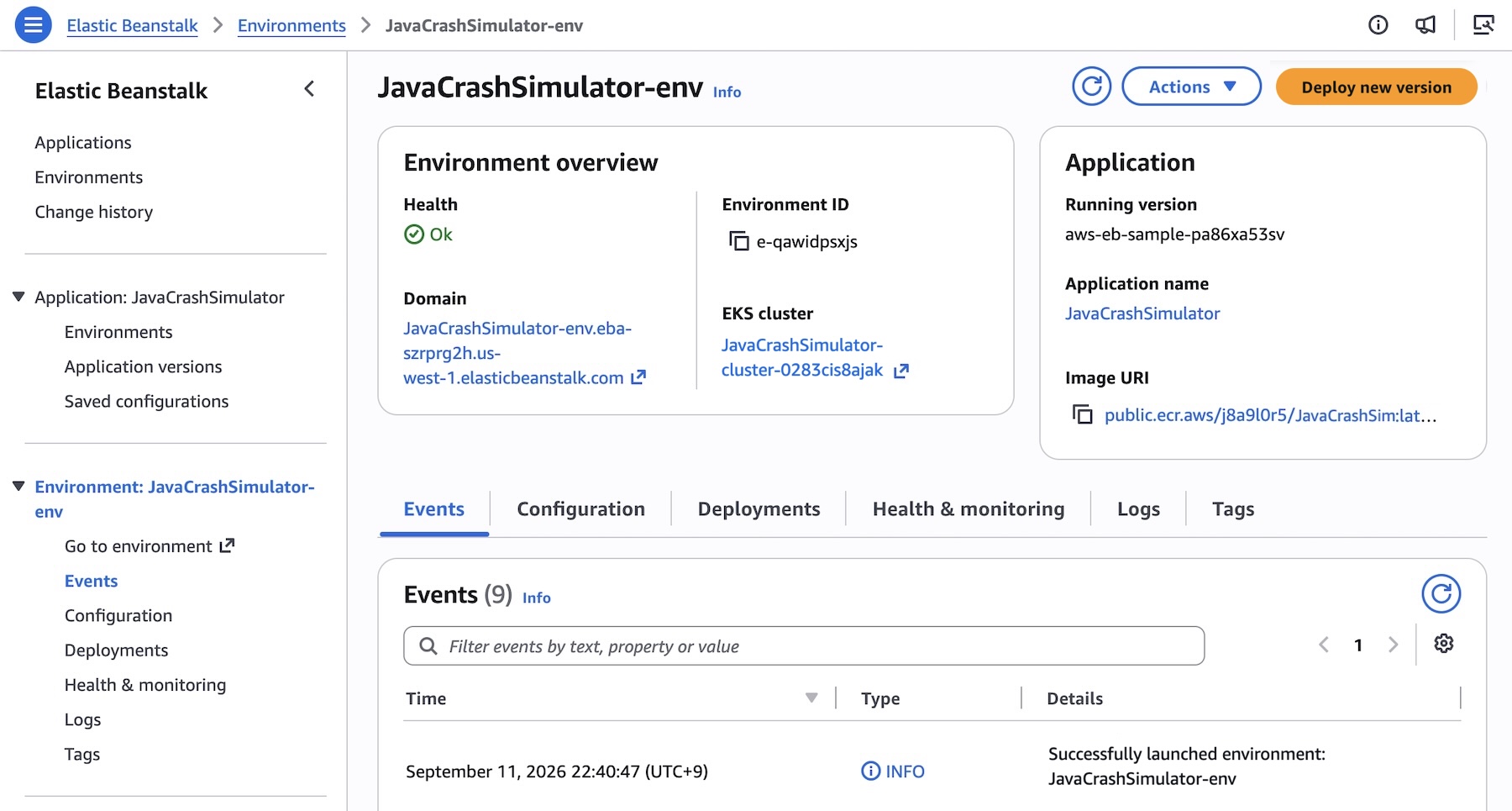
- Click Create. The initial deployment provisions a shared EKS cluster (taking approximately ten minutes), while subsequent deployments execute rapidly by recycling the warm cluster infrastructure.
Programmatic Deployment via AWS CLI and SDKs
For teams leveraging Infrastructure-as-Code (IaC) and automated CI/CD pipelines, Cluster Mode integrates seamlessly with the AWS CLI, EB CLI, and standard AWS SDKs.

Below is an example of registering multi-service microservice application versions using the AWS CLI:
# Define application name
APP_NAME="my-microservice"

aws elasticbeanstalk create-application
    --application-name "$APP_NAME"
    --description "Multi-services microservice demo cluster"

# Register container images in Amazon ECR as application versions
IMAGES=(
    "frontend-v1|public.ecr.aws/my-microservices/frontend:v1"
    "cartservice-v1|public.ecr.aws/my-microservices/cart:v1"
    "paymentservice-v1|public.ecr.aws/my-microservices/payment:v1"
    "shippingservice-v1|public.ecr.aws/my-microservices/shippingservice:v1"
)

for entry in "$IMAGES[@]"; do
    IFS='|' read -r label uri <<< "$entry"
    aws elasticbeanstalk create-application-version
        --application-name "$APP_NAME"
        --version-label "$label"
        --image-configuration Source="Uri=$uri"
        --region "us-west-2"
    echo "Successfully registered version: $label"
done
Configuring Microservice Options
Individual services within a cluster can be fine-tuned using JSON configuration option files. For instance, a frontend service requiring public internet access via an Application Load Balancer (ALB) and explicit HTTP health checks can be configured as follows (frontend-options.json):
[
    "Namespace": "aws:elasticbeanstalk:eks", "OptionName": "cluster-role", "Value": "arn:aws:iam::0123456789012:role/EksClusterRole",
    "Namespace": "aws:elasticbeanstalk:eks", "OptionName": "node-role", "Value": "arn:aws:iam::0123456789012:role/EksNodeRole",
    "Namespace": "aws:elasticbeanstalk:eks:environment", "OptionName": "observability-role", "Value": "arn:aws:iam::0123456789012:role/ObservabilityRole",
    "Namespace": "aws:elasticbeanstalk:eks:environment", "OptionName": "subnets", "Value": "subnet-1,subnet-2,subnet-3",
    "Namespace": "aws:elasticbeanstalk:eks:environment:autoscaling", "OptionName": "min-replica", "Value": "1",
    "Namespace": "aws:elasticbeanstalk:eks:environment:autoscaling", "OptionName": "max-replica", "Value": "5",
    "Namespace": "aws:elasticbeanstalk:eks:environment", "OptionName": "cpu", "Value": "0.5",
    "Namespace": "aws:elasticbeanstalk:eks:environment", "OptionName": "memory", "Value": "256Mi",
    "Namespace": "aws:elasticbeanstalk:eks:environment", "OptionName": "memory-limit", "Value": "512Mi",
    "Namespace": "aws:elasticbeanstalk:eks:environment", "OptionName": "service-port", "Value": "8080",
    "Namespace": "aws:elasticbeanstalk:eks:alb", "OptionName": "scheme", "Value": "internet-facing",
    "Namespace": "aws:elasticbeanstalk:eks:alb", "OptionName": "healthcheck-path", "Value": "/_healthz"
]
Executing the deployment environment via the AWS CLI is streamlined into a single command:
aws elasticbeanstalk create-environment
    --application-name my-microservice
    --environment-name frontend
    --version-label frontend-v1
    --tier Name=Cluster,Type=EKS
    --option-settings file:///tmp/frontend-options.json
    --region "us-west-2"
Official Responses and Strategic Perspective
Speaking on the launch, AWS engineering leadership emphasized that Elastic Beanstalk’s longevity stems from listening closely to developer pain points. While Kubernetes offers unmatched orchestration power, the cognitive load required to bootstrap, secure, and maintain raw Kubernetes control planes and node groups often overwhelms product-focused development teams.

"With Cluster Mode, we are giving developers the best of both worlds," noted AWS Principal Evangelist Channy Yun. "You get the enterprise-grade elasticity, portability, and microservices capability of Amazon EKS, wrapped inside the dead-simple, fully-managed deployment experience that millions of developers have trusted for over a decade. You bring your application; AWS runs it safely, continuously, and efficiently."
AWS has also confirmed that Elastic Beanstalk Standard Mode (EC2-backed) will remain fully supported. Organizations are under no pressure to immediately migrate existing applications. Standard and Cluster Mode environments can operate side-by-side within the same Elastic Beanstalk application construct. Automated validation checks confirm compatibility prior to any migration step, ensuring teams can transition at their own velocity.
Implications for the Cloud Ecosystem
The introduction of Elastic Beanstalk Cluster Mode carries profound implications for software architecture, developer productivity, and cloud financial management (FinOps):
- Lowering the Barrier to Kubernetes: Many small-to-medium businesses (SMBs) have hesitated to adopt Kubernetes due to a lack of specialized DevOps personnel. By abstracting EKS behind Elastic Beanstalk’s familiar abstraction layers, AWS makes native container orchestration accessible to standard application developers.
- Optimized Cloud Spend: Idle compute capacity is a persistent drain on corporate tech budgets. Cluster Mode’s resource-sharing model ensures that compute blocks are densely packed across multiple applications, driving down idle waste and improving infrastructure ROI.
- Streamlined AI and Automation Integration: By coupling Cluster Mode with recent additions like AI-powered health analysis, native GitHub Actions, and OpenTelemetry observability, AWS is setting a new benchmark for what Platform Engineering teams expect from a Platform-as-a-Service (PaaS) offering.
Availability and Pricing
AWS Elastic Beanstalk Cluster Mode is generally available today across all AWS commercial regions where Elastic Beanstalk is currently supported. Developers looking to query APIs, check regional service availability, or troubleshoot setups can also leverage the newly introduced AWS MCP Server and associated AI plugins within their preferred development environments.
There is no additional software charge for utilizing Cluster Mode. Customers incur standard fees strictly for underlying resource consumption—including the EKS control plane fee, EKS Auto Mode compute, Amazon ECR storage, and Amazon CloudWatch telemetry. Note that Cluster Mode environments are not eligible for the AWS Free Tier.
Developers can begin experimenting with Cluster Mode immediately via the AWS Elastic Beanstalk Console and contribute feedback via AWS re:Post.