










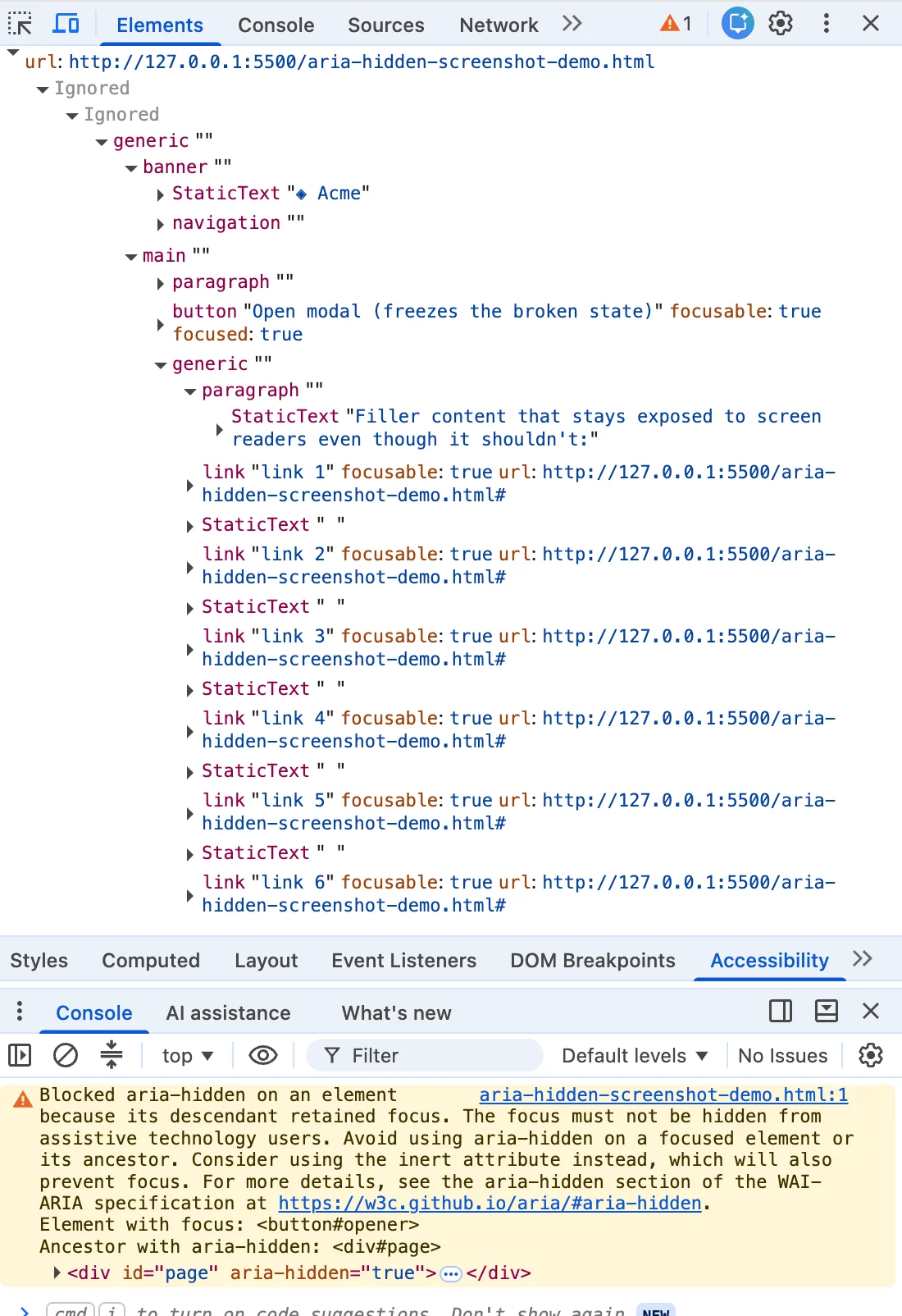
You closed a modal dialog, and your browser console flashed a distinct shade of angry mustard. You highlighted the error message, dropped it into a search engine, and landed here alongside half the front-end internet. Whether you are running Angular, Bootstrap, Ionic, or phpMyAdmin, this exact string appears identically, signaling a widespread architectural misalignment in modern web development.
Here is the truth that the top-ranking search results consistently bury: the browser warning is correct. There is a real person on the other side of that warning—someone relying on a screen reader whose focus is about to plummet into a logical void within your page.
The quick-fix solutions ranking at the top of search results all deploy variations of the same flawed remedies under different names: the blur() one-liner, the setTimeout wrapper, or the hack where developers forcefully strip the aria-hidden attribute. Each of these tricks quiets the console while quietly injuring the user the browser was trying to protect. If you have already shipped one of these patches to production, you are in massive company. You were failed by your search results, not by your own carelessness.
Chronology of an Invisible Bug: How We Got Here
The tension between browser engines and web frameworks regarding focus and accessibility is not new. To understand why browsers suddenly began shouting about "retained focus" and "open-time inversion," we have to look back at how accessibility trees and DOM rendering evolved over the last decade.
Phase One: The Early Warnings (2019–2020)
As single-page applications and complex component libraries (like Bootstrap and Material UI) proliferated, developers frequently applied aria-hidden="true" to large page wrappers or the <body> element itself when opening a modal. Through portal and markup mistakes, this sometimes accidentally hid the modal too, locking screen-reader users out of the entire page. You can track arguments regarding this failure as far back as Bootstrap issue #29769 in 2019.
Around 2020, Chromium engineering began proactively exposing focusable aria-hidden nodes. As recorded in W3C ARIA Working Group issue #1185, engineers proposed this shift so users could at least hear where they were tabbing rather than experiencing complete silence.
Phase Two: The Open-Time Inversion (Summer 2024)
The open-time variant of the warning—scolding developers about an element that "just received focus" while hidden—surfaced across issue trackers around Chrome 127 in July and August 2024. Bug reports clustered rapidly in major open-source repositories, including MUI #43106, Ant Design #50170, and Flowbite #943.
Phase Three: The Close-Time Race (Late 2024)
Months later, the close-time variant carrying the "retained focus" wording arrived alongside Chrome 131. Developers filing Bootstrap #41005 in November 2024 caught the warning live in beta and nightly builds, quickly followed by Angular #30187 in December.
Firefox and Safari do not surface a comparable console warning for this specific interaction; whatever each engine does about focused content inside a hidden subtree, it does silently. Chrome decided to make developers feel the friction. While the tone is sharp, the intervention is honest: a silent fix allows broken code to ship forever because the browser quietly papers over the mistake.
Supporting Data: The Four Vectors of Failure
Every instance of this bug ends in the same place: focus sitting inside a region that just became hidden. However, they arrive from four distinct directions. If you cannot identify which vector you are looking at, you will apply the wrong fix.
+-----------------------------------------------------------------+
|                  THE FOUR VECTORS OF "GHOST FOCUS"             |
+-----------------------------------------------------------------+
| 1. Hidden Mid-Goodbye (Close-Time Race)                         |
|    -> Modal fades out while focus is still on the close button. |
+-----------------------------------------------------------------+
| 2. The Trigger Left Behind (Open-Time Inversion)                |
|    -> Background gets aria-hidden while trigger holds focus.     |
+-----------------------------------------------------------------+
| 3. The Turf War (Nested Composition Conflicts)                  |
|    -> <select> or popover inside a <dialog> double-hide content. |
+-----------------------------------------------------------------+
| 4. User Walked Out (Focus Leaves the Page)                      |
|    -> Alt-Tab or tab-switch strands aria-hidden state.          |
+-----------------------------------------------------------------+
1. Hidden Mid-Goodbye (The Close-Time Race)
You click the close button, and the dialog begins its CSS fade-out animation. During those 200 milliseconds of transition, focus remains parked on the close button, which sits inside the overlay the library just marked hidden. The transition has not finished, focus has not moved, and Chrome logs the retained focus warning. This accounts for roughly 70 percent of occurrences.

2. The Trigger Left Behind (Open-Time Inversion)
Running the sequence in reverse, an overlay opens, and the library marks the background aria-hidden="true". However, the button the user just clicked still holds focus for a brief beat before anything moves it into the dialog. You are hiding a region focus has not yet escaped.
3. The Turf War (Nested Composition Conflicts)
You open a <dialog>, and inside it, you place a <select>. The user opens the select, picks an option, and the select closes. Suddenly, two components that both believe they are the "one true modal layer" fight over who gets to hide the rest of the page. Under React 19, this graduates from an annoyance to a fatal focus freeze, rendering the page entirely un-tabbable.
4. The User Walked Out (Focus Leaves the Page)
Nothing in your page changed; the user simply hit Alt+Tab or switched browser tabs while a menu was open, stranding an aria-hidden state with no live focus to reconcile against.
Official Responses and Ecosystem Reactions
The developer ecosystem’s response to these warnings has been defined by panic-driven patch work. When faced with failing CI pipelines or cluttered logs, teams routinely reached for quick fixes that inadvertently violated Web Content Accessibility Guidelines (WCAG).
- The
blur()One-Liner: Droppingdocument.activeElement.blur()into a close handler silences the console warning because no focused element remains inside the hidden subtree. However, it dumps the user’s focus straight to the<body>element. Screen reader users find themselves dumped to the top of the page, forced to tab entirely through headers and navigation just to resume their workflow—a direct violation of WCAG 2.4.3 (Focus Order). - Timing Shims (
setTimeout/requestAnimationFrame): Wrapping focus restoration in a delay bets that the render finishes before the focus call runs. On high-end machines, it works. Under heavy CPU load or React concurrent rendering, it fails intermittently, introducing unpredictable race conditions. - Stripping
aria-hidden: Using MutationObservers to riparia-hiddenout of markup stops the warnings by making nothing hidden. This breaks the basic modal contract, allowing users to tab out of active modals into background content. - Modal Escapes (
modal=false): Turning off modal behavior in libraries like Radix or Shadcn clears console warnings by eliminating the focus trap entirely. In Safari, this causes focus to tab right out of the dialog, causing the component to mistakenly register an outside interaction and dismiss itself mid-form.
Implications: The Correct Teardown Contract
If Chrome is actively repairing your accessibility tree, the question is no longer “How do I make this message go away?” but rather “At what exact instant does my code produce a focused node inside a hidden region?”
The durable fix relies on a strict Teardown Contract: focus must leave a closing region before that region becomes hidden or inert, and it must land somewhere real—never on an inert node and never on the <body>.
The 4-Step Vanilla JavaScript Implementation
class ModalController
  #trigger = null;
  #background = null;

  open(dialog, background)
    this.#background = background;
    this.#trigger = document.activeElement;
    this.#background.setAttribute('inert', '');
    dialog.hidden = false;
    dialog.querySelector('[autofocus], button, [href], input')?.focus();


  close(dialog)
The Framework Migration Path
Major component libraries are actively adapting to these architectural realities. Bootstrap version 6 has embraced native HTML <dialog> elements utilizing showModal(), placing dialogs in the browser’s top layer and making the rest of the document implicitly inert. This entirely bypasses manual inert toggling and eliminates ghost-focus bugs by design.
For teams unable to migrate away from custom component libraries this quarter, adopting imperative focus management and utilizing the native HTML inert attribute—rather than fragile aria-hidden wrappers—remains the gold standard for robust, accessible applications.
Conclusion
A clean console was never the true goal of front-end engineering. It is entirely possible to drive a browser warning count to zero while systematically degrading the experience for the exact users assistive technology was built to protect.
The angry mustard console warning is not an arbitrary styling nag; it is your browser architecture speaking honestly about what happens to a human being on the other side of the screen the moment you stop watching. Respect the contract, order your operations correctly, and put the user back where they belong.



