







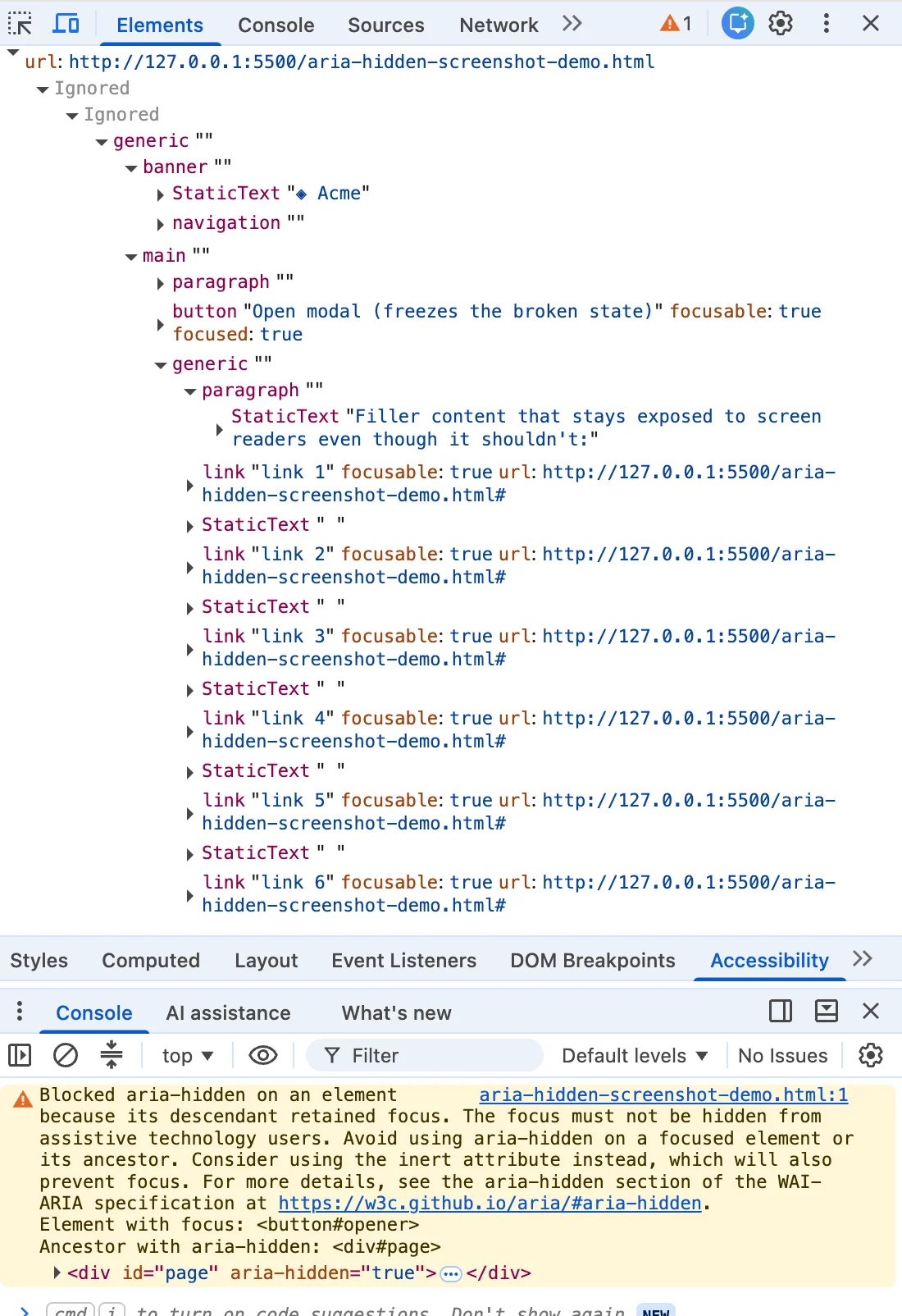
It starts with a flash of angry mustard yellow in the developer tools console. You have just closed a modal dialog, and a cryptic warning statement has appeared. Highlight the message, drop it into a search engine, and you will find yourself in digital company with half the front-end internet. This exact string turns up identically whether your stack is built on Angular, Bootstrap, Ionic, or phpMyAdmin.
For months, front-end engineers under pressure to clear build pipelines treated these console messages as annoying background noise—advisory nitpicking from a browser engine eager to enforce style-guide niceties. But according to web accessibility experts and recent browser updates, the top search results offering quick fixes have been leading developers astray. The popular workarounds—the blur() one-liners, the setTimeout wrappers, and the scripts that frantically strip aria-hidden attributes—silence the console while quietly harming the exact users the browser is trying to protect.
Main Facts: The Anatomy of Ghost Focus
The root of the issue lies in a fundamental architectural disconnect within modern web components: focus has to leave a region before that region becomes hidden or inert.
When developers build modal dialogs, they routinely execute a sequence of actions that creates what accessibility engineers call ghost focus. Typically, a script instructs the browser to hide an overlay background by setting aria-hidden="true" or adding a hidden display state, while the close button—which still holds keyboard focus—remains inside that newly hidden container.
The browser engine (specifically Chromium-based browsers like Chrome, Edge, and Brave) evaluates this state and encounters a paradox. The aria-hidden attribute removes content from the accessibility tree, but it does not remove that content from the keyboard focus order. Two different systems operate simultaneously without keeping in sync.
When a user presses the Tab key and lands on an element inside a hidden subtree, the screen reader fires a focus event for a node it has been told does not exist. It looks the property up, finds nothing it is allowed to describe, and stays silent.
From the user’s perspective, the experience is jarring:
- They press a key on their keyboard or screen reader.
- The control lights up visually, but the machine acknowledges nothing.
- They are left wondering if the web application broke, if their assistive technology crashed, or if they made a mistake.
They are stranded in the middle of a document structure that the navigation map insists is not there. The only way out is to press Tab blindly from the top of a long page and hope something eventually speaks.
Chronology: Two Waves and a Decade of Broken Teardowns
While the console warnings felt sudden when they began flooding developer logs, the underlying browser behavior had been maturing for years.

The Evolution of Chromium Enforcement
Back in early 2020, Chromium accessibility engineer Aaron Leventhal proposed exposing focusable aria-hidden nodes so users could at least hear where they were tabbing instead of facing complete silence (documented in W3C ARIA WG issue #1185). Teams had long struggled with portal and markup mistakes—such as accidentally slapping aria-hidden on the entire <body> element or giant wrapper containers—which locked screen reader users out of entire pages (visible as far back as Bootstrap issue #29769 in 2019).
The 2024 Warning Waves
Chromium began actively surfacing these architectural flaws in the developer console in two distinct waves throughout 2024:
- The Open-Time Variant (Summer 2024): Around Chrome 127 in July and August 2024, warning messages regarding elements that "just received focus" began clustering across major component libraries, including MUI (#43106), Ant Design (#50170), and Flowbite (#943).
- The Close-Time Variant (Late 2024): The "retained focus" warning arrived with Chrome 131 in late 2024. Developers caught it in beta and nightly builds, filing issues on Bootstrap (#41005) in November 2024 and Angular (#30187) by December.
Firefox and Safari do not currently surface comparable console warnings for this behavior; whatever those engines do with focused content inside hidden subtrees, they do silently. Chrome’s decision to make developers feel the friction was deliberate. A silent fix allows broken code to ship indefinitely because browser papering-and-patching is indistinguishable from correct code from the developer’s seat.
Supporting Data: The Four Ways You Fall Into the Trap
Engineers stumble into this accessibility trap from four distinct directions. Misidentifying the root cause leads to applying the wrong fix, which either fails to silence the warning or replaces it with a worse failure.
+--------------------------------------------------------------------------+
|                       THE FOUR TRAPS OF GHOST FOCUS                      |
+------------------------------------+-------------------------------------+
| 1. Hidden Mid-Goodbye              | Close-time race during CSS fade     |
| 2. The Trigger Left Behind         | Open-time inversion on mount        |
| 3. The Turf War                    | Nested components fighting for modals|
| 4. The User Walked Out             | Focus stranded by tab/window switch |
+------------------------------------+-------------------------------------+- Hidden Mid-Goodbye (The Close-Time Race): The user clicks close. The dialog begins a 200-millisecond CSS fade-out transition. For every frame of that animation, focus remains parked on the close button inside the overlay wrapper that the library just marked hidden. The code that moves focus away hasn’t run yet. This accounts for roughly 70% of reported console warnings across libraries like MUI, Shoelace, and Angular.
- The Trigger Left Behind (Open-Time Inversion): The process runs in reverse. An overlay opens, and the library marks the background
aria-hidden="true". However, the button the user just clicked still holds focus for a beat before it can be programmatically shifted into the dialog. - The Turf War (Nested Composition Conflicts): A user opens a
<dialog>, and inside it interacts with a<select>dropdown. When the select closes, two components—each believing they are the one true modal layer—fight over hiding the rest of the page. Under React 19, this shifts from an annoyance to a fatal navigation freeze, as unmount timing changes cause focus to drop to the body, prompting the parent dialog to re-hide itself with the user trapped inside. - The User Walked Out (Focus Leaves the Page): Nothing in the page changed, but the user hit Alt+Tab or switched browser tabs while a menu was open, stranding the
aria-hiddenstate with no live focus to reconcile against.
Official Responses and Ecosystem Reactions
The developer ecosystem reacted with a predictable flurry of quick fixes designed to appease continuous integration (CI) pipelines and quiet the developer tools console:
- The
blur()One-Liner: Droppingdocument.activeElement.blur()into hide handlers stops the warnings by stripping focus and dropping it onto the<body>element. While it satisfies automated logs, it abandons keyboard users at the top of long documents, violating WCAG 2.4.3 (Focus Order). - Timing Hacks (
setTimeout/requestAnimationFrame): Wrapping focus restoration in timers attempts to win a race against the browser render engine. On fast machines, it works; under heavy CPU load or concurrent rendering schedules, it fails intermittently, introducing frustrating flakiness. - Stripping
aria-hidden: Utilizing mutation observers or custom logic to strip the attribute entirely removes the warning by leaving the background fully interactive while a modal claims to be blocking it.
Major Framework Comparison
| Library / System | Focus Restoration Timing | Hiding Mechanism | Accessibility Status |
|---|---|---|---|
Native <dialog> |
Browser-internal, on close | Top layer, implicit inertness | Best default choice |
| React Aria | Synchronous, layout-effect timing | FocusScope + inert direction |
Strongest custom implementation |
| Radix UI | Pre-unmount via onCloseAutoFocus |
hide-others / aria-hidden |
Acceptable, with React 19 caveats |
| Bootstrap (v5.3) | On hidden.bs.modal, post-fade |
aria-hidden on wrapper |
The classic failing pattern |
Implications and the Correct Teardown Contract
The debate over who bears responsibility—browser vendors issuing scolding console outputs or maintainers whose idiomatic patterns were upended—misses the core reality: a clean console was never the goal.
Automated accessibility scanners like Axe or Lighthouse often pass these broken implementations because they photograph resting DOM states. They cannot capture failures living in the 200-millisecond transition between frames.
The Four-Step Teardown Contract
To satisfy both the browser engine and users relying on assistive tech, applications must adopt strict sequencing during modal teardowns:
- Un-inert the background FIRST: If triggers live inside an inert background container, browser security prevents them from receiving focus. Lift the background’s inert status first.
- Move focus out synchronously: Send focus back to the triggering element before any hide states or classes commit to the DOM.
- Inert the closing shell, don’t just hide it: Apply the
inertattribute (notaria-hidden) to the dying modal wrapper. This removes it from sequential focus navigation, pointer events, and the accessibility tree simultaneously during its exit animation. - Unmount after transition completion: Listen for
transitionendevents with proper target guards before finally removing the element from the document.
By replacing legacy workarounds with structured sequencing—or migrating natively to the HTML <dialog> element and calling .showModal()—developers can move beyond superficial console management and build resilient, truly inclusive web applications.