







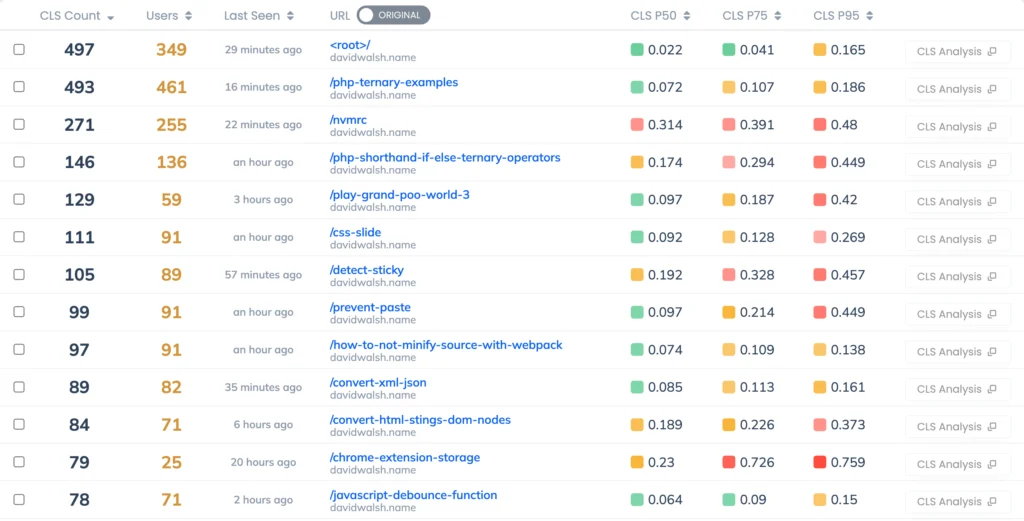
For over 50,000 developers worldwide, DavidWalshBlog has served as a cornerstone resource for mastering JavaScript, debugging complex code, and staying updated on modern web development practices. However, even the most authoritative technical sites face the inevitable friction of web performance. Recent monitoring data revealed that while the site’s content remains top-tier, the user experience was being quietly undermined by a persistent, invisible enemy: Cumulative Layout Shift (CLS).
This article explores the technical journey taken to identify these performance bottlenecks, the fallacy of relying solely on synthetic testing tools, and the architectural changes required to restore a seamless browsing experience for a global audience.
The Performance Crisis: Why CLS Matters
Cumulative Layout Shift is a core component of Google’s Core Web Vitals—the suite of metrics designed to quantify the user experience of a webpage. Unlike metrics that track raw loading speed, such as Largest Contentful Paint (LCP), CLS focuses on visual stability. It measures the cumulative score of all unexpected layout shifts that occur during the entire lifespan of a page.
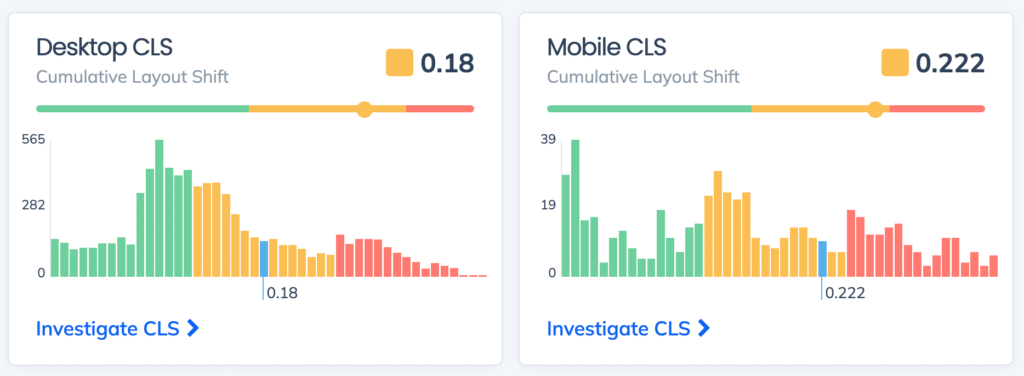
From a user’s perspective, CLS is the frustration of clicking a link only to have the text jump beneath your cursor at the last second, leading to an accidental click elsewhere. From a business perspective, it is a silent killer of engagement and search engine visibility. Search engines like Google have explicitly tied Core Web Vitals to page ranking algorithms, meaning that poor performance is no longer just a "technical debt" issue—it is a direct threat to a site’s discoverability and traffic.
The Myth of the "Perfect" Lighthouse Score
The investigation into DavidWalshBlog’s performance began with a common trap: relying exclusively on Google Lighthouse. When a developer runs a Lighthouse audit, they are essentially performing a synthetic test in a controlled, high-bandwidth environment.
When we ran an initial Lighthouse report on the blog, the results were stellar. The report returned a "perfect" score, suggesting that the site was highly optimized. However, a deeper analysis of real-world data revealed a starkly different reality. The "perfect" score was a snapshot of a single device, in a specific location, under ideal network conditions. It failed to account for the reality of the blog’s readership: a global audience accessing the site via varying devices, unstable mobile networks, and disparate geographic locations.
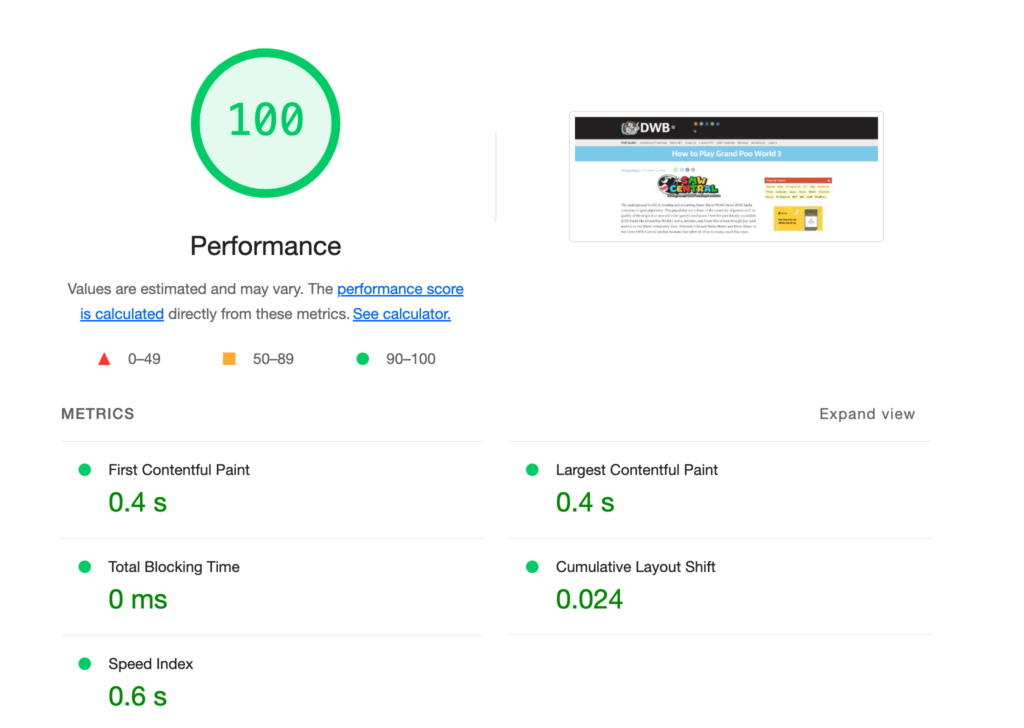
This highlighted a critical distinction in modern web development: Synthetic testing is not a substitute for Real User Monitoring (RUM). Lighthouse measures what could happen under perfect conditions, but RUM measures what is happening to actual users. By using Request Metrics to track the site’s performance, we were able to peel back the layers of the "perfect" score and uncover the true, slower experience being felt by the end-user.
Chronology of the Investigation
The process of isolating the root cause followed a structured technical methodology:
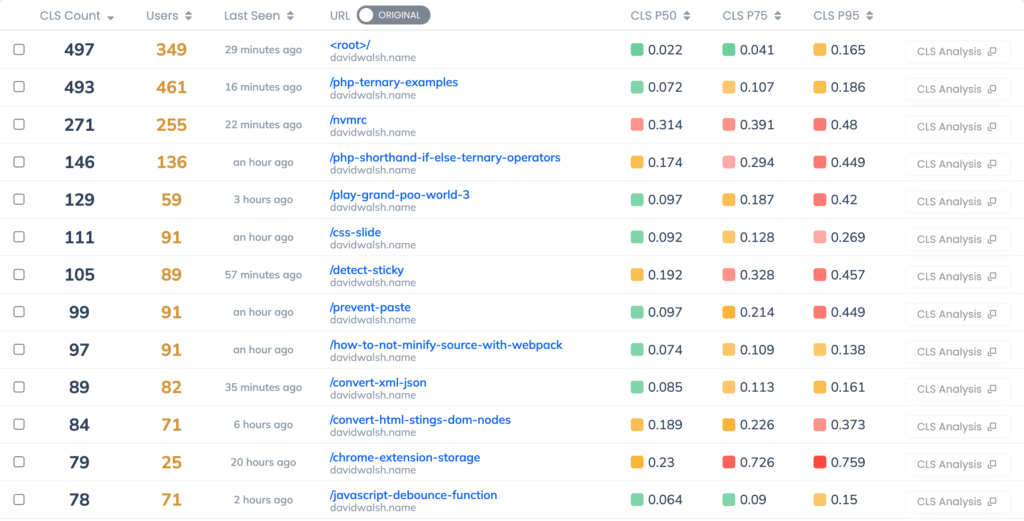
- Baseline Establishment: We integrated Request Metrics to track CLS scores on a per-page basis. The data immediately indicated that while the homepage maintained a healthy stability score, specific long-form articles were experiencing significant layout instability.
- Granular Analysis: We cross-referenced high-CLS pages with their DOM structures. The telemetry consistently pointed to the
main > article > pelements—specifically the first paragraph of the content—as the primary culprit for the shifting behavior. - The Culprit Revealed: After reviewing the content delivery pipeline, we identified that images within these posts were loading without predefined dimensions.
- Implementation of Fixes: We initiated a sitewide update to ensure that all
<img>tags utilized explicitwidthandheightattributes. - Validation: We monitored the performance trends over the following week to measure the tangible impact of these adjustments.
Why Images Drive Layout Instability
The investigation confirmed that images are the leading cause of CLS on the blog. Browsers are asynchronous by design; when an HTML file is parsed, the browser may not immediately know the dimensions of an image until the file has begun downloading.
Historically, developers would allow the browser to assume a 0x0 size for an image, which would then "snap" to its full size once the image binary arrived. This sudden expansion forces all subsequent text and page elements to shift downward, causing the dreaded layout jump. On a content-heavy site like DavidWalshBlog, which features numerous technical screenshots and diagrams, a single post with multiple images could trigger a dozen individual shifts, resulting in an atrocious user experience.
Technical Resolution: Setting the Foundation
The solution to this problem is surprisingly low-tech but highly effective. By providing the browser with explicit width and height attributes, we allow the browser to reserve the exact amount of space required for the image before it even begins to download.
<!-- The Correct Approach -->
<img src="/path/to/image.png" width="800" height="400" alt="Technical diagram" />
Crucially, these attributes do not need to include units like px. By defining these values, the browser calculates the aspect ratio of the container. Even if CSS is used to make the image responsive (e.g., width: 100%; height: auto;), the browser now knows exactly how much vertical space to reserve, eliminating the layout shift entirely.
For a WordPress-based site like DavidWalshBlog, we leveraged the wp_image_src_get_dimensions function to automate this process. This allowed us to programmatically inject the necessary dimensions into the markup for all historical and future posts, ensuring consistent performance without manual intervention for every image.
Implications and Results
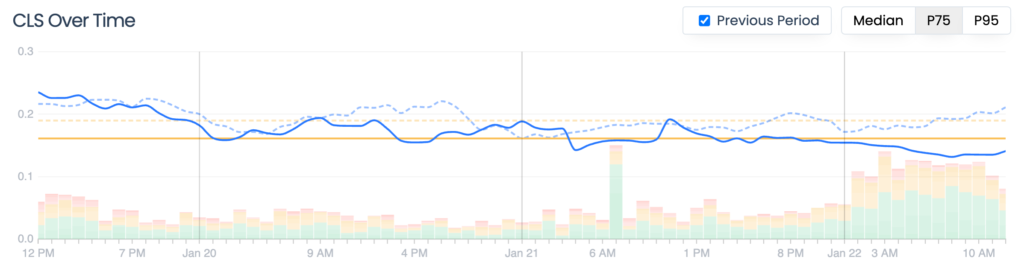
The results of this optimization were nearly instantaneous. Within days of implementing the dimension attributes, the site’s aggregate CLS score improved by 20%, dropping to 0.123. This movement brought the site significantly closer to the "Good" threshold as defined by Google’s Web Vitals standards (which target a score of 0.1 or lower).
Beyond the metrics, the implications for the blog are significant:

- User Retention: A stable page reduces user frustration, encouraging longer session durations and deeper content engagement.
- SEO Resilience: By aligning with Core Web Vitals, the site is better positioned to maintain its search engine ranking, ensuring that the blog continues to serve its primary purpose: helping developers solve problems.
- Infrastructure Health: This project serves as a case study for why "performance" should be treated as a continuous monitoring process rather than a one-time audit.
Looking Forward: The Ongoing Performance Challenge
While the CLS issue has been largely mitigated, the work is far from finished. Performance optimization is an iterative process. As our tracking data indicates, there are remaining complexities surrounding font loading—specifically the "Flash of Unstyled Text" (FOUT) or "Flash of Invisible Text" (FOIT)—that contribute to residual layout shifts.
These issues remain on the roadmap for future development. In the modern web landscape, where speed is a feature, constant vigilance is required. For site owners and developers, the lesson is clear: if you aren’t measuring your site through the lens of real-world user data, you are essentially flying blind.
For those looking to replicate these improvements, the path is straightforward: prioritize real user monitoring, identify your high-traffic pages, and address the low-hanging fruit of layout instability. Tools like Request Metrics provide the visibility necessary to turn "good enough" performance into a fast, reliable, and accessible user experience. The era of the "perfect" synthetic score is over; the era of real-world user experience is here to stay.