









In an era defined by data-driven decision-making, the barrier to entry for extracting actionable insights has never been lower—nor the demand higher. While enterprise-scale data science often conjures images of distributed clusters, complex neural networks, and esoteric machine learning pipelines, the fundamental truth remains immutable: all advanced data analysis begins with a localized, structured approach. It starts with loading a clean dataset, framing targeted business or operational questions, and leveraging robust scripting environments to uncover the answers.
For software engineers, analysts, and domain experts stepping into the programmatic ecosystem for the first time, Python—coupled with the powerful pandas library—offers an unmatched combination of readability and computational muscle. This comprehensive guide outlines the architecture and execution of building a lightweight, highly extensible data analyzer from scratch. By examining a fictional student performance model, you will learn how to orchestrate the entire Extract, Transform, Load (ETL) pipeline, manage programmatic anomalies, derive deep statistical summaries, and render impactful data visualizations using Matplotlib.
1. Main Facts & System Architecture
At its core, a data analyzer acts as an intermediary layer between raw, unformatted storage (such as CSV files) and human comprehension. To build this foundation, developers must understand the primary technological stack required to establish a functioning data analytics environment:
- Python: The core scripting language acting as the execution runtime.
- Pandas: An open-source data manipulation and analysis library built on top of NumPy, providing high-performance, easy-to-use data structures (specifically, the
DataFrame). - Matplotlib: A comprehensive library for creating static, animated, and interactive visualizations in Python.
Environment Preparation and Dependency Management
Before writing a single line of analytical code, you must provision your development workstation. This involves ensuring Python is installed alongside the necessary packages. Executing the following command within your terminal pulls the required binaries from the Python Package Index (PyPI):
pip install pandas matplotlibTo verify that the installation completed successfully and that your interpreter can resolve the imported modules, execute this diagnostic script:
import pandas as pd
import matplotlib.pyplot as plt

print(f"Pandas Version: pd.__version__")
If the console returns a valid semantic version string, your environment is provisioned and ready for execution.
2. Chronology of a Data Analysis Pipeline
Building a data analyzer follows a strict chronological methodology. Jumping straight into complex statistics without structuring your workflow invariably leads to silent logic errors, unhandled exceptions, and skewed analytical conclusions.
Step 1: Synthesizing the Raw Dataset
To establish our baseline, we construct a comma-separated values (students.csv) file. This file acts as our data source, modeling 12 fictional student records across grades 9 through 12. Each row is an isolated observation, and each column represents a discrete variable: name, grade, study hours, attendance percentage, and final test score.

name,grade,study_hours,attendance,score
Ava,9,4.5,95,82
Liam,9,6.0,98,91
Sophia,10,3.5,89,76
Noah,10,7.0,99,94
Emma,11,5.5,93,88
Oliver,11,8.0,97,96
Mia,12,4.0,91,79
Ethan,12,6.5,96,90
Isabella,9,7.5,100,97
Lucas,10,2.5,85,68
Amelia,11,6.0,94,92
James,12,5.0,90,84
Step 2: Loading Data into Memory via Pandas
Once the raw file exists within your local working directory, the next phase is ingestion. The pandas library abstracts away the complexities of parsing text files through its optimized read_csv() engine:
import pandas as pd

# Load the dataset into a pandas DataFrame
data = pd.read_csv("students.csv")

# Render the dataset to standard output
print(data)
The resulting DataFrame structure acts as a programmable, in-memory relational table, allowing developers to query rows and columns using vectorized operations rather than manual iteration loops.
3. Supporting Data & Deep Exploratory Analysis
Before computing advanced correlations or generating predictive visualizations, professional engineers perform exploratory data analysis (EDA). This stage confirms structural integrity, identifies data types, and flags potential anomalies.
Structural Inspection Methods
Executing foundational inspection commands prevents downstream execution faults by revealing the exact schema of your dataset:
# 1. Retrieve structural dimensions (Rows, Columns)
print(data.shape)  # Output: (12, 5)

# 2. Inspect the first N rows to verify data alignment
print(data.head(3))

# 3. List active column identifiers
print(data.columns)

# 4. Review memory usage, non-null counts, and data types
data.info()
Deriving Statistical Summaries
Pandas eliminates the need to manually implement complex mathematical formulae. Using built-in methods, developers can extract critical descriptive statistics instantaneously:
# Central tendencies
average_score = data["score"].mean()
median_score = data["score"].median()

# Dispersions
highest_score = data["score"].max()
lowest_score = data["score"].min()

print(f"Average Score: average_score:.2f")
print(f"Median Score: median_score:.2f")
print(f"Score Range: lowest_score - highest_score")

# Comprehensive statistical breakdown of numerical columns
print(data.describe())
Conditional Filtering and Grouping Operations
One of the greatest strengths of pandas is its capability to perform high-speed Boolean indexing and aggregations.
If we want to isolate high-performing students or examine performance cohorts by grade level, we construct logical queries using bitwise operators (& for AND, | for OR):
# Filter students with scores of 90 or higher
high_performers = data[data["score"] >= 90]
print(high_performers)

# Complex multi-condition filtering
elite_students = data[
    (data["study_hours"] > 5) &
    (data["attendance"] > 95)
]
print(elite_students)

# Grouping data to calculate aggregate metrics by grade level
grade_summary = data.groupby("grade")["score"].agg(
    ["mean", "min", "max", "count"]
).round(2)

print(grade_summary)
4. Official Technical Insights & Methodological Integrity
When developing automated analytics tools, practitioners must adhere to established data science standards. Ignoring fundamental statistical realities—such as the difference between correlation and causation—leads to flawed architectural decisions and misinformed business strategies.
Correlation vs. Causation
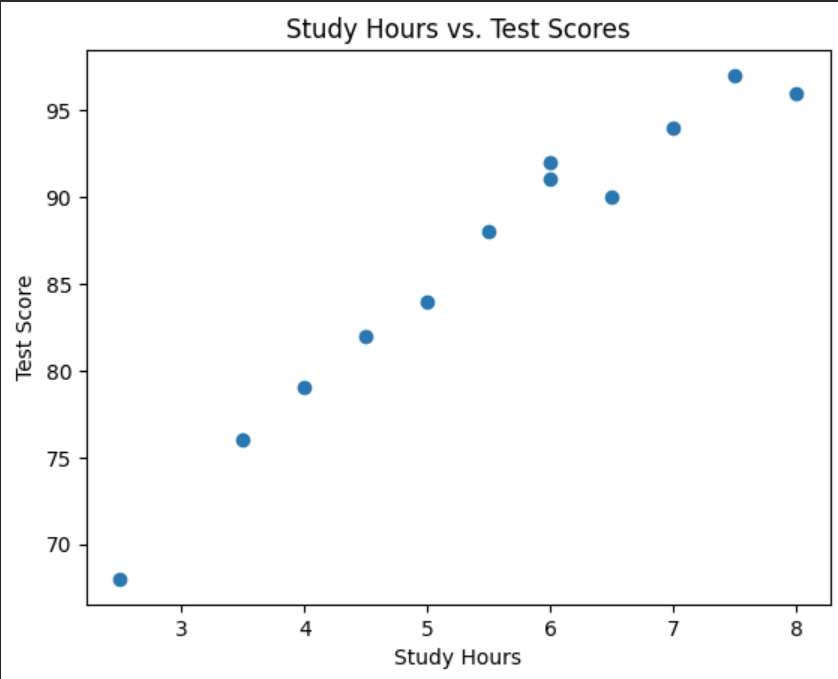
Consider the analysis of study hours versus test scores. By utilizing the corr() method, we can quantify the linear relationship between these two vectors:
correlation = data["study_hours"].corr(data["score"])
print(f"Study Hours vs. Score Correlation: correlation:.2f")
While a high positive correlation coefficient (approaching 1.0) indicates that students who study longer tend to achieve higher test scores, correlation does not establish direct causation. External confounding variables—such as foundational comprehension, instructional quality, and socioeconomic factors—may heavily influence the outcome. Developers and analysts must qualify their programmatic outputs with this critical distinction in mind.
Handling Missing Data Gracefully
Real-world datasets are rarely pristine. Missing or null values can trigger runtime exceptions or distort analytical calculations. Best practices dictate checking for null structures before processing:
# Identify total null values per column
print(data.isnull().sum())

# Drop rows containing incomplete data records
clean_data = data.dropna()

# Alternatively, impute missing values with strategic averages
data["score"] = data["score"].fillna(data["score"].mean())
5. Architectural Implications & Next Steps
Transforming a linear script into a robust, reusable data processing engine requires encapsulation. By abstracting repetitive logic into modular functions, developers can scale their analytical pipelines to ingest arbitrary CSV schemas without rewriting core code.
Encapsulation via Python Functions
def execute_pipeline(filepath):
    """
    Ingests a CSV dataset, performs exploratory computations,
    and returns processed dataframes and statistical summaries.
    """
    try:
        df = pd.read_csv(filepath)
    except FileNotFoundError:
        print(f"Error: The target file 'filepath' could not be located.")
        return None

    # Core analytics computations
    summary_stats = df.describe()

    # Exporting computed artifacts
    output_filename = "processed_summary.csv"
    summary_stats.to_csv(output_filename)
    print(f"Pipeline executed successfully. Results archived to output_filename")

    return df

# Execute the modular function
active_dataset = execute_pipeline("students.csv")
Visualizing Analytics Output
To convert raw numerical arrays into cognitive insights, integrate Matplotlib to generate graphical representations:
import matplotlib.pyplot as plt

if active_dataset is not None:
    # Render a Scatter Plot for Study Hours vs. Test Scores
    plt.figure(figsize=(8, 5))
    plt.scatter(active_dataset["study_hours"], active_dataset["score"], color='royalblue', edgecolors='k')
    plt.xlabel("Study Hours")
    plt.ylabel("Test Score")
    plt.title("Relationship Analysis: Study Hours vs. Test Scores")
    plt.grid(True, linestyle='--', alpha=0.6)
    plt.show()
Conclusion
Building a data analyzer in Python with pandas does not require advanced mastery of machine learning frameworks. By systematically managing environment provisioning, data ingestion, exploratory filtering, and modular code encapsulation, developers can construct powerful, reusable analytics applications. As you transition from small static datasets to enterprise-grade pipelines, these foundational habits will ensure your data workflows remain scalable, accurate, and production-ready.