By Digital Media & Monetization Desk
Published: October 2023
In the hyper-competitive landscape of digital publishing, every pixel of screen space matters. For website owners, bloggers, and content creators, empty ad slots represent not just an aesthetic flaw, but a direct hit to revenue. When an Google AdSense unit fails to populate an ad—leaving behind a blank, awkward white space—it signals lost monetization potential.
While advancements in remarketing and algorithmic matching have significantly reduced the frequency of unfulfilled ad requests, zero-fill scenarios still occur. When they do, publishers are often left scrambling to recover that lost value. Fortunately, Google AdSense provides a built-in mechanism to deploy alternative content through "backup ads."
However, the platform’s native user interface makes this process far from intuitive. By default, AdSense prompts users to input a single URL for a backup ad, leading many publishers to mistakenly believe they are restricted to displaying a static, unclickable image.
This comprehensive guide breaks down the core facts, step-by-step implementation chronology, performance data, industry implications, and workarounds needed to transform a dead ad space into a clickable, revenue-generating affiliate asset.
1. Main Facts: The Anatomy of AdSense Backup Units
To understand why custom backup ads are necessary, publishers must first examine how AdSense handles unfilled inventory.
- The Problem of Blank Space: When an ad request times out or returns no match from Google’s auction network, the default behavior of an unconfigured ad unit is to collapse or display a blank void. This disrupts user experience and yields zero revenue.
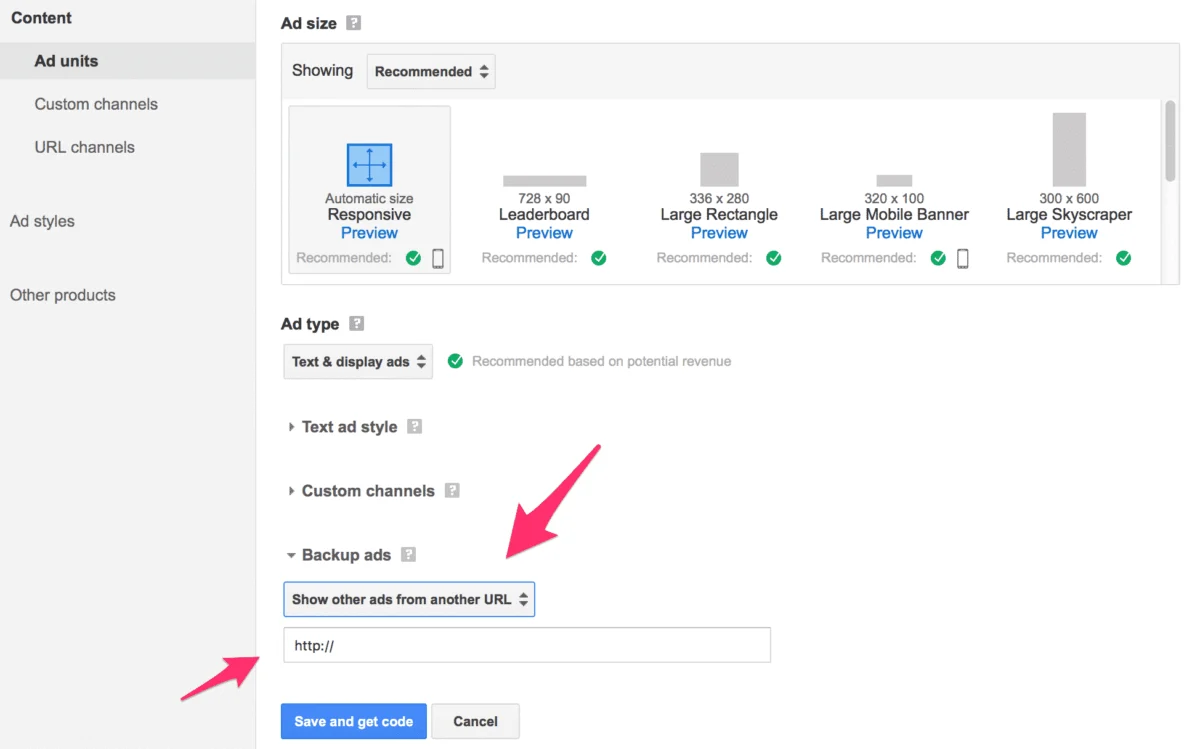
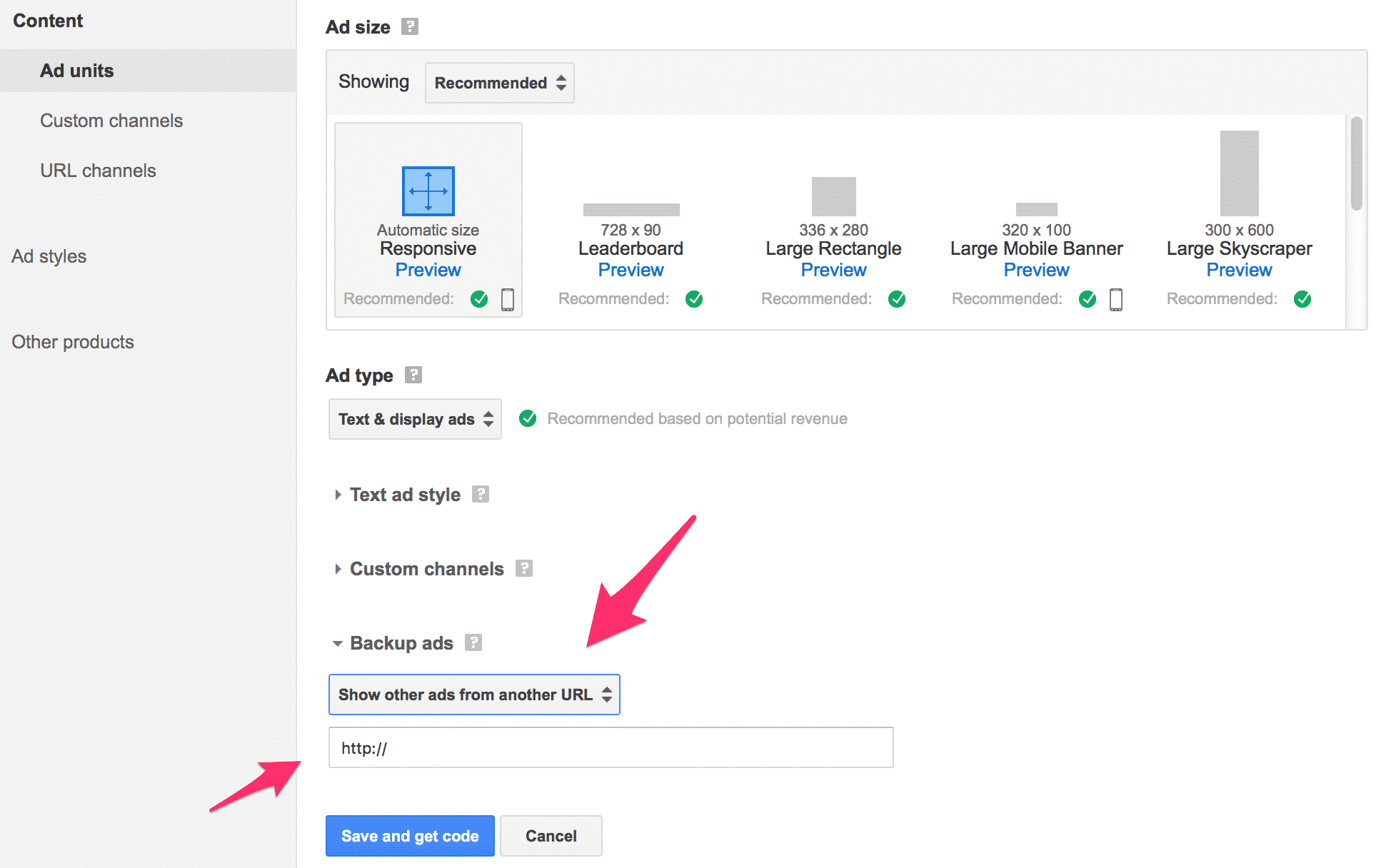
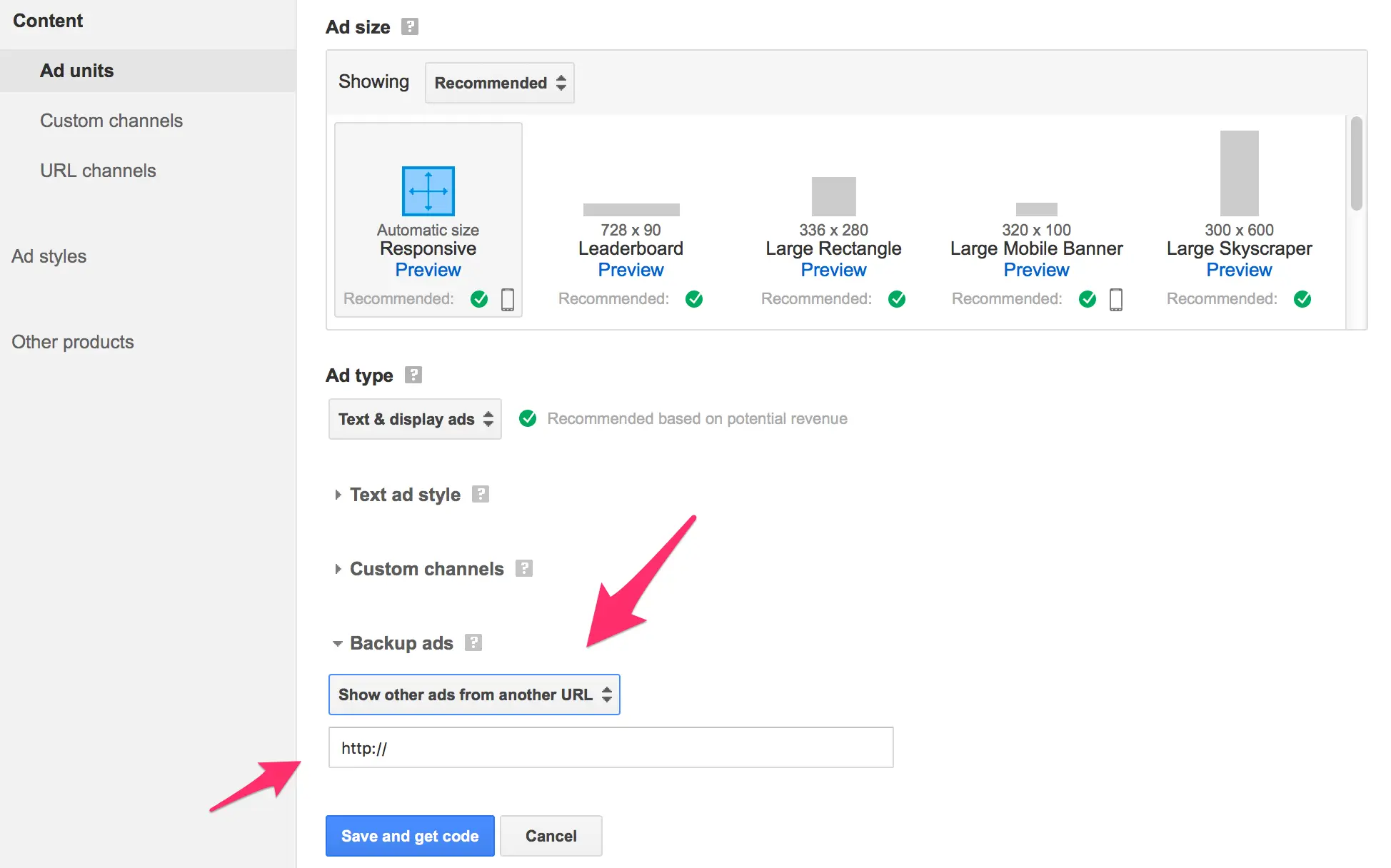
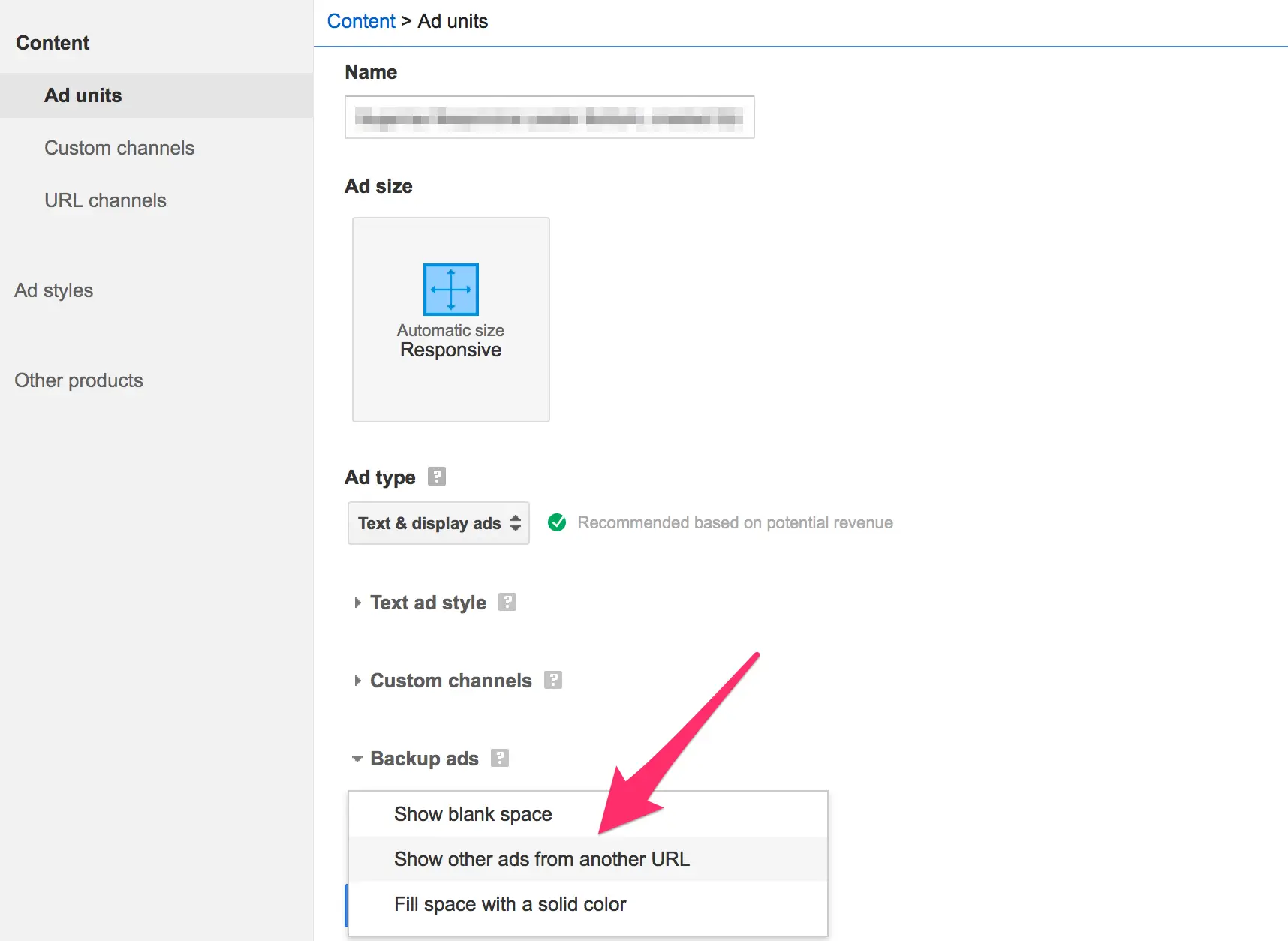
- The Limitations of the Interface: Within the AdSense dashboard, the "Backup Ads" setting allows publishers to choose between a blank space, a solid color, or "another URL." However, the input field requests only a single web address.
- The Misconception: Because the interface only asks for a URL, most webmasters assume they can input an image address (
.jpgor.png), resulting in an unclickable graphic that serves little strategic purpose. - The HTML Solution: Publishers can bypass this limitation by hosting a simple, single-purpose HTML file on their own web server. This file embeds an image wrapped in an anchor (
<a>) tag pointing to an affiliate link or high-converting landing page, effectively turning the backup space into a clickable banner.
2. Chronology: Step-by-Step Implementation Guide
Because Google does not provide a direct, visual WYSIWYG editor for building clickable backup ads, publishers must manually code, host, and link their alternative creatives. Below is the chronological workflow required to execute this setup successfully.
Phase 1: Drafting the HTML Code
First, you must create a lightweight HTML document that houses your banner creative and its corresponding destination link.
Using a plain-text editor (such as Notepad on Windows or TextEdit on macOS set to plain text mode—avoiding rich-text processors like Microsoft Word), input the following code template:
<html>
<head>
<title></title>
</head>
<body>
<a href="YOUR AFFILIATE LINK" target="_top"><img src="YOUR AD IMAGE"></a>
</body>
</html>- Customizing the Links: Replace
YOUR AFFILIATE LINKwith your target URL (such as an affiliate offer or internal promotion). ReplaceYOUR AD IMAGEwith the absolute URL of your banner creative. - Critical Elements: Ensure you include the
target="_top"attribute within the anchor tag. Without this element, the linked page may attempt to load inside the cramped confines of the iframe rather than breaking out into the full browser window. Additionally, your creative dimensions must match the exact pixel dimensions of the AdSense unit it supports.
Phase 2: Uploading the File to Your Server
Once your HTML file is customized, save it with a .html extension (for example, semrush-backup-ad.html).
Next, upload this file to your web server using an FTP client or your hosting provider’s file manager. The file can live anywhere on your domain, provided it possesses a publicly accessible URL on the internet (e.g., https://yourwebsite.com/semrush-backup-ad.html).
Phase 3: Configuring the AdSense Dashboard
With your HTML file hosted and live, navigate to your Google AdSense account to link the backup asset:
- Log into your AdSense dashboard and locate the specific ad unit you wish to configure.
- Click on the name of the ad unit (avoiding generic edit menus if they redirect elsewhere).
- Scroll down to the Backup Ads field.
- Select the dropdown option labeled Show other ads from another URL.
- Paste the absolute URL of the HTML file you uploaded in Phase 2.
- Click Save.
3. Supporting Data and Advanced Tracking Strategies
Implementing a backup ad is only half the battle; measuring its performance is critical to optimizing your site’s overall yield. Because fallback ads often sit dormant until an ad auction fails, tracking their direct impact can be challenging.
Overcoming Google’s Testing Limitations
A persistent frustration among web publishers is Google’s lack of a built-in testing environment for backup ads. There is no "preview" button in the AdSense UI that forces a zero-fill scenario on demand, meaning publishers must deploy the code and rely on live traffic data to evaluate its functionality.
Advanced Click Attribution (SID Tracking and Link Cloaking)
To accurately measure the return on investment (ROI) of your backup ad units, standard links should be avoided.
- Sub-ID (SID) Tracking: Whenever possible, use affiliate network links that support Sub-ID or tracking parameters. This allows your affiliate dashboard to report precisely how many clicks and conversions originated from the specific backup ad unit.
- Link Cloaking and Management Plugins: If your chosen affiliate program does not support native SID tracking—or if you want cleaner, centralized analytics—utilize a link management tool (such as Pretty Link Pro or similar redirection plugins). By generating a dedicated, cloaked redirect specifically for the backup ad, you can monitor total click volume directly from your WordPress dashboard or server analytics.
Note: Changes made within the AdSense dashboard do not take effect instantaneously. It may take anywhere from several hours to a couple of days for Google’s ad-serving servers to register the new backup URL parameters.
4. Official Responses and Platform Guidelines
Google’s official documentation regarding backup ads outlines specific parameters to ensure structural integrity and a safe user experience:
- Absolute URLs Recommended: Google strongly advises the use of absolute URLs (e.g.,
https://example.com/image.jpgrather than relative paths like/images/image.jpg) within iframe environments to prevent broken asset loading. - Policy Compliance: Backup ads remain subject to standard Google AdSense and publisher content policies. Even though the ad is served via an external HTML file, publishers cannot use backup units to promote prohibited content, malware, deceptive downloads, or adult material. If a backup ad violates terms of service, the publisher risks action against their broader AdSense account.
5. Implications for Digital Publishers
Mastering the implementation of clickable backup ads carries significant implications for modern web monetization strategies:
- Maximized Yield Efficiency: In programmatic advertising, impression leakage is a silent profit killer. By converting empty spaces into targeted affiliate banners, publishers capture residual value from traffic that would otherwise yield zero financial return.
- Diversified Revenue Streams: Relying solely on programmatic CPMs leaves publishers vulnerable to seasonal advertising slumps and macroeconomic downturns. Backup ads allow publishers to seamlessly blend programmatic display with high-converting direct affiliate marketing.
- Enhanced User Experience: A structured, branded graphic or relevant contextual promotion looks significantly more professional than a jarring, collapsed white block or broken image icon when an ad fails to load.
While Google’s interface leaves room for improvement in terms of intuitive design, taking the time to manually construct and deploy HTML-based backup ads remains an essential technical skill for any serious publisher looking to plug revenue leaks and optimize digital real estate.