










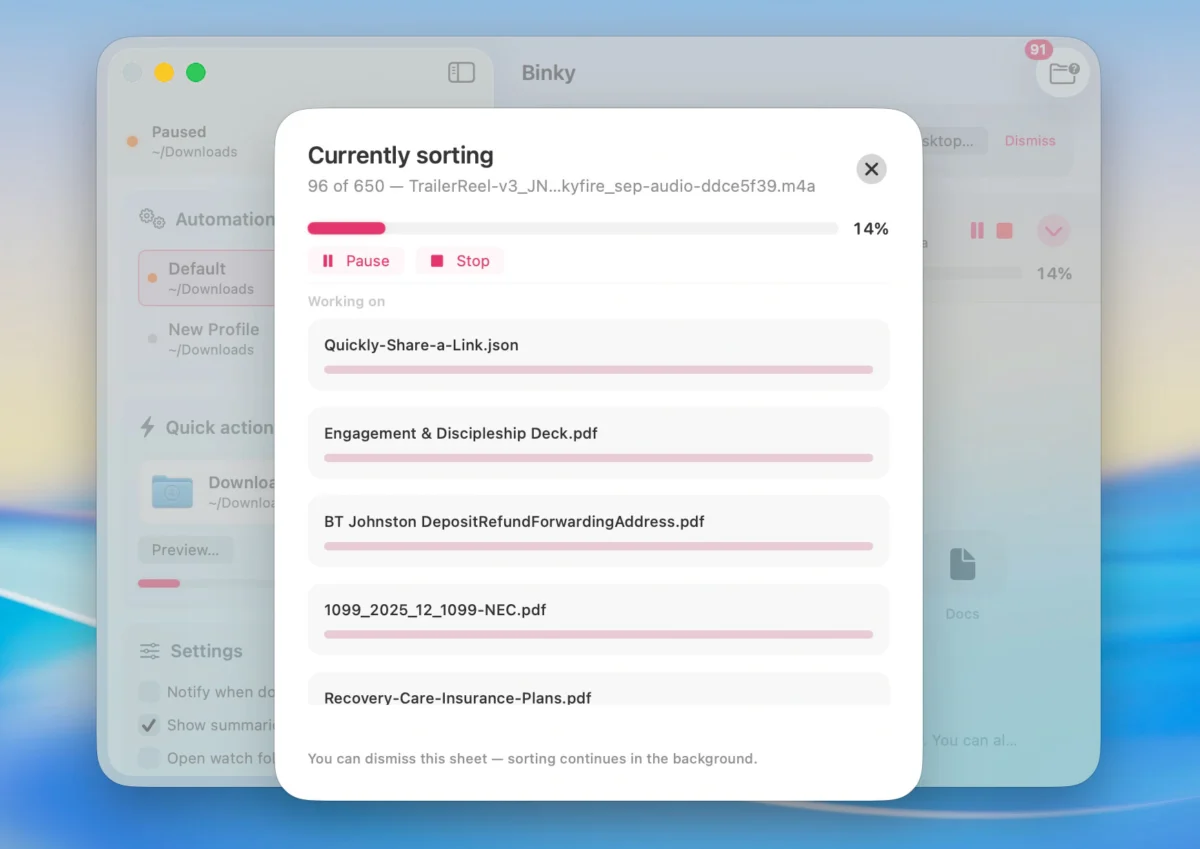
Every macOS user knows the distinct anxiety of the digital junk drawer. Whether it is a runaway Downloads folder overflowing with unread PDFs, a Desktop cluttered with forgotten screenshots, a neglected Dropbox inbox, or a project directory where exported assets multiply unchecked, digital clutter is a universal tax on productivity. While macOS has evolved significantly over the years, handling the daily influx of files often still requires manual labor—dragging, dropping, and filing into subfolders one by one.
Enter Binky, a new native macOS utility designed to bring predictable, automated order to the chaos. Developed as a lightweight, high-performance solution using SwiftUI and AppKit, Binky moves beyond simple file-extension sorting. Instead, it offers a sophisticated yet accessible routing system that turns chaotic directories into organized workspaces.
Main Facts: What is Binky and How Does It Work?
At its core, Binky is an automated file-sorting application built specifically for macOS 14 Sonoma and later. Rather than functioning as a resource-heavy web wrapper, Binky operates as a native Mac app, ensuring seamless integration with the operating system’s design language and performance standards.
The application approaches file management through two primary mechanisms: Quick Sort for immediate, one-off cleaning, and Routines for continuous, automated background monitoring.
When Binky processes a folder, it does not blindly snatch files the moment they land. Instead, it waits for downloads and transfers to completely finish before initiating a move, preventing corrupted or half-baked file transfers. Furthermore, the application features collision-safe moves, ensuring that if two files share the exact name, neither overwrites the other.
Files are typically routed into sensible default categories, such as:
- Images
- PDFs
- Media
- Documents
- Archives
- Apps
- Screenshots
- Misc
For files that do not fit neatly into predefined parameters, Binky routes them to a dedicated Review folder. This safety net prevents the app from guessing incorrectly and burying important documents in obscure directories.
Chronology: The Evolution of Mac File Management
To understand the significance of a tool like Binky, it is helpful to look back at how macOS users have historically managed file clutter.
The Era of Manual Organization (Early OS X Days)
In the early days of Mac OS X, file management was strictly a manual affair. Users relied on Finder windows, color labels, and meticulous folder structures. The burden of organization fell entirely on the individual, leading to the ubiquitous "Desktop as a storage facility" phenomenon.
The Rise of Scripting and Hazel
As automation became more accessible, power users turned to tools like Automator, AppleScript, and eventually third-party applications like Noodlesoft’s Hazel. Hazel revolutionized folder monitoring by allowing users to set up rule-based workflows that automatically filed, renamed, or archived documents based on specific criteria. However, setting up these legacy tools often presented a steep learning curve for average users.
The Modern Native Shift: Binky
Released under the permissive MIT license for its 1.x product line, Binky represents a modern shift toward open-source, highly targeted native utilities. Built for contemporary macOS frameworks, it bridges the gap between advanced rule-based automation and user-friendly interface design, offering command-line integration alongside graphical workflows.
Supporting Data and Architecture: Under the Hood
Binky’s technical architecture sets it apart from traditional drag-and-drop utilities. Because it is constructed using SwiftUI and AppKit, it respects macOS system resources, boasting low memory consumption and snappy execution times.
The utility provides multiple entry points for users of varying technical expertise:
- Graphical User Interface (GUI): A clean, modern dashboard for managing Routines, viewing history logs, and configuring global rules.
- Finder Integration: Full support for Finder Quick Actions and Services, allowing users to right-click any file or folder and select Sort with Binky directly from the context menu.
- Apple Shortcuts Support: A native Sort Files action enables users to integrate Binky’s sorting logic into broader macOS automation pipelines using the Shortcuts app.
- Command-Line Interface (CLI): A dedicated
binkycommand-line tool allows advanced users to preview sorting operations, execute Routines via the Terminal, or incorporate the app’s routing logic into custom shell scripts.
Privacy is another cornerstone of Binky’s architecture. The application operates entirely locally on the user’s Mac. There are no cloud accounts to configure, no telemetry data collected, and zero file uploads. Everything happens on-device.
Official Design Philosophy: Predictability Over Cleverness
According to the developers behind Binky, the primary objective of the software is not "clever" file management—which often results in artificial intelligence guessing wrong and hiding files—but rather predictable file management.
"The point is not clever file management. It is predictable file management."
This philosophy dictates how rules and edge cases are handled. Binky’s rule engine allows users to match files using a wide variety of attributes:
- File name and extension
- File kind and size
- Creation and modification dates
- File origin
- OCR (Optical Character Recognition) and receipt detection hints
- Finder tag conditions
When a rule matches, Binky can execute a variety of actions beyond simply moving the file. It can rename the document, apply specific Finder tags, extract compressed archives, automatically install software from a .dmg file, trash unwanted items, or fan files out across multiple directories based on tags. Crucially, custom rules execute before default sorting takes place, ensuring that specialized items—like monthly receipts or client invoices—are intercepted and routed correctly before hitting a generic PDF folder.
Implications: Changing How We Interact with Inboxes
The introduction of tools like Binky shifts how Mac users think about digital workspaces. By redefining folders like Downloads and Desktops not as permanent storage bins, but as temporary inboxes, the application encourages a cleaner, more efficient workflow.
Eliminating Decision Fatigue
One of the hidden costs of a cluttered computer is decision fatigue. Every time a user opens a messy Downloads folder to find a document from three weeks ago, they waste mental energy scanning through visual noise. Binky automates this friction away. Files arrive, are evaluated against deterministic rules, and are filed away invisibly in the background.
Bridging the Gap Between GUI and CLI
By offering both a polished graphical interface and a robust command-line tool (binky), the utility caters to a broad spectrum of the macOS ecosystem. Casual users can enjoy a set-it-and-forget-it automated folder watcher, while system administrators and developers can script complex file-routing pipelines that execute seamlessly in the background.
Open-Source Accessibility
Distributed as a free download via binkyfiles.com under an open-source MIT license, Binky removes financial barriers to digital productivity. Users can inspect the code, contribute to its development, and deploy it across multiple machines without subscription overhead.
The Bottom Line
Binky addresses a universally frustrating problem with elegance and technical precision. By treating folders as dynamic inboxes rather than stagnant junk drawers, it restores order to the macOS file system without requiring tedious manual intervention.
While it enforces a strict operational boundary—it strictly moves files rather than copying them, and it only actively monitors directories while the application is running—its combination of native performance, deep Finder integration, and powerful custom rule engines makes it an essential utility for any Mac user looking to reclaim their digital workspace.
For those running macOS 14 Sonoma or later, downloading Binky and setting up a few automated Routines may be the simplest way to turn digital chaos into absolute clarity.



