By Sorav Jain
Published in 2026
Almost everyone who tries AI video generation for the first time makes the exact same mistake. They open up an advanced AI video tool, type out a long, novel-length prompt detailing an entire cinematic universe, and sit back expecting a finished, Hollywood-grade film to emerge from a single generation.
It never works that way, and it never will. No single AI model on the market today is the absolute best at everything. Expecting a text-to-video platform to simultaneously handle complex physics, hyper-realistic human micro-expressions, flawless lighting consistency, and perfect narrative pacing in one go is like expecting a screenwriter to act, light the set, mix the sound, and direct the blockbuster single-handedly.
Professional AI filmmaking is a stack, not a single tool. Just like a real film production requires a specialized crew—a Director of Photography for the camera, a gaffer for lighting, and a sound designer for audio—modern AI video creation demands a multi-model workflow. Treating AI video like a slot machine—generating, hoping for the best, and regenerating—is the fastest way to burn through your creative credits and drain your patience without anything tangible to show for it.
Treat it like a professional production set instead, and the entire process transforms from a game of chance into a predictable, highly creative enterprise.
The Five-Stage Cinematic AI Production Workflow
Here is the exact sequence used and taught by industry professionals. It is broken down into the exact same five stages that every traditional film production goes through, simply compressed from weeks or months into a few focused hours.
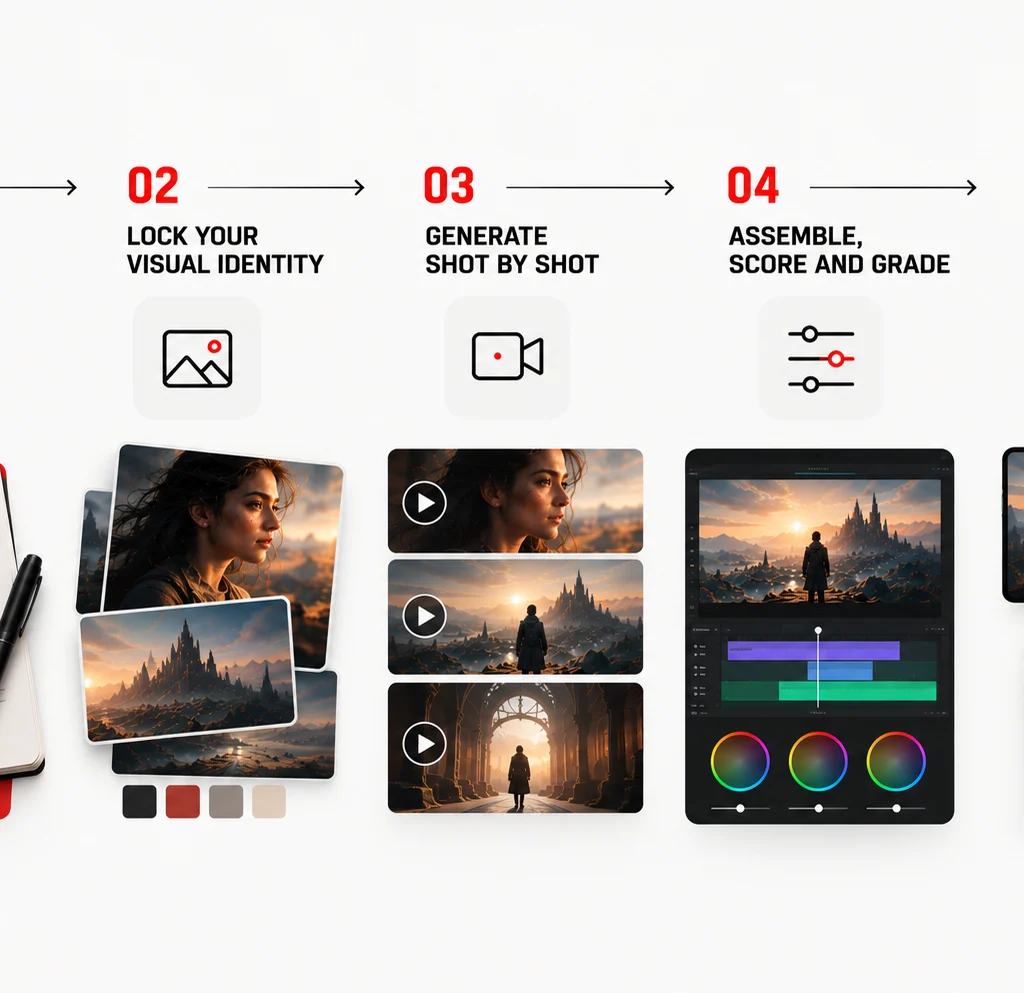
[1. One-Page Pitch] ➔ [2. Visual Identity] ➔ [3. Shot-by-Shot Generation] ➔ [4. Assemble, Score, Grade] ➔ [5. Platform Export]Step 1: Write the Idea Like a One-Page Pitch, Not a Script
Before opening a single AI software application, creators must write what is known as a one-page pitch. This document outlines the core elements:
- Who the character is.
- What they desperately want.
- What stands in their way.
- How the narrative resolves in under five shots.
This discipline matters far more in AI filmmaking than in traditional cinema. Every single shot you generate costs valuable time and computing credits. A crystal-clear pitch tells you precisely what you need to generate—and, just as importantly, what you shouldn’t waste resources generating.
Step 2: Lock Your Visual Identity Before You Touch Video
This is the step that almost every amateur skips, and it is the single dividing line between a disjointed reel of random clips and a film that looks like a continuous, high-end production.
Before generating video files, establish your color palette, character designs, aspect ratio, and lighting style through locked reference images. Without this foundation, your character will look like an entirely different person in every single shot.
Step 3: Generate Shot by Shot, Not Film by Film
Once your visual identity is completely locked, you move into the actual video generation phase—approaching it strictly one shot at a time. Utilize image-to-video capabilities and character-anchoring techniques to maintain structural continuity across your sequences.
Step 4: Assemble, Score, and Grade
Generated AI clips are merely raw footage, not a finished film. This post-production stage is where a project either becomes a cinematic masterpiece or remains a messy pile of disconnected clips.
Editorially, you must pace your cuts, layer sound effects, mix a compelling musical score, and apply color grading to tie the disparate visual generations into a cohesive aesthetic.
Step 5: Export for the Platform, Not Just for the Film
A cinematic short created for a brand campaign rarely lives in only one ecosystem. Before calling a project finished, you must export tailored versions optimized for the specific channels where they will live.
| Platform | Recommended Format | Why It Matters |
|---|---|---|
| YouTube | 16:9, full cinematic cut with opening titles | Built for sit-down viewing and SEO-driven discovery. |
| Instagram Reels / YouTube Shorts | 9:16, re-cut to lead with the strongest shot in the first 2 seconds | Algorithms heavily reward an immediate hook, not a slow build. |
| 1:1 or 16:9, captioned, under 90 seconds | Professional audiences frequently watch videos with sound off by default. | |
| Client Pitch Deck | Full cinematic cut embedded in a slide + behind-the-scenes slide | Showing the actual workflow builds far more trust than the film alone. |
Real-World Applications Across Business and Education
The implementation of this workflow extends far beyond hobbyist projects. It is reshaping commercial environments and educational frameworks.
1. Enterprise Campaign Prototyping (echoVME Digital)
For brands that cannot justify launching an expensive, multi-location physical shoot for a single experimental campaign concept, agencies are now prototyping entire films as AI cinematic shorts first.
This workflow allows clients to visualize and approve the emotional and creative direction of a campaign before a single rupee is spent on physical production. In multiple instances over the past year, the AI-generated version was polished enough to ship directly as the final commercial asset.
2. Next-Generation Education (Digital Scholar)
AI filmmaking has been integrated directly into modern marketing curricula. The fundamental skill that matters here is not the technical operation of any single software platform, but rather the foundational storytelling and direction sense that has always separated high-performing marketing content from forgettable noise.
Students are taught workflows, not tools, because software interfaces inevitably change from year to year.
3. Personal Branding and Keynotes
Major business announcements and keynotes are increasingly introduced using short cinematic teasers built via this exact multi-stage workflow. These assets take a fraction of the time required for traditional video shoots and consistently outperform plain talking-head clips in terms of audience watch time, engagement, and organic shares.
Frequently Asked Questions About Making AI Short Films
1. Do I need any filmmaking or video editing experience to make an AI short film?
No prior filmmaking experience is required to get started, but a basic understanding of narrative pacing and shot composition makes a massive difference in your final product. Most modern AI video platforms are beginner-friendly, generating a usable clip from a simple prompt within minutes. However, the skill that separates a polished cinematic short from an amateur-looking generation is direction—how you sequence shots, choose camera angles, and edit the final cut.
2. Which AI video tool should I start with as a complete beginner?
Start with whichever model currently offers the most robust free trial or accessible tier, because the underlying skill of directing AI footage transfers seamlessly across platforms. Google’s Veo and OpenAI’s Sora are generally praised for raw cinematic physics, while Kling is recognized for stable human movement across multiple cuts. Multi-model workspaces that grant access to several engines under a single login are ideal for beginners who are hesitant to commit to one ecosystem.
3. How long does it actually take to produce a finished cinematic AI short film?
A polished three-to-five-minute cinematic short typically takes between four to eight focused hours from an initial written pitch to a final exported cut once you are familiar with the workflow. The vast majority of that time is spent writing the pitch, establishing reference imagery, and editing clips together—not the video generation itself, which averages five to ten minutes per shot.
4. How much does it cost to make an AI short film compared to a traditional shoot?
Most AI video platforms operate on monthly subscriptions ranging from single digits to low double digits, unlocking premium models and longer generations. A complete cinematic short can be produced for a fraction of a traditional shoot’s budget, which historically requires heavy investment in crew, travel, locations, and specialized camera equipment. The primary trade-off is your own time spent directing, iterating, and editing.
5. Why do my AI-generated characters look different from shot to shot?
This is almost always a reference-consistency problem rather than a model limitation. Generating each shot from a completely fresh text prompt without reusing character reference images leaves the AI with no anchor. The solution is to lock a small set of approved reference stills for your character early in the process and input those images into every subsequent generation using image-to-video or character-locking features.
6. Can AI-generated video include realistic dialogue and lip-sync?
Yes. Several advanced models can generate synchronized dialogue, lip-sync, and background audio natively alongside video in a single generation pass. While this removes a major historical bottleneck in post-production, dialogue-heavy scenes remain slightly more prone to artifacts than atmospheric shots, so it is best to test dialogue lines early.
7. What is the biggest technical limitation of AI video generation right now?
Continuity across longer sequences remains the primary hurdle. While a three-to-five-minute short is fully achievable, producing a flawless feature-length film with absolute character and environment continuity throughout remains time-consuming. Most minor errors manifest as physically implausible motion or subtle object shifts between cuts.
8. Can brands legally and safely use AI-generated short films in advertising?
Brands can safely use AI-generated films in advertising provided they verify the platform’s commercial usage rights, avoid generating recognizable public figures without consent, and disclose AI involvement where local advertising regulations dictate. Always read the commercial terms of your chosen software platform directly rather than assuming entry-level tiers include broadcast rights.
9. How is making an AI short film different from using tools like Napkin AI or NotebookLM?
These tools occupy completely different stages of a content pipeline. NotebookLM assists with research and synthesizing large data sets, Napkin AI turns text into static infographics, and AI filmmaking is a multi-stage production process involving scriptwriting, visual styling, video generation, and non-linear editing to produce a moving narrative asset.
10. What is the single most important skill to develop for AI filmmaking?
Direction, not prompting. The technical gap between AI video models narrows every few months, but the gap between someone who generates a random collection of pretty clips and someone who directs a coherent, emotionally resonant narrative is widening.
Final Word
Digital marketing has gone through profound structural shifts over the years: the transition to mobile-first content, the rise of short-form video algorithms, and the explosion of influencer partnerships. AI filmmaking is the next monumental wave, and it is moving faster than anything that has come before it.
The brands and creators who pull ahead are no longer defined by who has the largest production budget, but by who knows how to direct. Stop reading about the technology and build your first short film this week: write your one-page pitch, lock your reference imagery, generate five shots, and cut them together. The workflow only becomes second nature once you complete your first project, flaws and all.