










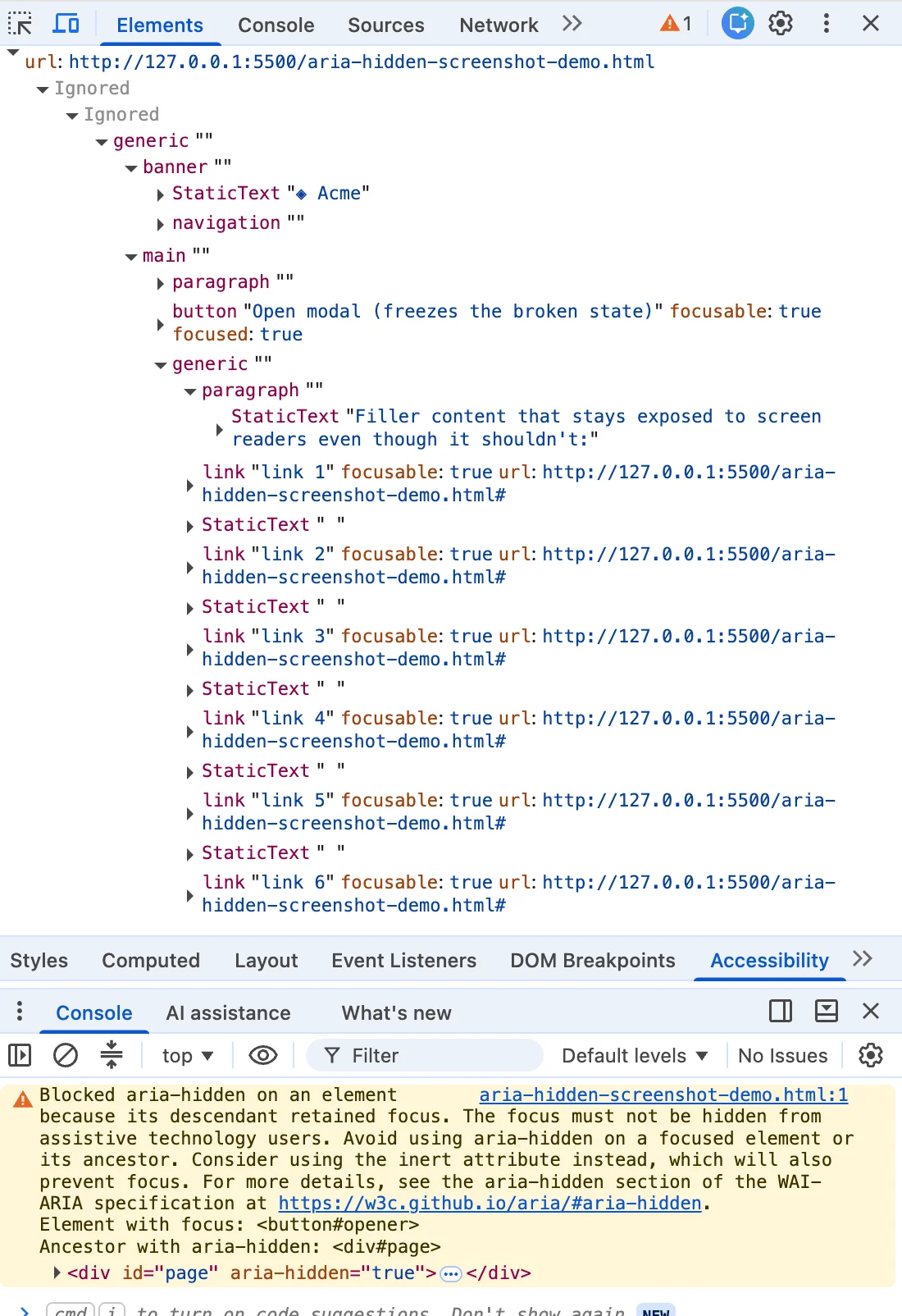
If you are a front-end developer reading this, chances are you arrived here via a very specific route. You closed a dialog box, looked at your browser console, and saw that particular shade of "angry mustard" warning text. You highlighted the message, dropped it into a search engine, and landed in a digital sea shared by developers working across Angular, Bootstrap, Ionic, and phpMyAdmin.
Every popular framework and custom design system hits this snag. Yet, the top-ranking search results consistently bury the most vital truth of all: the browser’s warning is entirely correct. There is a real human being on the other side of that screen—someone using a screen reader whose focus is about to drop into a blind spot in your page architecture.
The quick fixes dominating developer forums all promise relief under different names: the blur() one-liner, the setTimeout wrapper around the close event, or the CSS trick where you rip the aria-hidden attribute off the wrapper. Each of these "solutions" quiets the console while quietly harming the disabled user the browser was trying to protect. If you have already shipped one of these workarounds, you are in massive company. You were failed by your search results, not by your own carelessness. But it is time to understand the architectural debt behind that console warning and fix it properly.
Chronology of an Accessibility Crisis: How We Got Here
To understand why this issue exploded across GitHub repositories globally throughout 2024, 2025, and into 2026, we have to look at the timeline of how browser engines handle the tension between focus states and accessibility trees.
The Silent Repairs of the Past
For years, the Blink rendering engine (powering Chrome, Edge, and other Chromium-based browsers) engaged in quiet, behind-the-scenes repairs. Back in early 2020, Chromium engineering discussions—such as WARIA WG issue #1185—revealed that engineers were already trying to expose focusable aria-hidden nodes so users could at least hear where they were tabbing instead of experiencing complete silence.
Teams often slapped aria-hidden on the <body> element or giant layout wrappers when a modal opened. Through portal and markup mistakes, this sometimes hid the modal itself, completely locking screen-reader users out of the page. You can trace arguments about this failure back to Bootstrap #29769 in 2019.
The Two Waves of Loud Chromium Enforcement
Firefox and Safari rarely surface explicit console warnings for these underlying structural clashes. Chrome, however, decided to make developers feel the pain directly. This arrived in two distinct waves:
- The Open-Time Variant: Emerging around Chrome 127 in the summer of 2024, this wave flooded issue trackers for Material-UI (MUI #43106), Ant Design (#50170), and Flowbite (#943). It scolded developers about an element that "just received focus" while hidden inside an inert or hidden container.
- The Close-Time Variant: Arriving months later with Chrome 131 in late 2024, this wave introduced the "retained focus" warning. Developers spotted it in Bootstrap #41005 and Angular #30187.
By making the failure loud, Chrome forced an uncomfortable reckoning. A silent fix lets broken code ship forever, making browser-papered-over mistakes indistinguishable from correct code. Loudness is uncomfortable, but it is honest.
Supporting Data: The Four Vectors of "Ghost Focus"
Why does this mismatch happen? It stems from a fundamental paradox baked into aria-hidden. The attribute pulls content out of the accessibility tree, but it does not pull that content out of the keyboard focus order. Two different browser subsystems operate independently, and nothing keeps them synchronized.

Consequently, an element can be fully focusable yet completely imperceptible to a screen reader at the same time. The instant the Tab key lands on it, you create what accessibility engineers call ghost focus: the screen reader fires a focus event for a node it was told did not exist, looks it up, finds nothing it is allowed to describe, and lapses into absolute silence.
Through analysis of major open-source repositories, front-end architects have categorized these failures into four distinct operational patterns:
- The Close-Time Race (70% of cases): The user clicks close. The dialog begins its CSS fade-out. During those 200 milliseconds of transition, focus is still parked on the close button, which sits inside the overlay the library just marked hidden. The transition has not finished; the code to move focus hasn’t run yet.
- The Open-Time Inversion: Running backward, the overlay opens. The library marks the background
aria-hidden="true", but the trigger button the user just clicked still holds focus for a single beat before being shifted into the dialog. - Nested Composition Conflicts ("Turf Wars"): You open a
<dialog>and nest a<select>or dropdown inside it. The user picks an option, and the dropdown closes. Two components, each believing they are the "one true modal layer," fight over who gets to hide the rest of the page. Under React 19, this timing shift changes unmount sequences so drastically that focus drops to the<body>, causing the parent dialog to re-hide itself with the user’s focus trapped inside, freezing keyboard navigation entirely. - External Focus Departure: The user keeps an overlay open, then hits Alt+Tab or switches browser tabs. Focus leaves the page entirely, stranding an
aria-hiddenstate with no live focus to reconcile against.
Official Responses and Ecosystem Reactions
The developer ecosystem’s initial reaction to these warnings was uniform: find a way to make the red text go away. This led to a cottage industry of harmful folk remedies.
The Dangers of the blur() One-Liner
The most popular search result solution involves dropping a quick document.activeElement.blur() into modal close handlers. While this instantly clears the console warning, it creates a severe accessibility violation under WCAG 2.4.3 (Focus Order).
When you call blur() without specifying a destination, focus goes nowhere. The browser falls back to the <body> element. For a mouse user, this is invisible. For a screen reader user, the reader goes silent, and their very next Tab press restarts their navigation journey from the very top of a long document, forcing them to manually re-traverse headers, navigation bars, and sidebars. You traded a clean console for a broken user experience.
Timing Hacks and Attribute Stripping
- The
setTimeoutShim: Relying on asynchronous timers (requestAnimationFrameorsetTimeout) is a gamble against the browser’s render cycle. On fast machines, it works; under heavy CPU load, on budget mobile devices, or within concurrent rendering frameworks, it fails intermittently, creating unpredictable bugs that are impossible to reproduce consistently. - Stripping
aria-hidden: Using aMutationObserverto rip the attribute off entirely stops the warnings by making the background fully accessible while a modal is active. This shatters the core modal contract, allowing users to tab out of the active dialog and into background content they shouldn’t be able to interact with.
Implications and the Correct Teardown Contract
If a clean console was never the true goal, what is? The warning is merely a proxy; the human user is the target. Solving this requires aligning your application logic with a strict structural invariant: Focus has to leave a closing region before that region becomes hidden or inert.
The Four-Step Ordering Contract
Whether you are writing vanilla JavaScript or managing complex component lifecycles in React, proper teardown requires a strict, sequential order of operations:
- Un-inert the Background First: If your trigger button lives inside the background wrapper you set to
inertupon opening, you must lift thatinertstate first. Becauseinertblocks focus entirely, trying to focus a trigger inside an inert container is a silent no-op. - Move Focus Synchronously: Shift focus back to the trigger element before any hiding styles or accessibility flags commit to the DOM.
- Inert the Dying Shell: Apply
inert(notaria-hidden) directly to the closing modal wrapper. This ensures that while the element fades out over its 200ms CSS transition, it remains unreachable byTab, invisible to assistive technology, and immune to errant pointer clicks. - Unmount After Animation: Clean up and remove the element from the DOM only after the CSS
transitionendevent fires (ensuring you safely guard against zero-duration reductions for users withprefers-reduced-motionenabled).
The Ultimate Solution: Native Elements
Where possible, modern engineering teams are abandoning custom overlay abstractions entirely in favor of the native HTML <dialog> element and the .showModal() method. By leveraging the browser’s native top-layer rendering, the browser automatically manages the focus dance, makes the background implicitly inert, and makes this entire class of bugs vanish.
Until your architecture allows for a full migration away from legacy component libraries, stop treating console warnings as mere nuisances to be silenced. Listen to what your browser architecture is trying to tell you, respect the user’s keyboard journey, and fix the order of operations.



