By: Digital Infrastructure & Web Performance Desk
In the modern digital economy, the adage "time is money" has evolved from a folksy business proverb into a strict, algorithmic reality. Over the past six months, a quiet revolution has been taking place across independent publishing networks and blogs: a systematic, obsessive drive toward microsecond optimization.
While the search engine optimization (SEO) benefits of a fast-loading website are well-documented, the primary driver for this crusade is user experience (UX). Every fractional-second improvement in load time correlates directly with a drop in bounce rates and a corresponding surge in conversion rates—whether those conversions are measured in e-commerce sales, qualified lead generation, or newsletter subscriptions. For any modern business model, web performance is no longer a backend technicality; it is the front door of commerce.
Yet, web performance optimization has historically been viewed as the exclusive domain of senior backend developers and enterprise server administrators. For the average independent blogger or small business owner managing a WordPress site, diving into server-side architecture can feel like defusing a bomb.
However, a suite of accessible, highly effective strategies exists for non-technical site owners. By executing targeted instructions—ranging from database hygiene to stripping out superfluous code—publishers can dramatically trim load times without writing complex software or hiring expensive technical teams.
Main Facts: The Anatomy of Website Bloat
At its core, website performance is about reducing friction. When a user requests a web page, the browser must download HTML stylesheets, JavaScript files, images, and fonts, while simultaneously querying the site’s database. Every script called, every image uncompressed, and every database query executed adds precious milliseconds to the loading sequence.
While advanced webmasters lean heavily on server-level caching solutions (such as W3 Total Cache) and Content Delivery Networks (CDNs like MaxCDN) to handle heavy lifting, these tools only mask underlying inefficiencies. True optimization requires trimming the fat at the source.
Independent audits of slow-loading sites consistently reveal hidden bottlenecks built into stock WordPress installations:
- Database Bloat: Thousands of orphaned post revisions stacking up silently over years of publishing.
- Redundant Assets: Unused CSS theme styling, legacy scripts for emojis, and unnecessary JavaScript calls for disabled features like native commenting systems.
- Query String Drag: Uncached static resource requests that trigger continuous validation checks.
- Heavy Ad Networks: Third-party advertising scripts making hundreds of independent server requests, quietly choking page performance.
Chronology: The Six-Month Audit Methodology
For publishers looking to replicate these performance gains, a systematic, phased approach is required to identify issues, secure backups, and implement fixes safely.
Phase 1: Assessment and Baseline Testing
The optimization journey begins with diagnosis. While Google’s PageSpeed Insights offers limited, often vague improvement recommendations, it remains the gold standard for auditing how Google evaluates mobile user experience. Running a baseline test establishes a benchmark score (ideally aiming for a 100/100 mobile UX rating). Supplementary tools like GTmetrix can then be deployed to pinpoint specific technical hurdles, such as unoptimized query strings or heavy script execution.
Phase 2: Safeguarding Infrastructure (The Golden Rule)
Before touching a single line of code—particularly when editing critical files like wp-config.php or functions.php—site administrators must create manual backups. If a syntax error breaks the site, restoring normal operations is as simple as uploading the original backup via FTP or a host file manager.
Phase 3: Database Sanitation
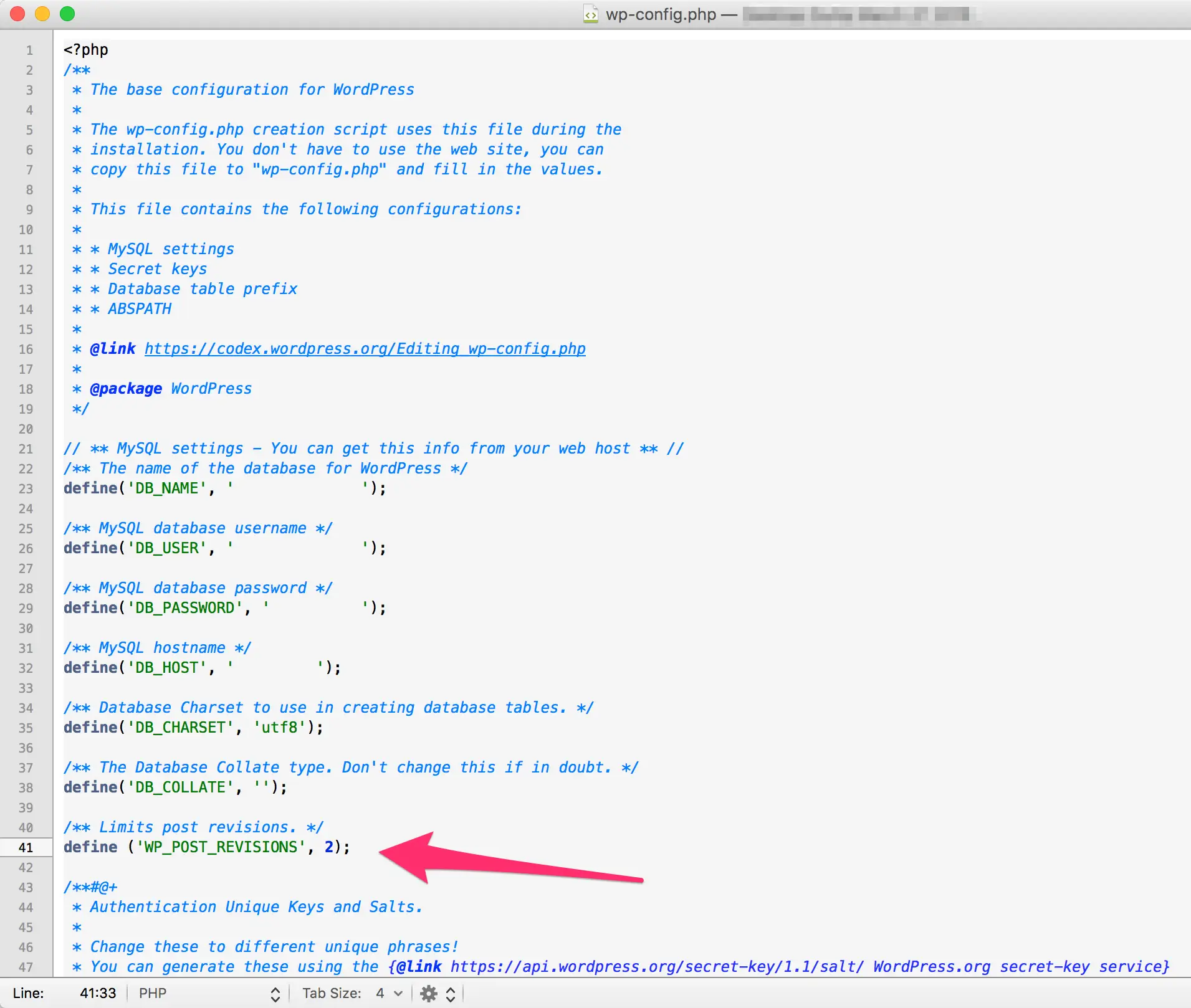
Next, focus shifts inward to the database. WordPress automatically saves historical versions of posts every time an author hits the "save" button. Over years of publishing, these revisions multiply exponentially, bloating database size.
- Install a management utility such as the Better Delete Revision plugin.
- Navigate to Settings > Better Delete Revision in the WordPress dashboard.
- Review and delete stored historical post revisions.
- Execute the database optimization protocol to reclaim fragmented server space.
- Implement a permanent cap or disable revisions entirely within the
wp-config.phpfile using code declarations.
Phase 4: Asset Trimming and Code Stripping
With the database streamlined, the focus moves to front-end assets. This involves systematically removing unused CSS color variations, unregistering native emoji detection scripts, stripping comment-reply.min.js scripts from sites that have disabled comments, and purging unused WordPress embed scripts.
Supporting Data: The Cost of Third-Party Bloat
While code optimization yields steady, incremental improvements, third-party integrations can instantly devastate a site’s performance profile. A striking case study from a recent site audit underscores the catastrophic impact of poorly optimized advertising networks.
An independent publisher approached web consultants struggling with an abysmal site load time exceeding 20 seconds. An initial audit revealed an astonishing statistic: a single page load was making 405 independent HTTP requests.
The primary culprit was identified as a third-party ad network (The Blogger Network), which was injecting a massive cascade of background scripts into the page rendering queue.
- Before Removal: 20+ second load time; 405 requests.
- After Ad Network Removal: 7-second load time; 175 requests.
- The Net Impact: That single advertising network was responsible for 230 requests and added over 13 seconds to the user’s waiting time.
This real-world data illustrates a vital principle: not all plugins and ad networks are created equal. While monetization is essential for digital publishers, the performance cost must be rigorously audited. Site owners are strongly advised to run comparative speed scans with and without their advertising scripts active to quantify the exact UX penalty they are paying for ad revenue.
Official Responses and Expert Insights
The methods for stripping unnecessary code bloat from WordPress have long been championed by veteran developers who advocate for a lightweight approach to content management. However, even among experts, nuances remain regarding execution.
When discussing the removal of unnecessary scripts, prominent WordPress community figure Andrew Norcross noted a common architectural quirk: WordPress core logic typically refrains from calling comments or embed scripts unless those features are actively enabled on a specific page. However, real-world audits frequently uncover these scripts running globally across sites with comments entirely disabled.
According to Norcross, this discrepancy is almost universally a theme-level issue rather than a core WordPress failure—themes often hardcode script calls into their header or footer templates regardless of database settings.
While troubleshooting rogue theme code is ideal, Norcross and performance advocates agree that explicitly deregistering unused scripts via functions like wp_deregister_script() is entirely harmless. For non-technical publishers caught between messy theme code and slow load times, stripping these calls programmatically provides an immediate, foolproof safety net.
Similarly, industry consensus on plugin usage leans heavily toward minimalism. Plugins themselves are not inherently harmful, but their performance impact depends entirely on the quality of their code and whether they inject front-end assets into every page view. The golden rule for independent site managers remains: If a task can be accomplished cleanly via a few lines of code in your theme’s functions.php file, avoid adding another plugin to your stack. When plugins are mandatory, utilizing profiling utilities like the P3 (Plugin Performance Profiler) helps identify and isolate resource-hogging culprits.
Implications for Independent Publishers
The implications of these optimization strategies extend far beyond technical vanity metrics. For independent bloggers, niche media sites, and small businesses, speed is an equalizer.
In an ecosystem dominated by massive media conglomerates with dedicated engineering teams and lightning-fast enterprise servers, individual publishers must compete on content quality and user experience. When a website loads in under two seconds, visitors stay longer, consume more pages, trust the brand more deeply, and convert at significantly higher rates. Conversely, a sluggish site acts as a digital bouncer, turning away prospective customers before they even see the headline.
By taking control of their site infrastructure—cleaning databases, losslessly compressing images, stripping query strings, and auditing heavy third-party ad networks—non-technical site owners can reclaim agency over their digital properties. You do not need a computer science degree to make milliseconds matter; you simply need a methodical approach, a reliable backup strategy, and the willingness to trim the digital fat.