










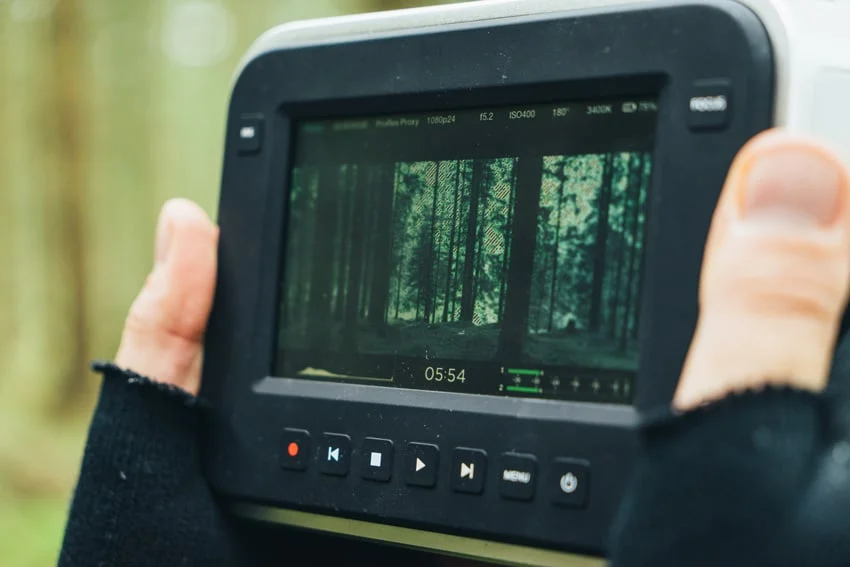
The Blackmagic Pocket Cinema Camera (BMPCC) series—with a particular emphasis on the industry-favorite BMPCC 4K—has fundamentally disrupted the independent filmmaking landscape. By offering cinema-grade RAW recording, incredible dynamic range, and an interchangeable lens mount at a fraction of the cost of traditional digital cinema cameras, Blackmagic Design democratized high-end production. Aspiring filmmakers, documentary crews, and commercial indie directors can now achieve Hollywood-level results on remarkably tight budgets.
However, unboxing a Blackmagic Pocket Cinema Camera is only the first step of the journey. Unlike traditional hybrid mirrorless cameras from brands like Sony, Canon, or Panasonic, which are often packed with consumer-friendly features right out of the box (such as continuous autofocus, massive internal battery life, and internal media card slots included for casual shooting), the BMPCC lineup is engineered strictly as a modular cinema tool. This means the camera body itself ships with very little included equipment, requiring creators to build out a custom ecosystem of accessories before they can successfully shoot their first project.

To bridge this gap, we have compiled the definitive master guide. Drawing from a comprehensive series of specialized tutorials and technical deep-dives, this article serves as your central hub. Whether you are unboxing your very first cinema camera today or fine-tuning a professional multi-rig setup for a feature film, this guide covers everything you need to know about storage, power, physical protection, audio management, and post-production workflows.
Main Facts: Understanding the BMPCC Ecosystem
At its core, the Blackmagic Pocket Cinema Camera series is designed to output breathtaking images, but mastering it requires navigating a few distinct hardware and software realities:

- Modular Design Philosophy: The camera is not an all-in-one consumer device. To make it functional on set, users must invest in external rigging, off-board power solutions, and dedicated monitoring tools.
- Data-Intensive Codecs: Shooting in Blackmagic RAW (BRAW) or high-bitrate ProRes yields incredible post-production flexibility, but it places extreme demands on both memory card capacity and computer processing power.
- Audio Architecture: While the camera features functional built-in microphones, achieving broadcast-quality sound requires external microphones, careful gain staging, and a thorough understanding of phantom power.
- Software Integration: Every BMPCC purchase includes a full license for DaVinci Resolve Studio, binding the camera hardware tightly to Blackmagic’s industry-leading editing, color grading, and audio post-production suite.
Chronology: The Evolution of Independent Cinema on a Budget
To understand the current impact of the BMPCC series, it helps to trace the timeline of how independent digital cinematography has matured over the past decade:
- Phase One: The DSLR Revolution (Early 2010s): Filmmakers first discovered that large-sensor photography cameras could shoot HD video with shallow depth of field. However, these systems suffered from severe rolling shutter, highly compressed codecs, and poor audio preamps.
- Phase Two: The Advent of Pocket Cinema (Mid 2010s): Blackmagic introduced the original Pocket Cinema Camera, introducing Super 16mm sensors and Apple ProRes recording to a handheld form factor. It proved that filmmakers craved raw data and dynamic range over consumer conveniences like autofocus.
- Phase Three: The 4K/6K Era (Late 2010s to Present): The release of the BMPCC 4K and 6K models revolutionized the market. Utilizing Micro Four Thirds and Super 35 sensors respectively, these cameras introduced dual native ISO, larger touchscreen interfaces, and direct recording to external USB-C solid-state drives (SSDs).
- Phase Four: The Modular Rigging Standard: Today, shooting with a Pocket Cinema Camera is synonymous with custom cages, V-mount battery plates, external monitors, and follow-focus units. The camera has effectively spawned a massive secondary market for indie filmmaking accessories.
Supporting Data: Essential Gear Checklist for Your BMPCC Setup
Because the BMPCC ships with minimal out-of-the-box accessories, planning your initial purchases is critical. Failing to account for storage, power, and protection can leave your brand-new camera sitting useless on a shelf.

1. Storage and Memory Management
The BMPCC does not feature a built-in internal hard drive. Furthermore, because it records massive, uncompressed or lightly compressed video files, choosing the right media is non-negotiable.
- CFast 2.0 and SD UHS-II Cards: For high-frame-rate 4K or RAW recording, you must purchase high-speed memory cards capable of sustained write speeds to avoid dropped frames.
- External USB-C SSDs: Many filmmakers bypass expensive memory cards entirely by mounting a bracket to hold a Samsung T5 or T7 solid-state drive, plugging it directly into the camera’s USB-C port. This offers terabytes of affordable, high-speed storage ideal for long-form narrative or documentary shoots.
2. Power Solutions
Factory LP-E6 style batteries for the BMPCC are notorious for their short lifespan—often lasting only 20 to 30 minutes under heavy 4K recording conditions. To maintain a functional set life, consider:

- External Power Distribution: Upgrading to larger Sony NP-F style battery plates, dummy batteries, or professional V-Mount/Gold-Mount batteries mounted to your camera cage.
- Workflow Flexibility: Designing a power system that adapts to your shooting style—for instance, powering the camera via a motorized gimbal when running stabilizer shots, and switching to a high-capacity V-mount battery when transitioning to a shoulder rig.
3. Physical Protection and Rigging
The body of the BMPCC, while ergonomically pleasing for handheld work, can be susceptible to damage if knocked or dropped. Moreover, ports such as the HDMI and USB-C slots can loosen or break if cables are sharply tugged.
- Camera Cages: Investing in a form-fitting aluminum cage is practically mandatory. Not only does it absorb the impact of accidental bumps, but it also provides dozens of 1/4"-20 and 3/8"-16 threaded mounting points.
- Cable Clamps and Port Savers: Use dedicated HDMI/USB-C clamp accessories to lock your cables in place, preventing catastrophic damage to the camera’s internal motherboard. Additionally, consider low-profile adapters that stay permanently plugged into your inputs to minimize wear and tear.
4. Professional Audio Gear
The built-in microphones on the BMPCC are acceptable for scratch audio or temporary reference tracks, but they pick up internal camera fan noise and ambient wind.

- External Microphones: Invest in a quality shotgun microphone or wireless lavalier system. Remember the golden rule of audio gear: buying cheap gear usually means buying twice.
- Wind Protection: Always utilize a furry windscreen ("dead cat") when shooting outdoors.
- Input Management: The BMPCC 4K features both a standard 3.5mm stereo audio jack and a professional Mini-XLR input with phantom power capabilities.
Technical Deep-Dive: Setup, Settings, and Cinema Tools
Once your physical rig is assembled, mastering the internal software and operational workflow is the next hurdle.
Navigating Camera Settings and Codecs
New operators must familiarize themselves with the balance between resolution, frame rates, and compression ratios. Choosing between Blackmagic RAW (BRAW) and Apple ProRes requires understanding your storage limits and post-production turnaround times. Additionally, mastering built-in monitoring tools—such as Focus Assist, false color for exposure evaluation, and zebra stripes—will drastically reduce the number of ruined takes.

Audio Engineering on Set
Capturing professional audio is a distinct discipline from operating a camera. You must understand how your microphones draw power: some require no power, some use internal batteries, and others require phantom power sent directly from the camera inputs.
- Crucial Warning: Accidentally sending phantom power to a microphone or device that does not support it can permanently fry your electronic components. Always verify your audio routing and power settings before hitting record.
Expanding Your Toolkit with Cinema Accessories
As your production needs grow, you will naturally integrate specialized cinema tools:

- External Field Monitors: Essential if you find the built-in LCD screen difficult to view under harsh sunlight or when shooting on complex shoulder rigs.
- Matte Boxes and ND Filters: Crucial for controlling exposure in bright daylight while allowing you to keep your lens aperture wide open for shallow depth of field.
- Follow Focus Systems: Mechanical or wireless follow-focus motors allow for smooth, precise focus pulls, eliminating jittery manual adjustments on the lens barrel.
- Look-Up Tables (LUTs): Because BRAW footage is shot in a flat, desaturated log profile designed to maximize dynamic range, applying accurate technical or creative LUTs—both on-set for monitoring and in post-production for grading—saves immense time and standardizes your color pipeline.
Implications: The Workflow Pipeline from Production to Post
The journey of a Blackmagic video file does not end when the director yells "cut." Because the camera ecosystem is intrinsically linked to DaVinci Resolve, the transition from production to post-production is streamlined unlike any other camera ecosystem on the market.
The DaVinci Resolve Advantage
Every BMPCC ships with a full activation key for DaVinci Resolve Studio. This eliminates the need for expensive third-party editing subscriptions. Editors working with BRAW benefit from direct access to sensor-level metadata:

- Adjust ISO, white tint, and exposure directly inside the editing timeline without degrading image quality.
- Utilize professional color-grading nodes, advanced audio fairlight tools, and seamless visual effects integration.
- Leverage community-driven video templates, lower thirds, and transition packs specifically designed for Resolve to accelerate project delivery times.
Conclusion: Is the BMPCC Right for You?
The Blackmagic Pocket Cinema Camera series is not a plug-and-play casual device. It demands patience, technical understanding, and financial investment in supporting infrastructure like storage, power, cages, and audio gear. However, for the aspiring filmmaker, indie director, or commercial cinematographer willing to put in the effort to build out a proper rig, the BMPCC offers an uncompromised cinematic image quality that punches far above its weight class. By taking the time to master your storage, protect your hardware, refine your audio workflow, and embrace the power of DaVinci Resolve, you transform a modest budget camera into a Hollywood-ready production powerhouse.



