







Despite being a widely supported feature across all modern browsers—boasting an impressive 94% compatibility rate—CSS Container Queries remain one of the most underutilized and misunderstood tools in the modern web developer’s arsenal. While the industry has long clamored for a way to make components respond to their immediate surroundings rather than the rigid boundaries of the browser window, the transition from legacy media queries to context-aware container queries has been surprisingly sluggish.
According to the 2025 State of CSS survey, while 86% of developers are aware of the existence of container queries, only 41.4% have integrated them into their production workflows. This discrepancy suggests a significant gap between theoretical knowledge and practical application. As web architecture shifts toward modular, reusable design systems, understanding the fundamental distinction between "macro" and "micro" layout logic is no longer optional—it is a requirement for building resilient, future-proof interfaces.
A Chronology of Responsive Frustration
For over a decade, responsive web design was synonymous with media queries. Introduced as the cornerstone of the responsive movement, they allowed developers to rearrange page layouts based on the width of the viewport. However, as the complexity of modern web applications grew, so did the limitations of this "viewport-centric" approach.
For years, the developer community voiced a consistent request: the ability to style a component based on its own parent container’s size, not the global screen width. This wish appeared on nearly every CSS feature wishlist throughout the late 2010s. When container queries finally began shipping in browsers, they were hailed as the "holy grail" of CSS. Yet, the adoption rate has been lukewarm at best.
At SmashingConf Amsterdam 2026, industry expert Kevin Powell highlighted the stagnation in adoption, noting that while the technical barrier to entry has evaporated, the mental model required to shift away from viewport-dependency remains a hurdle. The problem, as it turns out, is not a lack of interest, but a misunderstanding of intent. Many developers, upon encountering the syntax for the first time, dismissed container queries as merely a different way to write media queries. In reality, they represent a seismic shift in how we conceive of UI components.
The Flaw in the Viewport Proxy
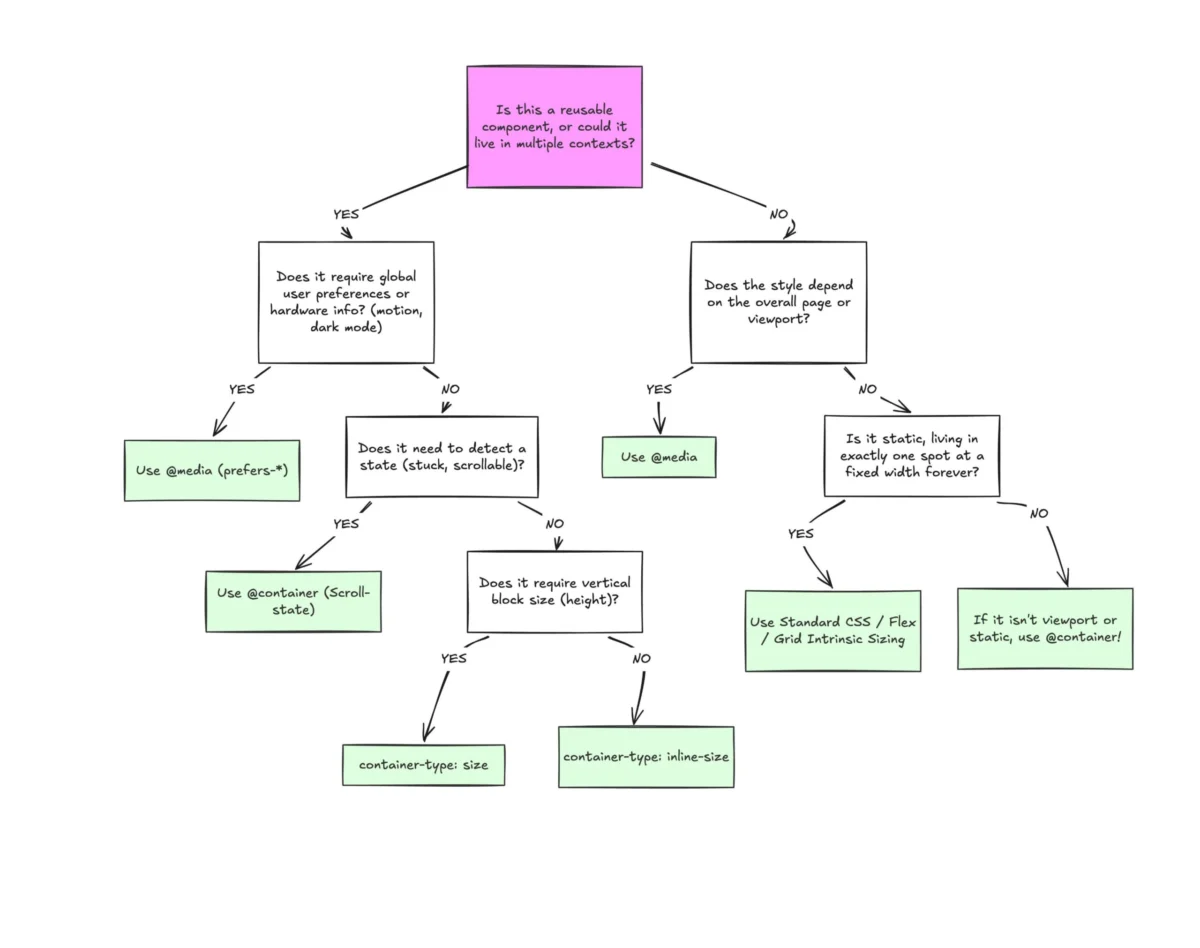
To understand why container queries are superior for component-based design, one must first recognize that the viewport is merely a proxy. When a developer writes @media (min-width: 1024px), they are asking the browser a singular question: "How wide is the entire screen right now?"
This works perfectly for high-level layouts, such as deciding when to switch from a single-column mobile view to a multi-column desktop dashboard. However, it fails spectacularly when applied to reusable components. Consider a "Card" component. If that card is placed in a main content area, it may look perfect. But if that same component is moved into a narrow sidebar on a high-resolution desktop, the media query—still seeing a 1920px screen—will continue to apply "desktop" styles. The card will either overflow, deform, or cramp up, completely unaware that it has been relegated to a space that can barely hold it.
As Kevin Powell famously noted, "Media queries are dumb. Not dumb in terms of the concept, but dumb in that they don’t know very much." They lack the situational awareness necessary for modern, modular development.
Macro vs. Micro: Defining the Two Layout Tiers
The distinction between these two CSS paradigms can be classified into "Macro" and "Micro" layout logic:
- Macro Layouts: These concern the page-level structure. Headers, footers, main grid layouts, and browser-level preferences (like
prefers-color-scheme) are all rightfully governed by media queries. They define the global environment. - Micro Layouts: These concern the component level. Widgets, cards, navigation menus, and form inputs fall into this category. These elements should be self-sufficient, capable of adapting their internal layout based on the specific space allocated to them by their parent container.
By separating these concerns, developers can ensure that a component remains functional regardless of where it is dropped in the DOM tree. An element shouldn’t "magically" become tablet-sized just because the browser window hits 768px; it should change its layout because it finally has enough (or too little) space to justify a transition.

Supporting Data: The Fragmentation of the Web
The necessity of container queries is underscored by the sheer chaos of modern device diversity. Recent research indicates there are over 2,300 unique viewport sizes currently in use on the modern web. The idea that a developer can create a handful of static breakpoints and expect every component to "just work" is a fallacy of the past.
When we rely on container queries, we move away from guessing what the user’s device might be and toward responding to the reality of the layout. This transition allows for fluid typography and adaptive components that scale gracefully in any context, from a sidebar in a web app to a modal window or a full-page hero section.
Technical Implementation and Caveats
Implementing container queries is straightforward, but it requires a shift in how we structure our HTML. To define a container, one uses the container-type property:
.card-wrapper
  container-name: card;
  container-type: inline-size;


@container card (min-width: 450px)
  .card
    display: flex;
    flex-direction: row;
However, there are critical nuances to keep in mind:
- The Self-Querying Trap: A container cannot query itself. You must wrap the element you wish to style inside a parent container. If you attempt to style the parent container based on its own size, you will trigger an infinite layout loop, which the browser will rightfully block.
- Size Collapsing: When using
container-type: size(which accounts for both width and height), the container may collapse to a height of 0px if its children are absolutely positioned or if no explicit height is provided. Developers are generally advised to stick toinline-sizeunless block-axis querying is strictly necessary. - Custom Property Limitations: You cannot currently use CSS custom properties (variables) inside a container query condition (e.g.,
min-width: var(--breakpoint-lg)). Because variables cascade and can be changed within the same query, this would lead to circular dependencies that the CSS engine cannot resolve.
Real-World Implications: Beyond Basic Layouts
The true power of container queries extends into the realm of state detection. For instance, flexbox wrapping has long been a "black box" in CSS. We have no native way to detect when items have wrapped to a new line, often forcing developers to rely on JavaScript-based ResizeObserver APIs.

By nesting a container query inside a flex item, developers can create a "workaround" that is essentially a native way to detect when a component has shifted from a horizontal row to a stacked layout. By defining the flex item as a container, the child elements can apply specific styles the moment the container’s width allows for a transition. This removes the need for expensive, janky JavaScript listeners and keeps the layout logic exactly where it belongs: in the CSS.
Conclusion: A Shift in Mental Models
The reluctance to adopt container queries is largely a symptom of deep-seated habits. For over a decade, we have been conditioned to look outward at the browser window to dictate our design logic. Reversing this gaze—looking inward to the component’s container—requires a fundamental change in how we architect our stylesheets.
While media queries remain essential for macro-level responsiveness, they should no longer be the default for component design. By embracing container queries, we create a more robust, modular, and maintainable web. The tools are ready, the browser support is universal, and the path to a more intelligent, context-aware web is open. It is time for the development community to stop treating components as pawns of the viewport and start treating them as the independent, intelligent units they were meant to be.