








While privacy remains the primary catalyst driving users toward DuckDuckGo, viewing the alternative search engine solely as a shield against digital tracking overlooks a robust suite of practical, everyday features. For millions of netizens weary of algorithmic echo chambers and hyper-targeted advertising, DuckDuckGo has evolved far beyond a basic privacy-first Google alternative.
By taking just five minutes to adjust a handful of settings and master hidden power-user shortcuts, users can radically streamline their browsing experience. Whether you want to block low-quality content farms, leverage free artificial intelligence tools without handing over personal data, or manage your digital footprint using email aliases, DuckDuckGo offers a surprisingly versatile ecosystem.
Below is a comprehensive guide to optimizing your DuckDuckGo setup for maximum efficiency, speed, and cleanliness.
Main Facts: What Makes DuckDuckGo More Than Just a Privacy Tool?
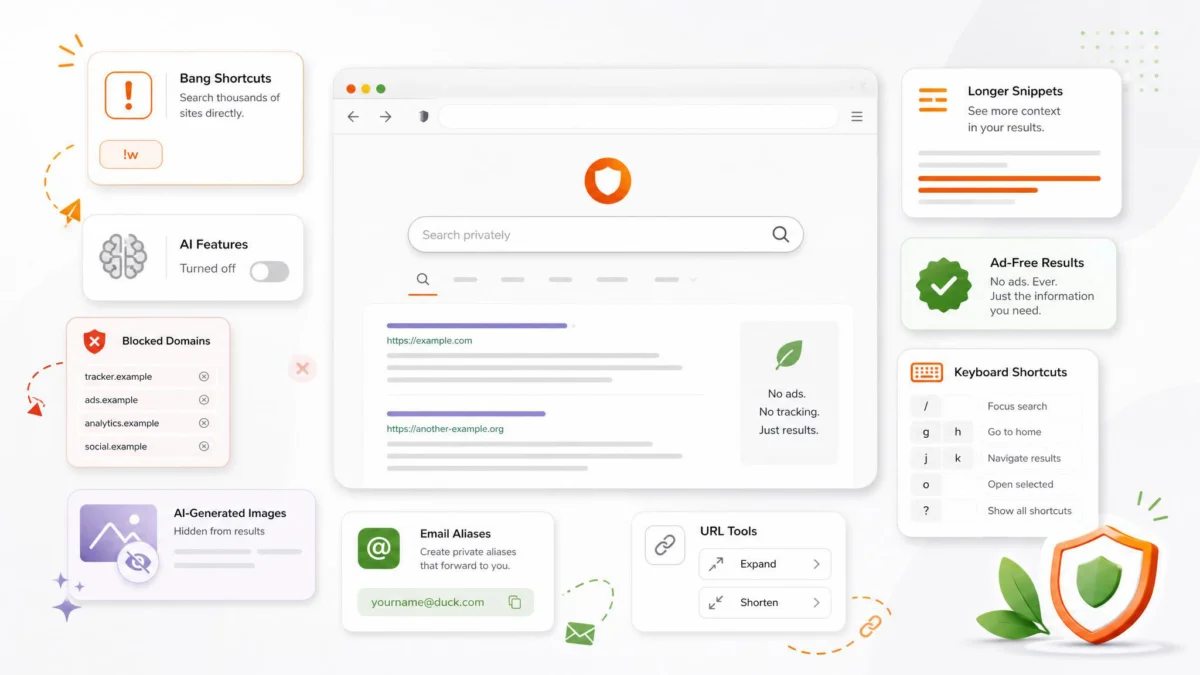
DuckDuckGo launched over a decade ago with a simple promise: we do not track you. In an era dominated by hyper-personalized data harvesting, that premise alone was enough to capture a dedicated market share. However, the modern iteration of DuckDuckGo is a feature-rich platform designed to compete with industry giants on usability, not just ethics.
Key capabilities that set the platform apart include:
- Bangs: Instant shortcuts that redirect queries to thousands of specific third-party websites.
- Integrated AI Access: Privacy-focused chatbot interaction via Duck.ai without mandatory account creation.
- Domain Blacklisting: The ability to permanently banish low-quality content farms and scraped article sites from your search results.
- Email Protection: Free @duck.com aliases that strip digital trackers and shield your primary inbox from spam.
- URL Management: Built-in tools to shorten and expand links directly from the search bar.
Chronology: The Evolution of DuckDuckGo From Niche Search to Power-User Hub
To understand how DuckDuckGo reached its current state, it helps to look at how the platform has systematically expanded its utility over the years.
- Phase 1: The Pure Privacy Era (2008–2015)
- DuckDuckGo emerged as a strictly privacy-oriented search engine, promising zero search history logging and protection against "filter bubbles." During this time, adoption was driven almost exclusively by privacy advocates, security researchers, and tech enthusiasts.
- Phase 2: Introduction of Power Features and Bangs (2015–2020)
- Recognizing that privacy alone could not convince mainstream users to abandon deeply ingrained search habits, the platform introduced advanced navigation tools. "Bangs" became a cult-favorite feature among developers and heavy web users, proving that an alternative search engine could actually be faster than Google.
- Phase 3: Expanding the Ecosystem (2020–Present)
- DuckDuckGo expanded vertically by launching mobile privacy browsers, Email Protection aliases, and app tracking protection. Most recently, the platform integrated AI capabilities and interface-customization toggles, allowing users to either embrace modern AI tools or strip them away entirely for a minimalist experience.
Supporting Data: Why Customization Matters
Navigating the modern web is increasingly difficult. Search engines are routinely cluttered with sponsored advertisements, algorithmic fluff, and low-effort, AI-generated content farms designed purely to manipulate search engine optimization (SEO) rankings.
Data and user surveys consistently highlight consumer fatigue regarding search clutter:
- The AI Sludge Problem: Independent web studies estimate that algorithmic and synthetic content now accounts for a significant percentage of top-tier search results across major platforms, often burying authentic human perspectives, forums, and primary documentation.
- The Cost of Convenience: While mainstream search engines rely on seamless cross-platform tracking to tie user behavior to revenue, privacy-first models demonstrate that users will actively migrate toward clean interfaces if given the tools to curate their own digital environments.
- Efficiency Gains: Power-user features like search bangs eliminate unnecessary navigation steps. Studies on micro-interactions show that saving even two or three clicks per search accumulates into hours of preserved productivity over the course of a year.
Official Responses and Platform Philosophy
DuckDuckGo’s executive leadership has consistently maintained that user autonomy should extend beyond data privacy to encompass interface control. Unlike competitors who force algorithmic updates and mandatory AI sidebars onto their user base, DuckDuckGo has purposely designed its newer features to be modular.
In official documentation and public statements regarding features like AI integration and ad toggling, company representatives emphasize a "choose your own adventure" philosophy. If a user wants to engage with cutting-edge AI models, they can do so via Duck.ai without sacrificing their personal identity. Conversely, if a user prefers a purely textual, retro search experience free of distractions, the platform provides explicit toggles to turn off ads, homepage prompts, and AI elements entirely.
10 Essential Tweaks and Features for Your DuckDuckGo Setup
If DuckDuckGo is already your default search engine—or if you are considering making the switch—here are the ten most impactful settings and shortcuts you should configure immediately.
1. Turn Off AI Features If You Do Not Want Them
DuckDuckGo has incorporated artificial intelligence elements, such as Search Assist and Duck.ai prompts, into its standard ecosystem. While useful for some, many users prefer a clean, traditional search page.
- How to set it up: Navigate to DuckDuckGo’s settings page, open AI Features, and disable Search Assist and Duck.ai.
- The benefit: This instantly strips away AI answers and chatbot prompts, leaving you with a lighter, faster, and less cluttered search experience.
2. Use Duck.ai Without Creating Another Account
If you do want to experiment with artificial intelligence tools without managing yet another login or feeding your personal data to tech monopolies, DuckDuckGo offers a compelling alternative.
- How to use it: Visit Duck.ai to chat with supported AI models directly. You can use the model picker beneath the chat box to select your preferred service before inputting a prompt.
- The benefit: While the free tier includes usage limits, it is ideal for quick inquiries, image generation, and basic photo-editing tasks—such as background removal—without tying the session to your real-world identity.
3. Master "Bangs" to Search Other Sites Instantly
Bangs are arguably DuckDuckGo’s most powerful productivity feature, allowing you to bypass the homepage of any major website entirely.
- How to use them: Append a short code like
!g(Google),!w(Wikipedia),!r(Reddit), or!yt(YouTube) to your search query. For example, typing!w Albert Einsteinsends you directly to Wikipedia’s article on Einstein. - The benefit: You can maintain DuckDuckGo as your default privacy-first browser while still enjoying instant access to thousands of specialized platforms. Browse the full directory at duck.com/bangs.
4. Hide AI-Generated Images From Image Search
The proliferation of synthetic imagery has made standard image searches increasingly noisy. Whether you are hunting for authentic product photographs, UI design references, or educational diagrams, AI-generated filler can obscure your results.
- How to set it up: Go to Settings > AI Features and enable Hide AI-Generated Images.
- The benefit: While no filter is absolute, this toggle dramatically reduces the volume of synthetic, uncanny-valley results cluttering your visual search tab.
5. Block Low-Quality Content Farms Permanently
We have all clicked on a search result only to find a recycled, poorly written content farm or scraped article site that offers zero value. DuckDuckGo allows you to banish these domains from your life forever.
- How to use it: When an unwanted site appears in your search results, click the three-dot menu icon beside the link and select Block this site from all results.
- The benefit: That domain will vanish from all future searches. You can review, manage, or unblock your blacklist at any time under Settings > General.
6. Turn Off Ads and Homepage Prompts for a Minimalist Look
While DuckDuckGo’s advertising model relies on anonymous keyword targeting rather than behavioral tracking, you can remove sponsored content altogether if you desire an entirely pristine interface.
- How to set it up: Navigate to Settings > General and toggle off Advertisements. While there, disable unwanted homepage widgets, and visit Settings > Appearance to turn off the "Protected Reminder" banner if you already know your searches are secure.
- The benefit: A completely distraction-free interface that focuses exclusively on the information you asked for.
7. Expand Snippet Lengths for Better Decision-Making
By default, search engine descriptions are kept relatively brief, often forcing users to click blindly into links to see if they are relevant.
- How to set it up: Go to Settings > Appearance > Max Snippet Length and increase the setting to 5 lines.
- The benefit: You gain significantly more context beneath each result, saving valuable time during technical troubleshooting, academic research, or complex product comparisons.
8. Shorten and Expand URLs Directly From the Search Bar
Managing URLs securely is a vital component of digital hygiene. DuckDuckGo allows you to handle link shortening and expansion without visiting third-party tools.
- How to use it: Type
shortenfollowed by any URL to generate a compact is.gd link. Conversely, typeexpandfollowed by a suspicious shortened link to reveal its true destination before clicking. - The benefit: You can instantly unmask deceptive hyperlinks and protect yourself against phishing attempts right from your search bar.
9. Utilize Email Protection for Burner Aliases
Just as you use unique passwords for every online account, you should be using unique email addresses.
- How to set it up: Register for DuckDuckGo Email Protection to secure a personalized
@duck.comhandle and generate unlimited private aliases for online signups. - The benefit: Emails are forwarded to your real inbox after having digital trackers stripped away. If a specific website begins spamming you or experiences a data leak, you can instantly deactivate that single alias without ever exposing your primary email address.
10. Pull Up Instant App Cheatsheets
Why dig through massive PDF manuals when you need a quick keyboard shortcut?
- How to use it: Search for an application name combined with the word
cheatsheet—for example,cheatsheet Excelorcheatsheet Photoshop. - The benefit: DuckDuckGo displays common keyboard shortcuts directly at the top of your search results, saving you precious minutes during creative or technical work sessions.
Implications: The Future of Consumer-Controlled Browsing
The enduring popularity of tools like DuckDuckGo—and the enthusiastic adoption of customizable settings—points to a broader cultural shift in how consumers interact with technology. For years, major tech conglomerates dictated the user experience, imposing algorithmic feeds, mandatory AI integrations, and inescapable tracking under the banner of "convenience."
DuckDuckGo’s framework proves that convenience and user control are not mutually exclusive. By empowering everyday web users to curate their own digital environments—blocking junk domains, shielding their inboxes with email aliases, and stripping away corporate clutter—platforms like DuckDuckGo are setting a new standard for what a search engine should be.
Ultimately, optimizing your search setup takes only a few minutes, but the compounding returns in daily productivity, mental clarity, and digital privacy make it an essential upgrade for any modern internet user.