





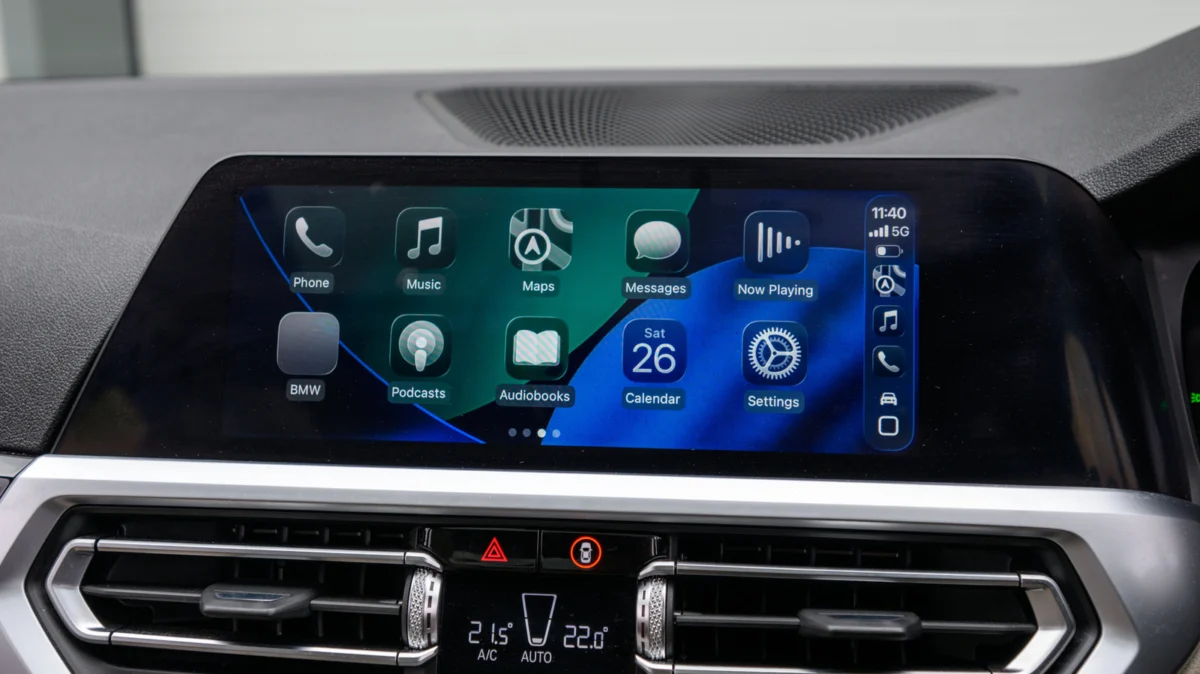
For millions of drivers, Apple CarPlay has become an indispensable companion on the road. Whether navigating through complex urban sprawl, managing Spotify playlists, or dictating text messages via Siri, the interface has transformed the standard vehicle infotainment system into a seamless extension of the iPhone. However, a lingering frustration persists: the requirement of a physical USB connection. While many modern luxury vehicles now offer wireless CarPlay as a factory-standard feature, a vast majority of the cars currently on the road remain tethered to the "wired-only" era.
Fortunately, the aftermarket has responded with a simple, cost-effective solution: the wireless CarPlay adapter. These palm-sized devices promise to liberate users from the cable, but the marketplace is flooded with options that range from highly efficient to profoundly frustrating. Understanding the nuances of these adapters is essential before making a purchase.
The Core Facts: How Wireless Adapters Work
At their simplest level, wireless CarPlay adapters function as a sophisticated bridge. When you plug a dongle into the USB port typically reserved for your phone, the adapter essentially "tricks" the vehicle’s infotainment system into believing that an iPhone is physically connected.
Inside the adapter is a small computer that runs a localized, stripped-down operating system. It initiates a Bluetooth handshake with your iPhone to establish an initial connection, and then seamlessly hands off the high-bandwidth data stream to a 5GHz Wi-Fi network. This Wi-Fi connection is the secret sauce; it is robust enough to handle the real-time transmission of maps, audio, and visual data without the latency that would make the interface unusable.
However, it is crucial to understand that these adapters are not magic. They do not add CarPlay to a vehicle that does not already support it. If your car’s head unit does not have native, wired CarPlay functionality, an adapter will be entirely useless. For those vehicles, the only solution is to replace the head unit entirely or invest in a standalone, portable CarPlay-enabled touchscreen display.
A Brief Chronology of In-Car Connectivity
The evolution of in-car connectivity has moved at a staggering pace over the last decade. To understand why these adapters are so popular, one must look at the timeline of mobile integration in the automotive sector:
- 2014–2015: Apple officially launches CarPlay. Initially, the implementation was exclusively wired, requiring users to connect via a Lightning cable. This provided a reliable, high-speed connection but meant users had to physically plug in every time they entered the vehicle.
- 2016–2018: As Bluetooth and Wi-Fi chipsets became more efficient, manufacturers began experimenting with wireless connectivity. The 2017 BMW 5 Series was one of the first vehicles to offer wireless CarPlay.
- 2019–2021: Wireless CarPlay began trickling down from premium luxury brands to mass-market vehicles. However, millions of cars sold during this period—and earlier—remained locked into the wired standard.
- 2022–Present: The aftermarket industry reached maturity. Companies like Ottocast, Carlinkit, and others standardized the "plug-and-play" dongle. Today, the focus has shifted from mere connectivity to reducing latency, improving firmware update accessibility, and supporting multi-device pairing.
Supporting Data: Why Hardware Specs Matter
The performance of a wireless adapter is almost entirely dependent on its internal hardware. While two devices might look identical on a retail website, their underlying components can dictate the difference between a smooth experience and a constant headache.

The Wi-Fi Standard
The most critical specification is the Wi-Fi frequency. Older or budget-tier adapters often rely on 2.4GHz Wi-Fi. While this frequency has excellent range, it is notoriously prone to interference from other signals in the car, such as Bluetooth and other cellular signals. A high-quality adapter must support 5GHz Wi-Fi (802.11ac or higher). This provides the necessary bandwidth for a fluid interface and reduces the likelihood of "stuttering" or dropped connections.
Bluetooth Protocol
Bluetooth 5.0 is the modern gold standard. It offers faster pairing times and lower power consumption. If an adapter is still using Bluetooth 4.0 or lower, you will likely notice a significant delay between the moment you start your car and the moment the CarPlay interface appears on your screen.
Firmware Support
Perhaps the most overlooked factor is the manufacturer’s commitment to software updates. Because Apple frequently updates iOS, a "static" adapter—one that cannot be updated—will eventually become obsolete as the iPhone’s software requirements outpace the dongle’s capabilities. Look for brands that provide a clear method for firmware updates, usually via a dedicated mobile app or a browser-based IP address.
Navigating Compatibility: What You Must Check
Before clicking "buy," you must conduct a brief audit of your vehicle and your current setup.
1. Port Compatibility
Modern vehicle interiors are in a transition phase. Many cars manufactured between 2018 and 2022 feature USB-A ports, while the newest models have shifted to USB-C. Buying an adapter with the wrong connector will force you to use a secondary dongle, which adds bulk and can degrade signal quality. Ensure the adapter’s port matches your car’s console exactly.
2. Vehicle-Specific Incompatibilities
Even if your car supports wired CarPlay, some specific infotainment systems—notably those in certain older Mazda, Honda, and some aftermarket Pioneer units—have reported issues with specific adapter chipsets. It is highly recommended to search online forums (such as Reddit’s r/CarPlay or dedicated car-model enthusiast sites) for your specific car model paired with the adapter you are considering.
3. Feature Parity
Do you rely on your steering wheel’s "next track" button? Do you frequently use "Hey Siri" for hands-free tasks? Not all adapters handle these inputs with equal grace. Cheap knock-offs often struggle to pass the steering wheel input signals back to the iPhone. High-end units, conversely, function as a seamless pass-through, maintaining 100% of the factory system’s functionality.
Implications of Going Wireless
Choosing to go wireless is not just about convenience; it is about changing your interaction with your vehicle.
The Proactive Benefit:
The primary advantage is the reduction of wear and tear. Constant plugging and unplugging of a Lightning or USB-C cable leads to port degradation, both in the car’s console and on the phone itself. Furthermore, it eliminates the "forgetting the phone in the car" syndrome. With wireless CarPlay, your phone can remain in your pocket, purse, or on a wireless charging pad, maintaining its battery without the physical tether.
The Trade-offs:
It is important to acknowledge that wireless CarPlay consumes significantly more battery power than a wired connection. When the phone is plugged in, the car charges it simultaneously. When using wireless CarPlay, the phone is handling the heavy lifting of data transmission and processing, which can drain your battery noticeably on long road trips. If your car does not have a wireless charging pad, you may find yourself having to plug the phone into a standard 12V charger anyway, which negates some of the "wireless" aesthetic benefit.
Security and Privacy:
Users should also be aware that these adapters act as an intermediary. While most reputable brands prioritize privacy, cheap, "no-name" devices found on obscure marketplaces could theoretically pose a security risk. Stick to well-reviewed, established brands that have a track record of transparency regarding their software.
Final Recommendations for the Consumer
When shopping for an adapter, look for the "sweet spot" in pricing. Generally, reputable units cost between $30 and $70. If you see a device for $10, it is likely using outdated hardware that will frustrate you within a month. If you see a device for $150+, it is likely offering "bloatware" features like video streaming or Android-to-iOS cross-compatibility, which may not be necessary if you are a dedicated iPhone user.
Ultimately, the best adapter is the one that disappears into the background of your daily commute. It should boot up within 10 to 15 seconds of turning the ignition, maintain a stable connection through urban signal congestion, and provide consistent, lag-free control of your music and maps. By prioritizing 5GHz Wi-Fi support, firmware upgradeability, and verified compatibility with your specific vehicle, you can successfully upgrade your driving experience without the need for a new car.