Main Facts: A New Tool for Creators and Developers
The WordPress project has officially released the WordPress Browser Extension, a powerful, open-source utility designed to streamline the workflows of site administrators, content creators, and developers. Available immediately for Google Chrome and Chromium-based browsers via the Chrome Web Store, as well as for Apple’s Safari on macOS through the Mac App Store, the extension bridges the gap between the browser and the Content Management System (CMS).
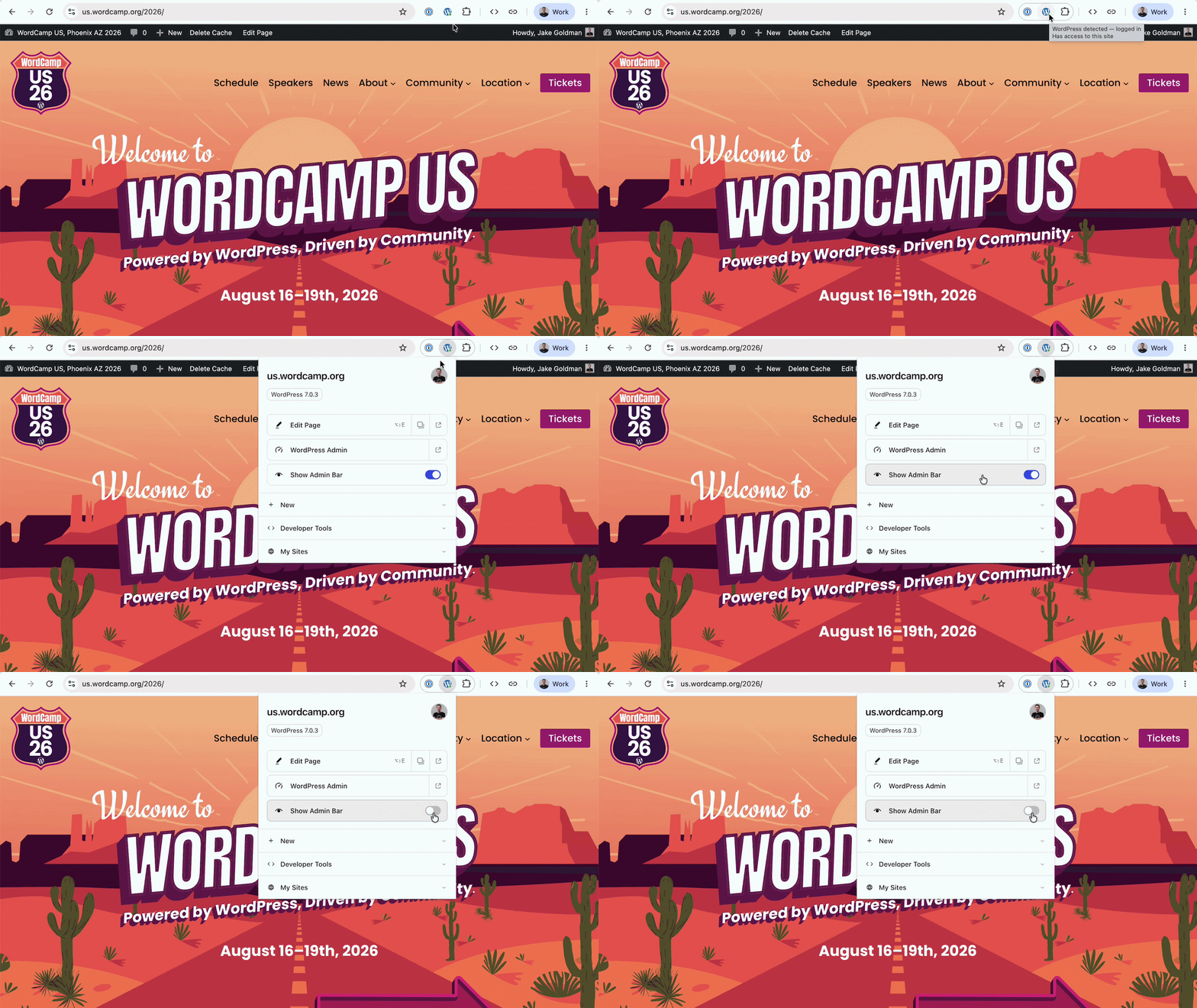
At its core, the extension solves a long-standing UX frustration for logged-in WordPress users: the omnipresent admin bar. While the bar provides quick links to the dashboard and editors, it alters the viewport, obscure sticky headers, and complicates debugging scroll-driven CSS effects. Turning it off traditionally meant sacrificing convenience. The new extension offers a seamless alternative: it automatically hides the admin bar while keeping vital shortcuts easily accessible from the browser toolbar.
Beyond managing the admin bar, the extension acts as a universal hub for all your WordPress sites, detects WordPress installations across the web in real-time, and equips developers with advanced layout-inspection and caching tools—all while maintaining strict privacy standards with zero tracking or external data transmission.
Chronology: From Independent Hack to Official Release
The path from a developer’s personal annoyance to an official WordPress ecosystem tool reflects the platform’s community-driven ethos.
- The Spark: The concept originated as an independent project by developer Jake Gold, who sought a cleaner way to handle the admin bar dilemma without sacrificing shortcuts.
- Adoption and Incubation: The project caught the attention of WordPress co-creator Matt Mullenweg, leading to its adoption as an official project under the WordPress umbrella.
- Collaborative Development: Core contributor Fabian Kägy (a developer at Fueled, formerly 10up) joined the effort to help shape its early architecture and UX design. Developer Khokan Sardar contributed critical patches, while a wider cohort of engineers at Fueled provided rigorous testing.
- Open Source Transition: The code was hosted openly on GitHub, inviting community contributions.
- Official Launch (August 2026): After extensive refinement, the extension officially launched on the Chrome Web Store and Mac App Store, marking a new milestone in cross-platform WordPress utility integration.
Supporting Data & Functional Capabilities
Unlike a traditional WordPress plugin that lives inside a specific site installation, a browser extension operates at the client level. This shift in architecture unlocks features that were previously difficult or impossible to achieve from within a site dashboard.
1. Intelligent Site Recognition and Quick Navigation
When browsing the web, the browser toolbar icon subtly indicates whether the current webpage runs WordPress and whether you are authenticated. For sites you manage, a single click opens direct pathways to:

- The overarching site dashboard.
- The specific post, page, custom taxonomy, or template currently rendered in the viewport.
- The Site Editor (for block-based themes).
A locally stored launcher remembers authenticated sites, allowing administrators to jump straight into editing interfaces from anywhere on the internet.
2. Client-Side Developer Tools
Because the extension resides in the browser rather than the server backend, it provides universal utility across every WordPress site you visit, requiring no plugin installations or permission configurations. Key developer tools include:
- Block Outlines: Instantly draws clear visual boundaries over rendered blocks to inspect page structures.
- Viewport Simulation: Opens a dedicated, phone-sized preview window to test mobile responsiveness on the fly.
- Cache Busting: Forces a hard reload bypassing local or server-side caching mechanisms.
- State Cleansing: Quickly clears cookies and local storage specifically tied to the active domain.
3. Privacy-First Architecture
In an era where browser extensions face intense scrutiny regarding data harvesting, the WordPress Browser Extension is built strictly for privacy. It reads the local Document Object Model (DOM) of the page in front of it to identify its structure. When it requires backend data, it queries the site directly. All user preferences and site credentials stay localized within the browser storage. Zero tracking, zero telemetry, and zero analytics are transmitted externally.
Official Responses and Community Perspectives
The release has drawn positive reviews across the developer community, praised particularly for its lightweight footprint and utility-first design.
The project’s evolution from an independent tool to an official offering highlights the porous boundary between core WordPress development and community-led innovation. Fabian Kägy, reflecting on his work on the extension’s architecture, emphasized the importance of developer ergonomics: "We wanted to build something that gets out of your way when you’re just reading, but springs into action the moment you need to inspect or edit a block layout."
With the project fully open-sourced on its GitHub repository, leadership anticipates robust ongoing contributions. Bug reports, feature requests, and pull requests from the global developer community are actively encouraged to steer future iterations of the tool.

Implications for the Future of WordPress Development
The launch of the official WordPress Browser Extension signals a subtle yet significant shift in how the CMS interacts with the modern web. By moving certain diagnostic and navigation features out of server-side plugins and into the browser sandbox, WordPress is adopting a more decoupled, client-aware approach.
1. Reduced Plugin Bloat
Historically, developers and site administrators installed various utility plugins—such as cache-clearers, mobile previewers, or admin bar modifiers—on every site they managed. By centralizing these features into a single browser extension, users can reduce plugin overhead, leading to cleaner codebases and faster server response times.
2. Enhanced Full Site Editing (FSE) Workflows
As WordPress continues its deep transition into full site editing and block-based themes, navigating between templates, template parts, and template-backed pages can sometimes require multiple clicks through the dashboard. The browser extension smooths this friction, allowing developers to target the exact structural block on screen and jump straight into the Site Editor.
3. A Blueprint for Future Cross-Platform Tools
By bridging the gap between desktop browsers (Chrome, Safari) and decentralized CMS architectures, this extension may serve as a testing ground for future native integrations. Whether it expands to support additional browsers like Firefox and Edge or introduces new collaborative review workflows, the extension establishes a new standard for how creators interact with WordPress on the open web.
Developers and site managers can download the extension today via the Chrome Web Store or Mac App Store, and contribute to its ongoing evolution on GitHub.