










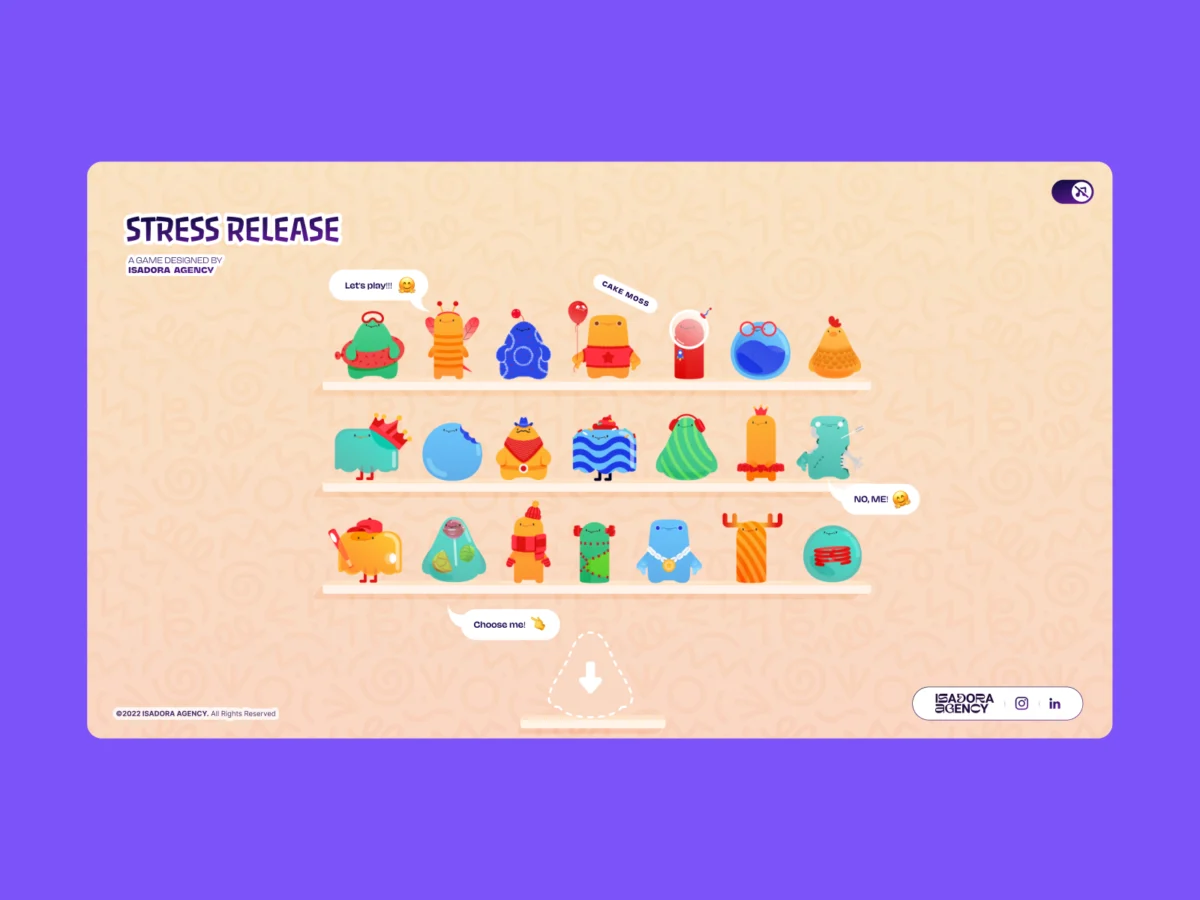
In the contemporary landscape of digital design, the quest for "tactile" web experiences often leads developers down a singular path: the physics engine. Whether it is Matter.js, Cannon.js, or complex WebGL implementations, the industry standard for creating interactive, bouncy, or destructive UI elements has long relied on algorithmic simulation. However, as the team at Isadora Agency discovered while building Stress Release—a digital stress-relief toy designed for burnt-out creatives—there is a fundamental tension between simulated physics and artistic intent.
When tasked with creating a web interface that feels genuinely responsive, developers often find that physics engines offer "plausible" motion rather than the "intentional" motion required by sophisticated art direction. This article explores the architectural rationale behind the development of Stress Release, detailing how the agency achieved high-fidelity interaction through programmatic Lottie state controls, DOM manipulation, and precise distance-based mathematics, completely bypassing the heavy lifting of traditional physics frameworks.
The Design Philosophy: Why Physics Engines Failed the Vision
The core challenge of Stress Release was the requirement for absolute deterministic control. The animators at Isadora Agency had meticulously crafted bespoke .json Lottie files, where every frame was a deliberate aesthetic choice. A "mega squeeze" reaction, for instance, required a precise 181-frame build-up sequence followed by a specific, dramatic release.
The Conflict of Simulation vs. Artistry
In a standard physics-driven environment, an object’s movement is calculated in real-time based on velocity, gravity, and collision vectors. While this creates a sense of realism, it is inherently unpredictable. If a developer attempts to force a physics engine to follow a 181-frame animation exactly, the two systems often clash, leading to "jitter" or "uncanny" motion that violates the designer’s intent.
Isadora Agency realized that to honor their animators’ work, they needed to abandon the idea of simulation entirely. Instead of letting an engine "calculate" what a squeeze looks like, they opted to let the code "trigger" the hand-crafted art. By choosing programmatic state control over procedural physics, the team ensured that the interaction layer acted as a flawless conduit for the animation layer.
Chronology of the Build: From Concept to Coordinate Mapping
The development process was characterized by a transition from traditional game-dev mindsets to a web-native, DOM-centric approach.

Step 1: Defining the Hitbox
The first technical hurdle was establishing how the browser registers a "hit" on a character. The team moved away from complex collision detection libraries and toward a radial input mapping system. By converting click coordinates into a local coordinate space relative to the character’s center, they created a clean, mathematical hitbox.
Using standard jQuery selectors and the Pythagorean theorem, the team calculated the distance from the center of the character to the user’s cursor:
var a = parseFloat(X - x_center);
var b = parseFloat(Y - y_center);
var distance = Math.hypot(a, b);
This single distance variable became the "master key" for the experience. It simultaneously determined the point reward, the intensity of the feedback, and the exact spatial coordinates for the "explosion" particle effect.

Step 2: Segmented Animation Control
Rather than playing a single long animation file, the team broke the Lottie assets into logical segments: idle, squeeze1, squeeze2, and squeeze3. By utilizing Lottie’s native playSegments API, they were able to force the browser to jump to specific frame ranges instantaneously upon a user click. This allowed the UI to remain locked in an idle state until the precise moment of interaction, ensuring that the visual feedback was perfectly synced with the user’s input.
Step 3: Responsive Scaling through CSS
A major advantage of this DOM-based architecture was its inherent responsiveness. By leveraging CSS variables (Custom Properties) to handle window resizing, the team ensured that the hitboxes and the Lottie containers scaled in lockstep. This eliminated the need for "responsive raycasting," where developers often have to re-map collision coordinates every time a user resizes their browser window.
Supporting Data: Optimization and Performance
One of the most significant challenges in using Lottie for a highly interactive experience is file size and rendering overhead. With 21 unique characters, each requiring high-frame-rate JSON files, performance could have easily suffered.

Balancing Quality and Frame Rate
The team implemented a tiered optimization strategy:
- Shelf Mode: When the user is viewing the character selection screen, 21 animations play simultaneously. To maintain stability, the team set
lottie.setQuality(0.5), reducing the interpolation calculations, and lowered the playback speed to 60%. - Interaction Mode: When a user selects a character and enters the "Play" screen, the architecture shifts. The background animations are paused or simplified, and the focused character receives
lottie.setQuality(1), ensuring the highest possible visual fidelity for the active interaction.
This dual-mode approach demonstrates that Lottie, when managed with intentional state control, can handle high-density UI interactions without the performance penalties usually associated with complex vector animations.
Official Perspectives: The Value of Determinism
Alexey Kopytin, the lead developer on the project, notes that the success of Stress Release lies in the "tightness" of the click-feedback loop. "The closer you can link the user’s input to a pre-defined, hand-crafted reaction, the more ‘tactile’ the web becomes," Kopytin explained.

By treating the screen as a canvas where math dictates placement but art dictates motion, the agency effectively removed the "randomness" of physics engines. The result is a user experience that feels solid and responsive—every click is rewarded with the exact, satisfying squish that the animator intended, never a generic "bounce" computed by a third-party script.
Implications for the Future of Web UX
The success of this approach has significant implications for how we view "gamified" web design. For years, the industry has been obsessed with pushing the boundaries of WebGL to mimic physical reality. However, Stress Release proves that for many applications, the best way to create a tactile experience is to lean into the strengths of the DOM and the precision of programmatic animation control.
The Return of Design-First Development
This architecture signals a potential shift back to design-first development. Instead of asking "What physics library can handle this?", developers are being encouraged to ask "How can I map this interaction to a pre-rendered state?" This approach empowers designers to maintain creative control over their assets, as they no longer have to worry about how their work will look after being processed by a physics engine.

Scalability and Accessibility
Furthermore, because this architecture relies on standard web technologies—CSS, SVG, and JavaScript—it is inherently more accessible than many WebGL-based experiences. It plays well with screen readers, handles browser zooming gracefully, and functions reliably across a wide range of devices without requiring the overhead of a GPU-heavy rendering pipeline.
Conclusion
The project Stress Release serves as a masterclass in architectural restraint. By rejecting the "default" choice of a physics engine in favor of a bespoke, math-driven interaction model, the team at Isadora Agency achieved a level of polish that is rarely seen in web-based games.
As the web continues to evolve toward more immersive and interactive interfaces, the lessons learned here are clear: technology should serve the art, not the other way around. By mapping Lottie’s native timeline capabilities to the DOM, developers can deliver incredibly rich, tactile experiences while maintaining absolute control over the art direction. In the end, the most "realistic" feeling often comes not from simulating the laws of physics, but from carefully choreographing the user’s journey through the interface.



