











In modern web development, speed and minimalism often reign supreme. Frameworks like Astro have revolutionized how developers build content-driven websites by shipping zero JavaScript by default and optimizing asset delivery. However, the path from local development to production deployment frequently introduces a classic engineering challenge: how to seamlessly secure a work-in-progress project, client staging environment, or internal tool without bloating the application with heavy third-party dependencies, complex VPN configurations, or convoluted Nginx reverse-proxy setups.
Traditionally, securing a web application meant introducing external npm packages, configuring separate authentication microservices, or relying on hosting-provider-specific gates. Fortunately, developers utilizing Astro can leverage a robust, built-in solution that requires zero external packages: a lightweight middleware function paired with standard HTTP Basic Authentication.
This comprehensive technical guide explores the mechanics, architecture, and step-by-step implementation of securing an Astro application using its native middleware system, runtime environment variables, and zero-dependency base64 decoding.
Main Facts: The Architecture of Astro Middleware Security
To understand why native HTTP Basic Authentication is an optimal choice for protecting Astro applications, it is essential to examine the underlying components that make the architecture function seamlessly.
- Zero External Dependencies: By utilizing native JavaScript runtime features—such as the global
atobfunction and standardRequestandResponseWeb APIs—developers avoid supply-chain vulnerabilities and keep their bundle sizes pristine. - Standardized Protocol Compliance: HTTP Basic Authentication relies on universal browser protocols. When a server responds with a
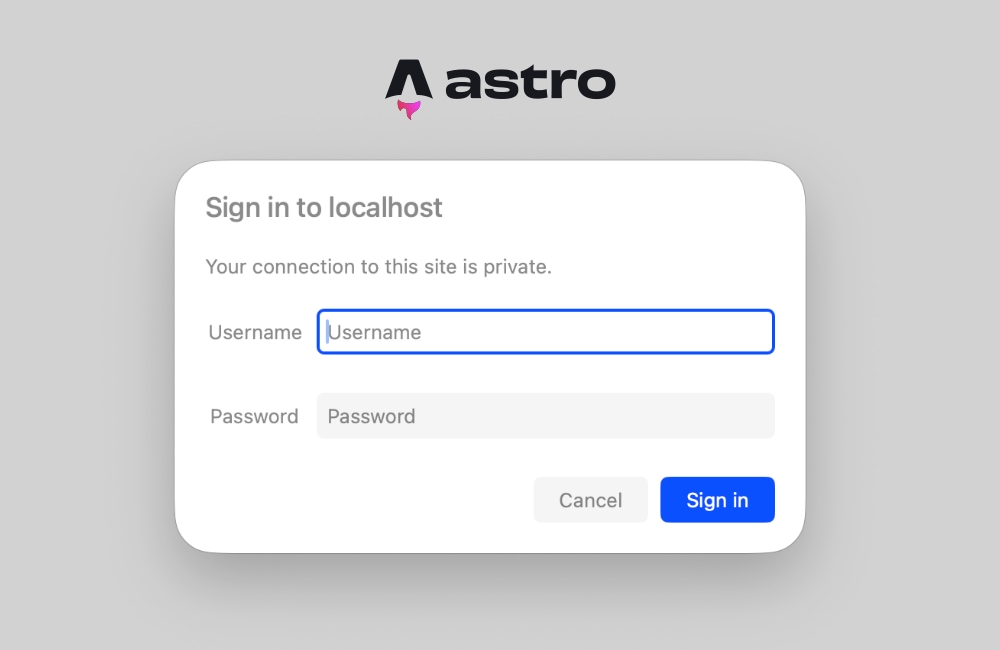
401 Unauthorizedstatus code accompanied by aWWW-Authenticateheader, every modern web browser automatically intercepts the response and renders a native login dialog. - The Power of Astro Middleware: Astro middleware executes a defined function (
onRequest) before rendering any page or API endpoint. This intercepts incoming traffic globally or per-route, acting as an unyielding gatekeeper. - Prerequisite Runtimes: Because HTTP Basic Authentication requires inspecting live incoming headers (
Authorization), the hosting environment or project configuration must support on-demand server-side rendering (SSR) rather than purely static site generation (SSG).
Chronology: Evolution of Server-Side Protection in Static-First Frameworks
The methodology of protecting static-first web generators has evolved significantly alongside the modern Jamstack ecosystem.
- Early Jamstack Era (Pre-2020): Securing static sites generated by tools like Hugo, Jekyll, or early Gatsby variants required heavy reliance on edge-hosting network rules (such as Netlify password protection or Cloudflare Access policies). If a developer wanted code-level control, they had to implement complex client-side JavaScript password prompts—a notoriously insecure practice easily bypassed by inspecting network requests or disabling scripts.
- The Rise of Hybrid Frameworks (2021–2023): As frameworks like Next.js, Remix, and Astro matured, they introduced server-side rendering adapters and edge functions. This shift allowed developers to run logic on the server prior to HTML delivery. However, early implementations often forced developers to pull in heavy middleware libraries or write verbose adapter-specific configuration files.
- Modern Astro Integration (Astro 3.0 to 5.0+): With the stabilization of Astro’s middleware API and standardized environment variable handling (
import.meta.env), the framework bridged the gap between static optimization and dynamic server control. Developers can now implement robust, production-grade security flows using standard Web APIs in fewer than thirty lines of clean, maintainable code.
Step-by-Step Implementation Guide
Implementing native HTTP Basic Authentication within an Astro project involves four primary phases: writing the middleware logic, constructing the validation function, configuring secure environment variables, and handling runtime rendering requirements.
1. Creating the Middleware File
Astro looks for middleware inside the src/ directory. Create a file named src/middleware.ts (or src/middleware.js if you are writing standard JavaScript) and initialize it using Astro’s defineMiddleware utility wrapper.
import  defineMiddleware  from 'astro:middleware';

export const onRequest = defineMiddleware(async (context, next) =>
  // Authentication logic will be injected here
  return next();
);
The defineMiddleware function wraps your handler, providing a context object containing request metadata, cookies, locals, and the next() callback, which allows the request pipeline to proceed if authentication succeeds.
2. Writing the Authentication Check
HTTP Basic Authentication operates on a predictable exchange: the client sends an Authorization header containing base64-encoded credentials (prefixed with the word Basic), and the server validates these credentials against authorized environment variables.
Add the following validation function to your middleware file or a dedicated utility module:
function isAuthenticated(request: Request): boolean
  const user = import.meta.env.BASIC_AUTH_USER;
  const pass = import.meta.env.BASIC_AUTH_PASS;

  // If environment variables are not defined, bypass authentication (useful for local testing)
  if (!user
3. Handling the 401 Unauthorized Response
When the validation check fails, your application must issue a strict HTTP 401 status code alongside a WWW-Authenticate header. This signals the browser to trigger its native login modal.
Update your onRequest handler to intercept unauthenticated requests:
export const onRequest = defineMiddleware(async (context, next) =>
  if (!isAuthenticated(context.request))
    return new Response('Unauthorized Access',
      status: 401,
      headers:
        'WWW-Authenticate': 'Basic realm="Staging Environment", charset="UTF-8"',
      ,
    );


  return next();
);
The realm parameter within the WWW-Authenticate header serves as a descriptive label displayed inside the browser’s native login dialog box (e.g., "Staging Environment").
4. Configuring Environment Variables
Secure credentials should never be hardcoded into version-controlled source files. Instead, manage them via runtime environment variables.
Create a .env file in the root directory of your project for local development:
BASIC_AUTH_USER=staging-admin
BASIC_AUTH_PASS=secure-password-123
When deploying your application to production platforms (such as Vercel, Netlify, Cloudflare Pages, or a custom Node.js server), add these identical keys (BASIC_AUTH_USER and BASIC_AUTH_PASS) into your hosting provider’s dashboard settings under Environment Variables.
Supporting Data and Technical Considerations
When adopting this approach, developers must account for how Astro handles build-time optimization versus runtime execution.
Resolving the Prerender Conflict
A common pitfall developers encounter when introducing server-side middleware into an Astro project is the following build or runtime error:
Astro.request.headers was used when rendering the route
src/pages/index.astro. Astro.request.headers is not available on prerendered pages.
This occurs because Astro aggressively prerenders pages into static HTML files during build time by default. When a page is statically generated, no live HTTP request exists, meaning request headers cannot be evaluated.
To resolve this, you must explicitly configure your application or specific routes for server-side rendering (SSR):
Option A: Route-Level Opt-Out
If you only want specific pages (or a staging subdirectory) to be dynamic, add the prerender export directive directly into the frontmatter of your page components:
---
export const prerender = false;
---
<html lang="en">
  <head>
    <title>Protected Staging Page</title>
  </head>
  <body>
    <h1>Welcome to the secure staging build.</h1>
  </body>
</html>
Option B: Global Server Output Mode
If your entire site is a staging environment, internal tool, or client review portal, configure your astro.config.mjs file to use server-side rendering globally:
// astro.config.mjs
import  defineConfig  from 'astro/config';
import node from '@astrojs/node';

export default defineConfig(
  output: 'server',
  adapter: node(
    mode: 'standalone'
  )
);
By setting output: 'server', every page is rendered on-demand by default, guaranteeing that incoming headers are always accessible to your middleware.
Official Responses and Industry Best Practices
Web performance engineers and security specialists frequently endorse native HTTP authentication patterns for non-public environments due to their efficiency and standards compliance.
- Reduced Attack Surface: By eliminating complex authentication packages, developers minimize vulnerabilities associated with deeply nested npm dependency trees.
- Edge Compatibility: Because the implementation relies strictly on Web standard APIs (
Request,Response,atob), the middleware compiles seamlessly across diverse edge runtimes, including Cloudflare Workers, Vercel Edge Functions, and standard Node.js servers. - Browser-Native UX: Unlike custom login forms that require state management, database connections, and session cookies, HTTP Basic Auth delegates UI rendering entirely to the browser, saving valuable development time on internal projects.
Implications and Future-Proofing
While HTTP Basic Authentication via Astro middleware is an ideal solution for staging sites, preview deployments, and internal tools, developers should evaluate its limitations for production-grade consumer applications.
- Transport Security: HTTP Basic Authentication transmits credentials encoded in base64, not encrypted. Therefore, HTTPS is mandatory. Operating this middleware over standard HTTP exposes credentials to trivial network sniffing.
- Session Persistence: Native browser authentication maintains credentials in memory for the duration of the browser session. There is no built-in "Log Out" button; clearing credentials typically requires closing the browser window or clearing cache data.
- Scalability of Credentials: Hardcoding usernames and passwords into environment variables works well for single-user staging sites. However, if an application requires multi-user access control, role-based permissions, or database-backed credential rotation, developers should transition from basic auth headers to robust token-based authentication (such as JSON Web Tokens or secure HTTP-only session cookies) while utilizing the exact same Astro middleware foundation.
By mastering Astro’s native middleware capabilities, developers gain absolute control over their application’s request pipeline, achieving enterprise-grade perimeter security with minimal code and zero dependencies.



