




In the modern digital landscape, user interface (UI) design is often a battle for clarity. Every pixel, every drop shadow, and every icon serves as a silent guide to the user’s journey. Among the most common patterns in web design is the "accordion"—a vertical stack of headers that can be clicked to reveal or hide content. While seemingly simple, this UI element has become a subject of intense scrutiny by usability experts, including the Nielsen Norman Group (NN/g), who have uncovered that our choices regarding these tiny visual indicators have massive implications for user behavior and task completion.
The research suggests a sobering reality for designers: many of the industry’s "clever" solutions, such as split menus and custom icon sets, are actually creating friction, confusion, and unintended interaction patterns.
Main Facts: The Anatomy of the Accordion
At its core, the accordion is designed to manage information density. It allows users to scan a list of topics without being overwhelmed by the full content of every section. However, the success of this pattern hinges entirely on the user’s ability to predict what will happen when they click.

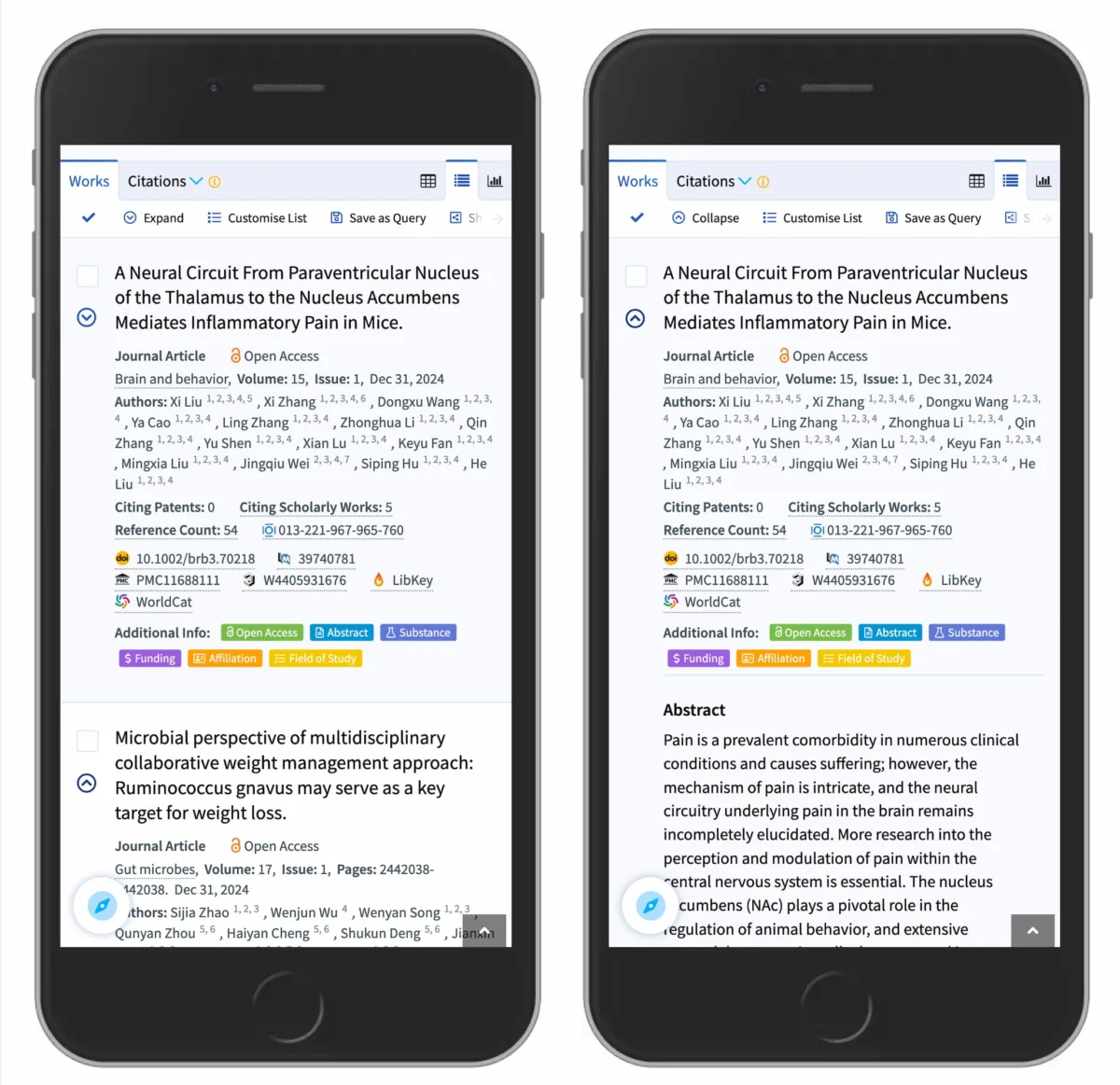
The primary finding from recent usability research is that the caret (the small chevron or triangle) is the gold standard for accordion expansion. It is the most reliable, universally understood indicator that a section is collapsible. Conversely, the absence of an icon often signals to users that clicking the header will trigger a page navigation—a direct jump to a new URL—rather than an expansion of content.
Perhaps the most critical takeaway is the "rule of simplicity": if an item is a link to a new page, it should be visually identified as such—usually through an underline or standard link styling—rather than being decorated with arrows or navigation icons.
A Chronology of Confusion: How We Got Here
The evolution of accordion icons has been marked by a shift from functional necessity to aesthetic "over-design."

- The Early Web (Pre-2010s): Accordions were rare, often built with custom JavaScript, and inconsistently styled. Icons were an afterthought, often consisting of simple text labels like "Expand" or "Read More."
- The Rise of Frameworks (2010–2018): With the advent of Bootstrap and other CSS frameworks, icons became standardized. However, designers began experimenting with "plus" and "minus" signs, as well as directional arrows. This era saw the birth of the "split button"—a design where one side of the header links to a page and the other toggles the menu.
- The Current Era (2019–Present): Extensive usability testing by organizations like NN/g has forced a re-evaluation. Data now shows that the "over-design" of these menus—adding complex arrows and split interactions—is actively degrading the user experience. We are now in a phase of "de-cluttering," where the industry is moving back toward the most minimalist, intuitive icons: the caret.
Supporting Data: Why "Split Menus" Fail
Usability studies provide concrete evidence as to why certain patterns should be abandoned. One of the most notorious offenders is the split menu. This pattern is often implemented in e-commerce or complex navigation systems, where the text label directs the user to a category page, while an icon on the right side opens a sub-menu.
The data reveals that users do not distinguish between these two "hit areas." Participants in recent studies were just as likely to tap the label as they were the icon. When a user expects to be taken to a page but finds themselves staring at an expanded sub-menu, or vice versa, the result is "interaction frustration."
Furthermore, the study confirms that when no icon is present, users overwhelmingly expect to be taken to a new page. When an arrow or a "plus" sign is introduced, expectations become muddy. The "plus" symbol, in particular, suffers from cognitive overload; it is frequently used to represent "adding to cart," "saving for later," or "zooming in," making it a poor choice for simple navigation.

Official Perspectives and Industry Best Practices
Leading UX researchers advocate for a "predictable hierarchy" of interactions. If a site uses an accordion, the icon should consistently behave in a specific way.
- The Caret: Should point down when collapsed and up (or sideways) when expanded.
- The Link: Should be treated as a standard, underlined, or color-distinct link. It should never be combined with an accordion toggle in a way that creates a "split" target.
- The Label: Should be treated as the main hit area. If a designer wants to provide a link to the category page, the best practice is to place that link inside the expanded accordion content, perhaps labeled as "View All" or "Overview."
By following this, companies like DHL have successfully implemented navigation systems that avoid the pitfalls of unnecessary arrows or split-target confusion. Their approach is direct: if it’s a page, it’s a link. If it’s a list, it’s an accordion. There is no mixing of the two.
Implications for Future Web Design
The implications of this research are twofold: for developers and for business stakeholders.

For Designers
The era of "creative" icons for basic navigation is effectively over. While it is tempting to create unique iconography to match a brand’s aesthetic, doing so often comes at the cost of the user’s mental model. When users are forced to learn how to navigate your site because you’ve invented a new icon language, you have already lost them. Stick to the caret.
For Business Stakeholders
Usability is not just about aesthetics; it is a direct contributor to conversion rates. When a user clicks a "Category" header and is met with a menu they didn’t want (because they wanted the category page), they are more likely to bounce. When they click a link and nothing happens because the site has a buggy "split" interaction, they lose trust in the brand. Simplifying the UI to follow established, tested patterns like those outlined by NN/g is one of the most effective ways to optimize for conversion and accessibility.
Conclusion: Simpler Is Better
As the digital landscape grows more complex, the need for intuitive, accessible, and simple design has never been greater. The research is clear: users want predictability. They want to know that a click on a piece of text will lead them to a new page, and a click on a caret will reveal more options.

By avoiding the temptation to overcomplicate the interface with "clever" icons and confusing split-button patterns, designers can create a more seamless experience. The most successful websites are those that disappear into the background, allowing the content to take center stage. When in doubt, look to the data, listen to the experts, and—most importantly—keep it simple.
The web is a collaborative environment, and by adhering to these evidence-based standards, we collectively make the internet a more usable and inclusive space for everyone. Whether you are building a personal blog or an enterprise-level e-commerce platform, the lesson remains the same: the best design is the one the user doesn’t have to think about.