






In the evolving landscape of web design, the traditional "fill-the-container" approach to grid layouts is increasingly being supplanted by more nuanced, editorial-style compositions. Designers are moving toward layouts that embrace negative space as a fundamental design element rather than an afterthought. With the release of CSS Grid in Divi 5, creators now have access to Grid Offset Rules—a powerful toolset that allows for the precise positioning of elements while leaving selected grid cells unoccupied. This capability marks a significant shift in how Divi users can manipulate document flow, enabling sophisticated, stepped, or asymmetrical designs that were previously difficult to achieve without complex custom CSS.
The Evolution of Web Layouts: Why Offset Rules Matter
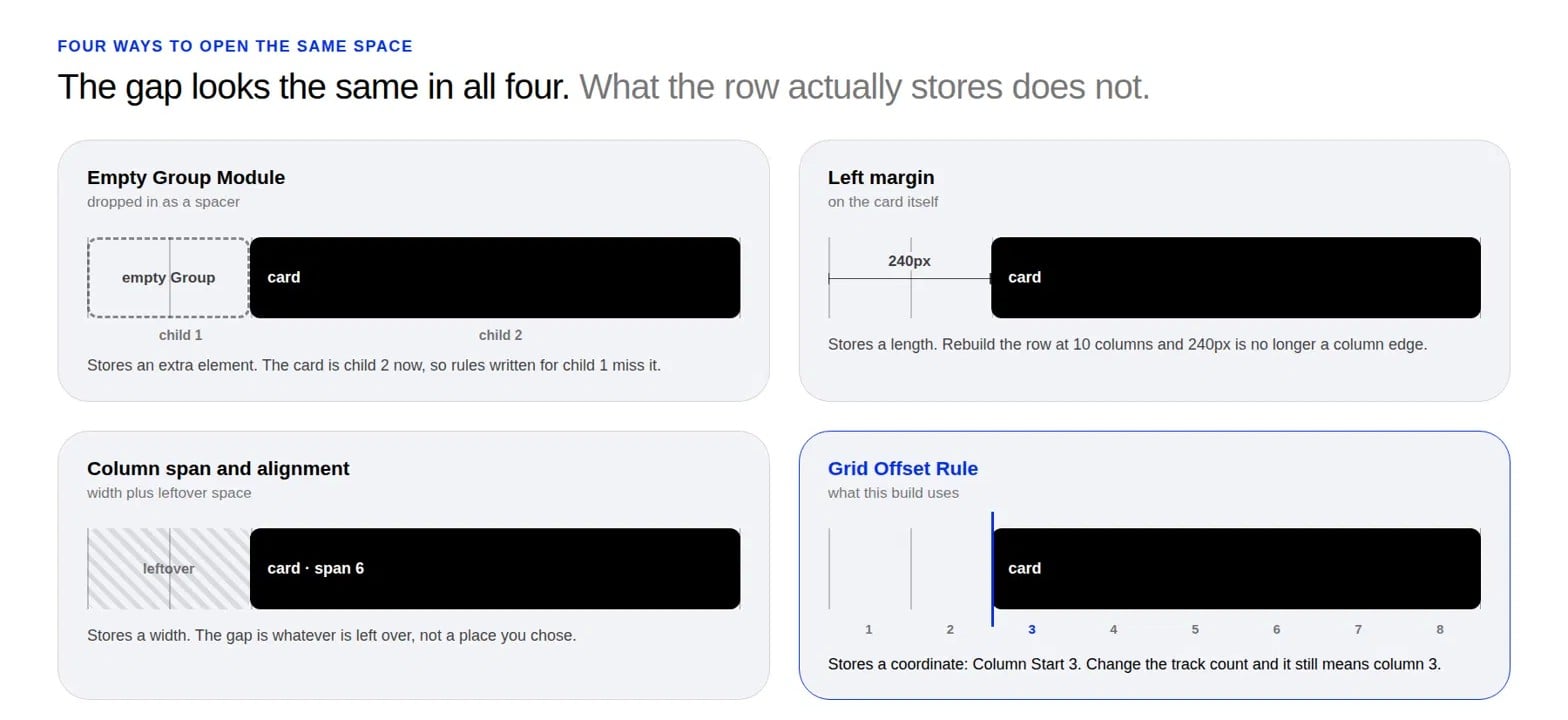
For years, web designers relied on a combination of spacers, hard-coded margins, and column spanning to create breathing room within layouts. However, these methods often introduce technical debt. A "Spacer" module, while effective at creating distance, functions as a DOM element; when inserted into a grid container, it is treated as a grid item, which can inadvertently disrupt index-based CSS targeting. Similarly, using fixed-pixel margins (e.g., 240px) creates brittle designs that fail to scale gracefully across varying viewport widths.
Grid Offset Rules solve these issues by decoupling the physical space from the content modules. By specifying exactly where an item starts and how many tracks it spans, designers can effectively "skip" grid cells. This results in a cleaner HTML structure and a more robust, responsive layout that maintains its integrity regardless of the user’s screen resolution.

Chronology of a Design: Building the Stepped Composition
To understand the practical application of these rules, we can follow the development of a four-card "stepped" layout. This design features an eight-column grid where each successive card begins further to the right, creating a cascading visual effect that naturally guides the viewer’s eye through the content.
Phase 1: Structural Setup
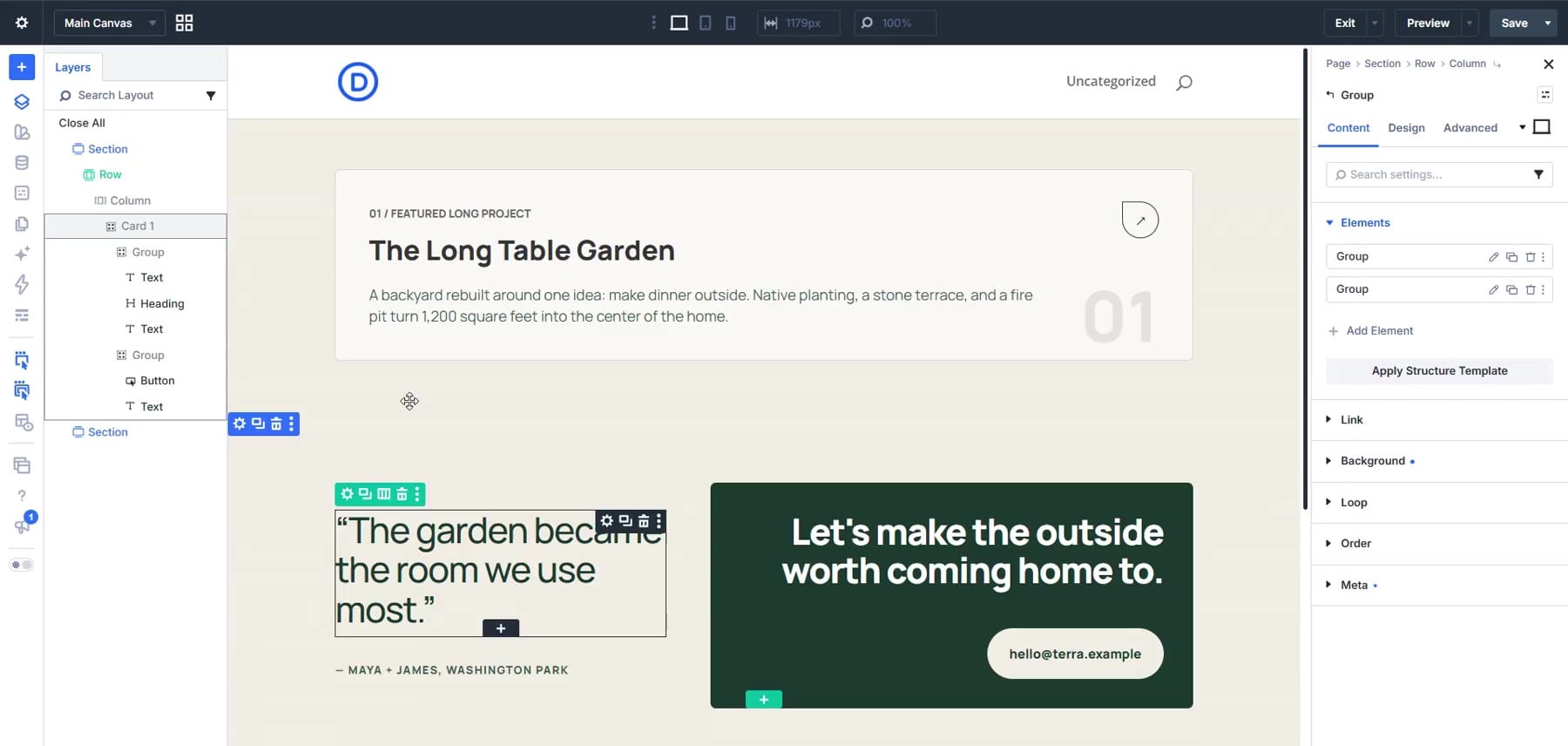
The foundation begins with a Section container with a neutral background (e.g., #F0EDE4). By utilizing a "Single Column Flex Structure," we maintain a fluid development environment where cards can be styled independently before the grid logic is applied. Each card is housed within a Group Module, serving as the functional container for the project text, navigation buttons, and aesthetic markers.
Phase 2: Building the Modular Card
Each card is treated as an independent unit. By nesting two inner Group Modules—one for text and one for call-to-action elements—we can utilize Flexbox properties to maintain precise alignment. The button design, characterized by a leaf-shaped border radius (0px top-left, 50% elsewhere) and an arrow glyph, serves as a focal point. Crucially, the addition of an aria-label attribute ensures that this minimalist navigation remains accessible to screen reader users, a critical requirement for professional web standards.
Phase 3: The Grid Transition
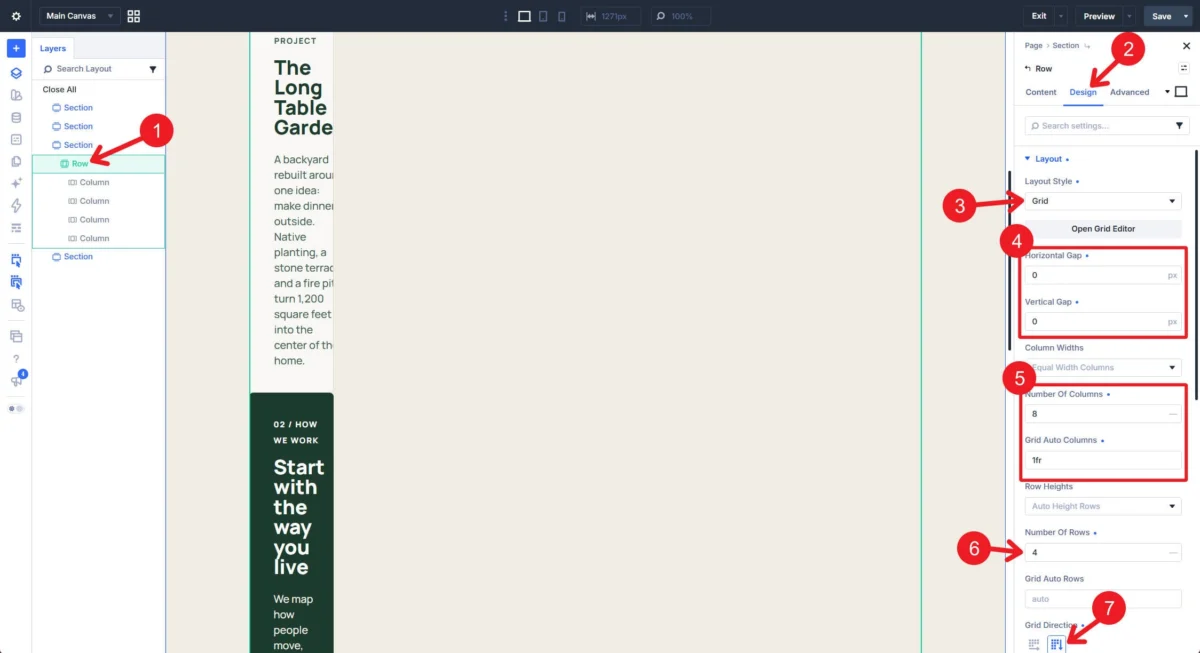
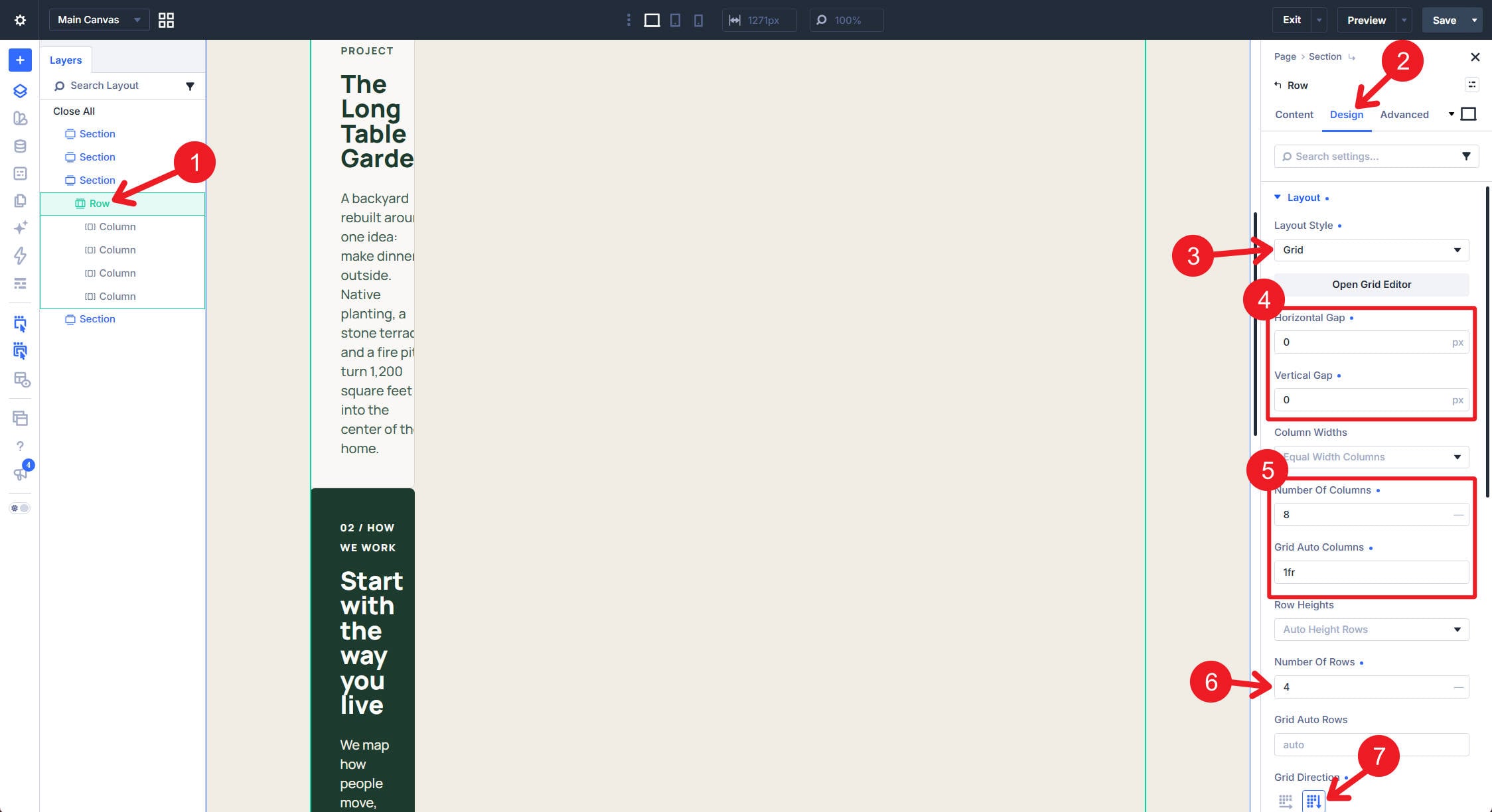
Once the cards are defined, the transition to a CSS Grid layout is initiated within the Row’s "Design & Layout" settings. By setting the grid to eight columns with zero gaps, the Row becomes a precise canvas. It is at this stage that the "Grid Offset Rules" are applied, transforming the stacked cards into the intended stepped composition.
Supporting Data: The Mechanics of Offset Rules
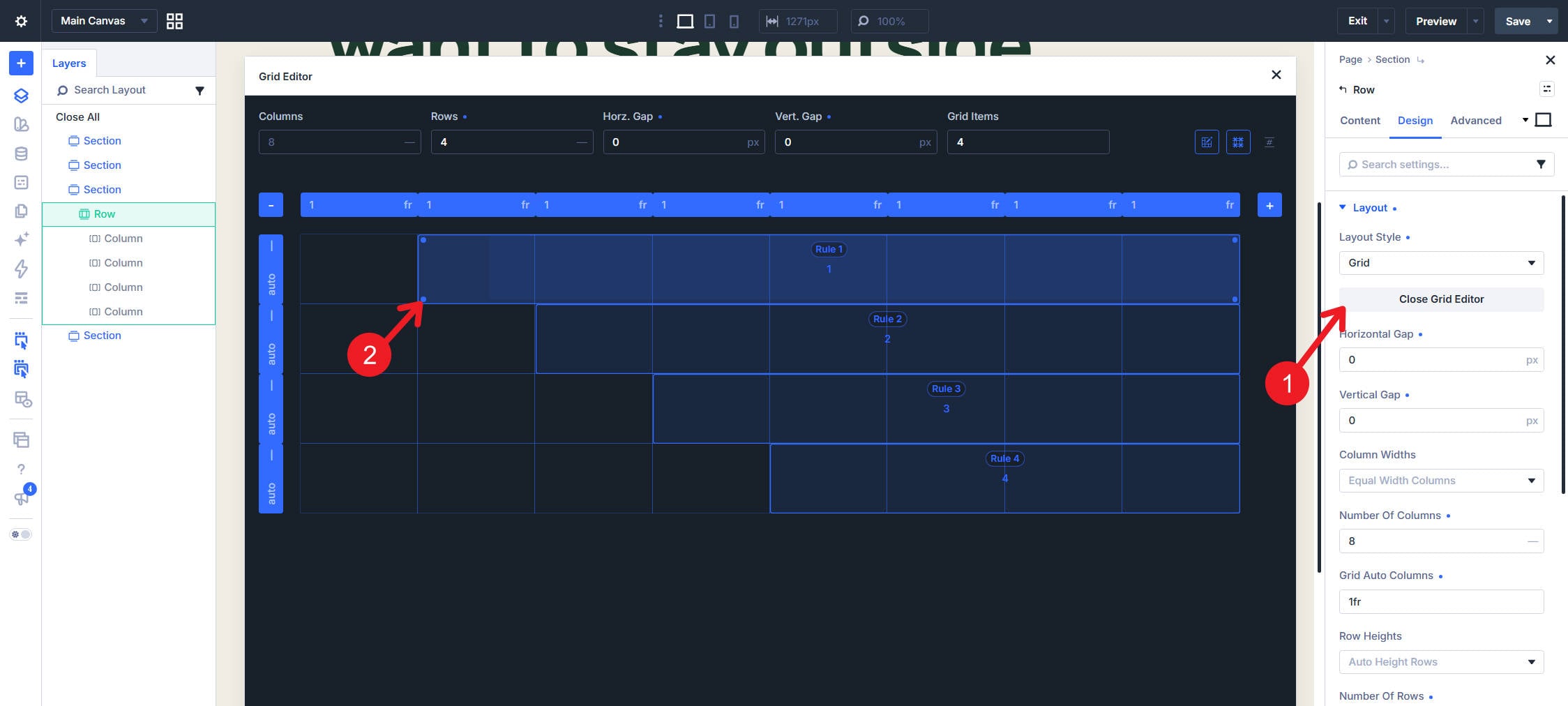
The power of Grid Offset Rules lies in their ability to manipulate the browser’s internal grid placement algorithm. By targeting specific indices (the nth-child of the Row), designers can assign distinct column-start and column-span values to every card.
- Card 1: Targeted at index 1, set to start at column 1 and span 8 tracks. This acts as the anchor for the composition.
- Card 2: Targeted at index 2, set to start at column 3 and span 6 tracks. This creates a two-column "void" on the left.
- Card 3: Targeted at index 3, set to start at column 4 and span 5 tracks.
- Card 4: Targeted at index 4, set to start at column 5 and span 4 tracks.
The mathematical result of these rules is a clean, intentional staircase of negative space that emphasizes the content as it progresses down the page. Because these rules are managed within the Divi 5 interface, they remain fully responsive.
Official Guidance: Best Practices and Optimization
The development team behind Divi 5 emphasizes that while these rules are powerful, they must be managed with an eye toward responsiveness. As a screen narrows to mobile dimensions, a complex desktop layout will naturally feel cramped.
The Responsive Strategy
"Grid Offset Rule values can be overridden responsively," notes the design documentation. For mobile users, the most effective strategy is often a transition from a complex grid to a full-width stack. By setting the row to a single column on mobile, and adjusting the column-start and span properties to 1 for all items, the designer ensures that the content remains readable without sacrificing the aesthetic integrity of the original desktop vision.
Accessibility Considerations
When using layout techniques that rely on "empty" space, there is a risk of losing the logical reading order. Because Divi 5’s Grid Offset Rules operate on the source order of the elements, the semantic structure of the page remains intact. Even if an item is visually pushed to the far right, it remains in its correct place in the document hierarchy. Designers are encouraged to verify this by testing the keyboard navigation path through the cards to ensure that the visual layout does not confuse the user experience.
Implications for Modern Web Design
The introduction of native CSS Grid support in Divi 5, and specifically the implementation of Offset Rules, represents a maturation of the WordPress site-building experience. Historically, page builders were criticized for producing "bloated" code—a byproduct of nested wrappers and unnecessary spacer elements. By allowing designers to utilize the native browser capabilities of CSS Grid, Divi 5 drastically reduces the DOM complexity of the final page.
The Shift Toward Editorial Design
This shift has profound implications for digital agencies and freelancers. It allows for a higher caliber of design—often referred to as "editorial-style" web design—which was previously the exclusive domain of custom-coded sites. The ability to create "punch-out" shapes, channels of negative space, or asymmetrical overlapping layouts is now available to the average user.
Future-Proofing Layouts
Furthermore, these layouts are inherently more future-proof. Because the positioning logic is tied to the grid tracks rather than fixed pixel dimensions, the layouts adapt naturally to ultra-wide monitors and emerging mobile form factors. As web design continues to move away from rigid, boxy templates, the mastery of Grid Offset Rules will become a defining skill for designers looking to distinguish their work in a crowded digital marketplace.
Conclusion
The transition from simple columns to nuanced grid compositions is a leap forward for the Divi ecosystem. By utilizing Grid Offset Rules, designers can move beyond the constraints of traditional layouts to create experiences that are not only visually striking but also technically sound and performant. Whether you are building a personal portfolio or a high-traffic corporate site, these tools provide the control necessary to treat white space with the same level of intention as any other design element. The stepped composition outlined here is merely a starting point; the underlying logic allows for infinite variations, encouraging a new era of creative experimentation within the Divi 5 platform.