The intersection of artificial intelligence and content management systems has reached a critical turning point with the standardization of the Model Context Protocol (MCP). For WordPress users and developers, this shift materializes through the WordPress MCP Adapter, an official plugin designed to transform any standard WordPress installation into a fully functional MCP server. By enabling AI clients to seamlessly discover and execute site-registered capabilities, the Adapter establishes a secure, protocol-driven bridge between local or remote websites and external large language models (LLMs).
However, this powerful capability introduces vital architectural considerations, particularly regarding security, permissions, and what plugins expose beneath the surface. This article explores the mechanics of the WordPress MCP Adapter, its historical context, real-world deployment data, security best practices, and alternative paths for AI integration.
Main Facts: What is the WordPress MCP Adapter?
At its core, the WordPress MCP Adapter serves as the transport and server layer for the Model Context Protocol—an open standard created to allow AI applications to interact with external data sources and tools through a unified interface. Published officially on the WordPress.org plugin directory starting with version 0.7.0, the Adapter is a core component of the broader "AI Building Blocks for WordPress" initiative.
Crucially, the Adapter ships with zero built-in AI features or content tools of its own. Instead, it acts as an intermediary, querying the WordPress Abilities API—a core registry introduced in WordPress 6.9—to surface actions, resources, and prompts registered by WordPress core, active plugins, or custom site code.

Key Operational Principles
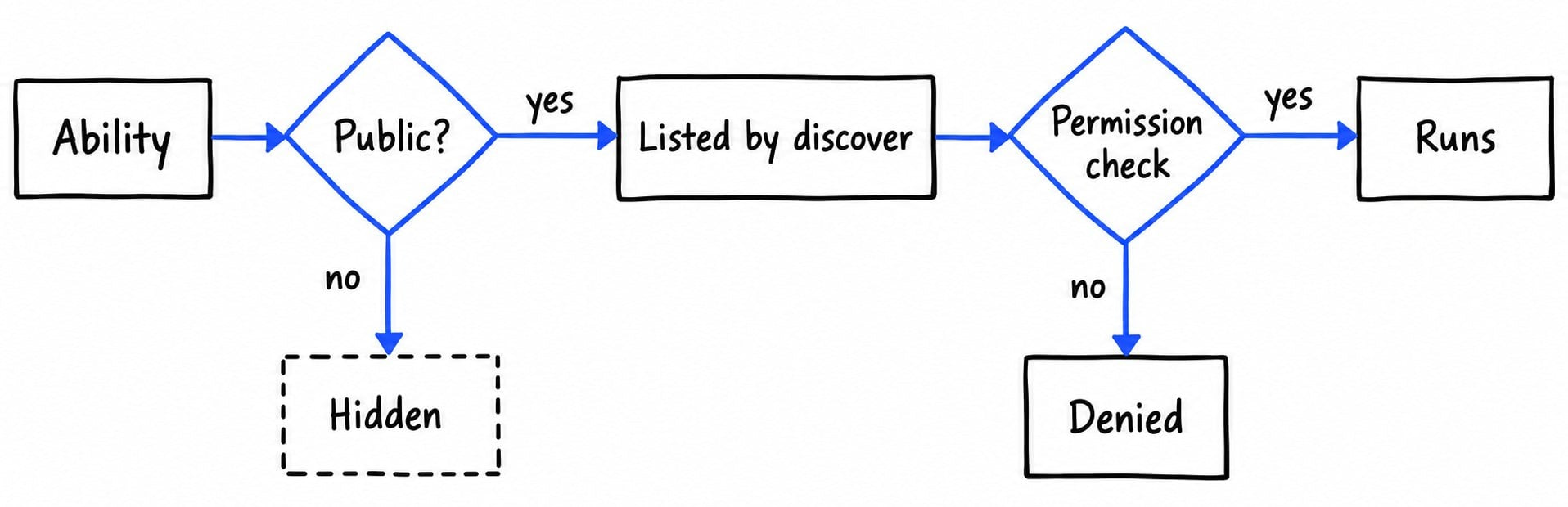
- Opt-In Exposure: By default, every ability registered within the WordPress ecosystem is private and entirely invisible to external MCP clients. An ability only becomes reachable if explicitly marked as public via general or MCP-specific flags.
- The Three-Tool Discovery Flow: Rather than overwhelming an AI client with dozens of direct tool schemas, the Adapter exposes only three foundational tools:
mcp-adapter-discover-abilities(lists available public abilities)mcp-adapter-get-ability-info(fetches the full execution schema for a specific ability)mcp-adapter-execute-ability(runs a specific ability)
- Strict Permission Checks: Even if an ability is marked public and successfully discovered, it cannot execute unless the requesting user passes the native WordPress permission callback tied to that specific action.
Chronology: The Evolution of WordPress and MCP Integration
The journey toward native AI tool execution in WordPress has evolved rapidly alongside the broader adoption of agentic workflows in software development.
- Pre-6.9 Era (Experimental Phase): Early attempts at connecting LLMs to WordPress relied on custom REST API endpoints or experimental GitHub repositories. Notably, Automattic maintained a repository titled
wordpress-mcp. However, as the ecosystem matured toward open standards, that repository was officially deprecated and archived in favor of standardized core APIs. - WordPress 6.9 Release: WordPress core introduced the Abilities API, laying the programmatic groundwork for standardized capability registration across core and third-party plugins.
- Early 2026 (The Developer Preview): WordPress core and community developers published foundational tutorials introducing the concept of moving from abilities to autonomous AI agents using an early iteration of the adapter architecture.
- October 2, 2026 (Version 0.7.0 Launch): The WordPress MCP Adapter officially graduated to the WordPress.org plugin directory, establishing itself as the canonical Composer package and plugin for MCP integration.
- October 2026 (Real-World Audits): Security and performance analysts began evaluating active plugin footprints, revealing that while the architecture is secure by default, third-party plugin configurations can inadvertently expose sensitive administrative capabilities if left unmanaged.
Supporting Data: What Does the Adapter Expose in Practice?
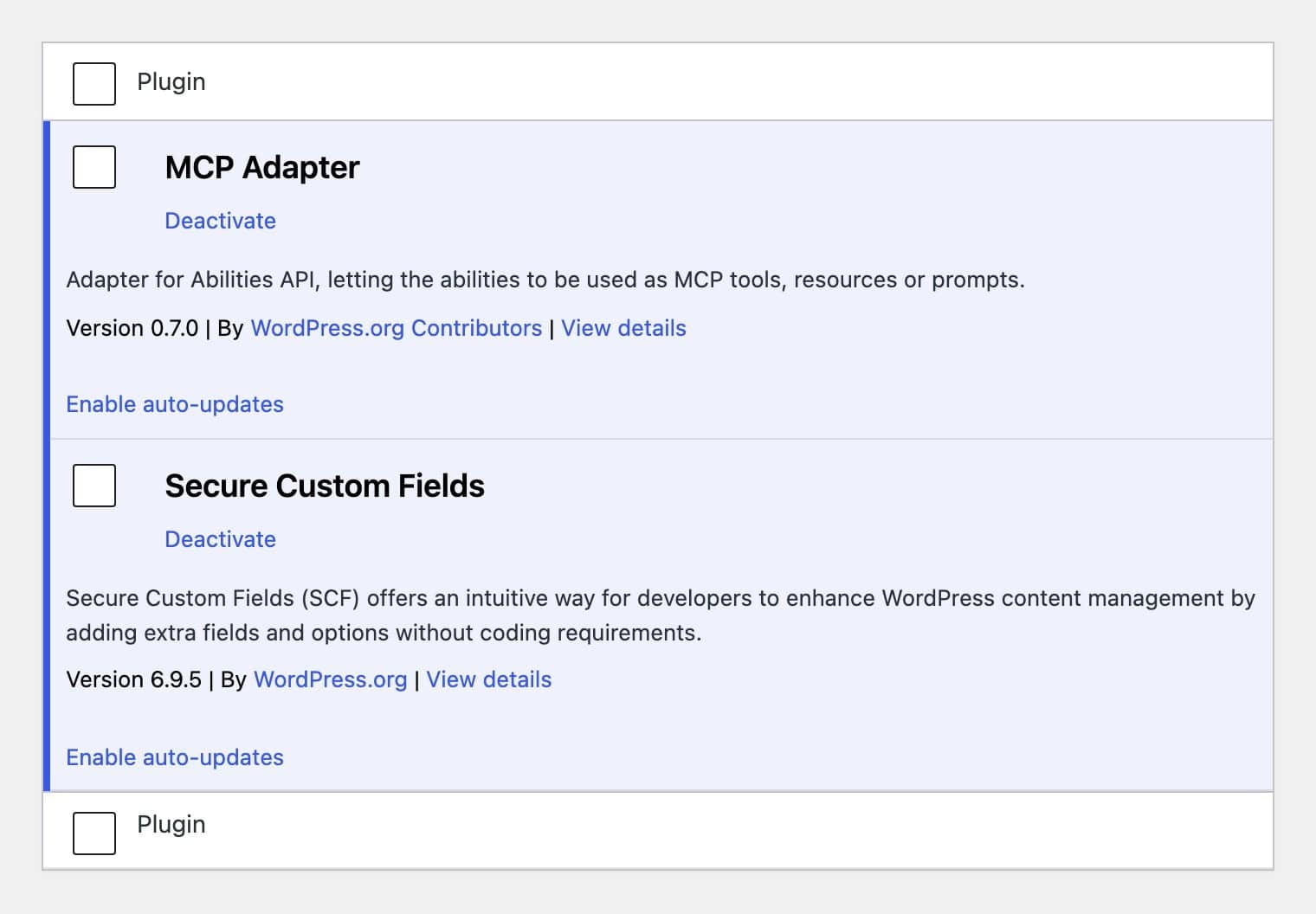
To understand the practical footprint of the MCP Adapter, consider a standardized test conducted on a WordPress 7.1.2 site running MCP Adapter 0.7.0 alongside Secure Custom Fields (SCF) version 6.9.5.
Upon activating the plugin, administrators will notice a distinct lack of configuration clutter: the Plugins screen displays no "Settings" link, and no new top-level administration menu is generated. Yet, when queried via an administrator-authenticated session, the discovery tool returned 51 distinct abilities:
- 3 Core Abilities: Provided natively by WordPress (
core/get-site-info,core/get-user-info, andcore/get-environment-info). - 48 Plugin Abilities: Contributed entirely by Secure Custom Fields, which explicitly flags its management utilities as MCP-public. These cover everything from listing and creating field groups, post types, and taxonomies to importing and exporting structures.
The Risk Profile of Unfiltered Exposure
Among the 48 SCF abilities exposed in this test environment, five were permanent deletion tools, including commands designed to irrevocably destroy field group instances. Conversely, none of the 51 default abilities provided permissions to read, write, or edit standard posts, pages, media attachments, or comments. This highlights a crucial architectural takeaway: The MCP Adapter is merely a window; WordPress core and active plugins dictate what lies on the other side.
Official Responses and Ecosystem Direction
The transition away from fragmented custom integrations toward a unified protocol has received unanimous backing from core contributors and commercial ecosystem developers alike.
In its archival documentation, the maintainers of the deprecated Automattic WordPress MCP repository explicitly directed developers toward the official MCP Adapter, designating it as the canonical solution for all future WordPress-to-AI communications.
Furthermore, major publishing platforms have integrated this philosophy natively. For instance, WordPress.com embeds a fully managed MCP server across its paid plans, enabling users to connect external AI assistants via secure OAuth 2.1 authentication without managing local application passwords or manual server configurations.
Implications: Security, Permissions, and Best Practices
Opening a Content Management System to an autonomous AI agent introduces profound security implications, making adherence to the principle of least privilege mandatory.
1. Authentication and Transport Layers
Clients can connect to the WordPress MCP server via two primary methods:
- HTTP Transport: Operating typically at
/wp-json/mcp/mcp-adapter-default-server, HTTP connections require authentication via WordPress Application Passwords. These cryptographic tokens are restricted to HTTPS environments, can be revoked instantly from user profile screens, and tie all AI actions to a specific user account. - WP-CLI Transport: For local development environments or server-side automation, administrators can leverage WP-CLI to communicate via standard input/output (STDIO):
wp mcp-adapter serve --user=admin --server=mcp-adapter-default-serverThis bypasses HTTP overhead entirely while executing actions strictly under the permissions of the specified user flag.
2. Mitigating Indirect Prompt Injection
According to the OWASP Top 10 for Large Language Models (specifically risk LLM01: Prompt Injection), any text ingested by an AI model—including website comments, form submissions, or imported blog posts—can potentially carry malicious instructions designed to hijack tool execution.
To counteract this, site administrators should never connect an MCP client using an unrestricted Administrator account unless strictly necessary. Instead, best practices dictate:

- Utilizing dedicated, low-privilege user accounts for AI integrations.
- Implementing custom mu-plugins (must-use plugins) to filter out destructive or writing-oriented abilities.
Example: Narrowing Ability Exposure
Administrators can programmatically strip dangerous write and delete functions from third-party plugins using a simple filter in a must-use plugin (wp-content/mu-plugins/limit-mcp-abilities.php):
<?php
/**
 * Plugin Name: Limit MCP Abilities
 * Description: Restricts MCP exposure to read-only capabilities for Secure Custom Fields.
 */
add_filter( 'wp_register_ability_args', function ( $args, $ability_name )
    if ( 0 === strpos( $ability_name, 'scf/' ) && empty( $args['meta']['annotations']['readonly'] ) )
        $args['meta']['mcp']['public'] = false;

    return $args;
, 10, 2 );
By deploying this filter, a site can successfully prune its exposed capability list—dropping dozens of potentially destructive database modification tools while retaining safe, read-only analytical functions for the connected AI assistant.
Conclusion and Alternative Integration Routes
The WordPress MCP Adapter represents a robust, standardized foundation for bridging enterprise content management with next-generation artificial intelligence. However, depending on your technical expertise and operational goals, you generally have three distinct pathways for AI integration:
- Build on the Adapter: Ideal for developers who want granular control over registered abilities, custom code, and strict security filtering.
- Use Managed Solutions: Leverage built-in infrastructure like the WordPress.com MCP server or Jetpack AI integrations for zero-configuration OAuth 2.1 connectivity.
- Install Dedicated Tool Suites: Utilize comprehensive commercial plugins (such as Easy MCP AI by Themeisle) that ship pre-configured with hundreds of user-friendly tools, granular permission switches, and detailed audit logs.
As AI agents become deeply embedded in daily web publishing workflows, understanding and auditing your site’s exposed capabilities via the WordPress MCP Adapter ensures that your website remains both cutting-edge and rigorously secure.