







By Editorial Staff
Updated May 12, 2025
Managing a content-heavy website—particularly one that relies on affiliate marketing—is an exercise in meticulous organization. As SEO best practices evolve, site owners are increasingly tasked with auditing thousands of pages to ensure compliance with search engine guidelines. A recent internal initiative at WPExplorer has highlighted a common pain point for WordPress administrators: the difficulty of identifying specific link attributes within the Gutenberg block editor.
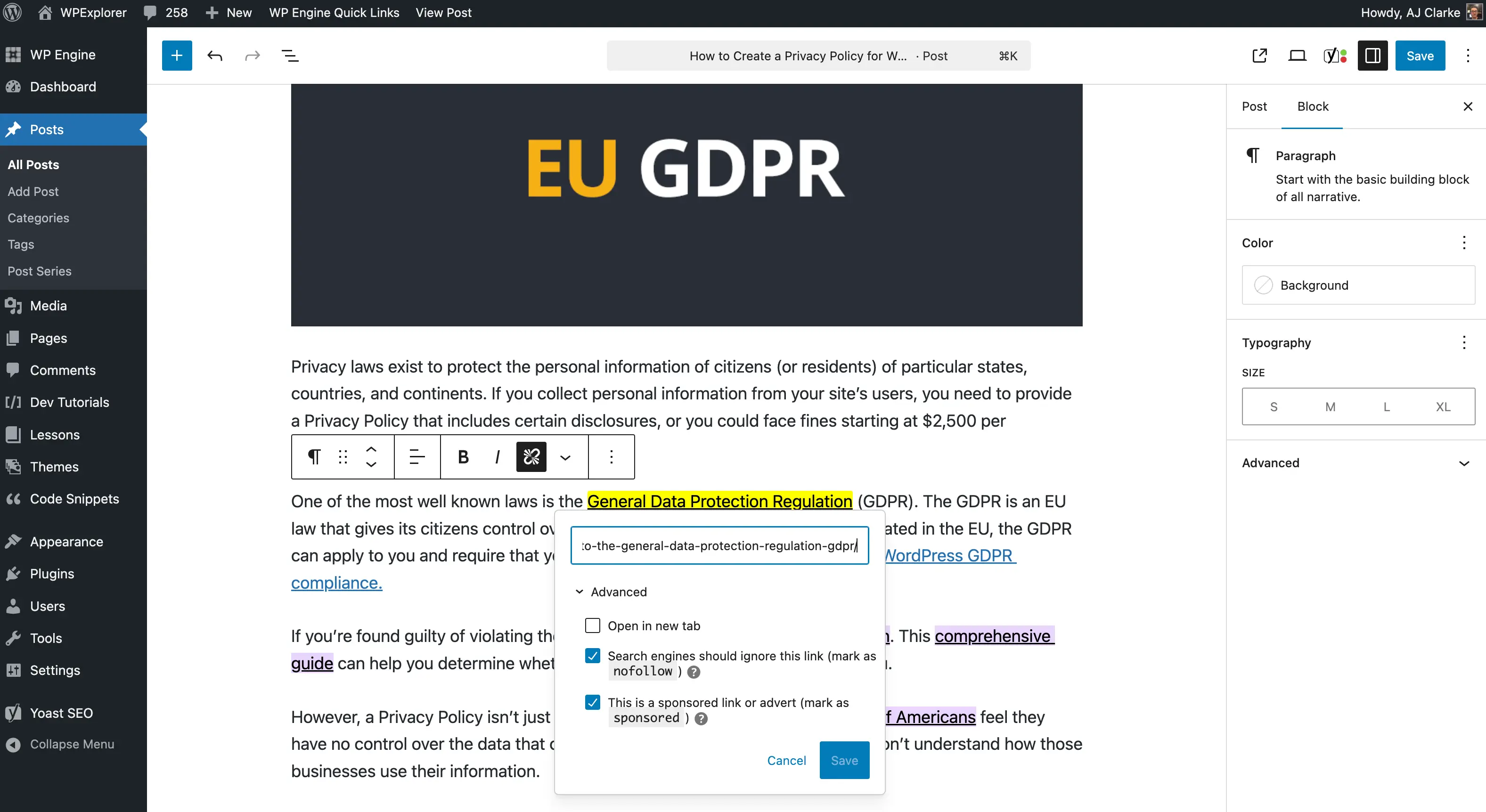
To address this, the team has developed a lightweight, efficient solution to visually highlight sponsored and nofollow links directly within the WordPress dashboard, providing a roadmap for other publishers facing similar technical challenges.
The Core Challenge: Auditing Affiliate Link Integrity
In the current digital landscape, the distinction between link types is more than just technical metadata; it is a critical component of search engine optimization (SEO) and site integrity. Recent updates to Google’s guidelines regarding link attributes have pushed many webmasters to move away from generic rel="nofollow" tags toward more specific identifiers like rel="sponsored" for paid placements and affiliate partnerships.
For sites with thousands of legacy posts, this transition is not merely a "find and replace" task. It requires a systematic audit to ensure that every affiliate link is clearly marked, that the site is in full compliance with disclosure regulations (such as FTC guidelines), and that the site architecture remains clean.
"Recently, I’ve been going through old articles and updating affiliate links to include a disclosure notice next to each one," says AJ Clarke, founder of WPExplorer. "Simultaneously, I’ve been transitioning older rel="nofollow" tags to rel="sponsored". It is a monumental task when dealing with thousands of pages."
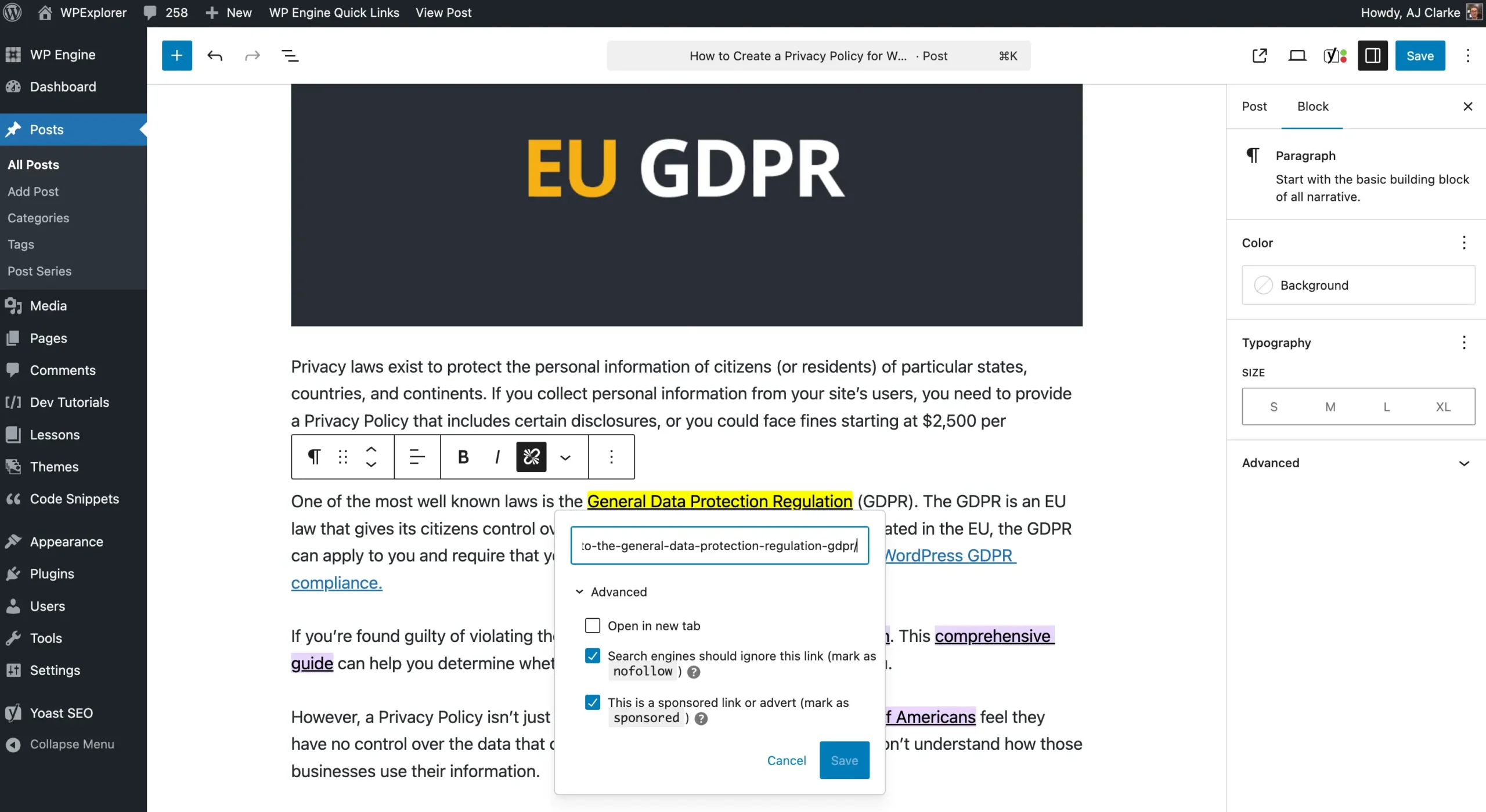
The problem is one of visibility. In the standard WordPress Gutenberg editor, a link looks like a link. Whether it contains a sponsored attribute or no attribute at all is invisible to the editor without manually clicking into the "Edit" block settings. This lack of visual feedback leads to wasted time and increases the likelihood of human error.
A Chronology of the Development Process
The development of the solution followed a logical, iterative path focused on efficiency and ease of deployment.
- Phase 1: Identification. The team recognized that the manual process of checking links was unsustainable. They needed a "heads-up display" approach where the editor could immediately identify the status of any link at a glance.
- Phase 2: CSS Strategy. The team opted for a CSS-based approach using attribute selectors. By leveraging the power of
a[rel~=sponsored], they could target specific link types without modifying the underlying database or post content. - Phase 3: Integration. The team experimented with two methods for injecting the CSS: modifying the theme’s
style-editor.cssand using theenqueue_block_editor_assetshook for an inline approach. The latter was chosen for its portability. - Phase 4: Optimization. By targeting the
.editor-styles-wrapperclass, they ensured the highlights only appeared within the editing environment, keeping the live, front-end user experience untouched. - Phase 5: Public Release. Recognizing the utility for the wider WordPress community, the code was packaged into a lightweight plugin and hosted on GitHub for open access.
Technical Implementation: Injecting Custom CSS
For administrators looking to replicate this functionality, there are two primary pathways: the Editor CSS file method and the inline hook method.
The Editor CSS File Method
For those managing their own themes, creating a dedicated style-editor.css file is the cleanest approach. By adding the following code to the functions.php file, WordPress is instructed to load your custom styles into the block editor:
add_action( 'after_setup_theme', function()
    add_theme_support( 'editor-styles' );
    add_editor_style( 'style-editor.css' );
 );
The Inline Hook Method (Recommended for Plugins)
If you prefer not to modify your theme files directly, or if you are using a third-party theme, the enqueue_block_editor_assets hook is the gold standard. This allows you to "inject" your CSS dynamically whenever the editor loads.
add_action( 'enqueue_block_editor_assets', function()
    wp_register_style( 'wpexplorer-editor-highlight', false );
    $css = '.editor-styles-wrapper a:is([rel~=sponsored],[rel~=nofollow])background:#FFFF00;color: #000; border-bottom: 2px solid #000;';
    wp_add_inline_style( 'wpexplorer-editor-highlight', $css );
    wp_enqueue_style( 'wpexplorer-editor-highlight' );
 );
This snippet uses the :is() CSS pseudo-class to apply a bright yellow background and black text to any link containing the specified rel attributes. The visual result is immediate and impossible to miss, effectively turning the editor into an audit tool.
Implications for SEO and Site Maintenance
The implications of this tool extend far beyond simple aesthetics. By making link attributes visible, site owners gain several strategic advantages:
- Quality Control: Administrators can quickly identify if a post is "over-linked" with affiliate content, allowing for better content balancing.
- SEO Hygiene: It becomes trivial to spot links that are missing necessary attributes. If a link is clearly an affiliate link but lacks a
sponsoredornofollowtag, the highlighting system acts as a safety net, signaling that the link is not currently optimized for search engines. - Disclosure Compliance: Many jurisdictions require clear disclosure of paid relationships. By highlighting these links in the editor, writers are reminded to include the necessary "affiliate link" text nearby, ensuring legal compliance.
- Workflow Efficiency: What previously took hours of tedious clicking now takes seconds of scanning. This allows editorial teams to focus on quality and strategy rather than technical verification.
Challenges in the WordPress Ecosystem
The project also highlights a growing frustration within the developer community regarding the centralized management of WordPress resources. The decision to release this tool via GitHub rather than the official WordPress.org plugin directory was a calculated choice based on the current state of the review process.

"The review process over at WordPress.org is an absolute struggle," the development team noted. "The lead times for plugin reviews can often stretch into months. For simple, utility-focused tools, this creates a significant barrier to entry that discourages innovation."
While WordPress has seen significant growth in revenue and market share, the administrative bottleneck for plugin developers remains a contentious topic. By bypassing the directory and utilizing GitHub, developers can push updates instantly, provide faster support, and avoid the unpredictability of the formal review pipeline.
Conclusion: A Proactive Future for Site Management
The ability to visualize the underlying metadata of a website is a game-changer for those managing large-scale content operations. By utilizing simple, robust CSS selectors within the Gutenberg environment, site owners can ensure their affiliate strategies are both compliant and optimized.
As the web continues to demand higher levels of transparency and technical precision, tools like the one developed by WPExplorer serve as essential components of a modern content workflow. For those interested in adopting this solution, the source code is available on the official WPExplorer GitHub repository, offering a plug-and-play solution for anyone looking to bring clarity to their WordPress dashboard.
Ultimately, the goal of such tools is to strip away the complexity of modern SEO, allowing creators to focus on the one thing that matters most: creating high-quality, valuable content for their readers.