










The architectural landscape of the modern web is undergoing a silent but seismic shift. For over a decade, the standard developer workflow for building a JavaScript application has relied on an ever-growing package.json. If a feature wasn’t readily available in the browser, developers reached for an npm package. This "there’s a library for that" culture was born of necessity, filling the gaps in a fragmented browser ecosystem.
However, the web platform has evolved at an unprecedented pace. Today, a significant portion of the code sitting in the average production bundle is redundant—functionality that was once external is now baked directly into the browser’s DNA. This article explores how developers can reclaim their bundle sizes, improve performance, and simplify their codebases by auditing dependencies against the "Baseline" of modern web standards.
The Evolution of the Web Platform
In the early 2010s, developers were forced to rely on heavy utility libraries like Lodash, date-formatting engines, and complex modal plugins to ensure a consistent experience across browsers. The browser was often seen as a volatile, inconsistent canvas.
The turning point arrived with the formalization of the Baseline initiative, a collaborative project led by the WebDX Community Group. Baseline provides a clear, objective signal about the availability of web features across major browsers (Chrome, Edge, Firefox, and Safari). By categorizing features as either "Newly available" or "Widely available," the platform has given developers a reliable roadmap for when it is safe to deprecate third-party dependencies.
This maturation of the web platform marks the transition from the "Polyfill Era" to the "Native Era," where the browser is no longer just a renderer but a robust application platform.

A Strategic Framework for Dependency Auditing
It is tempting to initiate a "rip and replace" strategy, but doing so without a framework is a recipe for regression. Before deleting a single dependency, development teams should apply a three-pillar decision framework:
- Baseline Compatibility: Is the native feature "Widely available" for your specific user base? If your analytics indicate a long tail of users on legacy browsers, a "Newly available" feature may require a conditional polyfill, which could negate any bundle size savings.
- The Cost of the Swap: Dropping a library is not always free. If a native alternative requires a 40KB polyfill to support older browsers, you may end up increasing your bundle size rather than shrinking it.
- Feature Parity: Libraries often provide convenience wrappers that handle edge cases. A native API might be lighter, but if you rely on specific interceptors or unique configuration patterns in a library like Axios, you must ensure your migration plan accounts for reimplementing that logic.
Cluster 1: The Internationalization (i18n) Win
Perhaps the most dramatic area for improvement is internationalization. Historically, developers relied on libraries like timeago.js and numeral to handle localized formatting. Today, the Intl namespace provides a native, highly performant suite of tools.
- Relative Time:
Intl.RelativeTimeFormatallows developers to generate strings like "yesterday" or "in 3 hours" natively. While the library version often handled unit selection automatically, a simple helper function can replicate this logic, removing the need for a 5-10KB dependency. - Numbers and Lists:
Intl.NumberFormathandles currency, percentages, and compact notation (e.g., "1.2M") with ease. Similarly,Intl.ListFormathandles the complexities of joining array items into grammatically correct sentences, complete with Oxford commas.
For many mid-sized applications, migrating from a suite of i18n libraries to the native Intl API can yield immediate savings of roughly 14KB gzipped.
Cluster 2: The HTTP Client Dilemma
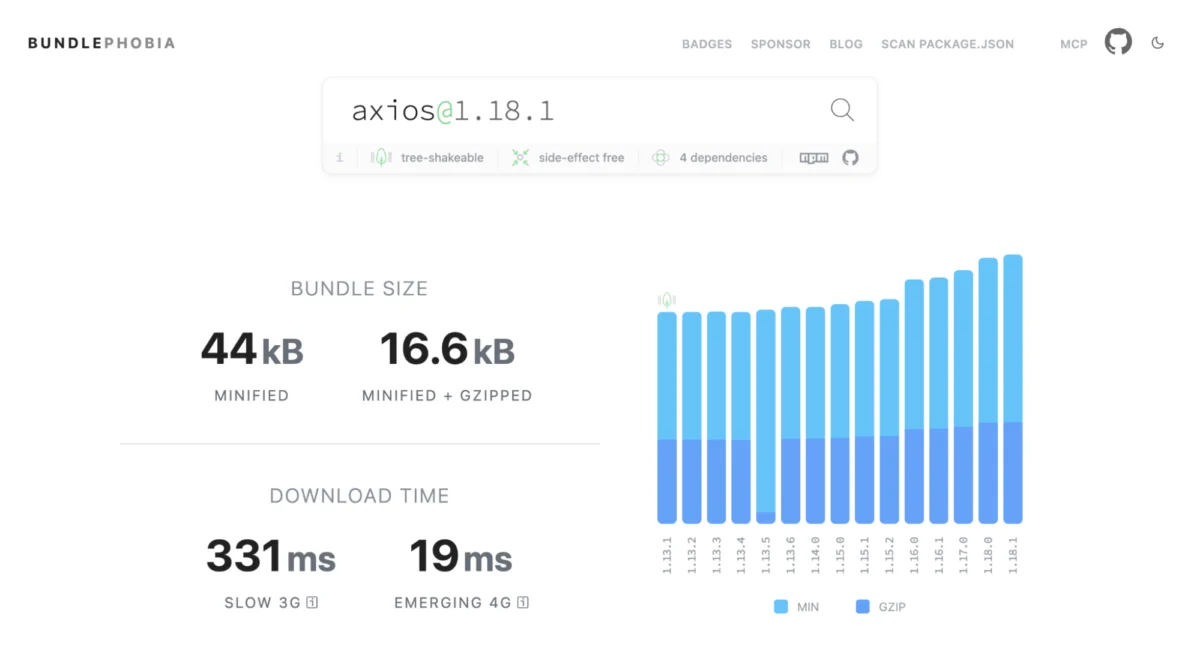
The debate over fetch versus axios is a staple of frontend engineering. While axios provides a rich feature set—interceptors, request cancellation, and automatic JSON parsing—it comes at a cost of roughly 17KB gzipped.
For the majority of web applications, fetch combined with AbortController is sufficient. While fetch requires more explicit syntax (such as calling .json() manually), it aligns the codebase with native standards. The decision here rests on your specific reliance on library-specific features. If you are using interceptors, you do not need to keep a bloated library; you can implement a lightweight, custom fetch wrapper in a few lines of code.

Cluster 3: Native UI Primitives
The most satisfying gains often come from removing UI-related dependencies. Modern browsers have introduced powerful primitives that supersede the need for external modal, tooltip, and focus-management libraries.
- The
<dialog>Element: This is a powerhouse of native accessibility. It handles focus trapping, backdrop styling, and "Top layer" rendering, effectively replacing libraries likefocus-trapanda11y-dialog. - Popover API and Anchor Positioning: Previously, libraries like
tippy.js(often bundled with Popper) were required for floating panels. With the introduction of the Popover API and CSS anchor positioning, developers can achieve the same behavior with zero JavaScript or minimal native logic.
Replacing these UI primitives can reduce a bundle by 24KB or more, while simultaneously improving accessibility, as native implementations are generally more robust than custom, hand-rolled solutions.
Cluster 4: The Lodash Purge
Lodash remains one of the most frequently included dependencies. While it is rare to import the entire library today, individual methods like clonedeep or groupby are often scattered throughout codebases.
- Object.groupBy: This method now replaces the most common use cases for
lodash.groupby. - structuredClone: This native function handles deep cloning of objects, including complex types like
Map,Set, andDate, makinglodash.clonedeeplargely obsolete. - Set Operations: Methods such as
intersection,union, anddifferenceare now native to theSetprototype, allowing for cleaner code and smaller bundle sizes.
Chronology: The Case for Patience (The Temporal Example)
Not every migration is ready for today. The Temporal API, intended to replace the archaic Date object, is a prime example of why developers must stay informed. While Temporal is a superior API, it lacks universal support across all major browser engines.
Currently, using Temporal requires a polyfill that can weigh up to 44KB. For most teams, the performance cost of the polyfill outweighs the benefits of the newer API. This serves as a vital reminder: the goal is not to use the newest feature, but to use the most efficient one. Revisit your dependencies on a quarterly basis; the "wait and see" approach is often the most professional strategy.

Implications for Web Performance
The cumulative effect of these swaps is substantial. For a mid-sized application, auditing and replacing these dependencies can result in a reduction of 60KB to 90KB of gzipped JavaScript. In the context of mobile devices on constrained networks, this equates to hundreds of milliseconds of faster time-to-interactive (TTI).
Beyond performance, there is a long-term maintenance benefit. Code that relies on browser-native APIs is inherently more stable and benefits from the browser engine’s ongoing performance optimizations. You are effectively outsourcing your maintenance burden to the standards bodies that define the web.
Conclusion: A Repeatable Audit Process
To capitalize on these advancements, development teams should adopt a quarterly audit ritual:
- List Dependencies: Use
npm ls --omit=devto identify what is actually in your production build. - Measure Impact: Utilize tools like
source-map-explorerorvite-bundle-visualizerto see which dependencies are the "heaviest" in your actual bundle. - Cross-Reference Baseline: Use
webstatus.devto check the status of native replacements. - Apply the Decision Framework: Evaluate each candidate based on your specific audience and usage patterns.
The gap between "you need a library for this" and "the browser does this" is closing rapidly. By staying current with Baseline and periodically pruning dependencies, developers can build leaner, faster, and more maintainable applications that leverage the full power of the modern web platform.



