SAN FRANCISCO — Messaging giant WhatsApp is quietly developing a substantial visual and functional overhaul for its flagship Android application. According to recent reports from early software builds, Meta is actively redesigning the app’s foundational navigation architecture. The primary focus of this early-stage development centers on the bottom navigation bar, which is slated to receive a modernized aesthetic, altered proportions, and a prominent integration of the company’s proprietary artificial intelligence ecosystem, Meta AI.
Spotted in a freshly deployed beta version, the prospective interface adjustments suggest that WhatsApp is steadily closing the design gap between its Android and iOS platforms, while simultaneously doubling down on the accessibility of conversational AI tools for its billions of users worldwide.
Main Facts
The ongoing redesign effort, which remains in its early developmental phases, introduces several notable departures from the current Android interface. The core takeaways from the latest software leak include:
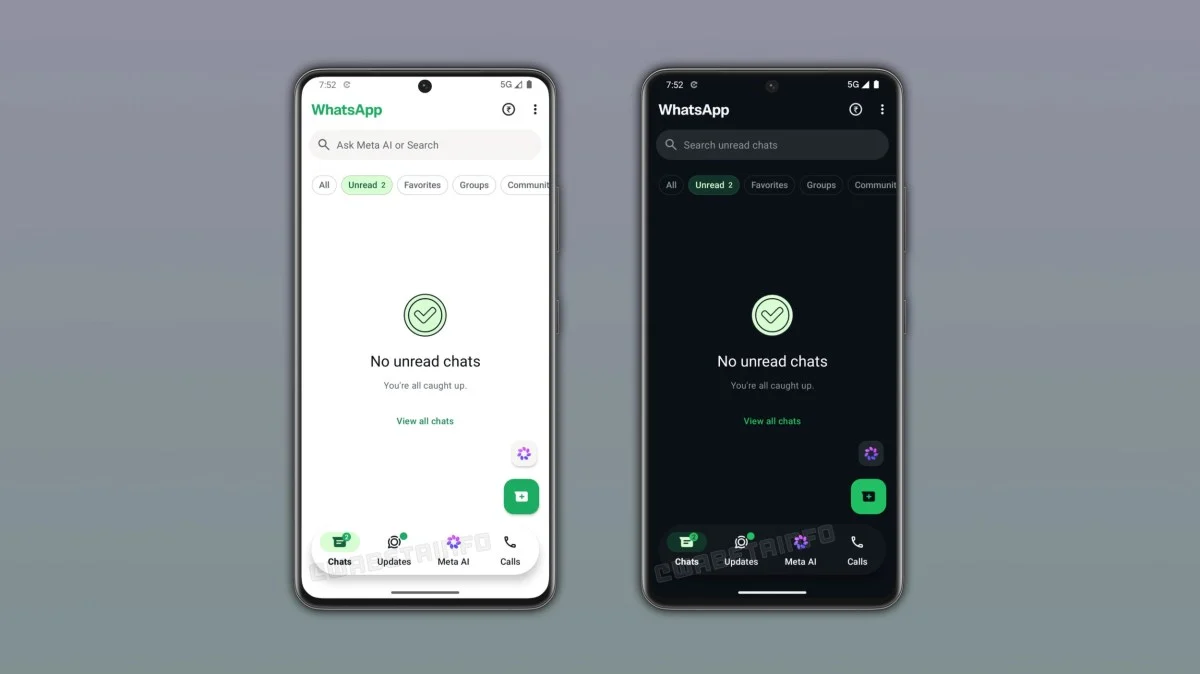
- Bottom Navigation Bar Overhaul: The familiar bottom navigation bar is undergoing a structural reshaping. Early builds show a transition toward a more pronounced, oval-shaped design language that echoes elements of the iOS application’s floating navigation style.
- Increased Transparency: The redesigned bar incorporates a semi-transparent finish, bringing a lighter, more modern aesthetic to the lower portion of the chat and status screens, though it stops short of the full glassmorphism transparency found on Apple devices.
- Prominent Meta AI Placement: Meta AI is moving from its current position as a floating action button situated above the standard "Compose" shortcut. Instead, it is being integrated directly into the core navigation framework of the application.
- Dark Mode Compatibility: As is standard for modern mobile application updates, the new navigation scheme features fully realized dark mode variants to accommodate low-light environments and OLED display efficiencies.
- Early Beta Availability: The experimental design has been detected exclusively within the WhatsApp beta for Android version 2.26.38.10, which is currently rolling out to registered participants in the Google Play Beta program.
Chronology of the Redesign
The evolution of WhatsApp’s user interface on Android has been a gradual process marked by a series of iterative shifts over the past several years. Understanding the current redesign requires looking back at how the platform’s navigation has evolved.
1. The Traditional Android Layout
For the majority of WhatsApp’s history on Android, the app adhered strictly to Google’s older Material Design guidelines. This featured a top-anchored header housing tabs for Communities, Chats, Status, and Calls, supplemented by a floating action button (FAB) for starting new conversations. This design prioritized function over form, ensuring that long-time Android users felt immediately at home within the app’s predictable ecosystem.
2. The Move to the Bottom Navigation Bar
In a significant departure from its historical layout, WhatsApp rolled out a major redesign in 2023 and early 2024 that moved the primary navigation tabs from the top of the screen to the bottom. This brought the Android version into closer alignment with the iOS client, making one-handed operation significantly easier on increasingly large modern smartphones. The layout streamlined navigation into four distinct sections: Chats, Updates, Communities, and Calls.
3. The Introduction of Meta AI
Following the broader industry push toward generative artificial intelligence, Meta integrated its Meta AI assistant directly into its family of applications, including WhatsApp, Instagram, and Messenger. On WhatsApp, this initially manifested as a dedicated blue-and-purple circular icon floating just above the chat compose button, allowing users to initiate queries, generate images, or interact with the assistant with a single tap. While functional, critics and power users noted that the floating button occasionally cluttered the messaging interface.
4. The Current Beta Discovery (Version 2.26.38.10)
The latest chapter in this UI evolution unfolded with the release of WhatsApp beta for Android version 2.26.38.10. Dataminers and eagle-eyed beta testers discovered that Meta is experimenting with unifying the navigation experience by moving Meta AI directly into the bottom navigation bar itself. Because the software is in such an early developmental stage, current builds exhibit placeholder bugs—such as the Meta AI button appearing in two distinct locations simultaneously—confirming that the design is far from finalized and remains subject to rigorous internal iteration.
Supporting Data and Technical Context
To fully grasp the scope of this update, it is helpful to examine the technical ecosystem surrounding WhatsApp’s development pipeline, user demographics, and the broader integration metrics of Meta AI.
Android vs. iOS Design Convergence
For years, cross-platform developers have grappled with the challenge of maintaining platform-native paradigms while ensuring brand consistency. Google’s Material You design language encourages dynamic coloring, card-based layouts, and deep integration with system accents, whereas iOS relies on fixed-position, semi-transparent bars with blurred backgrounds.
| Design Element | Current Android Layout | Proposed Beta Layout (v2.26.38.10) | iOS Equivalent |
|---|---|---|---|
| Navigation Position | Bottom of screen (Flat) | Bottom of screen (Oval, Floating) | Bottom of screen (Floating, Translucent) |
| Transparency | Solid background | Semi-transparent / Frosted effect | High transparency / Blur effect |
| Meta AI Location | Floating action button (above compose) | Integrated within navigation bar | Integrated / Tab-based access |
| Visual Geometry | Rectangular bounds with padding | Rounded, pill/oval geometry | Rounded, pill/oval geometry |
The Scale of WhatsApp
As the world’s dominant messaging platform, WhatsApp boasts over 2 billion active monthly users globally. The vast majority of these users access the service via Android devices, particularly in emerging markets across Latin America, South Asia, and Africa. Consequently, even minor adjustments to the user interface—such as shifting a navigation button by a few pixels or altering the transparency of a menu bar—impact billions of daily interactions.

Meta AI Adoption Metrics
Meta’s aggressive push to integrate artificial intelligence across its ecosystem has yielded massive exposure for Meta AI. According to financial earnings reports released by Meta Platforms, the assistant has accumulated hundreds of millions of monthly active users across WhatsApp, Instagram, and Facebook. By anchoring Meta AI directly into the primary navigation bar of WhatsApp, the company aims to reduce friction, transforming the assistant from a supplementary feature into a central pillar of the messaging experience.
Official Responses and Industry Reception
As is standard practice for major technology conglomerates, Meta has maintained a measured silence regarding unreleased features found in beta code. Representatives for WhatsApp did not immediately respond to requests for comment regarding a definitive rollout schedule or the ultimate design philosophy behind the navigation bar changes.
However, industry analysts and software developers who specialize in reverse-engineering application packages have offered varying perspectives on the update.
Developer Community Insights
Independent researchers who monitor beta builds, such as the prominent community outlet WABetaInfo, have emphasized that the appearance of duplicate buttons in the current test build is a clear indicator of active, fluid development.
"These images do however seem to show that Meta AI is going to be a part of the navigation bar, and not relegated to a floating button above the Compose button anymore," noted industry observers tracking the beta rollout. "However, because the Meta AI button appears in two different places in these early builds, it is definitively not the final version."
User and Critic Reactions
Reaction within the beta-testing community has been mixed, a common occurrence whenever an app utilized by billions alters its muscle-memory pathways:
- The Ergonomic Argument: Many power users welcome the cleanup of the chat interface. Removing the floating action button for Meta AI frees up valuable screen real estate, reducing visual clutter in active conversations.
- The AI Skepticism Argument: Conversely, a vocal segment of users has expressed fatigue regarding the omnipresence of generative artificial intelligence features. For users who prefer a pure, unadulterated messaging experience, embedding AI directly into the primary navigation bar can feel like forced adoption.
- The Aesthetic Appeal: From a purely visual standpoint, the shift toward a more rounded, semi-transparent, oval-shaped bar has been widely praised for modernizing the Android app and bringing a cleaner, more cohesive multi-platform aesthetic to Meta’s software portfolio.
Implications of the Redesign
The transition of Meta AI into the core navigation bar of WhatsApp’s Android client carries significant implications for the future of mobile messaging, user interface design, and artificial intelligence integration.
1. Mainstreaming Conversational AI
By positioning Meta AI alongside essential tabs like Chats and Calls, Meta is signaling that artificial intelligence is no longer an experimental novelty or an optional add-on. Instead, it is being positioned as a fundamental utility equal in importance to traditional peer-to-peer communication. This structural permanence ensures high visibility, which will likely drive continued engagement metrics for Meta’s AI models.
2. The Blurring of Platform Lines
The ongoing harmonization between WhatsApp’s Android and iOS apps reflects a broader industry trend where platform-specific design guidelines are increasingly subordinated to unified brand identities. While power-use Android purists occasionally lament the erosion of classic Material Design principles, the reality of cross-platform development favors a cohesive user experience that remains familiar whether a user switches from an iPhone to a Samsung Galaxy, or vice versa.
3. Future Development Timeline
Because the feature was discovered in version 2.26.38.10 of the Android beta—and given the presence of placeholder bugs and redundant UI elements—analysts estimate that a public rollout is still several weeks, if not months, away. Meta typically subjects major interface overhauls to extensive A/B testing, performance profiling, and accessibility reviews before pushing them to the stable release channel on the Google Play Store.
Conclusion
WhatsApp’s impending Android redesign demonstrates Meta’s relentless pursuit of interface refinement and AI integration. While the current implementation remains rough around the edges, the underlying direction is clear: the future of messaging on Android will be more streamlined, visually modern, and inextricably linked to artificial intelligence. As beta testing progresses in the coming weeks, users and developers alike will be watching closely to see how the final navigation architecture takes shape.