








In a significant effort to refine the user experience of its flagship operating system, Microsoft has begun rolling out a series of performance-focused updates for Windows 11. Following an extensive testing phase with Windows Insiders, the company is now deploying optimizations designed to make the OS feel significantly "zippier," with a particular emphasis on hardware configurations that have historically struggled under the weight of modern software demands—specifically, PCs equipped with 8GB of RAM or less.
These updates arrive at a time when the consumer hardware landscape is increasingly constrained by the rising costs of memory, a trend fueled largely by the massive demand for high-bandwidth RAM in AI data centers. By prioritizing software-level memory management, Microsoft is attempting to alleviate the pressure on everyday users who may be unable or unwilling to upgrade their physical hardware.
The Core Performance Enhancements: Doing More with Less
The hallmark of this latest Windows 11 update is a reported 20 percent increase in system responsiveness. According to Navjot Virk, Corporate Vice President of Windows Experiences, the improvements are rooted in a fundamental rethink of how the operating system manages memory allocation and data prioritization.
Smarter Memory Management
At the heart of the performance boost is a refined memory management system. Windows 11 is now capable of retaining up to 2GB of active data in memory rather than offloading that information to slower storage drives. By keeping critical processes in high-speed RAM, the OS reduces the latency associated with swapping data, allowing users to keep more browser tabs open and switch between demanding applications with significantly less "stutter."
For users running on 8GB of RAM—a configuration that has become increasingly tight for multitasking in the modern era—these changes are designed to provide a "meaningful difference." By optimizing the footprint of background services, Microsoft is effectively breathing new life into mid-range and budget laptops that might otherwise have been deemed "outdated" by software bloat.
Targeted Widget Optimization
Microsoft has also implemented a more aggressive "on-demand" strategy for system widgets. Previously, widgets could consume memory even when they weren’t being actively interacted with. On PCs with 8GB of RAM or less, Windows 11 will now only load these widgets when the user explicitly opens the widget board. This shift is projected to free up more than 200MB of memory, a small but impactful margin that can prevent system slowdowns during intensive tasks.
Chronology of the Update Rollout
The path to these performance optimizations has been a calculated process, moving from internal development to public-facing stability.
- Early Development and Insider Testing: Throughout the latter half of the year, Microsoft deployed various builds to the Windows Insider program. These builds acted as a testing ground for memory management algorithms and the revamped application suite.
- The "Zippier" Benchmarks: During the Insider phase, telemetry data provided the basis for the 20 percent responsiveness claim, as engineers tracked how long it took for the OS to handle "heavy" multitasking scenarios.
- The AI Integration Phase: Parallel to the performance work, Microsoft began testing the integration of chatbot-like capabilities into the Windows Search bar, moving from a simple file indexer to an intelligent assistant.
- Public Deployment: As of this week, these features are transitioning from the Insider branch to the general public, signaling a shift in focus from experimental features to stability and efficiency.
Supporting Data: Why RAM Management Matters
The industry-wide concern regarding RAM prices is not merely anecdotal. As AI-focused enterprises continue to purchase massive quantities of DDR5 and HBM (High Bandwidth Memory) modules, the supply chain for consumer-grade components has faced persistent price volatility.
- The 8GB Threshold: Historically, 8GB was the standard for a competent PC. Today, it is often viewed as the bare minimum. By optimizing Windows to work more efficiently within this specific bracket, Microsoft is protecting its user base from the necessity of forced upgrades.
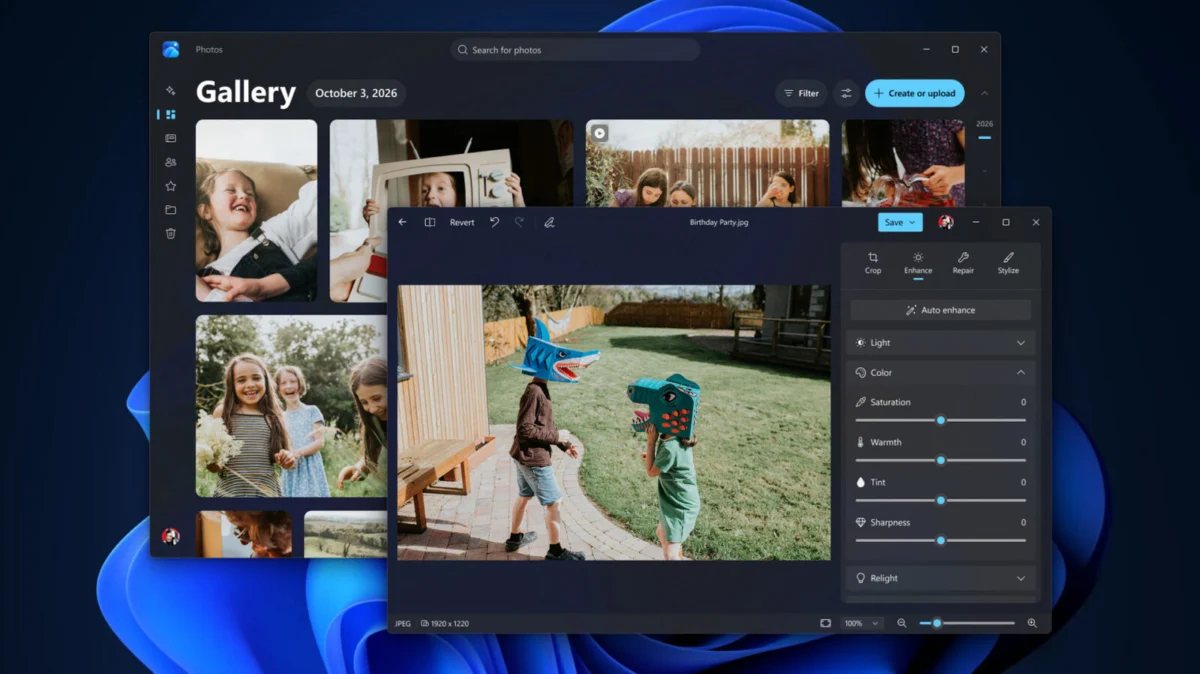
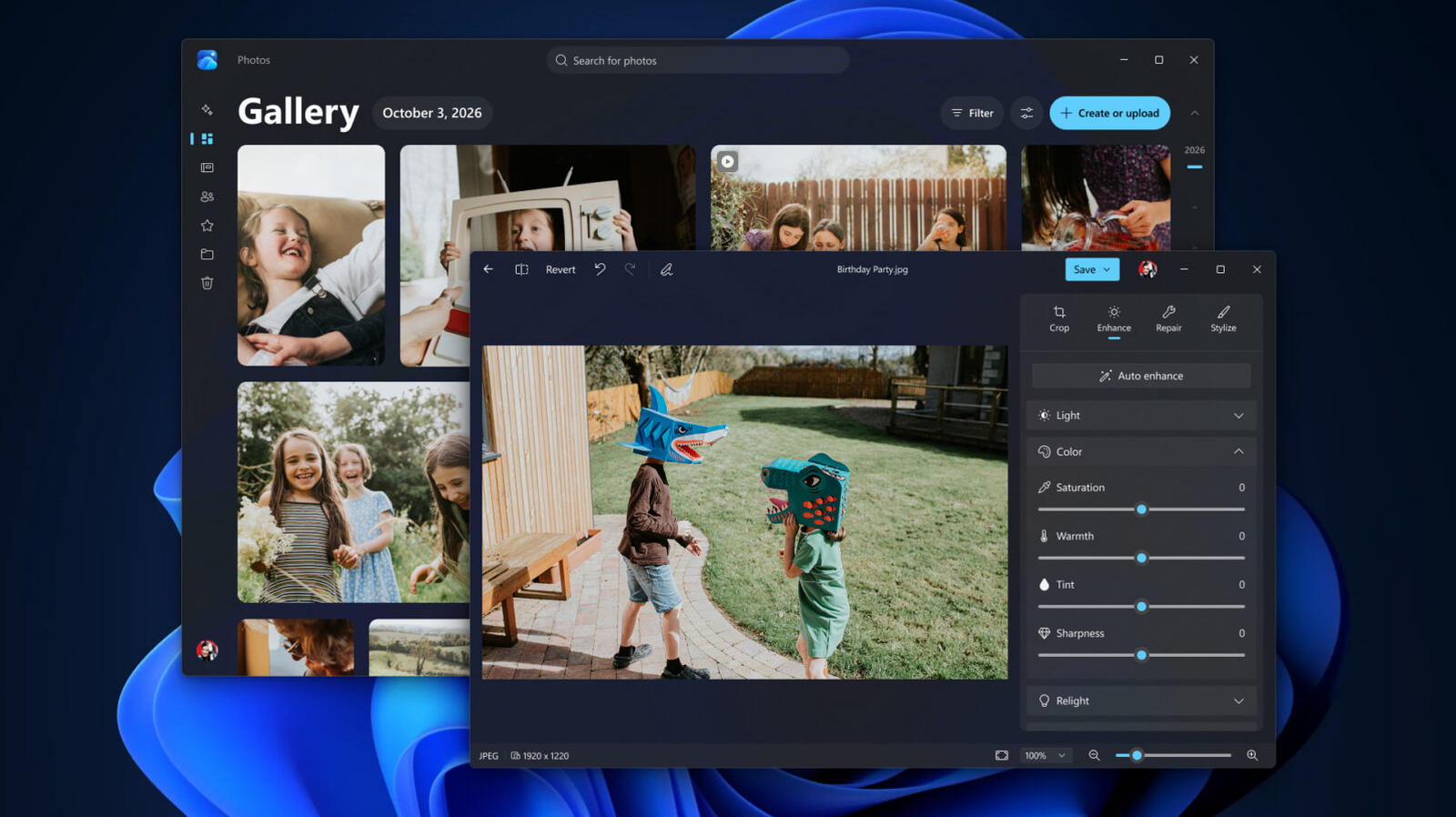
- Editor and Viewer Velocity: Beyond the OS kernel, Microsoft has overhauled its core creative applications. The native Photos app editor now loads 25 percent faster, while the standard image viewer is 30 percent quicker. These metrics are critical for users who rely on the OS for quick media management, as they demonstrate that the "responsiveness" goal extends from the system level to the user interface level.
Official Responses and Strategic Philosophy
In his official blog post, Navjot Virk emphasized that the goal of these updates is to make the "everyday experience" feel reimagined. The philosophy is clear: Microsoft recognizes that if it cannot control the global price of silicon, it must instead control the efficiency of the software running on that silicon.
Microsoft’s involvement in the AI space—through its massive investments in OpenAI and its own Azure data centers—makes it a key player in the current hardware supply crunch. Consequently, these performance updates serve as a necessary public relations move. By optimizing Windows 11, Microsoft mitigates the perception that its software is becoming "heavy" or "unoptimized," ensuring that the OS remains accessible even as hardware requirements for AI-centric features continue to climb.
Implications: A New Era of Software Efficiency?
The implications of this update are far-reaching for both enterprise and casual users.
For the Casual User
For the student, the remote worker, or the casual browser user, these changes mean that a three-year-old laptop will likely feel brand new. The reduction in background resource consumption means less heat, longer battery life, and fewer instances of the "spinning wheel" of death during heavy browser sessions.
For the Enterprise
Corporate IT departments often struggle with the "refresh cycle"—the cost of replacing thousands of machines when they become too slow to run the latest OS. Microsoft’s focus on 8GB-friendly performance helps extend the lifecycle of corporate fleets, providing a direct financial benefit to businesses that are currently managing tight budgets.
The Evolution of Windows Search
Perhaps the most ambitious change is the transition of Windows Search into a chatbot-driven interface. By allowing users to perform thousands of actions—ranging from changing system settings to managing files—through a conversational interface, Microsoft is signaling a shift away from traditional navigation. While this is currently limited to Insider testers, it represents the next stage of the Windows UI: a system that anticipates intent rather than simply executing commands.
Looking Ahead: The Future of Windows 11
As Microsoft continues to refine its ecosystem, the focus appears to be twofold: integrating sophisticated AI tools while simultaneously "trimming the fat" from the operating system’s core. The revamped Photos app, which now aggregates images from local storage, OneDrive, and iCloud into a single, high-performance gallery, is a prime example of this strategy. It is not just adding features; it is making the existing ones faster and more cohesive.
While the "AI-ification" of Windows 11 will likely remain a polarizing topic among purists, the under-the-hood performance improvements are universally beneficial. By successfully squeezing more performance out of modest hardware, Microsoft is proving that software innovation is just as important as raw hardware power.
As these updates reach the global user base, the true test will be in the real-world performance metrics observed by the community. If the 20 percent responsiveness gain holds true for the average user, it may well silence the lingering complaints regarding Windows 11’s resource demands. For now, the message from Redmond is clear: Windows 11 is becoming leaner, faster, and more capable, regardless of the hardware under the hood.