





In the rapidly evolving landscape of generative artificial intelligence, the transition from local experimentation to scalable application deployment remains a critical hurdle for developers. Most AI agents begin their lifecycle as ephemeral Python scripts running within the confines of a command-line interface (CLI). While this environment is ideal for initial testing and rapid iteration, it inherently lacks the accessibility and multi-tenancy required for broader deployment.
This guide explores the architectural shift required to transform a local AI agent—powered by LangChain, Ollama, and Qwen—into a robust, multi-user service. By leveraging FastAPI for the backend and Streamlit for the frontend, we can create a sophisticated, production-ready environment that maintains isolated user sessions, streams responses in real-time, and eliminates the dependency on costly, per-call model API fees.
The Architectural Shift: Why Decouple the Agent?
The fundamental limitation of a CLI-based agent is its monolithic nature. When a script runs on a local machine, the conversation state is typically locked to that single process. For an AI to be "useful" in a team or enterprise setting, it must be capable of handling concurrent requests from multiple users, each with their own unique context, history, and session state.
The proposed architecture utilizes a clear separation of concerns:

- The Backend (FastAPI): Acts as the orchestrator. It manages HTTP requests, validates inputs using Pydantic, executes the LangChain agent logic, and streams tokenized responses back to the client.
- The Frontend (Streamlit): Serves as a thin, reactive client. It abstracts the complexities of HTTP communication, maintaining a user-friendly interface that renders markdown and chat bubbles, while delegating all computational "heavy lifting" to the API.
This design is not merely about aesthetics; it is about modularity. By decoupling the agent from the UI, the same backend service can eventually be consumed by mobile applications, internal dashboards, or other automated services, providing a versatile foundation for future scaling.
Chronology of Development
Phase 1: Environment Preparation and Model Integration
The journey begins with local infrastructure. Using Ollama, a powerful tool for running large language models (LLMs) locally, we select the Qwen 3.5 series (specifically the 4B parameter version) to strike a balance between reasoning capability and hardware efficiency.
Prerequisites:
- Ollama Installation: Ensure the Ollama binary is active and pull the model:
ollama pull qwen3.5:4b. - Virtual Environment: Isolate dependencies using
python3 -m venv venv. - Library Configuration: Install the essential stack:
fastapi,uvicorn,streamlit,langchain,langchain-ollama, andlanggraph.
Phase 2: Building the FastAPI Backend
The core of our service lies in the app.py script. The implementation focuses on three primary objectives:

- Thread Isolation: By using
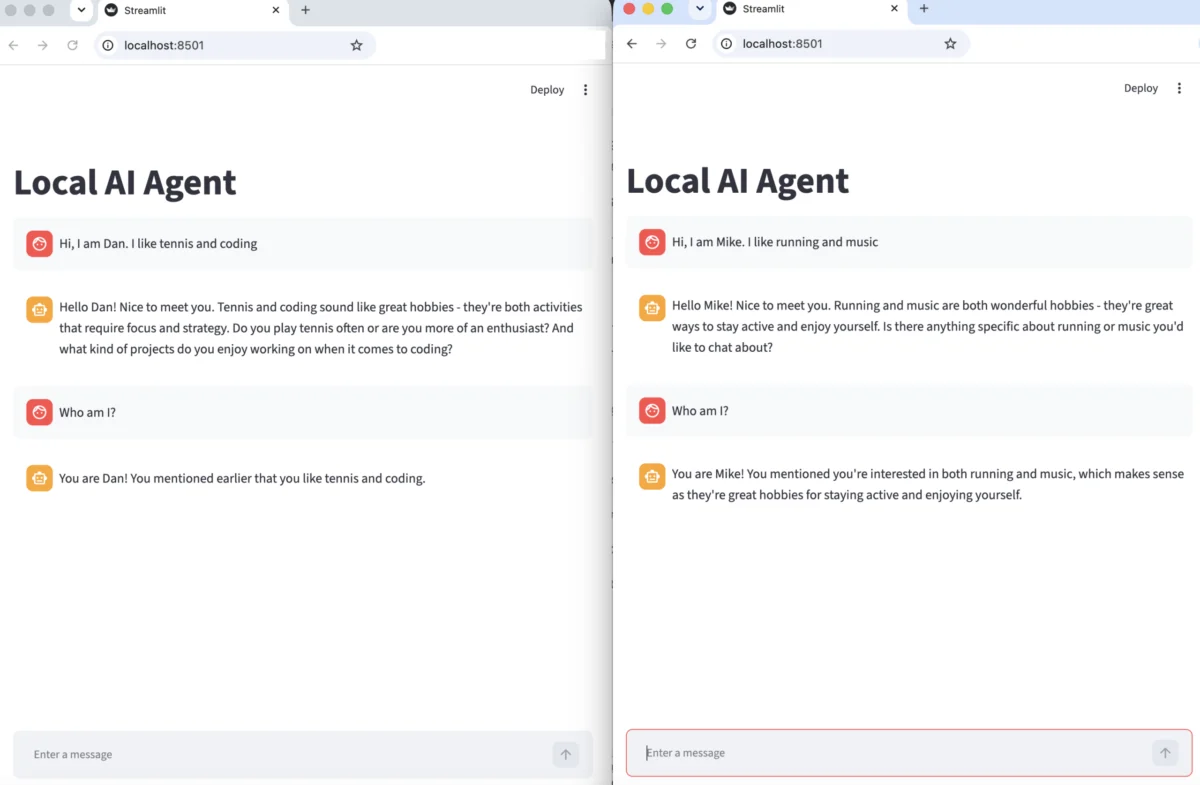
InMemorySaverfrom LangGraph, we can associate specificuser_idstrings with distinct conversation threads. This ensures that User A’s query about "word counts" does not contaminate the context of User B’s query about "current time." - Streaming Architecture: Waiting for a full LLM response can lead to high latency perception. We utilize
stream_events(version="v3")from LangChain to push tokens to the client as they are generated. - Endpoint Optimization: By instantiating the agent globally, we avoid the overhead of re-initializing the model on every POST request, significantly reducing latency.
Phase 3: The Streamlit Interface
The streamlit_app.py file acts as the bridge. It manages the st.session_state to ensure that every user is assigned a unique UUID upon their first visit. This UUID is passed in the JSON payload to every API call, allowing the backend to map the request to the correct memory thread.
Supporting Data and Technical Specifications
The efficiency of this architecture is highlighted by its resource consumption and response handling. When a user sends a message, the request follows a strictly defined lifecycle:
| Component | Responsibility | Technology |
|---|---|---|
| Validation | Schema enforcement | Pydantic |
| Orchestration | Agent flow & Tool calling | LangChain / LangGraph |
| Inference | Local model execution | Ollama (Qwen 3.5:4B) |
| API Layer | HTTP/JSON communication | FastAPI |
| Frontend | Interactive GUI | Streamlit |
The /chat/stream endpoint is designed to accept a ChatRequest object containing a UUID and a message string. The Pydantic model automatically rejects malformed requests, providing a layer of security and predictability. The use of StreamingResponse ensures that the network overhead is minimized, as the frontend begins rendering text chunks as soon as the first byte is produced by the model.
Official Implementation Logic
The brilliance of this setup is found in how it handles "state." In a traditional application, you might use a database to track sessions. Here, we use langgraph’s checkpointing system.

# Conceptual snippet for session isolation
config=
    "configurable":
        "thread_id": str(req.user_id),

,
By setting the thread_id to the user_id passed by the frontend, the agent is programmatically forced to retrieve only the relevant message history associated with that specific user. This is a highly efficient way to manage multi-user states without the immediate need for complex relational database management systems (RDBMS).
Implications for Future Scaling
Security and Authentication
While this tutorial provides the framework for multi-user support, it assumes a trusted environment. For production deployment, the next logical step is to integrate OAuth or JWT (JSON Web Token) authentication within the FastAPI layer. This would ensure that user_id values cannot be spoofed, protecting user data from unauthorized access.
Persistence
The InMemorySaver is perfect for development but is volatile—it clears upon server restart. To transition to a production-ready system, developers should swap the memory saver for a database-backed solution like Redis or PostgreSQL. LangGraph provides built-in adapters for these, making the transition relatively seamless.
Observability
As the number of users grows, monitoring becomes non-negotiable. Implementing structured logging and tracing (such as LangSmith) allows developers to inspect the "thought process" of the agent, identify bottlenecks in tool execution, and catch potential hallucinations before they reach the end user.

Why Build Your Own Instead of Using Existing Platforms?
One might ask: "Why not use LibreChat or Open WebUI?" The answer lies in Control and Domain Knowledge.
Using platforms like LibreChat is excellent for users who need an "out-of-the-box" solution. However, by building this stack yourself, you gain an intimate understanding of the AI pipeline. You learn how to manage token streams, how to debug tool-calling failures, and how to optimize the interaction between the frontend and backend. This knowledge is invaluable for developers looking to integrate AI into proprietary software or custom enterprise workflows where off-the-shelf tools might fall short of specific compliance or architectural requirements.
Conclusion
The evolution of an AI project from a local script to a multi-user service is a pivotal moment in any developer’s journey. By wrapping local agents in FastAPI and Streamlit, we break down the barriers of terminal-based interaction, opening the door to collaborative and scalable AI applications.
This architecture proves that you do not need an enterprise-grade cloud budget to build a professional-grade AI service. With Ollama, Python, and a clear understanding of state management, you can build tools that are not only functional but also highly extensible. Whether you are building a tool for personal productivity or a service for your entire team, the principles outlined here provide a robust, low-latency foundation for the next generation of AI-driven applications. Happy coding, and enjoy the process of bringing your agents to life.