





When a high-priority product page slips in the SERPs, or a competitor suddenly leapfrogs your best-performing content, the pressure to diagnose the issue is immediate. In the fast-paced world of SEO, waiting for a full-scale site crawl to identify a technical glitch is often a luxury you cannot afford. You need answers, and you need them now.
Enter SEOquake, Semrush’s powerful, free Chrome extension designed for rapid, surgical SEO analysis. By providing an instant, color-coded diagnostic of any webpage, it allows practitioners to move from triage to actionable insights in as little as three minutes. This article outlines a professional, streamlined workflow for auditing your pages without ever leaving your browser.

Understanding the SEOquake Advantage
At its core, SEOquake acts as a real-time health monitor for your web assets. It offers a comprehensive audit of technical signals, on-page SEO factors, linking architecture, and essential metrics provided by the Semrush database.

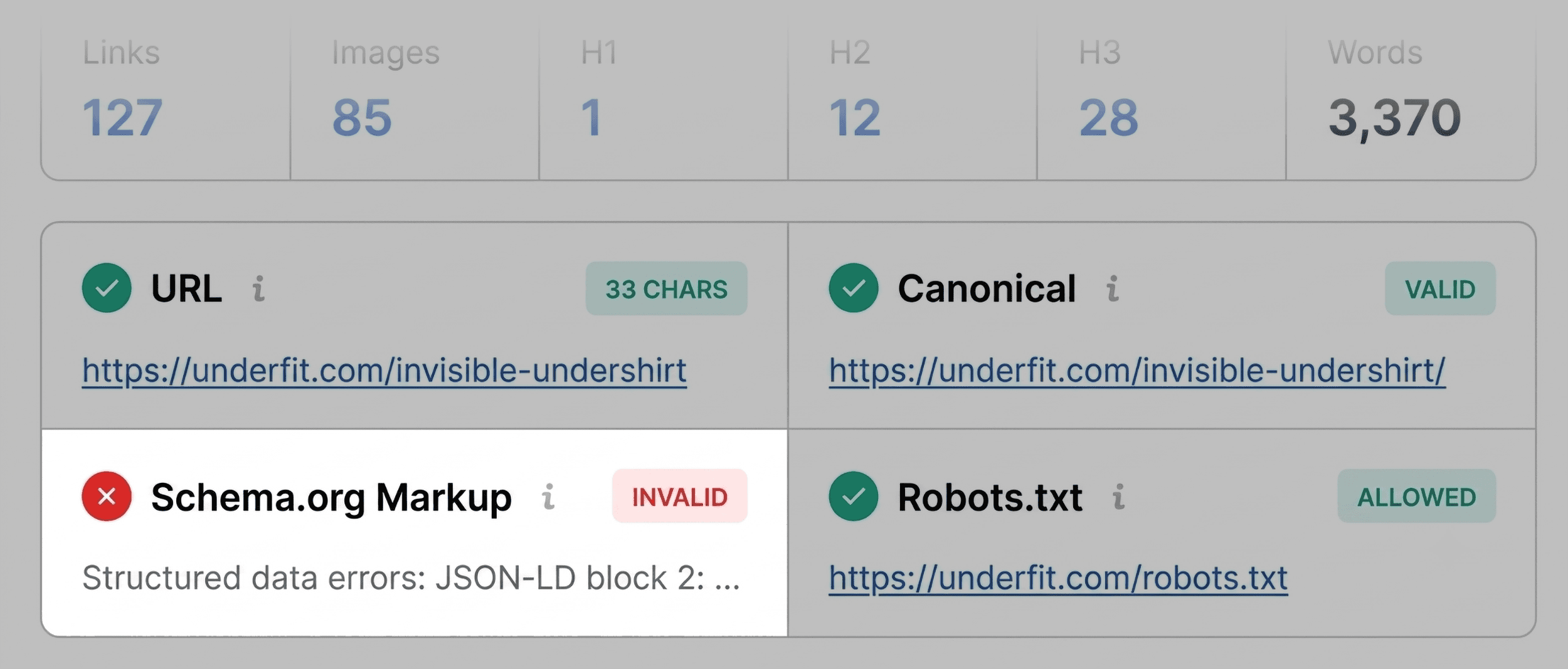
The utility of the tool lies in its visual simplicity. By utilizing a color-coded interface—green for optimal, orange for warnings, and red for critical errors—SEOquake allows you to prioritize your remediation efforts. If a page’s schema markup is flagged in red, you know exactly where to direct your focus, bypassing the need to hunt through thousands of lines of source code.

The Three-Minute Diagnostic Workflow
Phase 1: Triage via the Quick View Pop-Up (0:00–1:00)
The first minute of your audit is dedicated to "triage." The objective is not to solve every problem but to identify whether there is an obvious, show-stopping issue affecting your page’s visibility.

Open the SEOquake extension while on the page in question and navigate to the Page Info, Audit, and Content tabs. Spend approximately 20 seconds per tab.

What to look for in the Page Info tab:

- Title Tags and Meta Descriptions: Ensure they are present, descriptive, and within optimal character counts.
- Heading Tags: Check for a logical hierarchy (H1, H2, H3).
- Schema Markup: This is critical for e-commerce. If your product schema is flagged in red, your page may be ineligible for rich snippets, such as star ratings or price displays.
- Canonical Tags: Verify the page is self-referencing or points to the correct master copy.
- Language Tags: Ensure
hreflangis correctly implemented for international accessibility.
Phase 2: Technical Deep-Dive (1:00–2:00)
Once the initial triage is complete, pivot to the Audit tab. Here, the tool scans for the technical fundamentals that often fly under the radar. It evaluates crawlability, indexation status, meta robots tags, and mobile-friendliness.

While "orange" warnings may not be immediate blockers, they often indicate areas of technical debt. For instance, if the tool flags missing alt text on images, you aren’t just facing an SEO issue; you are facing an accessibility barrier. For product pages, where images are the primary sales driver, resolving these warnings is essential for both user experience and search engine interpretability.

Phase 3: Content Structure and Keyword Density (2:00–3:00)
In the final minute, examine the Content tab. In the era of AI-driven search, clear page structure is more important than ever. AI systems and search crawlers rely on the HTML structure to interpret the relationship between different topics on a page.

A common pitfall is a broken heading structure—for example, skipping from an H1 directly to an H4. While this might look fine on the front end, it creates a "fractured" document for search bots. Use this time to ensure your primary keywords are naturally integrated into your headings and that the page’s topic coverage is balanced.

Diagnosing Issues with the Full Report
If the Quick View pop-up reveals a red flag, click "View Full Report." This launches a more granular interface divided into six distinct panels: SEO Analysis, Diagnosis, Density, Internal Links, External Links, and Semrush.

Technical Audit Panel
When you encounter a red flag here, use the "Test in Rich Results" link to interface directly with Google’s own diagnostic tools. This confirms whether the issue identified by SEOquake matches the errors detected by search engine crawlers. For many, this provides the definitive proof needed to move a task into a developer’s sprint queue.

Keyword Density Panel
Use the keyword cloud to determine if your page’s focus has drifted. If a term like "v-neck" is your target keyword but doesn’t appear in the top 10 most frequent terms, your content may be insufficiently optimized. Note that some "odd" terms in the density table may simply be remnants of interactive UI elements; focus on the primary nouns and phrases that describe your product.

Link Health Panel
Broken links are a silent killer of SEO authority. The Links panel allows you to export a CSV of all internal and external links. If you discover a high volume of broken external links, it can indicate that the page is outdated or that the outbound content is no longer reliable. Cleaning these up strengthens your page’s credibility.

Implications: When to Fix at the Page Level vs. Site-Wide
The final step of your three-minute audit is determining the scale of the fix.

If you find that an XML sitemap is missing or that JSON-LD errors are appearing on every single product template, you are no longer dealing with a "page-level" problem; you are dealing with a site-wide architectural issue. In these cases, SEOquake acts as the early warning system that tells you it is time to run a comprehensive Site Audit using the full suite of tools available in Semrush.

Conclusion: The Power of Proactive Auditing
The value of an SEOquake audit is found in its frequency. By making this three-minute check a routine part of your workflow—perhaps every time you update a page or notice a fluctuation in rankings—you transform SEO from a reactive "firefighting" activity into a proactive maintenance strategy.

The tools are at your disposal; the Chrome Web Store provides immediate access. By mastering this three-minute workflow, you ensure that your pages are not just ranking, but performing at their peak, providing the best possible experience for both your users and the search engine bots.

Backlinko is owned by Semrush. We are dedicated to providing world-class SEO insights backed by hands-on experience. Unless otherwise noted, this content was written by an employee or paid contractor of Semrush Inc.