







Published: July 23, 2026
Author: Lumar Editorial Team
Reading Time: ~11 minutes
In a major development for the technical SEO and digital marketing industries, Lumar has officially announced the launch of its Model Context Protocol (MCP) server. This new capability connects users’ AI assistants directly to comprehensive Lumar website intelligence platforms, spanning crawl data to AI Visibility scores.
By eliminating the tedious process of manually switching between tabs, exporting CSVs, or copying raw data into separate chat windows, the integration allows digital marketing teams, engineers, and executives to interact with deep technical insights using plain, conversational English.
Main Facts: What is the Lumar MCP Server?
The Lumar MCP server is an open-standard integration built on the Model Context Protocol framework. It enables popular AI assistants—including Claude, ChatGPT, Cursor, and other MCP-compatible environments—to interface directly with a user’s Lumar account.
Rather than treating AI as an isolated tool requiring manual data entry, the Lumar MCP server bridges two core areas of the platform:
- Lumar Analyze: Empowers users to query crawl data, filter report rows, aggregate data across dimensions, track health trends, manage tasks and segments, and execute exports. It also integrates with external ticketing systems like Jira to raise issues straight from findings.
- Lumar AI Visibility: Tracks visibility scores over time, identifies which topics and prompts drive brand citations, compares performance against competitors in generative AI search, spots coverage gaps, and triggers fresh content-evaluation runs.
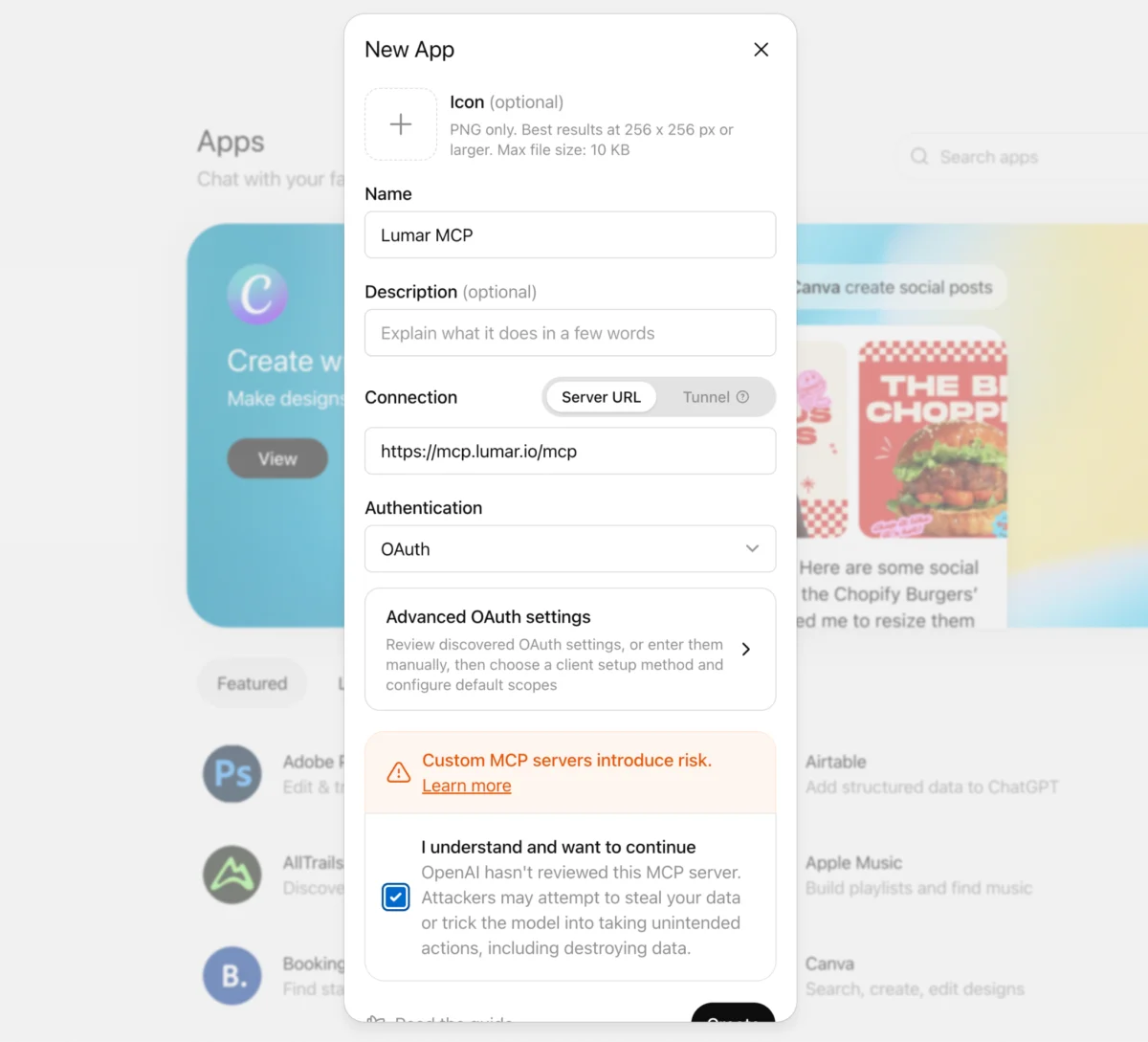
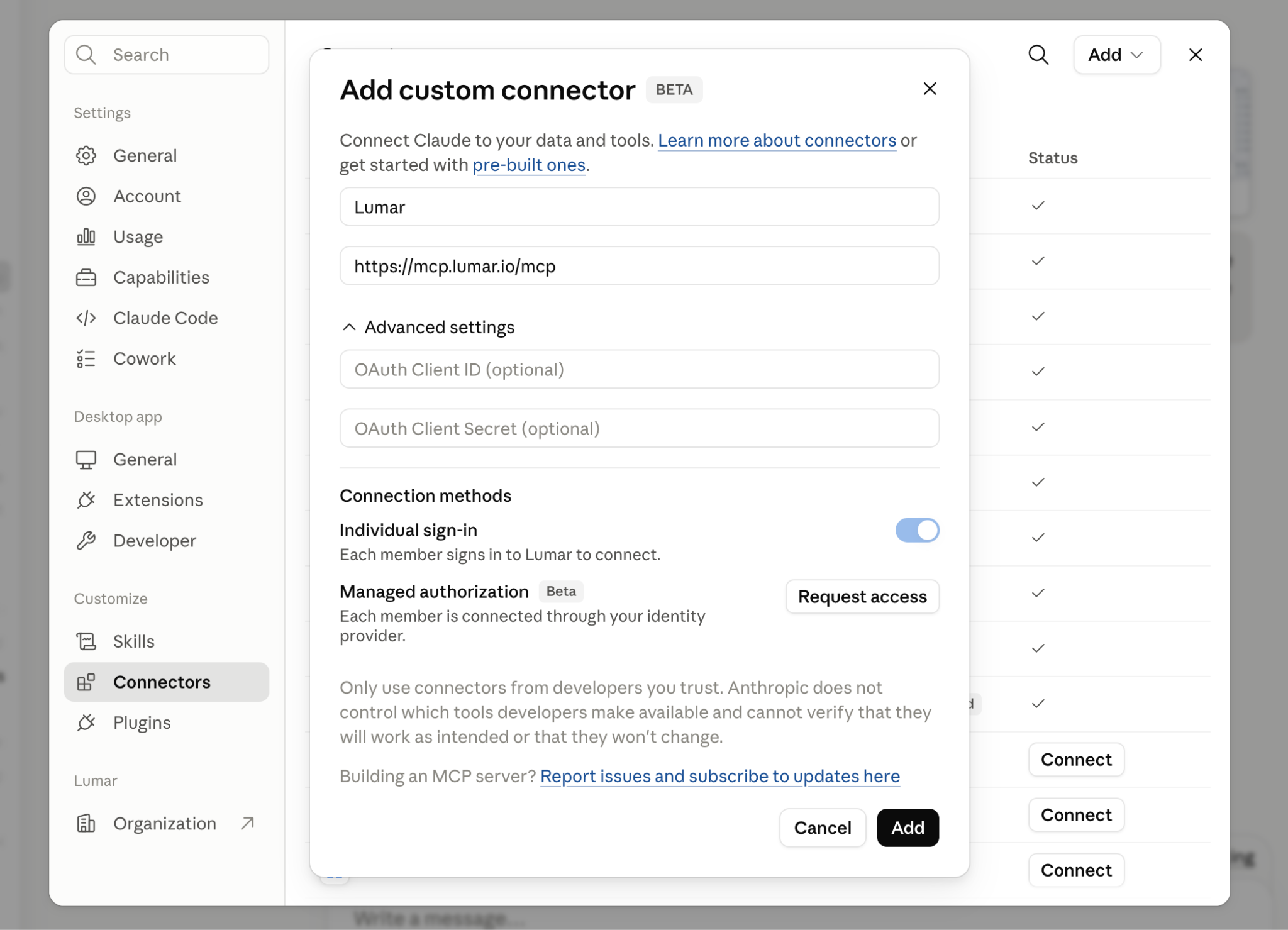
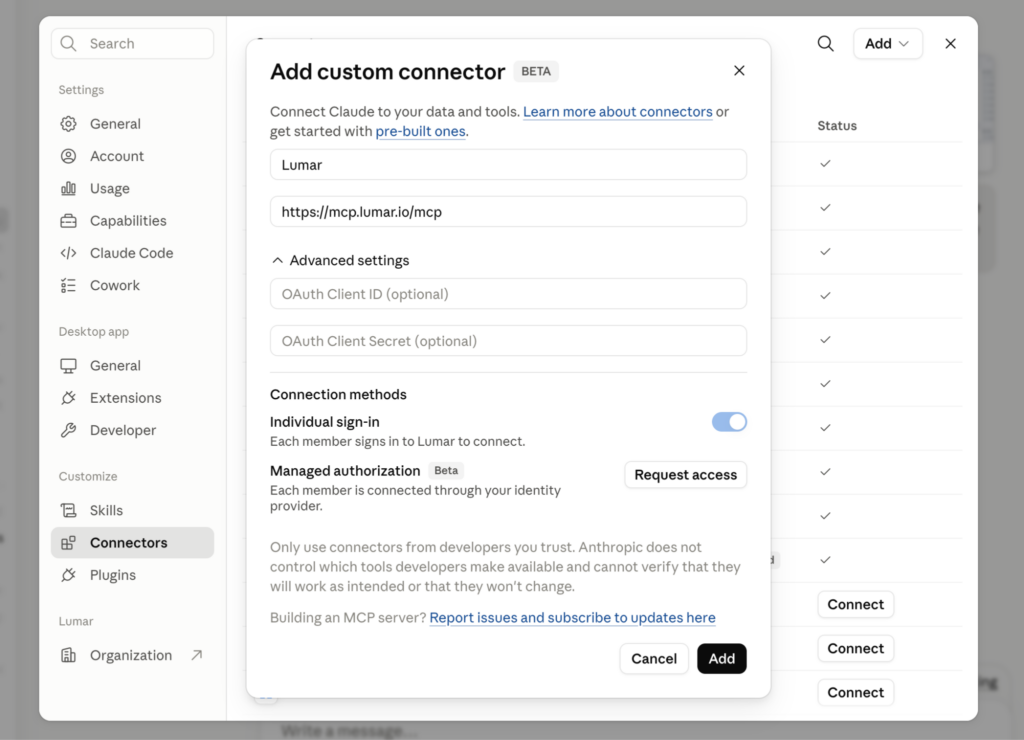
Setup requires no API keys or complex configuration files. Users simply add the server URL (https://mcp.lumar.io/mcp) as a connector in their chosen AI workspace and log into their existing Lumar credentials, inheriting all native account permissions automatically.
Chronology: The Evolution Toward Conversational SEO Workflows
The launch represents the culmination of a broader industry shift toward agentic AI workflows and integrated data pipelines:
- Late 2024 to 2025: As generative engine optimization (GEO) and AI search visibility tools like Lumar’s AI Visibility suite matured, professionals increasingly needed to synthesize traditional technical SEO metrics with unpredictable AI-driven citation data.
- December 2025: Major LLM platforms like OpenAI’s ChatGPT began standardizing connector ecosystems (transitioning nomenclature from "connectors" to "apps"), paving the way for standardized machine-to-machine context protocols.
- July 23, 2026: Lumar officially launches the MCP server, standardizing how technical SEO data is queried, analyzed, and actioned across external development environments and executive suites alike.
Supporting Data: 7 Ways MCP Transforms SEO Workflows
According to Lumar’s technical product teams, the MCP server is designed to compress hours of manual data extraction into seconds. The company highlights seven primary use cases:
1. Automated Crawl Audits
Instead of sorting through reports tab-by-tab, users can prompt their AI assistant: "Audit the latest crawl for [project]. What are the top issues and what got worse?" The assistant can immediately pull health scores, rank issues by volume, and run comparative analyses against previous crawls.
2. Conversational Data Filtering
Complex filter-building and custom query drafting can now be bypassed with natural language queries such as: "Show me every page over 3 seconds load time with a word count under 300, grouped by template."
3. Streamlined Admin and Project Setup
Administrative tasks—such as creating custom metrics to detect product templates and subsequently building distinct tracking segments—can now be executed in a single conversational turn rather than navigating multi-step platform UI forms.
4. Multi-Project Management
Agency professionals managing numerous domains can pull cross-portfolio updates instantly with prompts like: "Give me a one-line health summary for each of my projects, and flag anything that dropped this week."
5. AI Search & Generative Engine Monitoring
With brands increasingly fighting for visibility in AI-generated answers, users can monitor trends effortlessly: "What changed in our AI Visibility this week? Any drops or new competitors appearing?"
6. Cross-Platform Data Blending
By pairing Lumar with other MCP-compatible tools (such as Google Search Console or Google Analytics), teams can run complex cross-platform diagnostics: "Cross-reference the pages flagged as slow in my latest Lumar crawl with their Search Console clicks over the last 28 days. Which slow pages are costing me the most traffic?"
7. Stakeholder-Ready Reporting
Translating technical SEO jargon into executive metrics has historically been a bottleneck. The MCP server allows users to blend crawl health with revenue-weighted data to draft cohesive updates for non-technical stakeholders like CMOs.
Step-by-Step Platform Setup Guide
The Lumar MCP server relies on standard Streamable HTTP transport. Implementation varies slightly depending on the chosen AI environment:
Claude (claude.ai)
- Free, Pro, or Max Plans: Navigate to Customize > Connectors, locate Lumar, and sign in. (Note: Free tier users are limited to one custom connector).
- Team or Enterprise Plans: Organization Owners must first add the connector globally via workspace settings before individual team members can sign in through their personal profiles.
ChatGPT
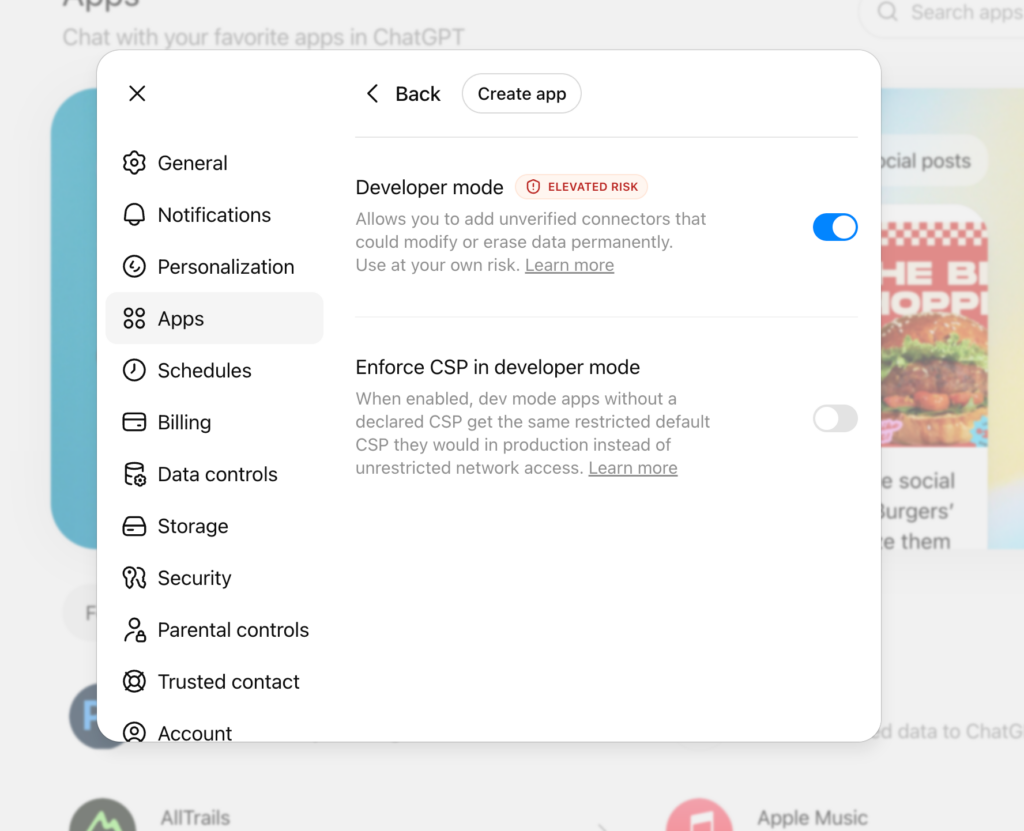
- Supported Plans: Plus, Pro, Team, Business, Enterprise, and Education (not available on the free tier; full write/action support requires Business/Enterprise/Education tiers).
- Configuration Steps:
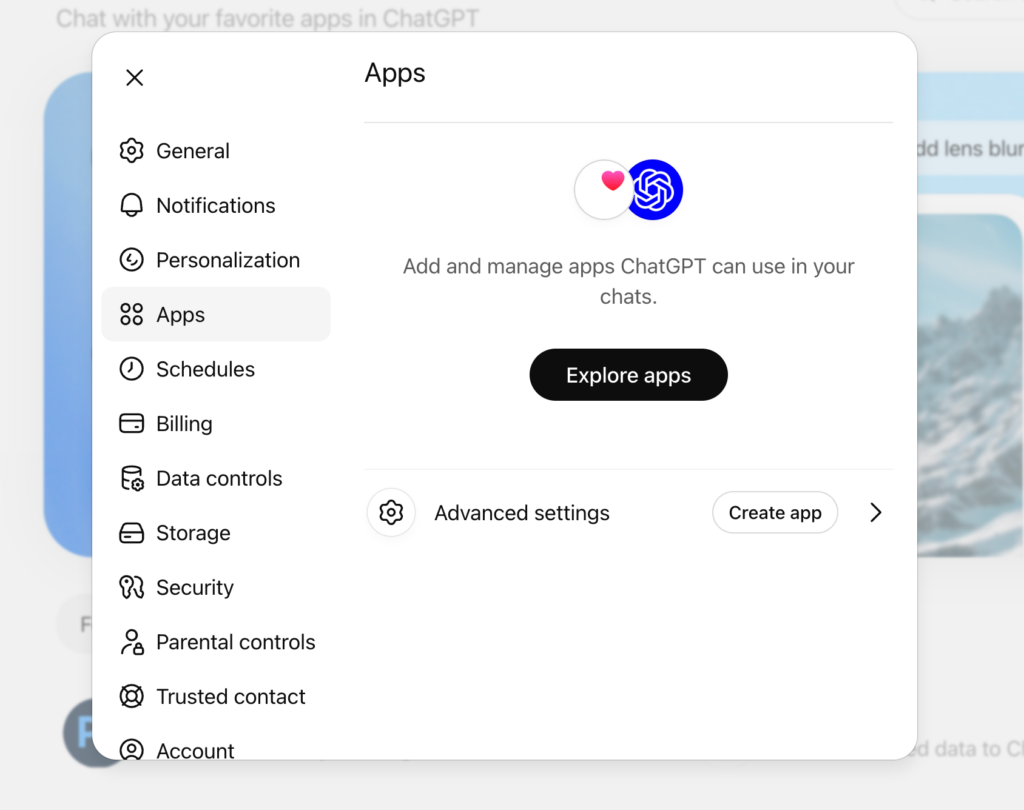
- Navigate to workspace settings, select Connectors (or Apps, depending on UI updates).
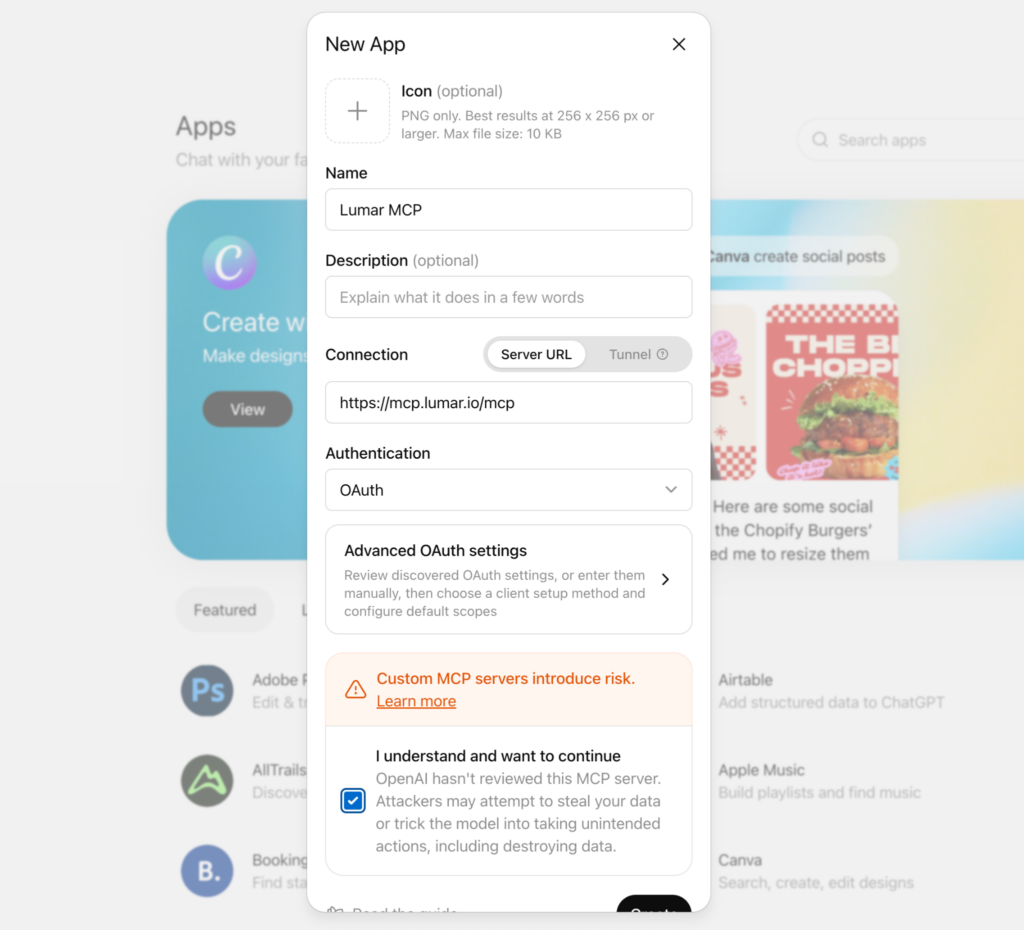
- Go to Settings > Advanced and select Create App.
- Choose Custom and enter the server URL:
https://mcp.lumar.io/mcp. - Authenticate by logging into your Lumar account when prompted.
Cursor
- Configuration Steps:
- Open Cursor Settings and navigate to Features > MCP Servers.
- Click + Add new server.
- Enter
Lumaras the server name, selectsse(Server-Sent Events) as the type, and inputhttps://mcp.lumar.io/mcpas the URL. - Save the configuration, authorize the connection via the browser popup window, and verify connection status via the green indicator dot.
Implications: Security, Data Privacy, and the Future of Technical SEO
While the productivity gains of the Lumar MCP server are substantial, the introduction of direct LLM integrations brings critical data governance implications to the forefront.
1. Data Privacy and Training Policies
Lumar has issued important compliance warnings regarding third-party AI platforms. Because crawl data passes through the chosen AI assistant during queries, organizations must review their respective AI provider’s data retention and training policies. Lumar explicitly advises users to verify that their chosen AI subscription tier guarantees that enterprise data will not be used for model training—a standard safeguard typically reserved for paid business, team, and enterprise tiers.
2. Role-Based Access Control
Because authorization occurs via individual user login credentials, the MCP server respects existing Lumar permissions. AI assistants cannot surface data that the authenticating user is not already authorized to view within the native Lumar dashboard.
3. Agentic Write-Operations
Unlike read-only reporting plugins, Lumar’s MCP integration supports write-operations on higher-tier plans—such as triggering crawls, creating remediation tasks, or linking issues directly to Jira. To maintain quality control, the architecture requires the AI assistant to display proposed actions for human review before execution.
As generative search and automated workflows continue to reshape digital marketing, tools like the Lumar MCP server signal a decisive step away from manual data retrieval, moving the industry toward a future where website intelligence is queried as fluidly as human conversation.