








Securing modern web applications during development and staging cycles remains a critical operational priority for engineering teams worldwide. Whether safeguarding an unreleased client project, an internal business dashboard, or an experimental feature branch from premature search engine indexing and unauthorized public exposure, developers frequently require a lightweight, robust security gate.
While traditional approaches involve deploying complex virtual private networks (VPNs), configuring intricate Nginx reverse-proxy authentication parameters, or integrating third-party Node.js packages that introduce software bloat and dependency vulnerabilities, modern framework architectures offer streamlined alternatives.
This article explores how developers can leverage Astro’s built-in middleware infrastructure and native HTTP Basic Authentication protocols to lock down an Astro web application securely. By utilizing platform capabilities already present within the framework, development teams can establish enterprise-grade security perimeters in minutes without writing custom login forms, managing session databases, or increasing maintenance overhead.
Main Facts: The Anatomy of Astro Middleware Authentication
At its core, securing an Astro application via HTTP Basic Authentication requires three primary components: an on-demand rendering runtime or adapter, a middleware request handler, and a pair of environment variables containing administrative credentials.
Unlike static-site generation (SSG), which compiles HTML files at build time without active server processes, server-side rendering (SSR) environments evaluate incoming requests dynamically. Astro’s middleware system intercepts these HTTP requests before page rendering occurs. By inspecting the incoming Authorization header, validating it against environment-stored credentials, and issuing a standard 401 Unauthorized challenge when validation fails, developers can enforce strict access controls.
Key structural facts regarding this implementation include:
- Zero Dependencies: The mechanism relies entirely on native JavaScript primitives (such as the global
atobfunction) and standard HTTP protocol specifications supported universally by modern web browsers. - Minimal Footprint: The entire security logic encompasses fewer than thirty lines of clean, maintainable TypeScript or JavaScript code.
- Native Browser Integration: Upon encountering a
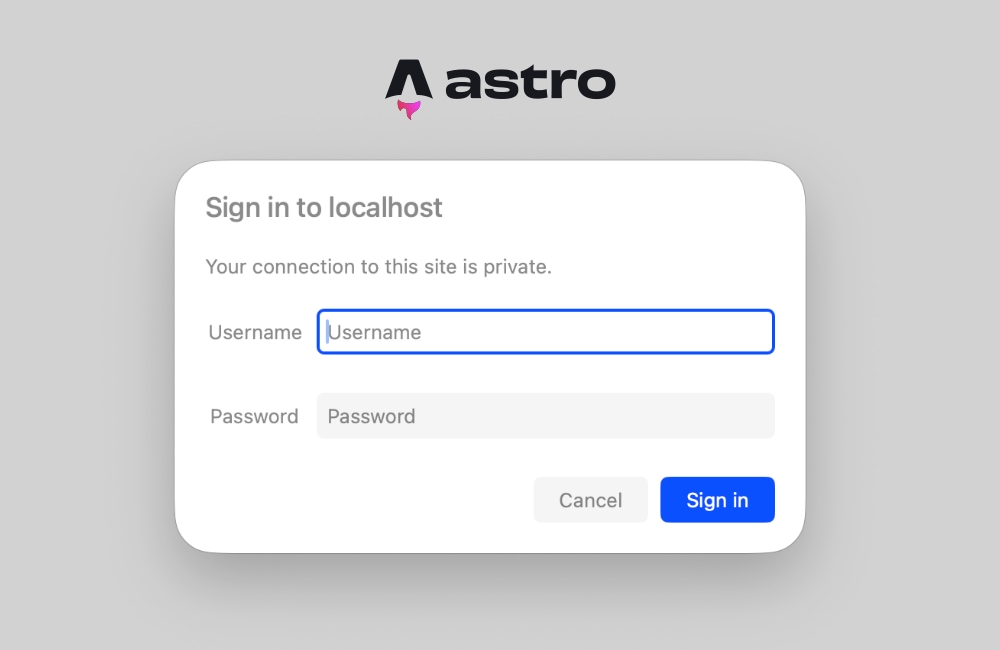
401response paired with aWWW-Authenticateheader, web browsers natively render a secure login prompt, eliminating the need for custom frontend UI components.
Chronology: Evolution of Server-Side Security in Astro
Understanding how Astro arrived at this streamlined authentication pattern requires examining the evolution of its rendering architecture.
Early Iterations: Static-First Constraints
In its initial iterations, Astro positioned itself primarily as a static-site generator optimized for content-driven websites. During this period, protecting a site required routing traffic through edge network configurations (such as Cloudflare Access, Netlify password protection, or Vercel deployment passwords) or pushing infrastructure boundaries by setting up dedicated reverse proxies. Developers lacked a unified, framework-native mechanism to intercept requests because the build output consisted purely of static assets.
The Rise of Hybrid Rendering and Adapters
As adoption expanded into enterprise applications, dashboard development, and dynamic software-as-a-service (SaaS) frontends, the Astro core team introduced hybrid rendering and server adapters. By integrating adapters for Node.js, Cloudflare, Vercel, Netlify, and Deno, Astro gained the ability to execute server-side code on demand.
Introduction of the Middleware API
To support cross-cutting concerns such as authentication, request logging, and header manipulation, Astro introduced its native middleware API via src/middleware.ts. This feature provided developers with a standardized onRequest hook. Capitalizing on this pipeline, engineers quickly realized that standard HTTP Basic Authentication could be mapped directly into the middleware lifecycle, bridging the gap between static speed and dynamic server-side security controls.
Supporting Data: Implementation Mechanics and Codebases
To put this architecture into practice, developers must execute a series of structured steps within their Astro project environment.
1. Constructing the Middleware File
Astro expects middleware to reside in a designated file located at src/middleware.ts (or src/middleware.js for plain JavaScript projects). The foundation of this file relies on the defineMiddleware utility imported from astro:middleware.
import  defineMiddleware  from 'astro:middleware';

export const onRequest = defineMiddleware(async (context, next) =>
  // Authentication validation logic executes here
  return next();
);
The defineMiddleware wrapper ensures type safety and exposes the request context alongside the next() callback, which advances valid requests further down the execution pipeline.
2. Implementing the Credential Validation Logic
HTTP Basic Authentication operates by evaluating an Authorization header transmitted by the client browser. This header contains the word Basic followed by a Base64-encoded string representing the username:password pair.
function isAuthenticated(request: Request): boolean  !pass)
    return true;


  const authHeader = request.headers.get('Authorization');

  if (!authHeader?.startsWith('Basic '))
    return false;


  const encoded = authHeader.slice(6);
  const decoded = atob(encoded);
  const [providedUser, providedPass] = decoded.split(':');

  return providedUser === user && providedPass === pass;
This verification function checks whether the required environment variables are populated. If they are missing, it gracefully permits traffic to prevent accidental server lockouts. If credentials are present, it extracts the Base64 payload, decodes it, splits the resulting string at the colon separator, and performs a strict equality check against the environment values.
3. Issuing the 401 Challenge Response
When the validation check returns false, the middleware must intercept the request and return an HTTP 401 status code accompanied by the WWW-Authenticate header.
export const onRequest = defineMiddleware(async (context, next) =>
  if (!isAuthenticated(context.request))
    return new Response('Unauthorized',
      status: 401,
      headers:
        'WWW-Authenticate': 'Basic realm="Staging Environment", charset="UTF-8"',
      ,
    );


  return next();
);
The realm directive instructs the browser what label to display within its native login modal (e.g., "Staging Environment"). Upon successful entry, the browser caches these credentials and automatically appends the Authorization header to all subsequent requests during the active session.
4. Environment Configuration
Credentials must be stored securely outside the source code repository. During local development, developers configure these variables within a root-level .env file:
BASIC_AUTH_USER=staging-operator
BASIC_AUTH_PASS=secure-staging-password-2026
For production or staging deployments on platforms such as Cloudflare Pages, Vercel, or Netlify, these identical keys must be populated within the platform’s dashboard under environment variable settings.
Official Responses and Technical Considerations
Engineering architecture discussions surrounding server-side security in modern static-first frameworks frequently focus on performance, edge optimization, and build configurations. Core framework maintainers and infrastructure architects emphasize specific operational considerations when deploying middleware-based authentication.
Build-Time vs. Run-Time Rendering Conflicts
A common technical hurdle developers encounter when implementing authentication middleware involves static prerendering conflicts. If an Astro page is configured to be prerendered statically at build time, accessing Astro.request.headers inside the component will trigger a build error:
Astro.request.headers was used when rendering the route 'src/pages/index.astro'. Astro.request.headers is not available on prerendered pages.
Framework documentation clarifies that this occurs because prerendered assets are compiled into static HTML files without an active HTTP server context. To resolve this, engineering teams must adopt one of two architectural patterns:
- Explicit Page-Level Opt-Out: Configure individual pages to support server-side rendering by exporting a runtime flag within the page frontmatter:
--- export const prerender = false; --- -
Project-Wide Server Output: Shift the entire application build target to server-side rendering within the project configuration file:
// astro.config.mjs
import  defineConfig  from 'astro/config';
import node from '@astrojs/node';

export default defineConfig(
 output: 'server',
 adapter: node( mode: 'standalone' )
);
Adopting output: 'server' ensures that every incoming request passes through the middleware layer, making runtime request headers universally available across all application routes.
Implications: Security, Scalability, and Future Maintenance
Implementing native HTTP Basic Authentication within an Astro middleware pipeline carries significant implications for web development workflows, operational security, and team productivity.
Enhanced Security Posture for Preview Environments
For agencies, freelance developers, and enterprise software teams, exposing work-in-progress builds to clients presents potential reputational and intellectual property risks. By securing staging URLs with basic authentication, teams eliminate the threat of premature public indexing by search engine crawlers or unauthorized user sign-ups during pre-release phases.
Elimination of Operational Bloat
Historically, securing a static build output required layering disparate tools—such as configuring .htpasswd files on Apache servers, setting up Cloudflare Zero Trust tunnels, or purchasing commercial monitoring software with built-in gating. By utilizing Astro’s native middleware, organizations reduce their software dependency graph, lower vulnerability attack surfaces, and streamline continuous integration and continuous deployment (CI/CD) pipelines.
Scalability and Extensibility of the Middleware Pattern
While HTTP Basic Authentication provides an effective perimeter defense for staging sites and internal tools, the underlying middleware pattern scales to accommodate more advanced authorization strategies. Because the onRequest hook functions as a standard JavaScript execution pipeline, developers can easily transition from hardcoded environment credentials to sophisticated enterprise security architectures:
- Database Lookups: Querying PostgreSQL or Redis instances to validate user roles and session tokens dynamically.
- JSON Web Token (JWT) Verification: Inspecting bearer tokens for microservices and API endpoints.
- Role-Based Access Control (RBAC): Restricting specific administrative sub-routes based on cookie inspection or user clearance levels.
Summary
Securing an Astro application no longer demands cumbersome infrastructure workarounds or bloated third-party packages. By harnessing Astro’s robust middleware system and standard HTTP Basic Authentication protocols, developers can protect their web properties efficiently, securely, and with minimal code complexity. Whether preparing a client review or locking down an internal dashboard, this native approach delivers enterprise-grade staging security in a matter of minutes.