
In the modern digital landscape, the "human" experience of the internet is increasingly being crowded out by automation. Recent data from Kinsta, based on an analysis of over 10 billion requests, reveals a staggering 300% surge in AI-driven bot traffic over the past year. For website owners, developers, and digital agencies, this trend represents a paradigm shift: bot traffic is no longer a niche technical concern but a core component of daily site management.
As the volume of automated requests grows, the challenge for administrators is no longer simply "keeping the site up." It is about distinguishing between the "good" bots—essential search crawlers and performance monitors—and the "bad" bots that consume server resources, scrape proprietary data, or launch malicious attacks.
The Chronology of an Automated Web
The evolution of bot traffic has moved from simple, predictable indexing crawlers to highly sophisticated AI agents capable of mimicking human behavior.
Historically, web traffic was divided into two camps: organic human visitors and search engine indexers. Today, that binary has been shattered by the proliferation of Large Language Model (LLM) scrapers, aggressive price-comparison bots, and automated threat actors.
This transformation has happened in three distinct waves:
- The Indexing Era: Simple bots from Google or Bing that helped users find content.
- The Scraping/Aggregator Era: Tools designed to siphon content for data analysis or competitive pricing intelligence.
- The Generative AI Era: Current, high-intensity crawlers designed to ingest entire websites to train LLMs, often operating without clear attribution or respect for standard rate limits.
This surge has forced a move away from reactive "panic blocking" toward a sophisticated, tiered management strategy.

Analyzing the Impact: Is it a Problem or an Attack?
Before any defensive measures are deployed, administrators must define the scope of the problem. A spike in traffic does not automatically equate to a malicious attack.
The Diagnostic Framework
To determine if your site is under duress, you must distinguish between benign automation and an acute threat. Kinsta’s analytics tools allow for a granular breakdown of request types. By examining the Request Breakdown, administrators can categorize traffic by:
- Verified Bots: Known, trusted entities (e.g., search engine spiders).
- Unverified/Unknown Bots: Tools whose intent is ambiguous.
- Malicious Actors: Bots identified by patterns associated with exploits, brute-force attempts, or DDoS signatures.
If your site is experiencing elevated CPU usage, slow Time-to-First-Byte (TTFB) metrics, or degraded database performance, the traffic is likely impacting your bottom line. These indicators serve as the "red alert" that an immediate response is required.
The Strategy: Stabilize, Categorize, and Refine
Effective bot management is a cyclical process. It begins with stabilization and moves toward long-term optimization.
1. Immediate Stabilization
When a site is under an active, resource-draining attack, the priority is to preserve the experience for legitimate users. During these moments, the "allow-all" policy is discarded.
- Aggressive Throttling: Implementing temporary rate limits on unverified bots.
- Challenge Walls: Utilizing CAPTCHAs or JavaScript challenges to filter automated scripts.
- Targeted Blocking: If a specific IP range or user-agent is identified as the source of a resource-heavy spike, temporary blocklists provide the necessary breathing room to investigate further.
2. The Long-Term Governance Model
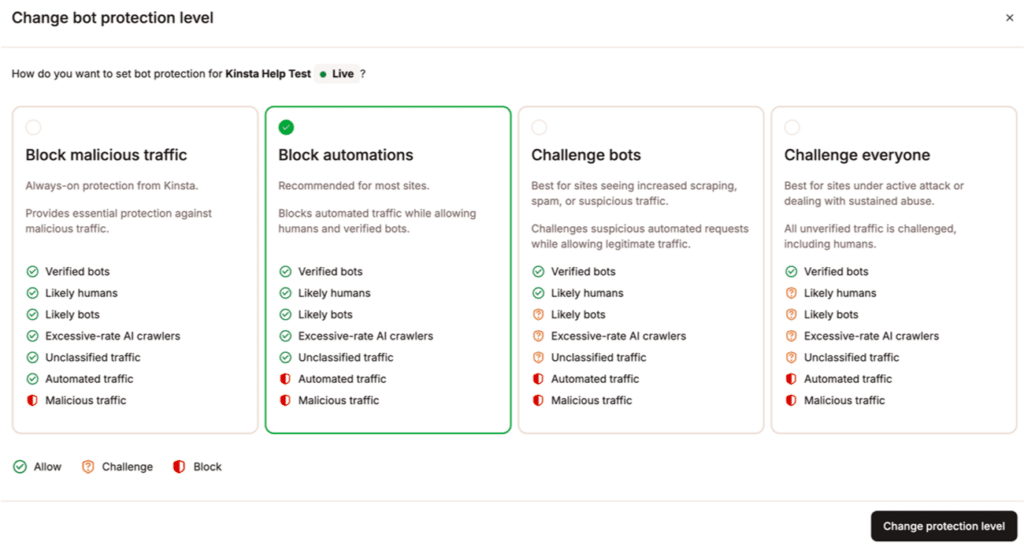
Once the site is stabilized, the "allow, challenge, or block" framework comes into play.
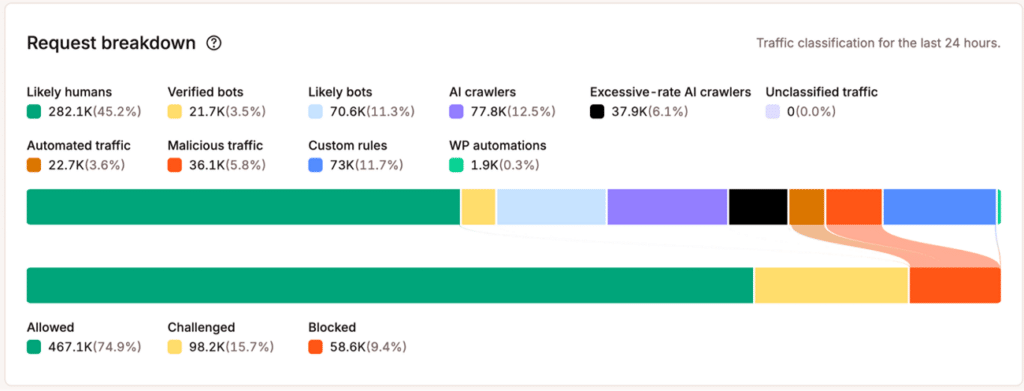
- Allow: Essential services that provide SEO value or site health monitoring.
- Challenge: Tools that may be useful but are overly aggressive, forcing them to prove they are a legitimate browser or service.
- Block: Scraping tools, malicious scanners, and AI crawlers that provide no tangible value to the site owner.
Case Studies: Responding to Specific Scenarios
Bot traffic is rarely monolithic. Different types of automation require different tactical responses.
Handling Search Engine Crawlers
If a search engine crawler is overwhelming your server, the first step is to check robots.txt instructions. If the bot is ignoring these standards, you should move to rate-limiting via your hosting provider’s management interface. You want to keep the bot indexing, but at a pace that ensures your server remains responsive to real customers.
The AI Crawler Dilemma
AI scrapers represent the most contentious category of modern traffic. Unlike search engines, which drive traffic to your site, many AI crawlers ingest content to provide answers directly in a chat interface, effectively bypassing your site entirely.
- The Question: Does this crawler provide value (e.g., referral traffic, improved visibility)?
- The Response: If the crawler is consuming significant resources with zero ROI, it is a candidate for a permanent block.
Dynamic Endpoint Protection
Dynamic endpoints—such as WooCommerce checkout pages, search functions, or login portals—are "expensive" in terms of server resources. Bot hits here are significantly more dangerous than hits to static pages. Protecting these endpoints with stricter security rules is critical for e-commerce integrity.
Monitoring and Business Implications
A successful bot management strategy is not "set it and forget it." It requires continuous monitoring of:
- Resource Usage: Has the CPU/RAM pressure decreased?
- SEO Impact: Are your core pages still being correctly indexed by major search engines?
- Business Metrics: Has the conversion rate improved now that legitimate traffic is no longer competing with bots for bandwidth?
If you notice a drop in organic search traffic, your "block" rules may have been too broad, inadvertently catching a beneficial crawler. The key is iterative adjustment—fine-tuning your filters until the balance between security and accessibility is perfect.
The Essential Bot-Response Checklist
To maintain control, site owners should adopt the following operational checklist:
Phase 1: Initial Detection
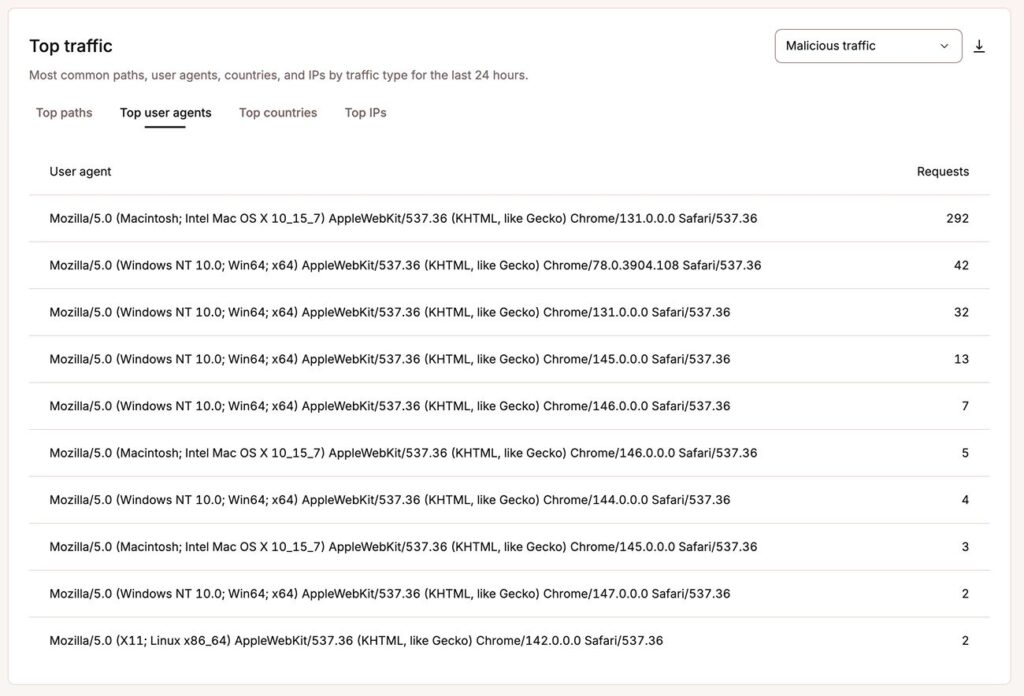
- Identify the source (IP, User Agent, Country).
- Check if the traffic is targeting sensitive endpoints (Login, Checkout, Search).
- Assess if the traffic pattern mimics known malicious signatures.
Phase 2: Emergency Response (If under pressure)
- Implement immediate "Challenge" rules for all non-verified traffic.
- Apply rate limits to prevent resource exhaustion.
- White-list known, trusted service IPs to ensure business continuity.
Phase 3: Post-Incident Refinement
- Analyze logs to identify the "bad" actors.
- Create permanent, specific block rules.
- Update
robots.txtto provide clear guidelines for future crawlers.
Phase 4: Periodic Audit
- Review bot traffic analytics at least monthly.
- Adjust rules based on changes in traffic patterns or new business requirements.
The "New Normal" for Web Infrastructure
The rise of automated traffic is the "new normal." In an era where AI can crawl the entire web in a matter of days, the responsibility falls on site owners to define the boundaries of their digital property.
"Block all" is no longer a viable strategy, as it would effectively disconnect your site from the essential services that power discovery and visibility. Instead, the future of the web belongs to those who employ a nuanced, proactive, and analytical approach to traffic management.
Tools like Kinsta’s Bot Protection provide the necessary visibility to turn the tide against unwanted automation. By leveraging these technologies, businesses can reclaim their resources, protect their proprietary data, and ensure that their sites remain fast, secure, and available for the human users who truly matter.
As the web continues to evolve, the ability to discern the "good" from the "bad" will define the success of digital enterprises in the coming decade. Whether you are managing a small blog or a high-traffic e-commerce store, the time to establish your bot strategy is now—before the next surge in traffic hits your infrastructure.