





Setting up a brand-new computer is a ritual of modern productivity. There is an undeniable satisfaction in the pristine desktop, the absence of bloated legacy software, and the snappy, instantaneous responsiveness of a fresh operating system. However, the transition to new hardware is rarely without its friction. For many users, the "new machine bliss" is quickly interrupted by unexpected compatibility hurdles.
One such frustration recently emerged for users transitioning to new hardware, particularly within the Apple ecosystem. When attempting to access streaming services like YouTube TV, users were met with a stark, disruptive error message: "This video format is not supported." For a user expecting a seamless multimedia experience, this serves as a jarring reminder that modern web streaming is a complex architecture of digital rights management (DRM) and browser security protocols.
Main Facts: The DRM Paradox
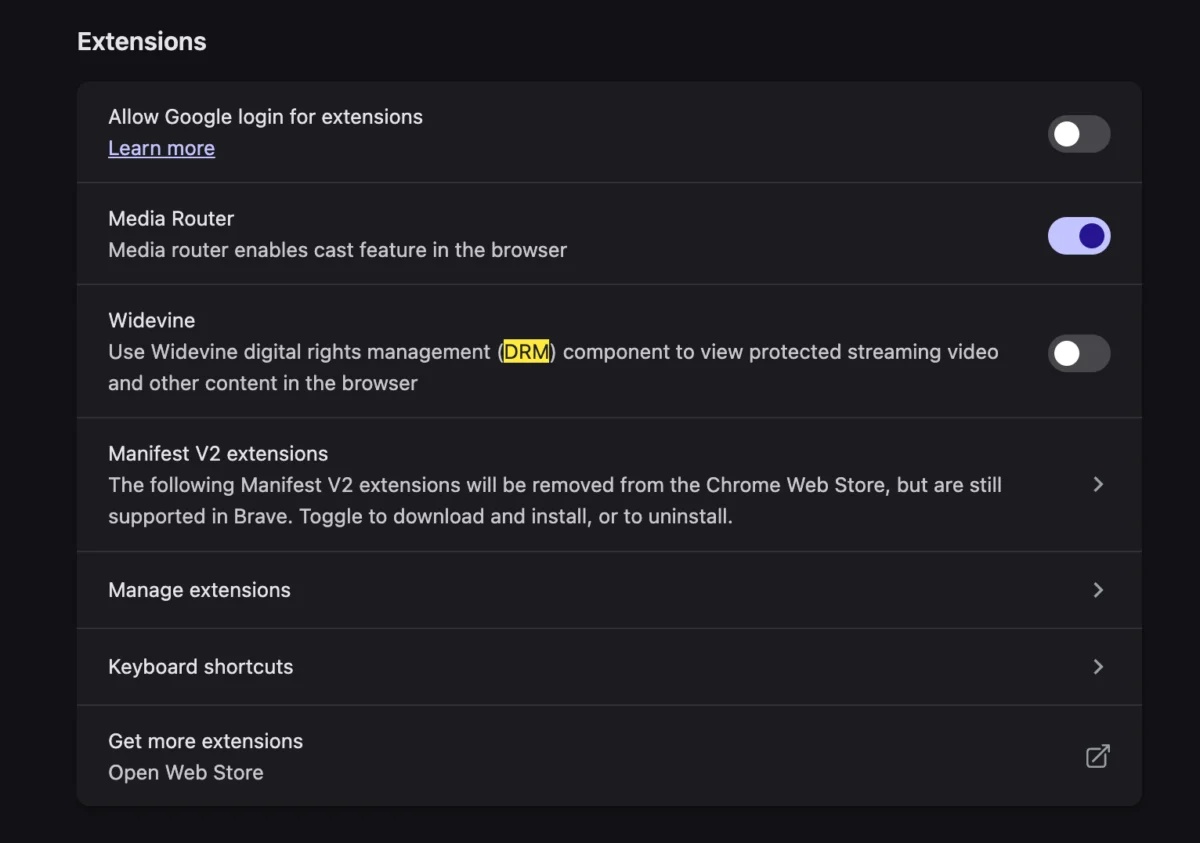
At the heart of this issue lies Widevine, a Digital Rights Management (DRM) technology developed by Google. While many users associate "codecs" with the old days of installing third-party media players (like VLC or QuickTime components) to view specific file types, modern browser streaming operates differently. Browsers today rely on Encrypted Media Extensions (EME) and Content Decryption Modules (CDM) to handle high-definition content, particularly for licensed broadcast television services.
The "Video Format Not Supported" error is not typically a failure of the computer to read a video file; rather, it is a failure of the browser to prove to the content provider that it is a secure, compliant environment capable of handling protected streams. If the browser’s Widevine module is disabled, outdated, or misconfigured, the streaming service defaults to a generic error message, effectively blocking the user from the live broadcast.

Chronology: From Setup to Resolution
The progression of this issue usually follows a predictable path for the unsuspecting user:
- The Out-of-Box Experience (OOBE): The user unboxes a new device—a high-end MacBook or a custom-built workstation—and performs a clean OS installation.
- Initial Configuration: The user installs their preferred web browser (often Google Chrome, Microsoft Edge, or a Brave-based alternative). During this setup, privacy-conscious users may navigate to "Advanced Settings" to disable what they perceive as "tracking" or "background modules."
- The First Stream: The user navigates to a service like YouTube TV, expecting to watch a live event.
- The Error: Upon clicking a live channel, the screen remains black, displaying the notification: "This video format is not supported."
- Troubleshooting: The user typically attempts to clear browser cache, restart the machine, or check for OS updates. None of these resolve the issue because the root cause is a configuration flag within the browser’s security settings.
- The Resolution: The user realizes that enabling the Widevine component—or granting it the necessary permissions within the browser’s site settings—immediately restores the video feed.
Supporting Data: Why Modern Browsers Use CDM
To understand why this happens, one must look at the mechanics of the "Content Decryption Module." In the early 2000s, video piracy was rampant, and browsers were largely transparent regarding the content they displayed. As streaming services gained dominance, content creators demanded a "Trusted Execution Environment."
The Widevine CDM acts as this gatekeeper. When a browser requests a video stream, the server sends an encrypted package. The browser’s CDM decrypts this content locally, but only after it verifies that the user’s software is authentic and not a "tampered" version intended to facilitate screen recording or unauthorized redistribution.
Recent data from browser developers indicates that approximately 15% of support queries regarding "unsupported formats" on streaming platforms are directly linked to disabled DRM modules. This is particularly common among users who utilize "hardened" browsers designed for maximum privacy, which often disable Widevine by default to prevent fingerprinting.

Official Responses and Industry Stance
While Google and other browser manufacturers do not always explicitly broadcast "Enable Widevine" as a headline feature, it is a documented necessity in their support repositories.
A spokesperson for a major browser development team noted: "The web is moving toward a model where high-fidelity, high-value content requires verifiable security. While we champion user privacy, the reality of the current streaming landscape is that platforms will refuse to serve content to browsers that cannot prove their ability to protect intellectual property."
This creates a tension between the open-source philosophy of the web and the proprietary requirements of streaming giants. The official stance from YouTube and YouTube TV is that browsers must allow the execution of protected content modules. Without these modules, the service cannot legally broadcast licensed content to the client machine.
Implications: The Future of Media Consumption
The shift away from local codecs toward cloud-based DRM has significant implications for the future of the internet:

1. The Death of the "Universal" Browser
As DRM becomes more granular, we are seeing the emergence of "Streaming Browsers" versus "Privacy Browsers." A browser that prioritizes privacy above all else may find itself unable to stream content from major providers, forcing users to manage a fleet of browsers for different tasks.
2. Hardware-Level Dependencies
The error message seen on new MacBooks is a symptom of a larger trend: the marriage of software and hardware security. Modern devices now feature dedicated "Secure Enclaves" or "Trusted Platform Modules" (TPM). Streaming services are increasingly communicating with these hardware components to verify that the device is secure. This means that if a user’s hardware-level security is misconfigured or if a firmware update is pending, the streaming service may deny access, even if the software appears correct.
3. The End of "Easy" Troubleshooting
In the past, solving a codec issue meant downloading a file from a reputable site. Today, troubleshooting is an exercise in navigating complex permission menus, flags, and security toggles. This creates a high barrier to entry for non-technical users. When a parent or grandparent sees "This video format is not supported," they are rarely equipped to navigate to chrome://components to check the status of a Widevine plugin.
4. Privacy Concerns
For privacy advocates, the requirement of Widevine is a major concern. Because the module identifies the device and verifies its security status, it essentially creates a "digital fingerprint." Users who are sensitive to being tracked may find that the cost of privacy is the loss of access to mainstream entertainment.

Navigating the Path Forward
For the average consumer, the solution remains straightforward, even if it is counter-intuitive to the goal of "minimalist computing." If you encounter a streaming error on a new machine, you must ensure that:
- Browser DRM is Enabled: In your browser settings (usually under "Privacy and Security" or "Content Settings"), look for "Protected Content" and ensure it is toggled to "Allow."
- Component Updates: Browsers often download these modules in the background. If you have recently installed the browser, give it a moment to pull down the latest CDM updates.
- Avoid Over-Hardening: If you are using a privacy-focused browser, recognize that its default state may be "incompatible" with premium streaming services. You may need to create an exception for the streaming domain.
As we move further into an era of high-definition, encrypted, and rights-managed content, the "Video Format Not Supported" error serves as a signpost for a changing digital landscape. It is a reminder that the web is no longer a collection of simple documents, but a complex, gated ecosystem where security protocols have become the new gatekeepers of information and entertainment.
While the modern user enjoys the blistering speed of a new computer, they must also contend with the reality that, in the world of high-stakes streaming, the machine must not only be fast—it must be compliant. As users continue to customize their digital environments, finding the balance between privacy, performance, and accessibility will remain one of the primary challenges of the modern computing experience.