







There is a unique, fleeting joy in the ritual of setting up a brand-new computer. The chassis is pristine, the fans are silent, and the operating system is free from the digital detritus—the forgotten applications, background processes, and bloated caches—that inevitably accumulate over years of daily use. For a brief window, your machine runs with a crisp, efficient velocity that feels like a fresh start.
However, this "new computer bliss" is frequently punctured by the harsh realities of modern software compatibility. Recently, while transitioning to a new MacBook, I encountered a jarring obstacle: attempting to access YouTube TV resulted in a flat, unhelpful error message: "This video format is not supported."
For a user accustomed to the "it just works" philosophy of premium hardware, this error is not just a nuisance; it is a fundamental disruption of the expected user experience. When you cannot access your favorite live sports, news, or entertainment, the promise of a superior machine feels hollow. This article explores the root causes of this common digital friction, the role of Content Decryption Modules (CDMs), and how to restore your viewing experience.
Main Facts: Decoding the Error
The "Video Format Not Supported" error on platforms like YouTube TV, Netflix, or Hulu is rarely a problem with the actual video file. Instead, it is a handshake failure between your web browser and the platform’s Digital Rights Management (DRM) protocols.
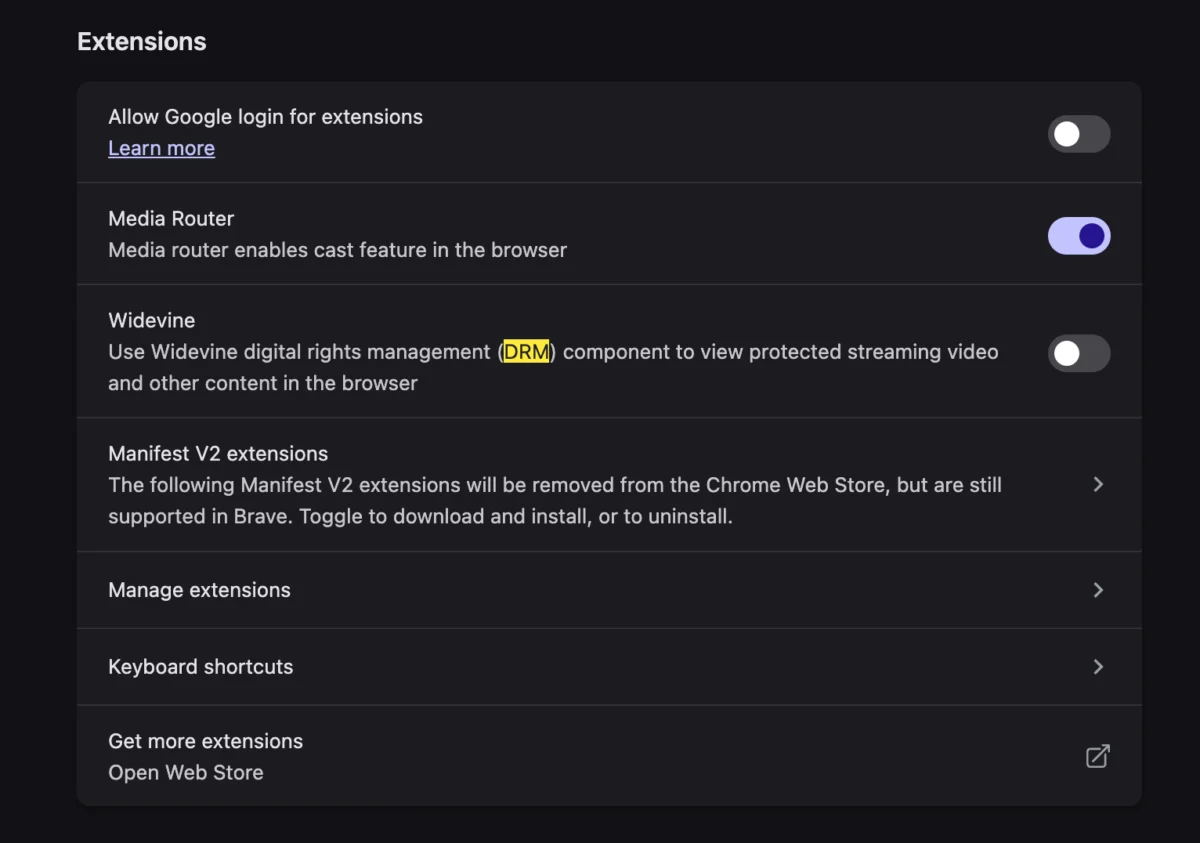
At the heart of the issue is Widevine, a proprietary DRM technology developed by Google. Widevine is used by streaming services to ensure that copyrighted content is not illegally intercepted, copied, or pirated. When you navigate to a streaming site, your browser must "negotiate" with the site’s server, proving that it has a secure, authorized environment to display protected video.

If your browser has Widevine disabled, or if the module is outdated or corrupted during a system migration, the streaming service will refuse to serve the video. The error message is, in effect, a security fail-safe. The browser is essentially saying, "I cannot verify that I have permission to play this, so I will play nothing at all."
Chronology: The Evolution of Media Protection
To understand why we face these errors today, we must look at the shift from open codecs to protected streaming.
The Era of External Codecs
Twenty years ago, playing video on a computer was a manual labor of love. Users had to hunt for specific codecs—like DivX or Xvid—to install into their media players. If you didn’t have the right "plug-in," the video simply wouldn’t play.
The HTML5 Transition
As the web evolved, the industry moved away from reliance on third-party plugins like Adobe Flash or Silverlight. The introduction of HTML5 promised a cleaner, faster web. However, the entertainment industry demanded that the same level of piracy protection provided by Silverlight be integrated directly into the browser.
The Rise of EME and Widevine
This led to the creation of Encrypted Media Extensions (EME). EME allows browsers to communicate with CDMs like Widevine. By 2015, major browsers like Chrome, Firefox, and Edge had adopted this standard. Consequently, the modern web user no longer installs "codecs," but they are now subject to the silent, background operation of DRM modules. When these modules fail, the user is left with a black screen and a vague error message, unaware that a background security process has stalled.

Supporting Data: Why DRM Matters to Platforms
Why do services like YouTube TV enforce such strict compliance? The data regarding digital piracy is the primary driver.
According to industry reports, the estimated annual loss to streaming services from unauthorized redistribution reaches into the billions of dollars. Widevine provides three levels of security, with Level 1 being the most secure (processing video decryption within a "Trusted Execution Environment" or TEE on the hardware itself).
When you set up a new computer, you are often moving between different security architectures. For example, moving from an Intel-based Mac to an Apple Silicon (M1/M2/M3) chip changes how the browser interacts with the hardware-backed DRM. If the browser settings do not reflect these hardware changes, the Widevine CDM may remain in a "locked" or "inactive" state, preventing high-definition playback.
For the average consumer, this means that even if your hardware is capable of 4K streaming, a simple toggle in your browser settings can be the difference between a pristine picture and an error screen.
Troubleshooting: How to Enable Widevine
If you encounter the "Video Format Not Supported" error on a modern browser, follow these steps to re-enable your DRM capabilities. While interface labels vary by browser, the underlying mechanism remains consistent:

- Access Browser Settings: Open your browser’s "Settings" or "Preferences" menu.
- Search for Protected Content: Use the search bar within the settings menu to look for keywords like "DRM," "Content," or "Widevine."
- Check Permissions: Look for "Protected Content" or "Content Decryption Modules." Ensure that the option to "Allow sites to play protected content" is toggled to ON.
- Restart the Browser: After enabling this setting, you must close the browser completely and restart it. This allows the browser to download or re-initialize the Widevine module if it was missing or disabled.
- Clear Cache/Cookies: If the issue persists, clear the cookies associated with the streaming site. Sometimes, the site retains a "corrupted" session token from your old machine that conflicts with the new hardware ID.
By enabling this setting, you are essentially granting your browser the "key" to decrypt the video stream. It is a far more streamlined process than the "good old days" of manually downloading codec packs, though it remains hidden behind layers of UI that prioritize simplicity over transparency.
Implications: The Future of Browser Transparency
The frustration caused by these errors highlights a growing tension between user control and platform security. As we rely more on web-based streaming services for our primary media consumption, the "black box" nature of DRM modules becomes a point of concern.
The Privacy Trade-off
Widevine and similar technologies rely on device identification (Fingerprinting). Every time you stream, the CDM sends a unique identifier to the server to prove you are using a legitimate device. While this protects content, it also allows platforms to track users with high precision. As browsers become more privacy-conscious, the "permissions" for these modules will likely become even more complex.
The Role of User Education
The "Video Format Not Supported" error is a classic example of a "usability gap." When software becomes too automated, users lose the ability to troubleshoot when things break. Browser manufacturers should consider clearer error reporting. Instead of a generic message, a browser could detect that a CDM is disabled and provide a "One-Click Fix" button, bridging the gap between high-level security and user convenience.
Accessibility and Compatibility
For users who rely on older hardware or niche operating systems, the push toward mandatory, hardware-backed DRM can result in "digital exclusion." If a device does not support the latest security protocols, it is effectively rendered useless for modern entertainment, regardless of its processing power. This forces a cycle of planned obsolescence that is both economically and environmentally taxing.
Conclusion
The transition to a new computer should be a celebration of efficiency, not a lesson in troubleshooting. While the "Video Format Not Supported" error is a minor hurdle in the grand scheme of digital life, it serves as a reminder of the complex, invisible architecture that governs our media consumption.
By understanding the role of Widevine and the necessity of DRM, users can reclaim control over their devices. The next time you see that error message, don’t reach for a new codec or despair over your new hardware. Check your browser permissions, ensure your DRM modules are active, and return to the seamless experience that modern computing promised you in the first place.
As the web continues to evolve, the challenge will be to balance the industry’s need for copyright protection with the user’s need for a transparent, functional, and open computing environment. For now, a simple toggle is all that stands between you and your favorite show.