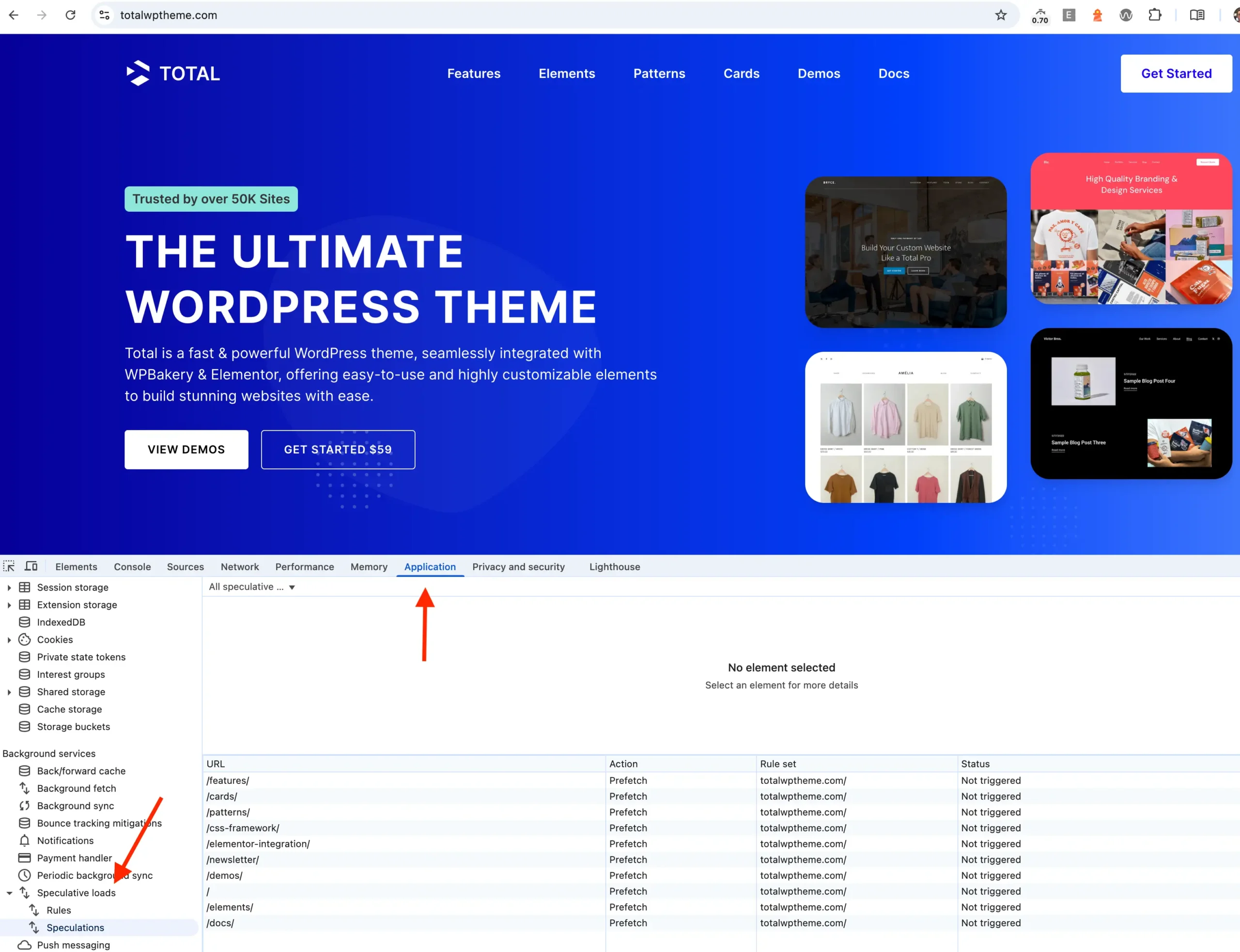
The modern web landscape is defined by a relentless pursuit of speed. In an era where a delay of even a few hundred milliseconds can lead to significant bounce rates and decreased conversion, performance is no longer just a technical metric—it is a business imperative. With the arrival of WordPress 6.8, the platform has integrated a transformative feature designed to make navigation feel instantaneous: Speculative Loading.
By predicting a user’s intent and pre-fetching page data before a click even occurs, WordPress is shifting from a reactive model of content delivery to a proactive one. This guide explores the mechanics, implications, and strategic considerations of this major architectural shift.
Main Facts: What is Speculative Loading?
At its core, speculative loading is a browser-level optimization technique. It leverages the Speculation Rules API to fetch or render content in the background before a user explicitly requests it.
Historically, WordPress utilized "resource hints" (like dns-prefetch and preconnect) to resolve domains and establish connections early. However, WordPress 6.8 elevates this by allowing the browser to download and prepare full documents. When a visitor navigates your site, the browser analyzes the links currently visible in the viewport and, based on predefined rules, begins "speculating" which page the user is most likely to visit next.
When the user eventually clicks that link, the page is already waiting in the browser’s memory. The result is a navigation experience that feels near-instant, effectively eliminating the traditional "white screen" wait time that characterizes most page loads.
The Chronology of Performance Evolution
To understand why this is a milestone for WordPress, we must look at how performance has evolved:
- The Early Days (Pre-2015): Performance was largely restricted to server-side caching and basic image compression.
- The Resource Hints Era (2015–2024): WordPress began implementing
dns-prefetch,preconnect, andpreloadtags to tell browsers which external resources (like fonts or scripts) to prepare. This reduced latency for static assets but did little for the HTML document itself. - The Speculation Rules API Era (2025–Present): With the release of WordPress 6.8, the focus shifted to the document level. By utilizing the Speculation Rules API, WordPress now provides the browser with a JSON-based "map" of which pages are candidates for pre-fetching or pre-rendering.
This progression marks the transition of WordPress from a platform that merely serves documents to one that actively manages the user’s journey through the site.
Supporting Data: Why "Instant" Matters
The necessity for speculative loading is backed by years of performance data. According to Google’s Web Vitals metrics, the "Largest Contentful Paint" (LCP) is a critical factor in user retention.

- The 100ms Threshold: Research suggests that navigation feels instantaneous if it occurs within 100ms. Standard server-response times rarely meet this threshold.
- Conversion Impact: Data consistently shows that for every 100ms of latency reduction, conversion rates can improve by nearly 1%.
- Predictive Accuracy: While browser heuristics are powerful, they are not infallible. The Speculation Rules API allows developers to refine these predictions, ensuring that the "pre-loading" effort is focused on high-value paths (e.g., product pages or call-to-action landing pages) rather than random sidebar links.
Official Responses and Technical Integration
The WordPress Core team introduced this feature to modernize the platform’s performance baseline. Unlike previous optimizations that required third-party plugins, this implementation is native.
How the Rules Function
WordPress generates a <script type="speculationrules"> block in the document header. This script is a JSON object that defines "where" to look for links and "how" to handle them. The default configuration is intentionally "conservative." It ignores:
- Links with
rel="nofollow". - Admin-related paths (
/wp-admin/,/wp-content/). - Links with query strings that might imply dynamic state changes.
Browser Compatibility
It is crucial to note that this is a progressive enhancement. The feature currently relies on the Chromium engine (Chrome, Edge, Opera). Firefox and Safari have not yet fully adopted the Speculation Rules API. In these browsers, the code is simply ignored, ensuring that site functionality remains intact regardless of the user’s choice of browser.
Implications: The Trade-offs of Speed
While the promise of instant loading is enticing, the feature is not without its controversies and potential drawbacks.
1. Increased Server Load
The most significant concern is the increase in server requests. If a user lands on a page with ten links, and the browser decides to pre-fetch all ten, your server effectively receives ten page requests for every one human visitor. For sites with high traffic or expensive hosting, this could lead to increased CPU usage and potential bandwidth costs.
2. Data Staleness
On websites where content changes in real-time (such as news portals or stock tickers), pre-fetching can be a liability. If the system fetches a page that is updated two seconds later, the user might be served "stale" content from the browser cache, leading to a poor user experience.
3. Plugin Conflicts
Plugins that rely on tracking pixels, session cookies, or dynamic content injection may be triggered prematurely by a "pre-fetch" action. If a plugin is not built to handle the difference between a "speculative" visit and a "real" visit, it may double-count analytics or trigger unnecessary database operations.
Strategic Implementation and Customization
For developers and site owners, the "one-size-fits-all" approach may not be ideal. WordPress provides several hooks to maintain control.

Modifying the Configuration
You can use the wp_speculation_rules_configuration filter to adjust the "eagerness" of the loading. If your server resources are limited, you might shift the setting from "moderate" to "conservative."
Excluding Sensitive Paths
If your site has specific sections that should never be pre-fetched—such as a user account portal or a checkout flow—you can use the wp_speculation_rules_href_exclude_paths filter. This allows you to blacklist specific URL patterns, preventing the browser from wasting resources on sensitive or unnecessary pages.
Advanced Customization
For power users, the wp_load_speculation_rules action allows for the creation of high-priority rules. If you are running a seasonal sale, you can explicitly instruct the browser to prioritize pre-rendering the "Black Friday" landing page, ensuring that when the user clicks, the page is already fully rendered in the background.
Conclusion: A Balanced Approach to Performance
Speculative loading represents a quantum leap in how WordPress handles navigation. By leveraging the power of modern browser APIs, the platform is effectively removing the barrier between a user’s intent and the content they seek.
However, the "enabled by default" nature of this feature requires site owners to be vigilant. If your server is struggling under the load of speculative requests, or if your site relies on complex, real-time data that shouldn’t be cached, disabling the feature or refining the rules is a necessary step.
Final Recommendation:
- For most users: Leave it enabled. The performance benefits outweigh the minor increases in server traffic.
- For high-traffic or dynamic sites: Conduct a performance audit. Monitor your server logs for an increase in requests from bots or browsers, and use the provided filters to narrow down which pages are eligible for pre-fetching.
As the web continues to demand faster, more responsive interfaces, tools like the Speculation Rules API will become standard. WordPress has once again proven its commitment to being at the forefront of this evolution, placing the power of "instant" in the hands of millions of site creators.