The landscape of web management is undergoing a seismic shift. For nearly two decades, managing a WordPress site required a manual, click-intensive workflow: logging into the dashboard, navigating through sub-menus, and performing repetitive tasks one by one. Today, the integration of Large Language Models (LLMs) like ChatGPT and Claude into the WordPress ecosystem is fundamentally changing this paradigm. Through the implementation of the Model Context Protocol (MCP), site owners can now delegate technical maintenance, content creation, and SEO optimization to intelligent AI agents.
This guide explores the mechanics of this transformation, detailing how tools like WPVibe are bridging the gap between conversational AI and your site’s backend.
Main Facts: What It Means to Manage WordPress with AI
When we talk about "managing WordPress with AI," we are not referring to the common, customer-facing chatbots that answer visitor queries. Instead, this represents a new class of administrative AI agents. By connecting an AI assistant directly to your WordPress backend, you enable the tool to "read" your content, analyze your site structure, and execute commands—such as updating plugins, identifying broken links, or auditing meta-descriptions—directly within your WordPress environment.
The key to this functionality is the Model Context Protocol (MCP). Think of MCP as a "universal charger" for software. Before MCP, connecting an AI to a specific database required bespoke, fragile coding. With MCP, a standardized communication layer allows the AI to interact with your site, your calendar, and your files through a single, secure connection. This is the most flexible approach to AI integration, vastly superior to basic "copy-paste" methods or restricted, single-function plugins.
Chronology: The Evolution of AI-WordPress Integration
The integration of AI into web development has progressed rapidly:
- The Manual Era: Users relied on manual labor for content creation and plugin updates, with minimal automation support.
- The "Copy-Paste" Phase: Early AI adoption saw users generating text in ChatGPT and manually pasting it into the WordPress block editor. While useful for individual pages, this proved unsustainable for scaling content across hundreds of product listings.
- The Plugin-Specific Phase: Specialized plugins appeared that added a "Generate" button within the WordPress interface. While convenient, these were siloed; they could write content but were unable to interact with the wider site architecture or plugin ecosystem.
- The MCP Era (Current): The emergence of WPVibe and similar MCP servers marks the current frontier. By treating the AI as an authenticated administrator, users can issue natural language commands that perform complex, cross-functional tasks across the entire site.
Supporting Data: Testing the Capabilities
In a controlled test conducted on a demo travel site, we pushed an AI assistant to handle typical site maintenance burdens. The results were striking:
- Audit Performance: Within minutes, the AI identified a series of broken internal links that had been overlooked for months.
- SEO Coverage: The tool successfully scanned 300+ recipes and posts, identifying every instance missing a meta-description or focus keyphrase.
- Maintenance Efficiency: The assistant flagged four outdated themes and a dormant plugin, providing a single-click update path for the entire site.
- Media Management: The agent successfully processed 50 images, generating accurate, context-aware alt text in just under 10 minutes—a task that would have taken a human editor significantly longer.
How to Connect Your AI Assistant
To leverage these capabilities, you must establish a secure bridge between your AI and your server. The WPVibe plugin is currently the leading solution for this process.
Step-by-Step Configuration:
- Installation: Install and activate the WPVibe plugin via your WordPress dashboard.
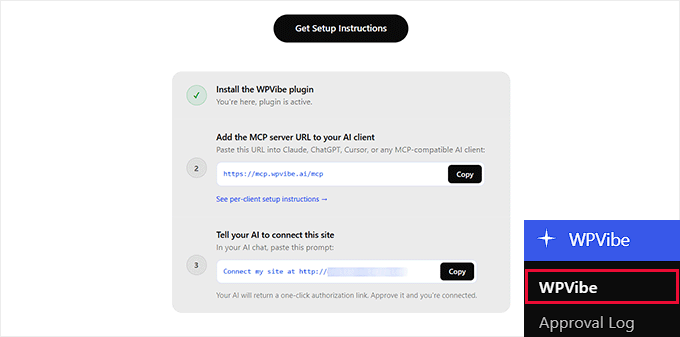
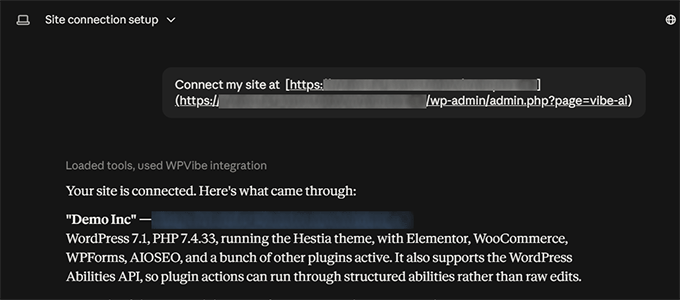
- Server Initialization: Access the new "WPVibe" menu in your sidebar to retrieve your unique server address and authorization prompt.
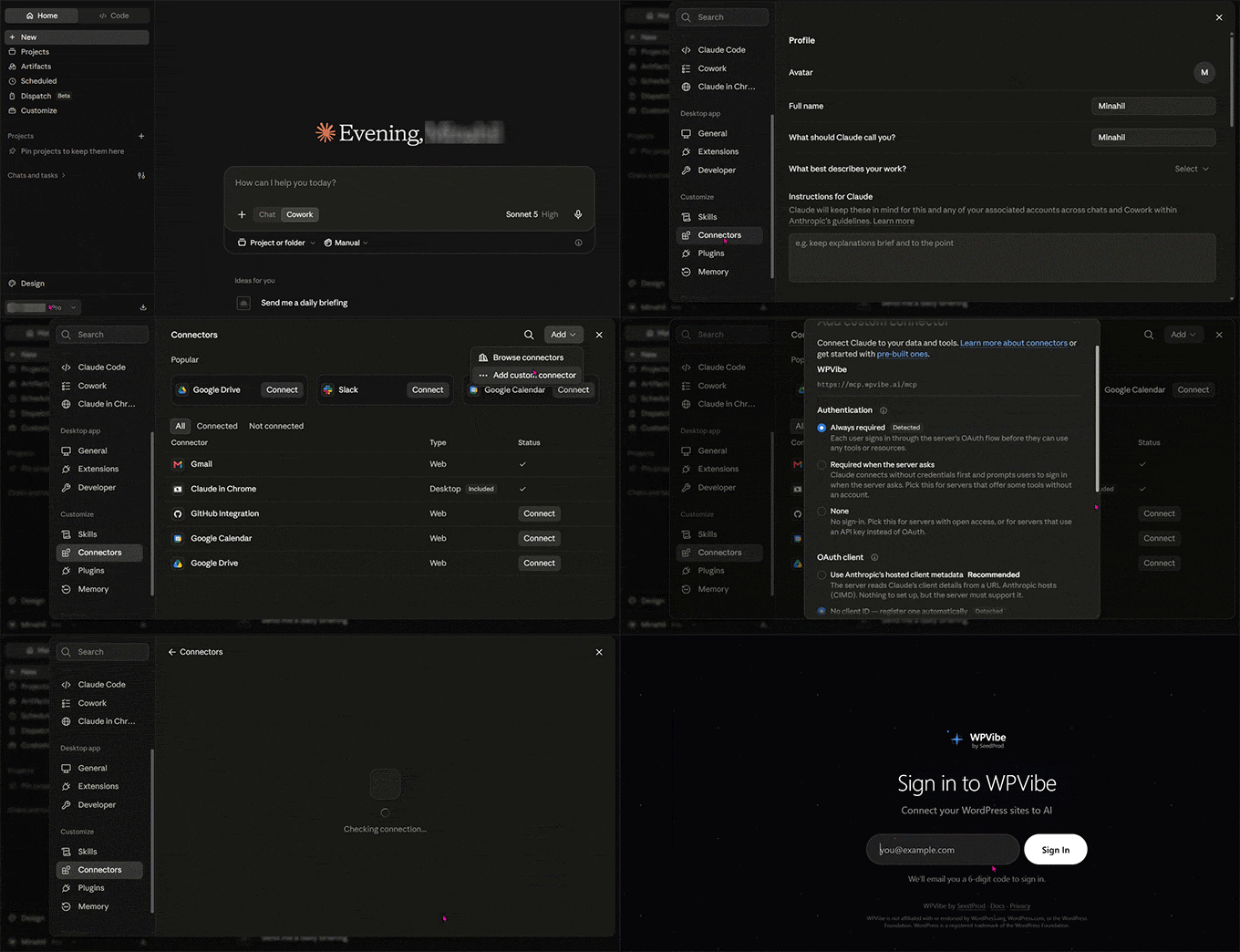
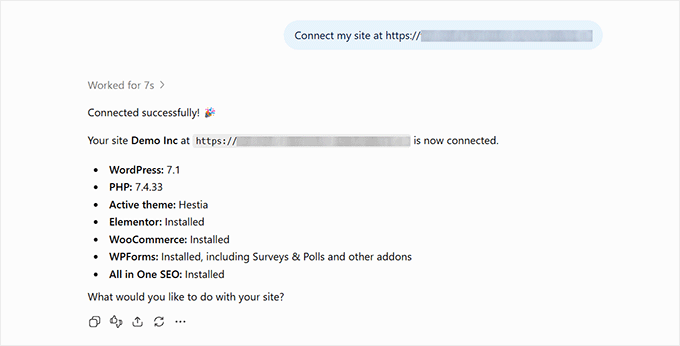
- Claude Integration: Navigate to Settings » Connectors in Claude, add a "custom connector," and input the WPVibe server URL.
- Authorization: Authenticate via the email-based verification process provided by WPVibe.
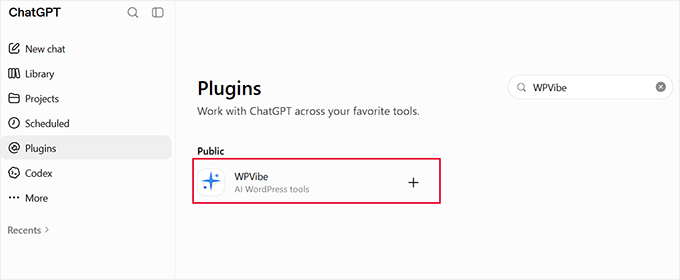
- ChatGPT Integration: For ChatGPT, use the "Plugins" directory to add the WPVibe tool. Note that unlike some permanent connections, you may need to re-select the WPVibe tool in new chat sessions to ensure the AI is drawing from your site data rather than general web data.
Implications: The Shift in Administrative Workflows
The move toward AI-managed websites carries profound implications for small business owners, bloggers, and developers.
1. The Death of Tedious Maintenance
Site maintenance is often neglected because it is boring, not because it is difficult. By delegating broken link detection, plugin updates, and core software management to an AI, site owners can ensure their site remains healthy without dedicating hours of their weekend to technical hygiene.
2. SEO at Scale
For sites with hundreds or thousands of pages, manual SEO optimization is a logistical nightmare. With an AI agent integrated with tools like All in One SEO (AIOSEO), you can automate the generation of titles, meta descriptions, and canonical URLs. This allows small teams to achieve the professional SEO footprint of a much larger organization.
3. Safety and Control
The primary concern for any site owner is: Can the AI break my site?
The WPVibe architecture addresses this through "guard rails." The AI is designed to request human approval before executing critical, site-altering commands. However, the onus remains on the user to establish sound operational habits:
- Limit Access: Only grant the AI permissions necessary for its intended tasks.
- Test First: Always test automated changes on a staging site or a single, non-critical page before authorizing bulk updates.
- Version Control: Ensure you have regular backups (using tools like UpdraftPlus or BlogVault) before running major AI-led cleanup tasks.
Official Responses and Expert Outlook
The industry reaction to MCP-based management has been largely positive, with developers praising the standardization of how AI interacts with the WordPress REST API.
Compatibility Considerations:
The AI-WordPress connection is surprisingly robust regarding page builders. Whether you use Elementor, Divi, Bricks, or Breakdance, the integration detects your builder’s unique save path, ensuring that the AI writes to your content blocks rather than overwriting your CSS or layout settings.
The Cost of Automation:
The WPVibe plugin offers a free tier supporting up to 100 tool calls per day, which is sufficient for most individual site owners. For high-traffic sites or agencies managing a portfolio, the Pro plan ($99/year) increases capacity to 500 calls daily.
Conclusion: A New Standard for WordPress
As we look toward the future, the integration of AI into the WordPress dashboard is no longer a "nice-to-have" novelty; it is becoming a core component of efficient site management. By embracing the Model Context Protocol, site owners can move from being "manual administrators" to "orchestrators," using AI to handle the heavy lifting while focusing their own energy on strategy and creativity.
Whether you are a developer looking to streamline your workflow or a blogger hoping to optimize your SEO at scale, the tools to transform your WordPress management are available today. By starting with a cautious, test-driven approach, you can harness the power of AI to make your website more secure, more visible, and significantly easier to maintain.