The landscape of website administration is undergoing a seismic shift. For years, WordPress users have relied on manual input, piecemeal plugins, and tedious administrative workflows to keep their digital properties running smoothly. However, the integration of Large Language Models (LLMs) like ChatGPT and Claude directly into the WordPress ecosystem is fundamentally changing the role of the site administrator from "manual operator" to "strategic orchestrator."
By leveraging the Model Context Protocol (MCP), a new standard for connecting AI assistants to local and remote data sources, users can now transform their AI chatbots into powerful, hands-on site managers.
Main Facts: What is AI-Driven WordPress Management?
Managing a WordPress site with AI is no longer limited to using a chatbot to write a blog post draft. Through the WPVibe plugin, users can establish a secure, two-way bridge between their WordPress installation and AI powerhouses like Claude or ChatGPT.
Unlike traditional AI writing assistants that merely provide text for you to copy and paste, an MCP-connected AI agent acts as a direct administrator. It can navigate your site’s backend, identify technical debt, perform content updates, and execute maintenance tasks in real-time.
The Core Mechanism: What is MCP?
The Model Context Protocol (MCP) serves as the "universal charger" for artificial intelligence. Just as a single USB-C cable can power your laptop, phone, and camera, the MCP allows an AI assistant to interact with a vast array of tools—including your WordPress database, calendar, or file system—without requiring custom, bespoke integrations for every single function. By installing WPVibe, you are essentially providing your AI agent with the "keys to the kingdom," allowing it to read and write directly to your site’s core architecture under your specific instructions.
The Chronology: A New Era of Workflow Efficiency
The integration process follows a structured path designed for security and precision. While the setup takes only a few minutes, it fundamentally alters the daily rhythm of site management.
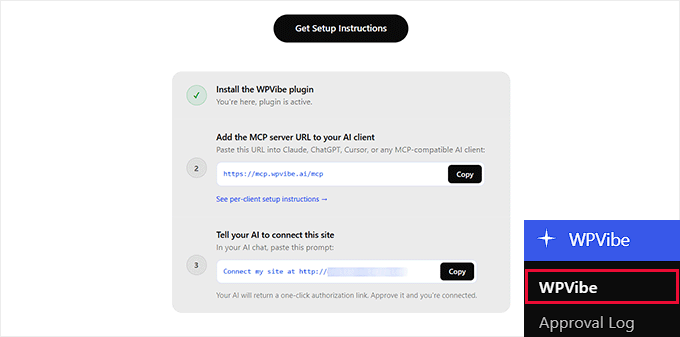
Step 1: Establishing the Connection
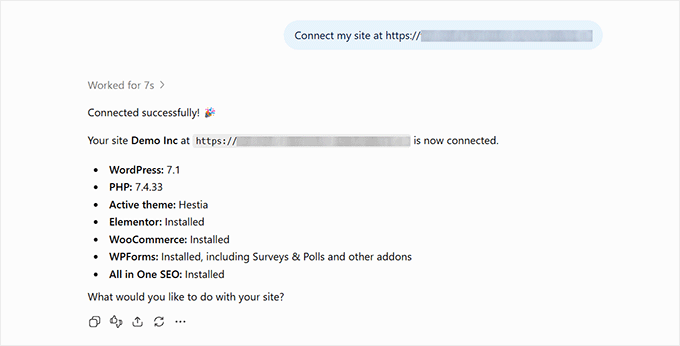
The journey begins by installing the WPVibe plugin from the official WordPress repository. Once activated, the plugin generates a unique server address and an authorization prompt.
- For Claude Users: Navigate to Settings > Connectors within the Claude interface. By selecting "Add custom connector," you input the WPVibe URL. The system then requires a secure handshake via email-based authentication.
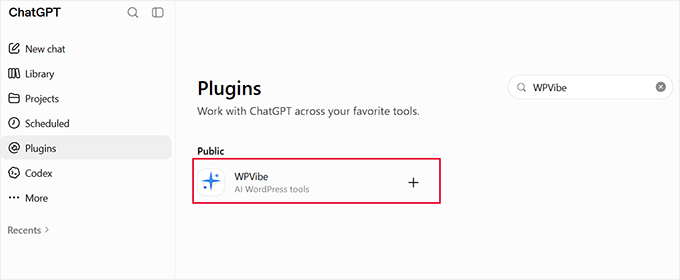
- For ChatGPT Users: The process utilizes the internal plugin directory. After searching for and enabling WPVibe, users must complete a secondary validation step by pasting an authorization prompt into a new chat window, ensuring that the AI has permission to interact with your specific instance.
Step 2: The Audit and Execution Phase
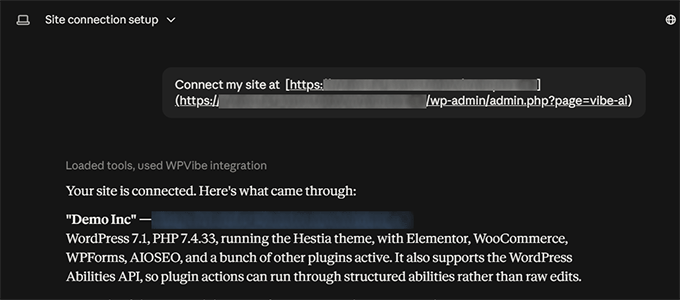
Once connected, the AI does not simply wait for a prompt; it begins to interpret the state of your site. In testing environments, researchers observed that the AI could perform a comprehensive health scan in under five minutes. This included identifying broken internal links, detecting missing meta descriptions, flagging outdated plugins, and highlighting theme compatibility issues.
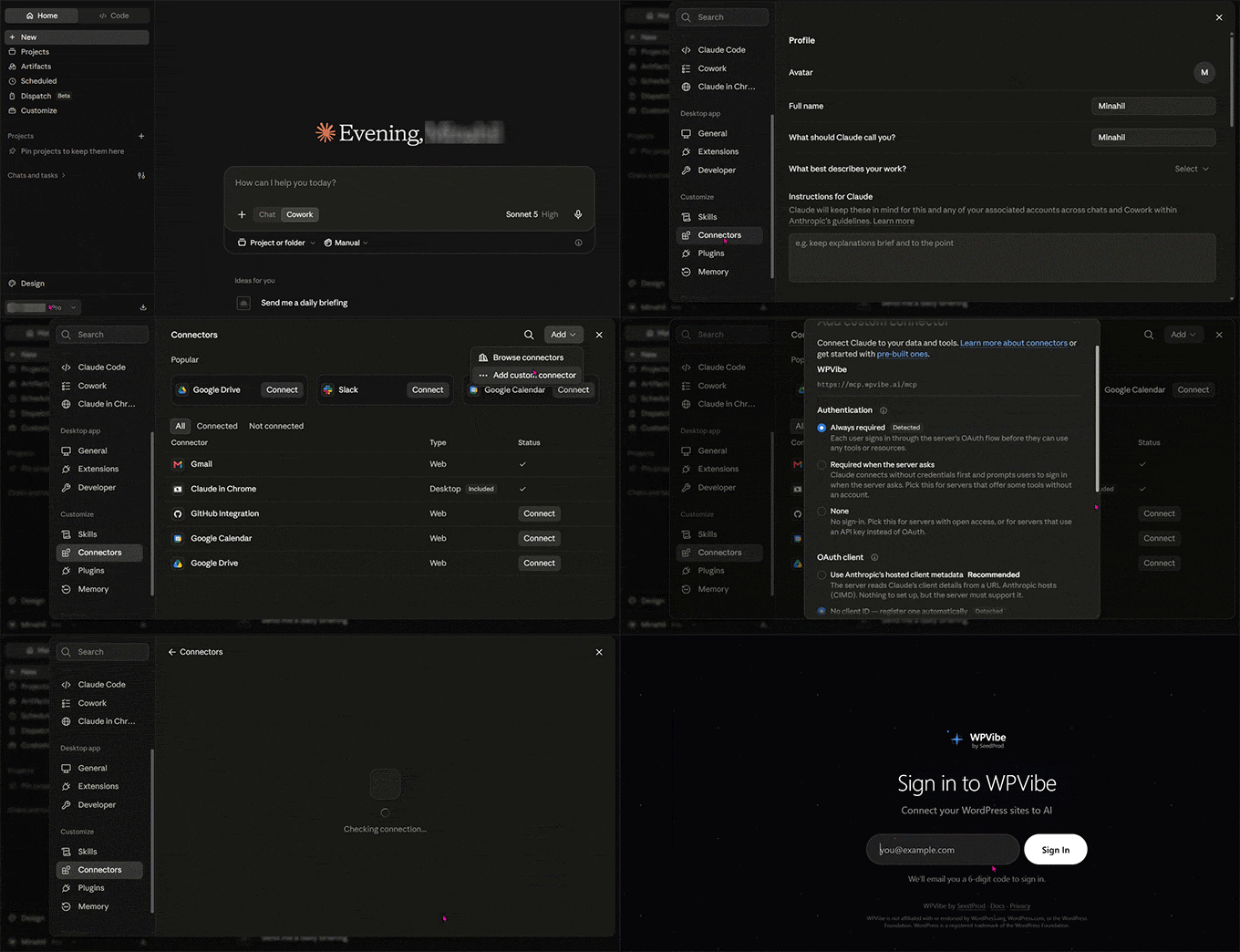
Step 3: Ongoing Management
The final phase is the transition to "AI-assisted operations." Whether you are a solo blogger managing three posts or a store manager overseeing hundreds of WooCommerce products, the AI maintains a record of your site’s health, allowing you to trigger bulk updates or content refreshes with a single natural language command.
Supporting Data: Why Direct Integration Outperforms Traditional Tools
To understand the value of this evolution, one must compare it to legacy methods of site management. The following table highlights why MCP-based connections represent a paradigm shift:
| Approach | Functional Capability | Primary Failure Point |
|---|---|---|
| Manual Copy/Paste | High creative control | Inefficient for high-volume tasks (e.g., 50+ pages) |
| Standard AI Plugins | Limited to specific fields | Cannot interact with site architecture or plugins |
| Connected AI (MCP) | Full administrative access | Requires careful permission management |
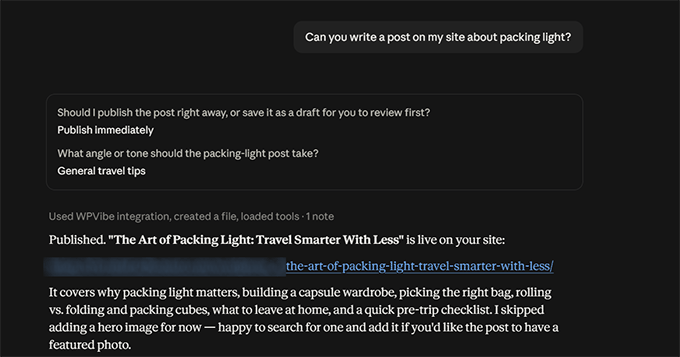
Data from recent test runs on demo sites show that an AI agent can, on average, tag, categorize, and publish a formatted blog post in approximately 45 seconds—a task that typically consumes 15 to 20 minutes of manual labor. Furthermore, the ability to automate mundane tasks like generating image alt-text for hundreds of media files at once offers an exponential increase in productivity for content-heavy sites.
Official Perspectives and Technical Implications
Industry experts view the move toward "Agentic WordPress" as the natural conclusion of the AI boom. By moving from "generative" AI (which creates content) to "agentic" AI (which performs actions), developers are creating a more resilient web.
The Role of AIOSEO
The partnership between AI agents and SEO-specialized plugins like All in One SEO (AIOSEO) is particularly noteworthy. By granting an AI agent access to SEO data, users can effectively outsource their site audits. An agent can crawl the entire site, identify pages with low SEO scores, and then automatically rewrite meta titles, descriptions, and focus keywords based on real-time search data.
Technical Safeguards
A common concern among developers is the risk of "runaway" AI. If an AI agent has the power to delete plugins or change database configurations, what happens if it makes a mistake?
The WPVibe architecture addresses this by implementing "guard rails." Before any critical action is taken—such as updating the WordPress core or deleting a plugin—the system requires explicit user confirmation. This human-in-the-loop requirement ensures that the AI serves as an extension of the administrator’s will, rather than an autonomous decision-maker.
Implications for the Future of Web Management
The transition to AI-managed WordPress sites has profound implications for the industry:
- Lowering the Barrier to Entry: Small business owners who lack the technical expertise to manage complex site maintenance now have a virtual "CTO" at their fingertips.
- Scalability: Websites can now grow in complexity without a linear increase in administrative costs. Whether you are managing one site or fifty, the AI agent can apply updates and fixes across your entire network simultaneously.
- The Death of "Manual Drudgery": The future of web management is increasingly focused on high-level strategy. Instead of spending hours checking broken links or filling in SEO metadata, administrators will focus on content strategy, branding, and user experience, leaving the "janitorial" work of the internet to their AI agents.
Security and Best Practices
While the technology is transformative, users must adopt "AI-first" security habits:
- Segmented Access: Only grant your AI agent the permissions it absolutely needs to perform its job.
- Staging First: For major site changes or bulk updates, test the AI’s behavior on a staging site before deploying it to your production environment.
- Version Control: Always maintain regular backups of your database. Even with a highly capable AI, human error or unexpected AI hallucinations can occur.
In conclusion, the integration of ChatGPT and Claude via MCP is not merely a feature update—it is the beginning of a new chapter for WordPress. By embracing these tools, site owners are not just keeping up with technology; they are positioning themselves at the forefront of a more efficient, automated, and powerful web. As these AI agents become more sophisticated, the only limit to what a WordPress site can achieve will be the clarity and intent of the instructions provided by the human at the helm.