







Setting up a brand-new computer is often described as a digital "reset"—a moment of pure, unadulterated productivity potential. The machine is fast, the operating system is clean, and the absence of years of accumulated software bloat makes every task feel snappier. However, this period of technological bliss is frequently interrupted by the cold reality of modern hardware and software compatibility.
For many users transitioning to new high-end machines, particularly new MacBook models, the honeymoon phase is abruptly curtailed by a frustrating technical hurdle: the "This video format is not supported" error when attempting to stream content on platforms like YouTube TV. This article explores the root causes of this issue, the technical landscape of browser-based digital rights management (DRM), and the step-by-step resolution that allows users to regain access to their favorite live broadcasts.
Main Facts: Decoding the Error
The "This video format is not supported" error is rarely a reflection of the hardware’s actual capability. Modern computers, especially Apple’s Silicon-based MacBooks, are more than powerful enough to handle high-definition streaming. Instead, the error is almost exclusively a manifestation of a missing or disabled digital bridge between the streaming service and the browser’s ability to decode protected content.
Streaming services like YouTube TV, Netflix, and Disney+ rely on a technology known as Widevine. Widevine is a proprietary Digital Rights Management (DRM) system developed by Google. It acts as a gatekeeper, ensuring that the content being streamed is protected from piracy and unauthorized copying. When a browser cannot interact with the Widevine Content Decryption Module (CDM), it fails to handshake with the streaming provider’s servers, resulting in the generic error message that leads so many users to believe their hardware is faulty.

Chronology of a Streaming Failure
The frustration of this error typically follows a predictable timeline:
- The Out-of-Box Experience (OOBE): The user unboxes their new device, migrates their essential data, and logs into their preferred web browser (Chrome, Brave, or Vivaldi).
- The Initial Attempt: The user navigates to
tv.youtube.com, eager to test the performance of the new machine. - The Trigger: Upon selecting a live broadcast, the screen flashes black, followed by the appearance of the "This video format is not supported" warning.
- The Troubleshooting Phase: The user attempts to refresh the page, clear their cache, and check for OS updates. Finding no immediate relief, they often assume it is a network issue or a temporary glitch with YouTube’s servers.
- The Realization: After consulting support forums, the user identifies the lack of Widevine integration as the culprit.
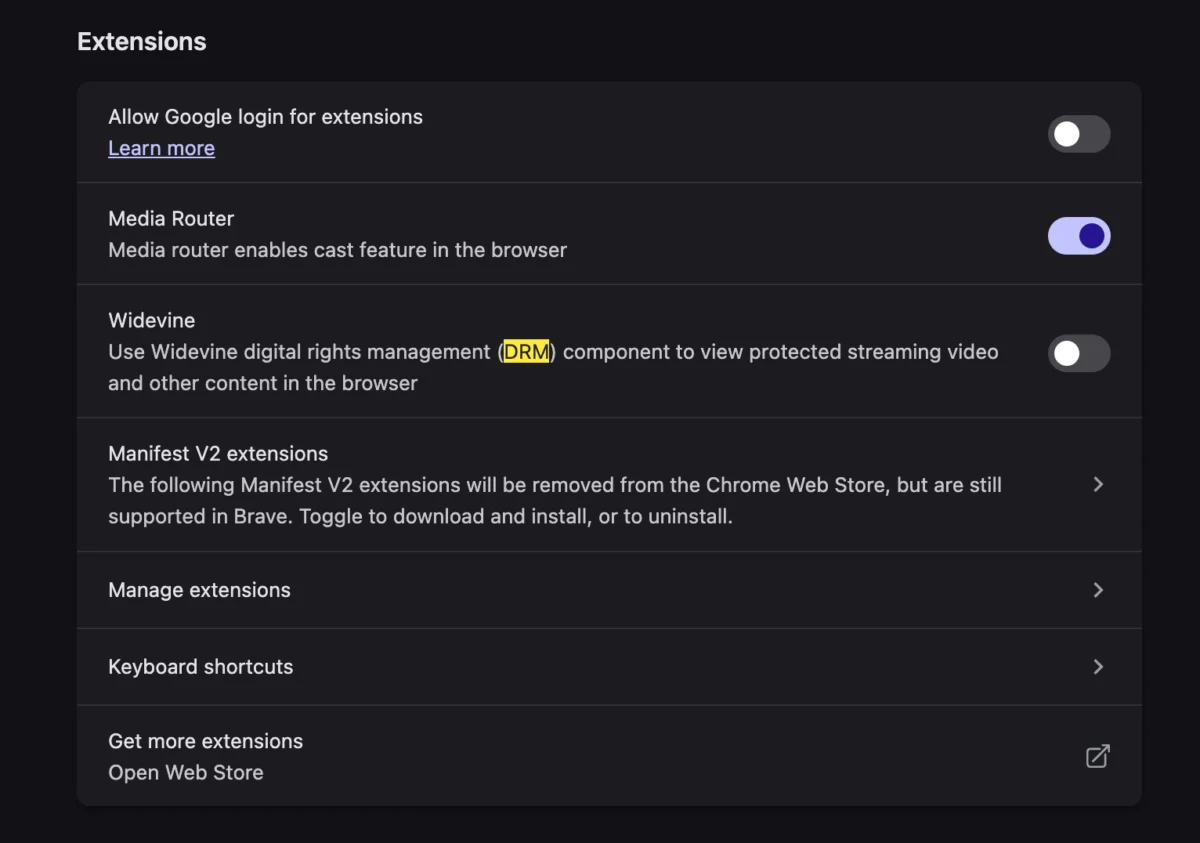
- The Resolution: By manually enabling Widevine in the browser settings, the decryption module downloads, the browser restarts, and the streaming service resumes normal operation.
Supporting Data: Why DRM is Essential
To understand why this issue persists, one must look at the data surrounding content protection. The streaming industry loses billions of dollars annually to unauthorized distribution. Content providers—such as major television networks and film studios—require that streaming platforms implement strict DRM protocols as a condition of their licensing agreements.
Widevine comes in three security levels:
- L1: The highest level of security, where all video processing and decryption occur within a Trusted Execution Environment (TEE).
- L2: A middle ground, rarely used, where video processing occurs in the TEE but audio is handled elsewhere.
- L3: The base level, used when the hardware TEE is not available or supported.
When a browser fails to load Widevine, it is essentially failing to provide the "handshake" required for these levels. Without it, the content provider refuses to stream the video, fearing the stream could be easily intercepted and ripped. While this may seem like an inconvenience for the end-user, it is the fundamental mechanism that keeps professional broadcast content viable on the open web.

Official Responses and Industry Standards
While Google (the creator of Widevine) does not explicitly highlight this error in its consumer-facing marketing, it remains a standard part of the Chromium development framework. Most browsers based on the Chromium engine—including Google Chrome, Microsoft Edge, Brave, and Vivaldi—are designed to prompt users to download the Widevine component automatically.
However, in privacy-focused browsers or hardened system environments, the automatic download of proprietary modules is sometimes blocked by default to prevent "phone home" telemetry. This is a common occurrence on new MacBooks where strict privacy settings might prevent the browser from reaching out to Google’s servers to pull down the binary required for Widevine.
Representatives from browser development teams often emphasize that this is a trade-off between user privacy and feature compatibility. By choosing a browser that prioritizes blocking third-party tracking, users occasionally disable the very mechanisms that enable high-quality video streaming.
Implications for the Modern User
The "Video Format Not Supported" error serves as a microcosm of the modern digital experience: we are increasingly reliant on proprietary, "black-box" systems to consume everyday media.

The Shift from Codecs to CDM
In the "good old days" of the early internet, users often had to manually install codecs—pieces of software like DivX or Xvid—to watch specific video files. Today, the industry has moved toward Content Decryption Modules (CDM). While the user experience is generally smoother, the underlying complexity has increased. We are no longer just installing a codec; we are installing a security client that manages our rights to view content.
Privacy vs. Convenience
This incident highlights the tension between privacy-focused browsing and mainstream web functionality. If you are a user who prefers a "de-Googled" or privacy-hardened environment, you will inevitably hit walls like this. The solution is rarely to replace the hardware; it is to understand the configuration of the browser.
The Portability Problem
As users move between devices—from a desktop PC to a MacBook to a mobile tablet—they expect a seamless experience. However, because each device handles DRM at the hardware level (specifically through the TEE mentioned earlier), a configuration that works on one machine may not migrate perfectly to another. This creates a "fragmented" user experience where the same browser version on different machines behaves differently regarding content protection.
How to Resolve the Issue: A Practical Guide
If you are currently experiencing this error on your new machine, follow these steps to restore your streaming capabilities:

- Check Browser Settings: Most browsers have a specific "Components" or "Privacy" tab. In Chrome, typing
chrome://componentsinto your address bar will show you a list of installed modules. Look for "Widevine Content Decryption Module." - Force an Update: If the module is missing or marked as "0.0.0.0," click the "Check for update" button. This will force the browser to reach out to the DRM server and pull down the necessary files.
- Review Permissions: Ensure that your browser has permission to run protected content. In many privacy-oriented browsers, there is a toggle switch labeled "Allow Widevine" or "Enable DRM content" under the Privacy and Security section.
- Restart the Application: Once the module is installed, it is essential to perform a full restart of the browser. DRM modules are loaded at launch; they cannot be hot-swapped while the browser is actively running.
- Verify with a Test: Navigate back to your streaming provider. If the issue persists, clear your site-specific cookies for that domain, as outdated authentication tokens can sometimes conflict with the newly enabled DRM module.
Conclusion: Embracing the New Workflow
Transitioning to new hardware is an opportunity to optimize your digital workspace, but it also forces a confrontation with the invisible infrastructure that powers the web. The "This video format is not supported" error is a reminder that even in a world of high-speed silicon and advanced operating systems, our ability to consume media is tethered to a complex web of security protocols.
By understanding the role of Widevine and the necessity of DRM in modern streaming, users can bypass the frustration that comes with these errors. It is not a failure of your hardware, but rather a final step in configuring your browser to participate in the protected, modern streaming ecosystem. Once the Widevine module is active, you can return to enjoying your live TV, confident that your new machine is finally operating at its full, intended potential.