By Global Tech & Education Desk
Published: October 2026
Main Facts: The Rise of Visual AI Prompting in Modern Education
Artificial intelligence has long transcended its initial reputation as a mere productivity booster for white-collar workers and programmers. Today, it stands as the go-to virtual tutor for millions of students, self-directed learners, and curious professionals worldwide. While OpenAI’s ChatGPT is universally recognized for drafting emails, debugging code, and summarizing dense literary texts, a vast ecosystem of advanced prompt engineering remains hidden in plain sight.
For visual learners—those who process information significantly better through diagrams, spatial layouts, and structured schematics than through walls of dense text—creating custom charts has traditionally been an arduous task. Designing a comprehensive timeline, an anatomical breakdown, or a mechanical cross-section from scratch requires specialized graphic design skills, expensive software licenses, and hours of painstaking manual labor.

That paradigm is shifting dramatically. Thanks to recent capability upgrades in conversational AI models—such as OpenAI’s advanced multimodal architectures—users can now bypass complex editing suites entirely. By deploying specific shorthand commands, or "codes," learners can instruct AI platforms to generate intricate, structured visual diagrams for virtually any subject in a matter of seconds.
Popularized by digital creator Lucky Balaraman (known online as AI Voyager on Instagram), these four simple prompt codes are revolutionizing how people digest complex information. Whether you are a medical student cramming for an orthopedic exam, an engineering enthusiast dissecting a locomotive, or a primary school teacher looking for intuitive ways to explain technology, these prompts act as immediate shortcuts to visual comprehension.
Chronology: The Evolution of Text-to-Visual AI Learning
To understand the gravity of this development, it is helpful to trace how educational technology and generative AI have converged over the past half-decade:
- 2020–2022 (The Text-Only Era): Early large language models (LLMs) operated strictly on a text-in, text-out basis. Educational queries were answered with bulleted lists and paragraphs. While informative, these text blocks often failed to engage visual-spatial learners, requiring users to look elsewhere for diagrams.
- 2023 (The Advent of Multimodality): The integration of text generation with diffusion-based image models allowed AI to begin producing pictures from text prompts. However, early image generators struggled with consistency, text labeling, and accurate anatomical or mechanical structures, often rendering garbled letters and nonsensical machinery parts.
- 2024–2025 (Refining Structured Outputs): AI tools began incorporating advanced vector handling and precise spatial layout controls. Users discovered that specific formatting instructions could yield cleaner charts, flowcharts, and infographics, though they still required long, descriptive prompt paragraphs.
- Late 2026 (The Era of Shorthand Commands): Platforms integrated faster, native visual features with robust interactive capabilities. This paved the way for minimalist slash-commands—such as
/timeline,/exploded,/anatomy, and/cross-section—allowing users to instantly trigger highly specific, multi-layered graphical schemas with minimal linguistic effort.
Supporting Data: The Four Essential ChatGPT Visual Prompts Tested
We tested the four viral prompt "codes" shared by AI Voyager to evaluate their speed, accuracy, and utility across different disciplines. Here is how each one operates in practice, along with recommendations for their ideal use cases.
1. The Timeline Code (/timeline)
- Purpose: To map out the historical evolution, chronological phases, or developmental milestones of a subject, technology, or movement.
- How to Use It: Type
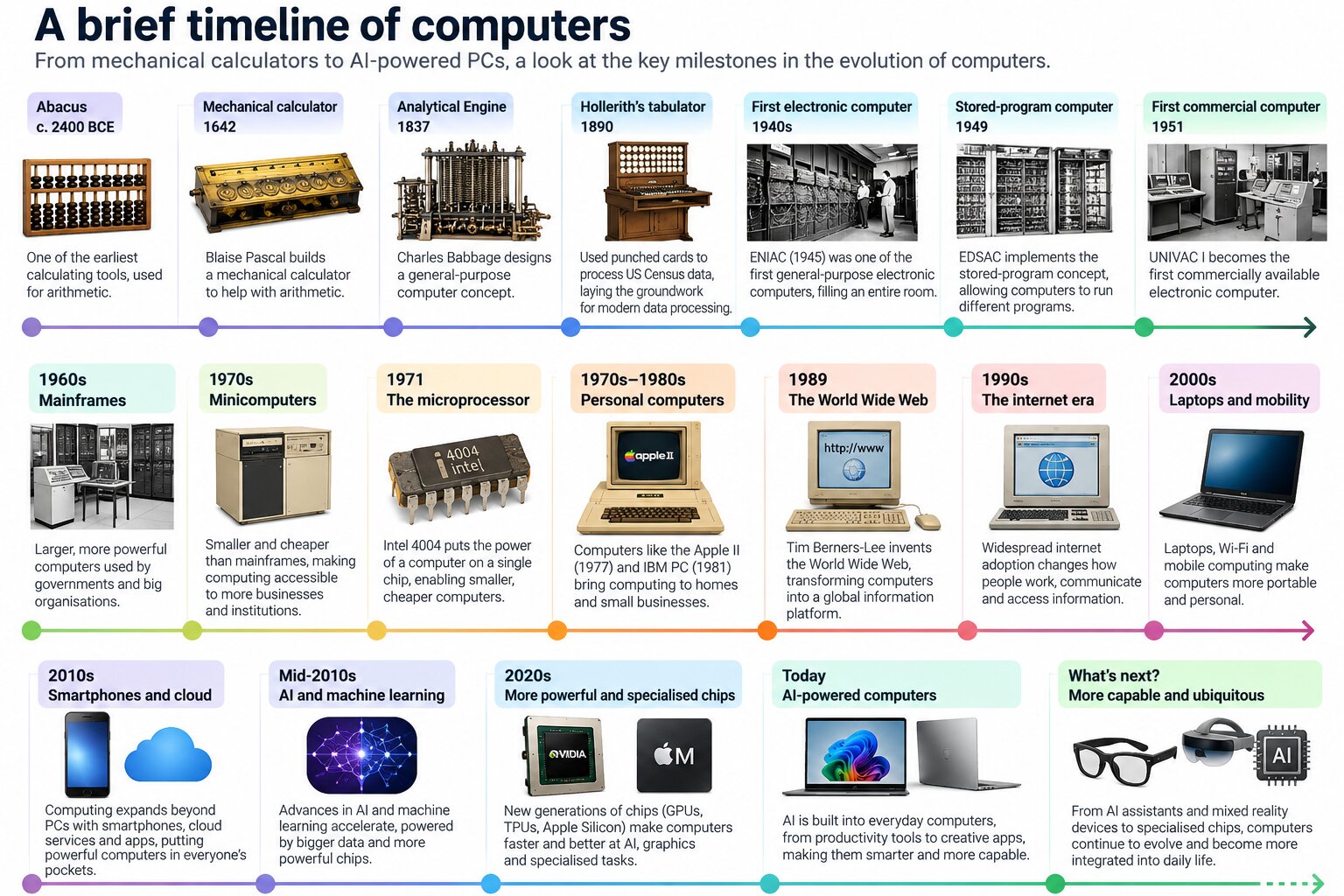
/timeline [desired subject]into the prompt box. - Example in Action: Entering
/timeline computerscommands ChatGPT to synthesize decades of computing history into a structured, phase-by-phase chronological chart. The resulting output spans everything from the ancient abacus and mechanical punch-card systems to vacuum tubes, transistors, silicon microchips, and modern quantum and advanced computing paradigms. - Target Audience & Utility: Ideal for history students, researchers, and professionals trying to understand how complex industries or scientific fields developed over time without reading through multi-chapter textbooks.
2. The Exploded View Code (/exploded or /explodedviews)
- Purpose: To generate a meticulously labeled, photorealistic diagram of a physical object, broken down into its fundamental components and arranged according to their spatial positions.
- How to Use It: Enter
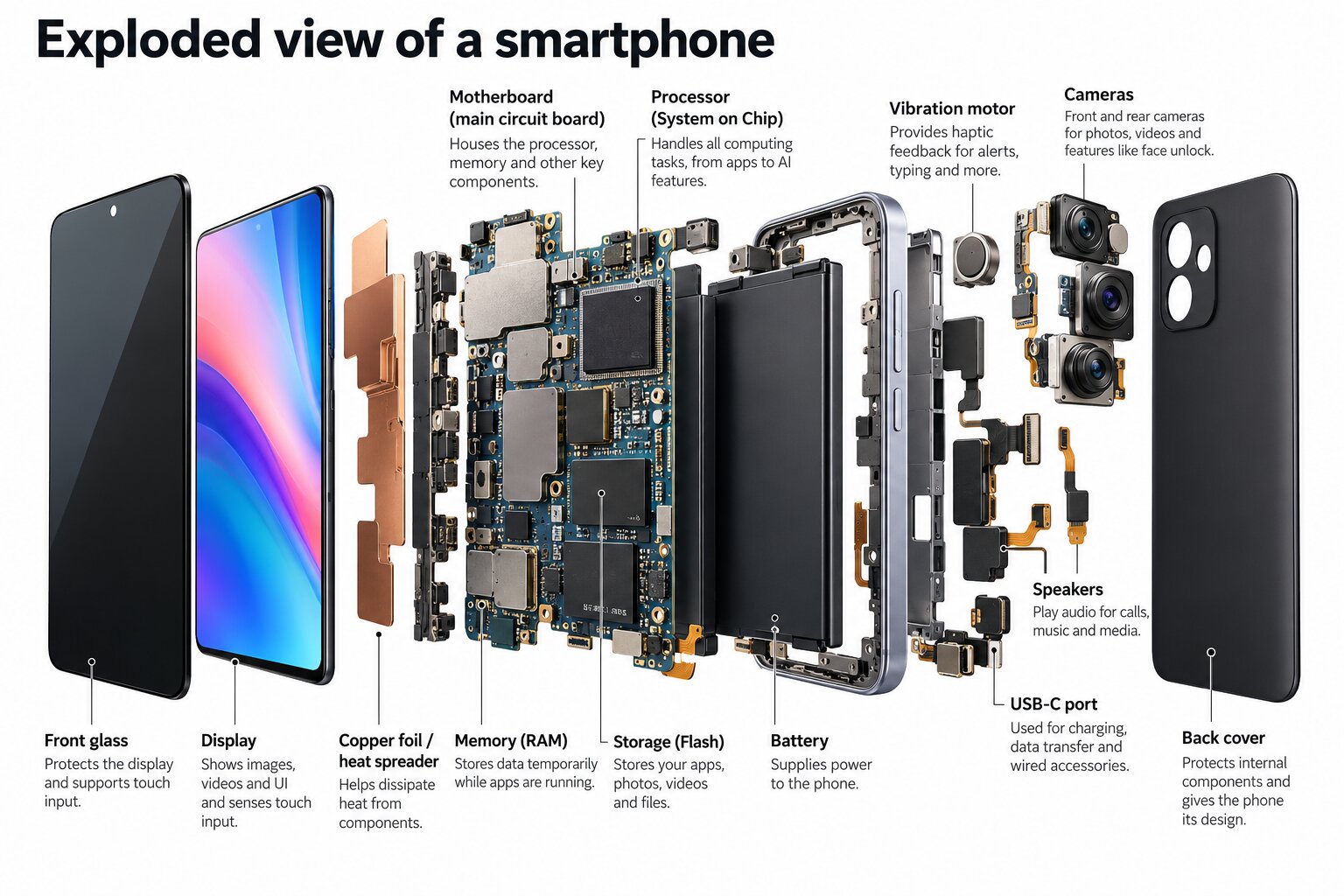
/explodedviews [object name]. - Example in Action: When prompted with
/explodedviews smartphone, the AI produces a detailed architectural breakdown of a modern mobile device. The visualization cleanly separates the outer casing, front glass display, touch digitizer, lithium-ion battery, microchips, camera modules, and rear panel, complete with spatial alignment lines. - Target Audience & Utility: Invaluable for engineering students, product designers, technical repair technicians, and educators teaching children how everyday physical devices function beneath the surface.
3. The Anatomy Code (/anatomy)
- Purpose: To produce a scientifically structured, labeled anatomical illustration of specific biological structures, body parts, or physiological systems.
- How to Use It: Type
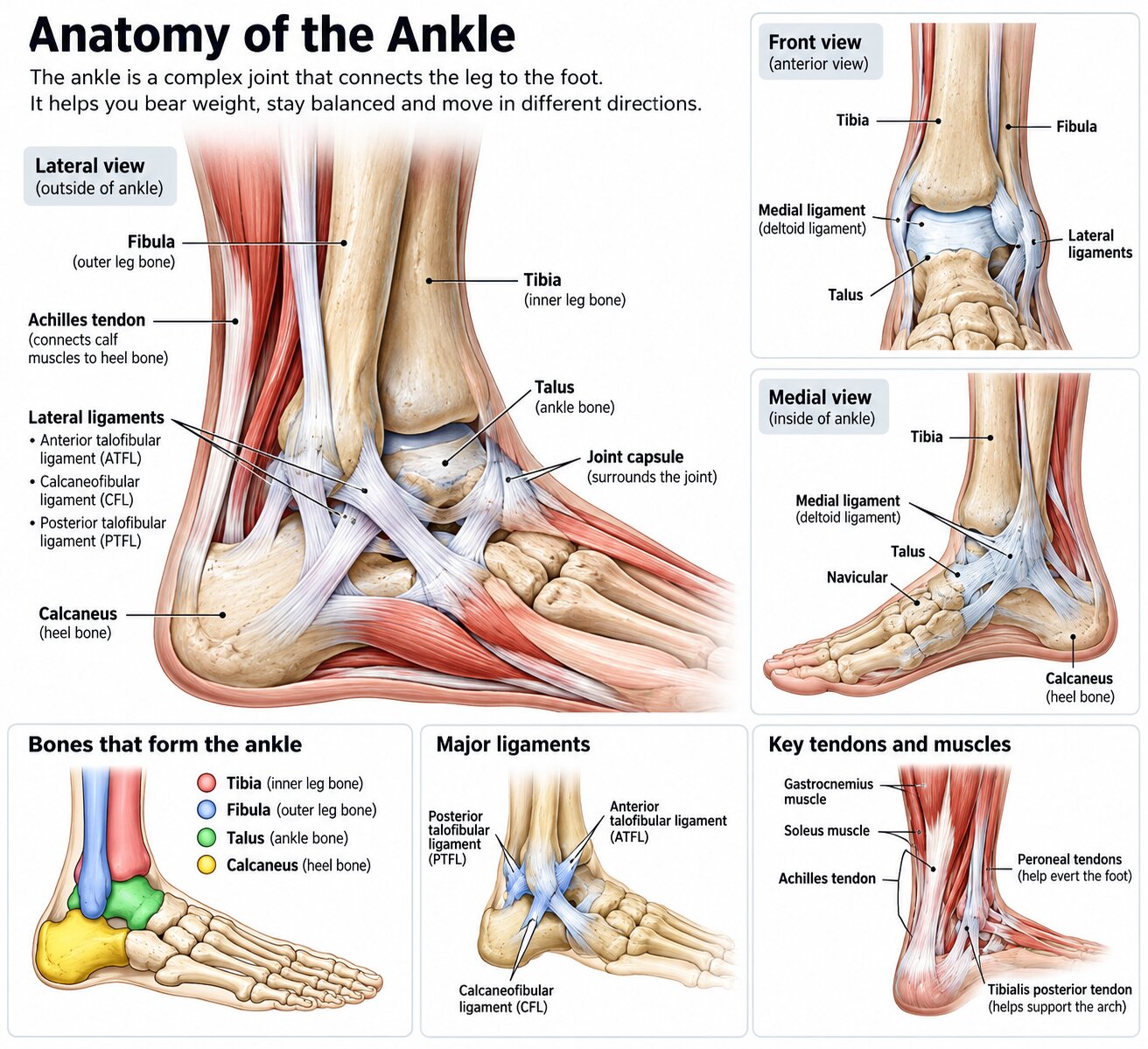
/anatomy [body part or organism]. - Example in Action: Inputting
/anatomy anklegenerates a comprehensive medical-style diagram focusing on the skeletal structure, tendons, ligaments, and muscular arches of the human ankle joint. - Target Audience & Utility: Highly beneficial for biology students, medical trainees, physical therapists, yoga instructors, and fitness coaches seeking clear visual references to explain biomechanics to clients or peers.
4. The Cross-Section Code (/cross-section)
- Purpose: To provide a cutaway, multi-layered visual diagram that reveals the internal architecture and inner workings of large-scale objects, infrastructure, or complex systems.
- How to Use It: Type
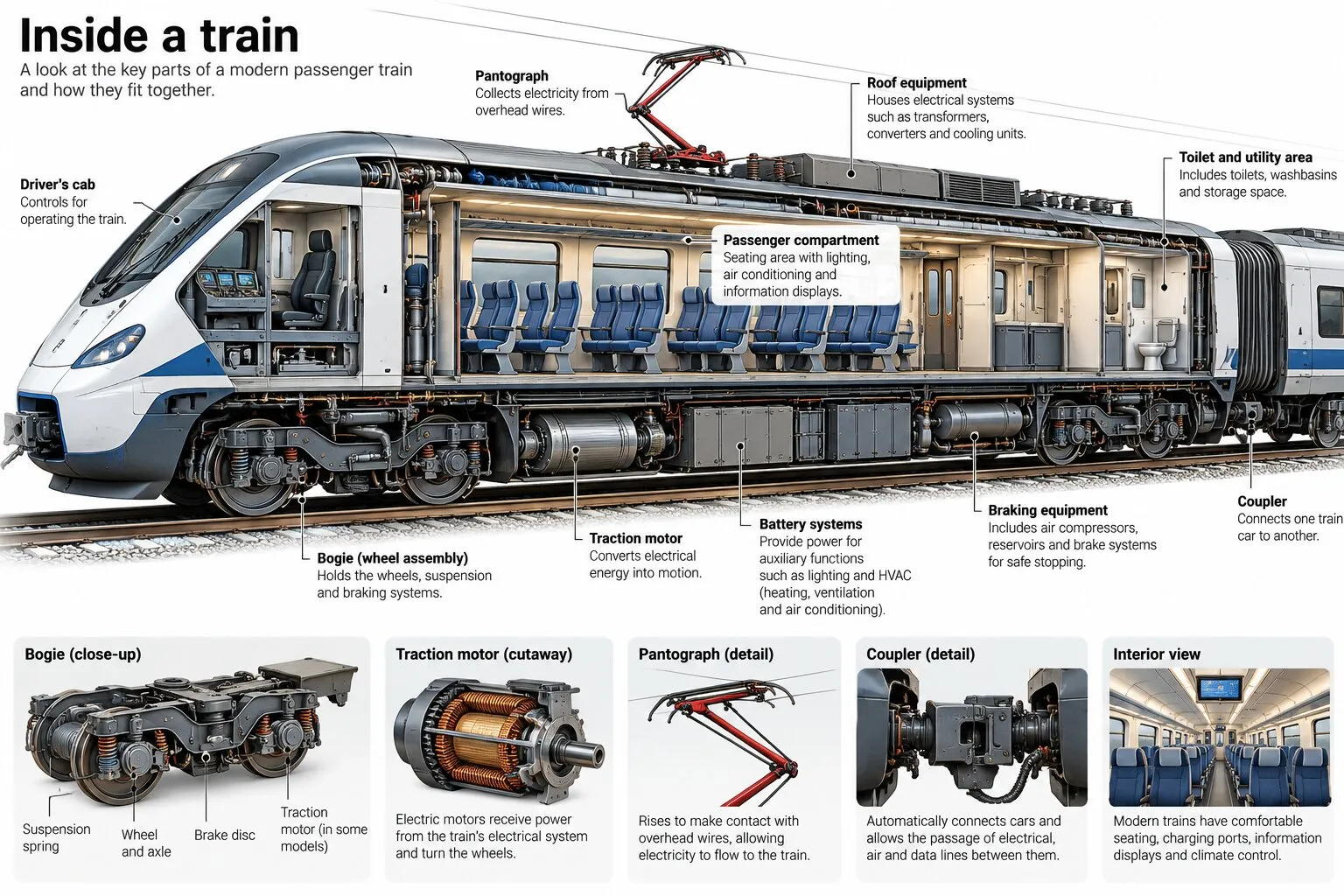
/cross-section [large object, building, or system]. - Example in Action: Testing the prompt
/cross-section trainyields a layered cutaway graphic of a modern passenger train. The diagram reveals the internal passenger compartments, seating arrangements, roof-mounted HVAC systems, pantographs, and undercarriage mechanical components. - Target Audience & Utility: Perfectly suited for architecture students, mechanical engineers, science educators, and anyone driven by general curiosity about how massive structural systems are built internally—from car engines and skyscrapers to tree trunks.
Official Responses and Expert Perspectives: Benefits and Caveats
While the democratization of visual learning tools has been widely celebrated across social media and educational forums, pedagogical experts and AI researchers urge caution alongside enthusiasm.
Dr. Elena Vance, a professor of cognitive psychology specializing in multi-sensory learning, notes that visual diagrams significantly reduce cognitive load. "When learners can immediately perceive relationships such as cause-and-effect, part-to-whole structures, and operational sequences visually, their retention rates skyrocket compared to reading plain text," she explains. "These shortcut prompts lower the barrier to entry for complex subjects, making advanced conceptual learning accessible to visual-spatial thinkers."
However, tech ethicists and AI developers emphasize crucial limitations regarding accuracy and reliability:
- Conceptual vs. Professional Use: Because these diagrams rely on generative AI text-and-image synthesis engines, they are optimized for conceptual understanding. Experts warn that they should never be used for professional engineering, surgical planning, or legal applications where 100 percent structural accuracy is mission-critical.
- Hallucination Risks: AI models can occasionally mislabel anatomical parts, misplace mechanical components, or invent historical milestones. Users must cross-reference critical data with authoritative academic sources.
- Data Privacy Warnings: Cybersecurity advocates continue to remind the public that public-facing AI chatbots absorb user inputs for training purposes. Learners and professionals are strongly advised never to input proprietary schematics, sensitive corporate data, or personal private information into chatbot prompts.
Implications: The Future of Autonomous, Visual-First Learning
The proliferation of slash-command prompting marks a profound shift in human-computer interaction. We are moving away from cumbersome, text-heavy search engine queries toward intuitive, media-rich generative outputs tailored instantly to individual cognitive styles.
For the modern student, self-taught programmer, or curious hobbyist, tools like ChatGPT no longer serve merely as writing assistants or digital dictionaries. They are morphing into dynamic, on-demand illustration studios. By mastering simple codes like /timeline, /exploded, /anatomy, and /cross-section, learners can bypass hours of tedious research, replacing endless scrolling with instant, structured visual clarity.
As artificial intelligence models continue to evolve in precision and reliability, the classroom of tomorrow may rely less on static textbook diagrams and more on personalized, real-time visual simulations generated at the stroke of a keystroke. Yet, as these tools become ubiquitous, the ultimate responsibility remains with the user: to balance the dazzling efficiency of AI with rigorous critical thinking, fact-checking, and digital safety.