










Introduction: The Promise and Peril of the Fresh Setup
There is a distinct, almost tactile pleasure in unboxing a new computer. For the technology enthusiast or the professional power user, a fresh machine represents a blank slate—a high-performance vessel free from the digital detritus of outdated applications, fragmented cache files, and background processes that inevitably accumulate over years of use. However, this transition to modern hardware is not always seamless. As computing architectures evolve, so too do the complex layers of Digital Rights Management (DRM) and browser-based security protocols.
Recently, users migrating to high-end hardware—specifically the latest iteration of Apple’s MacBook lineup—have encountered a frustrating hurdle. Upon navigating to streaming services like YouTube TV, they are met with the stark, prohibitive message: "This video format is not supported." This error, which effectively renders a premium streaming service unusable, is not a failure of the hardware itself, but rather a misalignment between modern browser security configurations and the proprietary content protection standards used by major streaming providers.
Main Facts: Deciphering the DRM Dilemma
The "Video Format Not Supported" error is rarely a reflection of the browser’s actual inability to decode a video stream. Instead, it is a handshake failure between the client’s browser and the content delivery network (CDN).
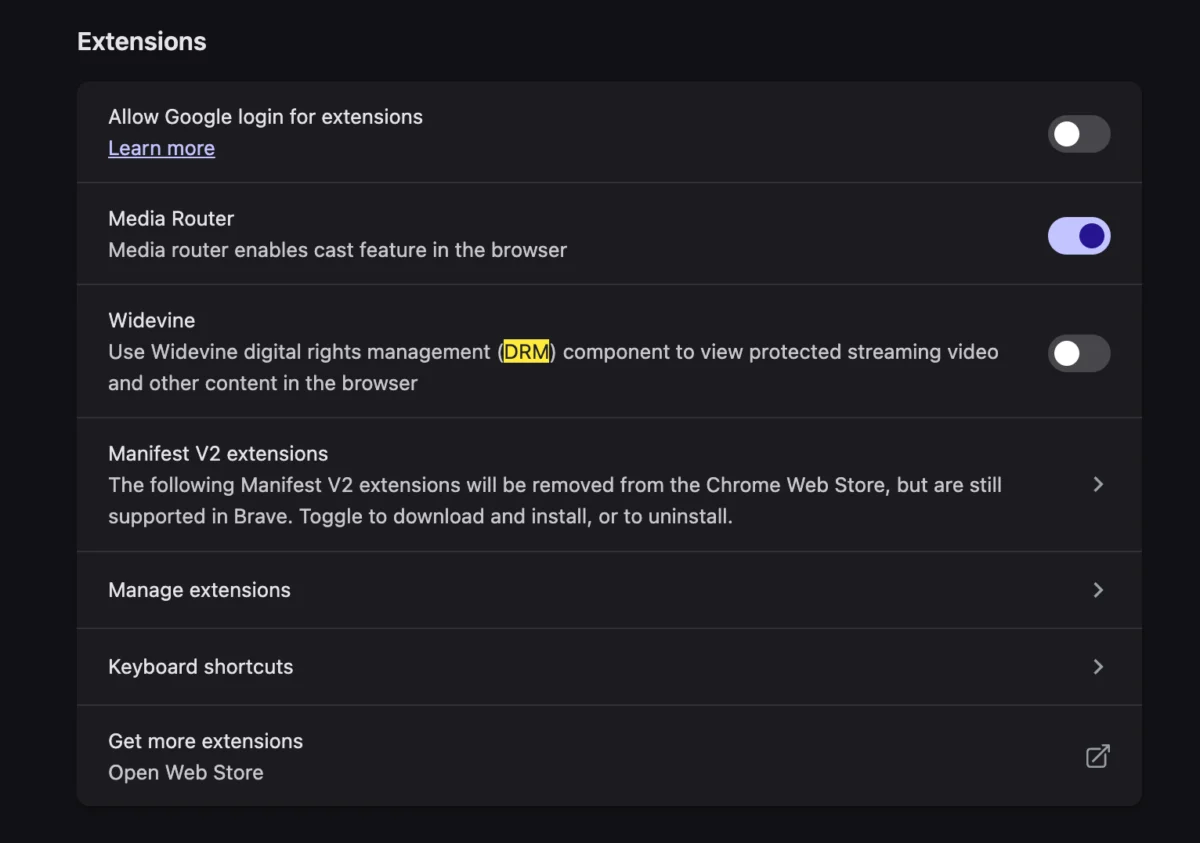
At the heart of this issue is Widevine, a proprietary Digital Rights Management (DRM) platform developed by Google. Widevine is used by streaming services—including Netflix, Disney+, and YouTube TV—to prevent piracy by ensuring that high-definition video content is only decrypted on secure, authenticated hardware.

When a user sets up a new machine, their browser often defaults to high-security, privacy-focused settings. If the browser lacks the necessary permission to execute the Widevine Content Decryption Module (CDM), the streaming service defaults to an error state. The server perceives the lack of a verified Widevine environment as a potential security risk or an unsupported configuration, triggering the "format not supported" notification despite the browser being perfectly capable of handling the media stream.
Chronology: The Evolution of the Error
The transition from legacy codec installation to modern browser-based DRM has been a slow-moving evolution over the last decade.
- 2010s: The Era of Plugins: In the early days of streaming, users were frequently required to download external plugins like Adobe Flash or Silverlight to play protected content. These were often security nightmares, prone to vulnerabilities and requiring frequent, manual updates.
- 2015-2017: The Shift to HTML5: Browser vendors and content providers moved toward the Encrypted Media Extensions (EME) API, which allowed browsers to handle DRM natively without external plugins. This was hailed as a major security win.
- 2020-Present: The Modern Configuration Wall: As hardware manufacturers (like Apple with their M-series chips) and browser developers (like Google, Mozilla, and Brave) have tightened privacy and security sandboxing, the "Widevine" module has become an opt-in feature rather than a background given.
For the modern user, the chronology of the error typically follows this path:
- System Migration: The user moves their data to a new MacBook.
- Browser Installation: The user installs a browser (often a privacy-hardened version of Chromium or Firefox).
- The Trigger: The user attempts to access a live broadcast on YouTube TV.
- The Failure: The browser detects the DRM request, but because the Widevine module is either disabled or awaiting user permission, the handshake fails, resulting in the error message.
Supporting Data: Understanding Browser Security Layers
To understand why this happens, one must look at how modern browsers manage security. Browsers are no longer just windowing engines for the web; they are isolated operating systems.

The Role of Content Decryption Modules (CDMs)
A CDM is a small piece of software that acts as the "key" to the locked video content. When you press play on a movie, the CDM verifies your device’s security level.
- Level 1 Security: The highest level of security, where decryption happens within a "Trusted Execution Environment" (TEE) on the hardware itself.
- Level 3 Security: The lowest level, where decryption happens in software.
If your browser settings have been tuned for maximum privacy—such as disabling "Content Decryption Modules" or blocking third-party tracking cookies—the streaming service cannot communicate with the Widevine CDM. Without this verification, the service assumes your device is not capable of protecting the copyrighted media, and it halts the stream to prevent unauthorized distribution.
Official Responses and Industry Standards
While streaming services rarely provide detailed technical documentation on these errors, industry consensus from the W3C (World Wide Web Consortium) regarding EME suggests that the error is working as intended. The "Video Format Not Supported" error is, ironically, a feature of a robust security model.
Most major browser developers have issued guidance stating that for high-fidelity media consumption, users must ensure the "Play Protected Content" or "Allow Widevine" flag is enabled in their settings.

Troubleshooting Steps for the Modern User
If you are currently facing this issue, the solution is typically found within the browser’s advanced settings menu:
- Navigate to Settings: Open your browser’s configuration panel (typically found under
chrome://settingsorabout:preferences). - Search for DRM or Protected Content: Use the search bar to look for "Widevine" or "Protected Content."
- Enable the Module: Ensure that "Allow sites to play protected content" is toggled to the On position.
- Clear Browser Cache/Cookies: Sometimes, the browser holds a corrupted DRM session key from the previous machine. Clearing cache for the specific site (YouTube TV) forces a fresh, successful handshake.
- Hardware Acceleration: Ensure that "Hardware Acceleration" is enabled in your browser settings, as many DRM modules require direct access to GPU decoding.
Implications: The Trade-off Between Privacy and Accessibility
The existence of this error highlights the central tension in modern computing: the battle between user privacy and content protection.
The Privacy Perspective
Users often disable DRM modules because they prefer a "clean" browser that does not track their activities. DRM modules are essentially black boxes; they execute code that the user cannot audit, and they report device information back to content providers. For the privacy-conscious, this is an unacceptable compromise. However, the consequence of this stance is the inability to access mainstream streaming platforms.
The Content Provider Perspective
From the perspective of content creators and copyright holders, DRM is an essential requirement. Without it, high-quality, 4K resolution streams could be easily captured, ripped, and distributed illegally. The "Video Format Not Supported" message is their way of saying, "We cannot verify that you are not a pirate."

The Future of Web Streaming
As we move toward a future where more professional work and entertainment occur within the browser, these friction points will likely become more prominent. The industry is currently experimenting with "Privacy-Preserving DRM," which aims to allow the handshake to occur without exposing the user’s specific device telemetry. Until such standards are universally adopted, users will continue to find themselves stuck in this digital limbo—a place where the most advanced hardware in the world is brought to a standstill by a single, unverified software permission.
Conclusion: Balancing the Machine
The "Video Format Not Supported" error on a new machine is a rite of passage for the modern digital citizen. It serves as a stark reminder that while we own our hardware, the content we consume is heavily governed by layers of software-based permissioning. By understanding the role of Widevine and the necessity of DRM, users can move beyond the frustration of the error message and regain access to their media libraries.
As technology continues to evolve, the goal for both browser developers and streaming services should be to make these security handshakes invisible. Until that day, the user remains the ultimate arbiter of their digital experience—balancing the desire for total privacy with the practical necessity of enabling the modules required to keep the screens bright and the content flowing.



