








Main Facts
When modern web applications migrate from local development environments to cloud-native CI/CD pipelines or container registries like the Azure Container Registry (ACR), subtle infrastructure disparities frequently disrupt deployment scripts. A prevalent and confounding symptom of this mismatch is the sudden appearance of a sh: 1: vite: not found error during the application compilation phase.
This error typically materializes when a Node.js application utilizing Vite for frontend bundling attempts to run its build script inside a Docker container. At first glance, developers often assume the issue stems from misconfigured multi-stage Docker builds, omitted development dependencies (devDependencies), or incorrect assignments of the NODE_ENV environment variable.
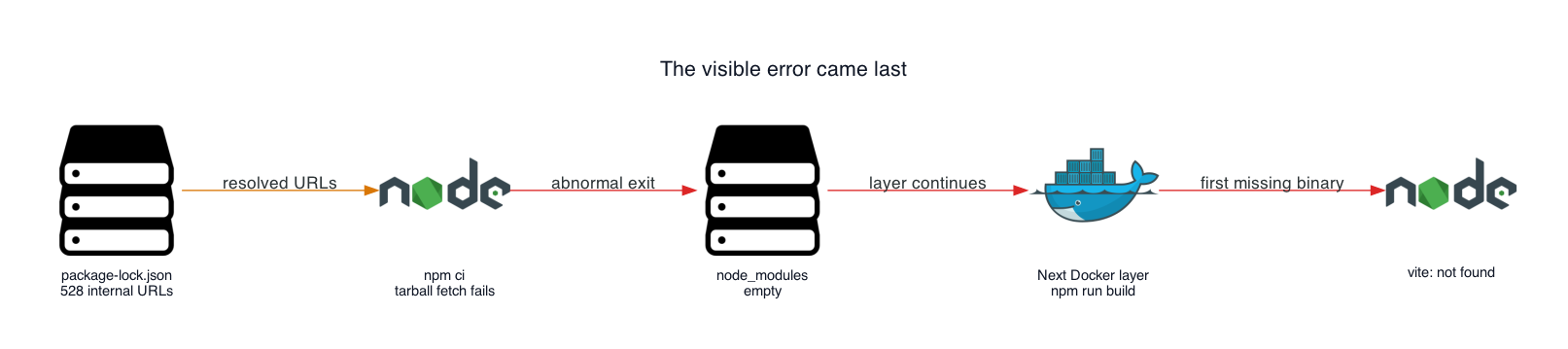
However, a deeper forensic examination of container build logs often reveals a more insidious root cause: a corrupted or environment-dependent package-lock.json file. Specifically, lockfiles generated within browser-hosted or specialized internal development environments frequently embed private proxy URLs or internal hostnames within their resolved fields. When npm ci executes inside an isolated container build runner, it attempts to query these unreachable internal package hosts, times out, throws silent or cryptic errors such as Exit handler never called!, leaves the node_modules directory completely empty, and ultimately allows the build process to proceed to the compilation stage without warning—where it immediately crashes upon failing to locate the Vite binary.
Chronology
The trajectory of this error unfolds across a predictable, multi-phase operational timeline that bridges local development and cloud infrastructure execution.
Phase 1: Local Development and Proxy Routing
The application is initially developed within a browser-hosted or containerized cloud development environment. This platform acts as an internal proxy for public npm packages, intercepting download requests and caching assets. When dependencies are updated or installed, the development platform automatically regenerates the package-lock.json file, writing its own internal, non-routable proxy URLs into the resolved properties of thousands of dependency objects.

Phase 2: Migration to Cloud Container Registries
The project codebase, including the updated package-lock.json, is committed to version control and later triggered for an automated build within a cloud service, such as an Azure Container Registry task or a GitHub Actions runner.
Phase 3: The Silent Failure of npm ci
Within the Dockerfile, the build sequence executes COPY package.json package-lock.json ./ followed by npm ci. Because npm ci relies strictly on the lockfile to determine where to fetch dependencies, it attempts to download hundreds of tarballs from the internal development environment’s hostname—a host that does not exist on the public internet or within the isolated cloud build runner.
Phase 4: Termination and Empty Directories
The network requests time out. The npm client terminates abruptly, often logging an ambiguous message like Exit handler never called! and failing to return a clean, descriptive exit code to the Docker daemon. Because npm ci strictly purges any existing node_modules before executing, the directory is left entirely empty.
Phase 5: The Build Stage Crash
Docker advances to the subsequent instruction in the build pipeline (RUN npm run build). The build script invokes Vite to compile the frontend assets. Because node_modules contains no binaries, the container execution halts immediately, outputting the diagnostic error:
sh: 1: vite: not foundSupporting Data and Diagnostic Findings
Diagnosing this error requires moving past the superficial error message and auditing the state of the dependency tree, the lockfile composition, and the network resolution pathways embedded within the project files.
1. Auditing the Dependency Directory
To confirm whether npm ci actually populated the environment, engineers can run inspection commands within the failing build environment before the compilation step occurs:
test -d node_modules && find node_modules -mindepth 1 -maxdepth 1 | head
test -x node_modules/.bin/vite
echo $?- Empty Output: If the directory search yields nothing and the exit status of the executable check returns
1, it confirms that the installation phase failed completely rather than simply omitting development dependencies. - Exit Status
0: Indicates that the binary is present and correctly executable.
2. Inspecting the Lockfile Tarball URLs
By analyzing the package-lock.json file programmatically, developers can quantify how many dependency entries point to unreachable hosts. Utilizing a lightweight Node.js script allows teams to parse every HTTP resolved field and group them by hostname:
const fs = require('node:fs');
const lock = JSON.parse(fs.readFileSync('package-lock.json', 'utf8'));
const hosts = ;

for (const entry of Object.values(lock.packages ?? ))
  if (!entry.resolved?.startsWith('http')) continue;
  const host = new URL(entry.resolved).host;
  hosts[host] = (hosts[host] ?? 0) + 1;


console.table(hosts);
In typical incidents involving cloud-dev proxies, this audit reveals that hundreds of entries point to internal domains (e.g., packages.internal.invalid), while zero point to the official public registry (registry.npmjs.org).
| Hostname | Resolved URL Count | Status |
|---|---|---|
packages.internal.invalid |
528 | Unreachable in Cloud Build Environment |
registry.npmjs.org |
0 | Expected Public Registry |
Official Responses and Engineering Best Practices
Package managers like npm are designed to respect the exact cryptographic and locational metadata stored within lockfiles. According to official npm documentation, npm ci is engineered for automated environments precisely because it enforces strict adherence to package-lock.json, bypassing dynamic resolution strategies. However, this architectural rigidity becomes a vulnerability when lockfiles are generated behind specialized development proxies.
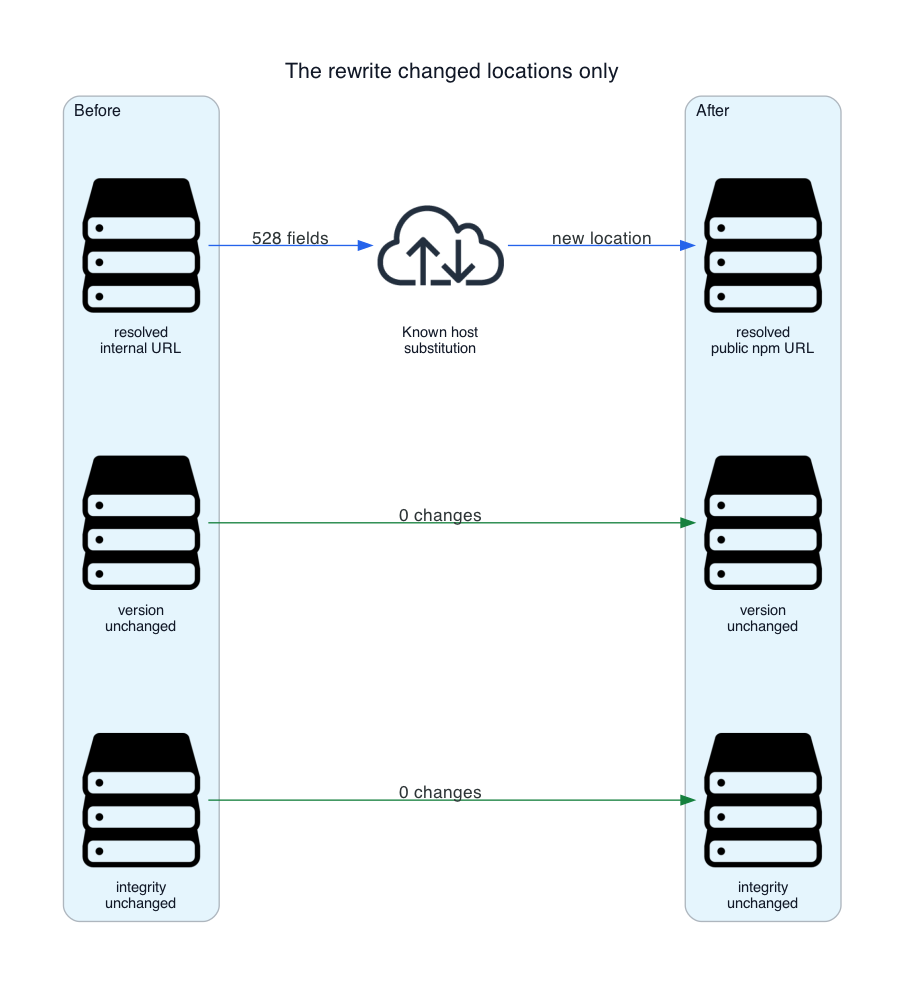
To remediate this structural mismatch without altering package versions, integrity hashes, or core application source code, engineers must implement a targeted URL-rewriting script that executes before the package installation phase inside the container build.
Implementing a Secure Lockfile Transformer
The following production-ready script (rewrite-lockfile.cjs) safely converts internal proxy URLs back to the official public npm registry while preserving all cryptographic integrity values:
const fs = require('node:fs');

const oldPrefix = 'http://packages.internal.invalid/npm/';
const newPrefix = 'https://registry.npmjs.org/';
const oldHostname = new URL(oldPrefix).hostname;
const filename = 'package-lock.json';
const lock = JSON.parse(fs.readFileSync(filename, 'utf8'));

if (!lock.packages || typeof lock.packages !== 'object')
  throw new Error('Expected a lockfile with a packages object (version 2 or 3)');


let rewritten = 0;
for (const entry of Object.values(lock.packages))
  if (typeof entry.resolved !== 'string') continue;
  if (!entry.resolved.startsWith(oldPrefix)) continue;
  if (!entry.integrity) throw new Error('An affected package has no integrity value');
  entry.resolved = newPrefix + entry.resolved.slice(oldPrefix.length);
  rewritten += 1;


for (const entry of Object.values(lock.packages))
  if (typeof entry.resolved !== 'string') continue;
  if (!entry.resolved.startsWith('http')) continue;
  if (new URL(entry.resolved).hostname === oldHostname)
    throw new Error('The old hostname remains under an unexpected URL prefix');


fs.writeFileSync(filename, JSON.stringify(lock, null, 2) + 'n');
console.log(`Rewrote $rewritten resolved URLs`);
Optimizing the Multi-Stage Dockerfile
To integrate this fix robustly, the container build file must be structured into distinct, cached stages. This ensures that the URL rewriting and dependency installation happen reliably before source code compilation:
FROM node:24-slim AS dependencies
WORKDIR /app

COPY package.json package-lock.json rewrite-lockfile.cjs ./
RUN node rewrite-lockfile.cjs
    && npm ci --include=dev
    && test -x node_modules/.bin/vite

FROM node:24-slim AS build
WORKDIR /app

COPY . .
COPY --from=dependencies /app/node_modules ./node_modules
COPY --from=dependencies /app/package-lock.json ./package-lock.json
RUN npm run build
Implications
Addressing the root cause of the vite: not found container error carries profound implications for software supply chain security, CI/CD pipeline reliability, and cloud-native architecture:
- Supply Chain Integrity and Trust Boundaries: Rewriting lockfile URLs is safe only when dealing with standard public packages whose cryptographic hashes (
integrityvalues) are independently verified by npm during extraction. If an internal registry serves proprietary or patched packages, overriding URLs with public registry endpoints will cause cryptographic hash mismatches, failing the build securely. Organizations must audit their dependency inventories to clearly separate public packages from private intellectual property. - Environment Portability: Modern development teams increasingly rely on browser-based or cloud-hosted development environments (e.g., GitHub Codespaces, Gitpod, or proprietary internal platforms). While these tools accelerate onboarding, they introduce invisible environmental coupling if lockfiles absorb local proxy states. Ensuring that lockfiles remain environment-agnostic is paramount for true CI/CD portability.
- Pipeline Observability: By injecting explicit validation checks—such as
test -x node_modules/.bin/vite—directly into container build instructions, engineering teams transform silent, cascading failures into explicit, fail-fast checkpoints. This drastically reduces debugging overhead, preventing wasted compute resources and accelerating deployment feedback loops in cloud environments like Azure Container Registry.