







By: Digital Publishing Desk
Published: Industry Insights & Web Operations
Executive Summary & Core Facts
In the modern landscape of digital publishing and affiliate marketing, raw tracking links are increasingly viewed as a liability. Long, unwieldy URLs laden with tracking parameters, network identification numbers, and cryptographic strings erode user trust, look unprofessional, and fail to provide clean analytical oversight. To combat this, professional publishers rely on link cloaking—the practice of transforming a chaotic affiliate URL into a branded, clean, and memorable redirect housed on the publisher’s own domain.
This comprehensive operational guide details the precise methodology for implementing, configuring, and optimizing affiliate link cloaking using the industry-standard WordPress plugin, Pretty Link Pro. By standardizing core configurations, disabling high-risk automated features to maintain Federal Trade Commission (FTC) compliance, optimizing robots.txt directives for search engine optimization (SEO), and leveraging advanced group segmentation, publishers can secure their technical infrastructure while maximizing monetization transparency.
The Chronology of Link Management: From Manual Edits to Automated Pro Solutions
The evolution of link management within WordPress publishing has moved through several distinct phases over the last two decades:
- The Raw Link Era (Pre-2008): Publishers routinely pasted raw affiliate network URLs (from platforms like ShareASale, Commission Junction, or Amazon Associates) directly into text editor hyperlinks. This resulted in broken user experiences, exposed affiliate IDs, and zero localized click tracking.
- The Manual
.htaccessand PHP Redirect Era: Advanced webmasters began writing custom server-side 301/302 redirects or utilizing lightweight functions via the Yoast SEO manual method. While effective, this required manual file management, posing a constant threat of crashing entire server environments due to minor syntax errors. - The Introduction of Link Cloaking Plugins: The release of plugins like Pretty Link introduced user-friendly dashboard interfaces to handle redirects dynamically.
- The Modern Compliance and Data Segmentation Era: With stricter regulatory frameworks—such as updated FTC disclosure guidelines and rigorous search engine crawling budgets—modern link management has evolved into an exercise in precision. Today, publishers use specialized Pro plugins not just for aesthetics, but for IP exclusion, bot filtering, conversion tracking, and structured data organization.
Supporting Data & Technical Infrastructure
Understanding the mechanics of link cloaking requires looking under the hood at how redirects interact with web browsers, affiliate networks, and search engines.
Anatomy of an Affiliate Link
- Raw Affiliate Link:
http://www.shareasale.com/r.cfm?b=601672&u=313242&m=49337&urllink=&afftrack=- Characteristics: Long, intimidating to users, explicitly exposes affiliate network parameters, and offers no internal tracking beyond what the third-party network provides.
- Cloaked Affiliate Link:
https://yourdomain.com/out/optinmonster- Characteristics: Branded, trustworthy, easy to remember, passes HTTP redirect parameters cleanly, and registers internal click metrics before forwarding the user to the destination.
Essential Software and Tools
- Platform: WordPress (Self-hosted).
- Plugin: Pretty Link Pro (selected for advanced features such as customizable base slugs, detailed reporting, and granular grouping).
- Auxiliary Plugins: Yoast SEO (or equivalent) for
robots.txtgeneration and file management. - Compliance Checks: FTC disclosure verification frameworks.
Step-by-Step Implementation Guide
Executing a robust link-cloaking architecture requires a structured approach to installation, global configuration, search engine management, and link grouping.
Phase 1: Installation and Purchase Verification
- Purchase and download the Pretty Link Pro plugin package from the developer repository.
- Navigate to your WordPress dashboard, select Plugins > Add New > Upload Plugin, and upload the zip file. Activate the plugin.
- Input your license credentials in the plugin settings to unlock advanced features.
- Upon activation, click the prompt to Automatically upgrade your database to ensure all migration tables and tracking schemas align with the active plugin version.
Phase 2: Configuring Basic Link and Reporting Options
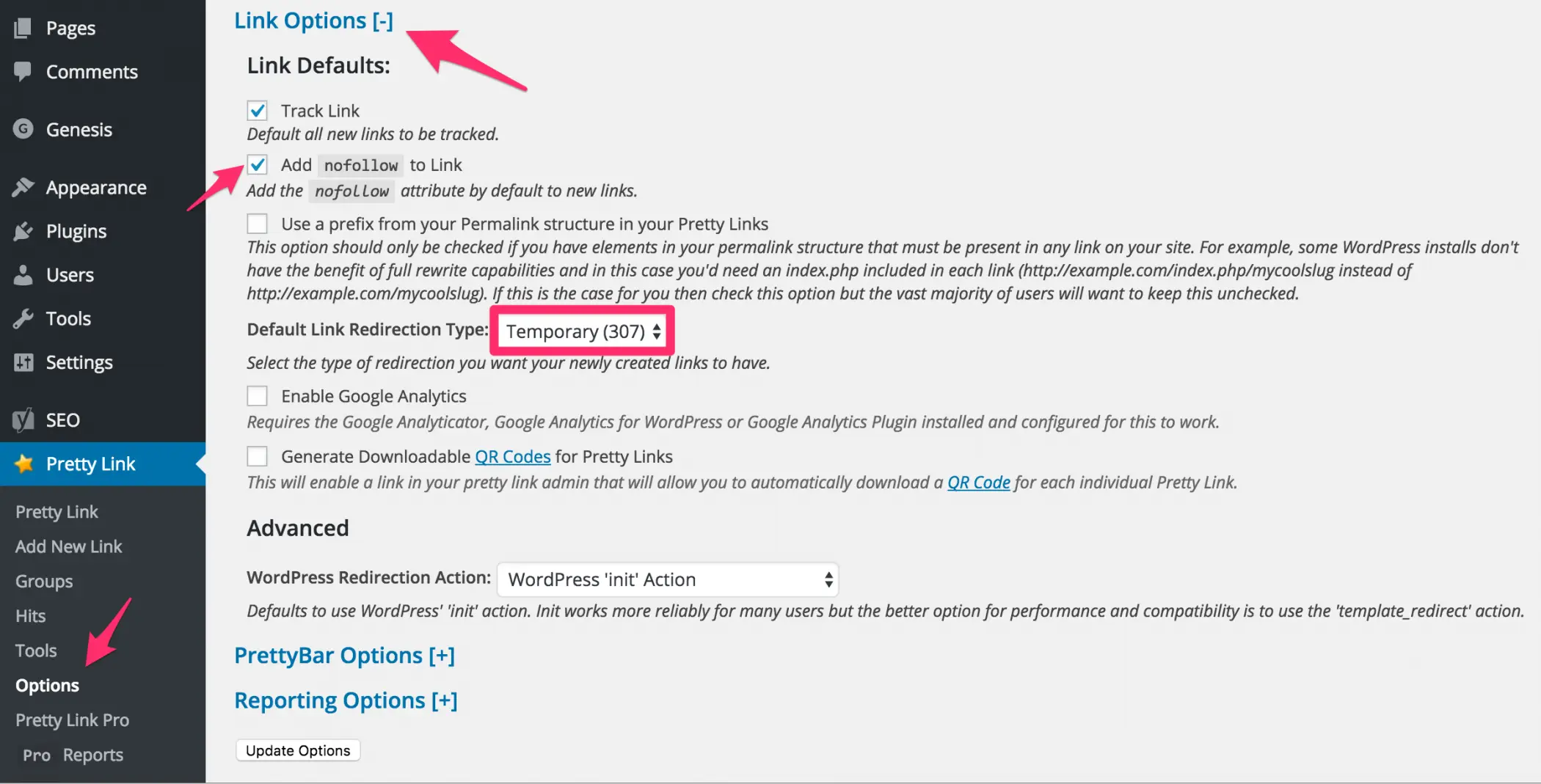
To avoid feature bloat while maximizing utility, configure the core settings under Pretty Link > Options.
Link Options Setup
- Redirect Type: Choose between Permanent (301), Temporary (307), or JavaScript redirects. For standard affiliate links, a 301 Moved Permanently or 307 Temporary Redirect is typically deployed depending on whether the target URL changes frequently.
- Tracking Enabled: Ensure click tracking remains toggled on to capture unique versus gross click data.
Reporting Options & IP Exclusion
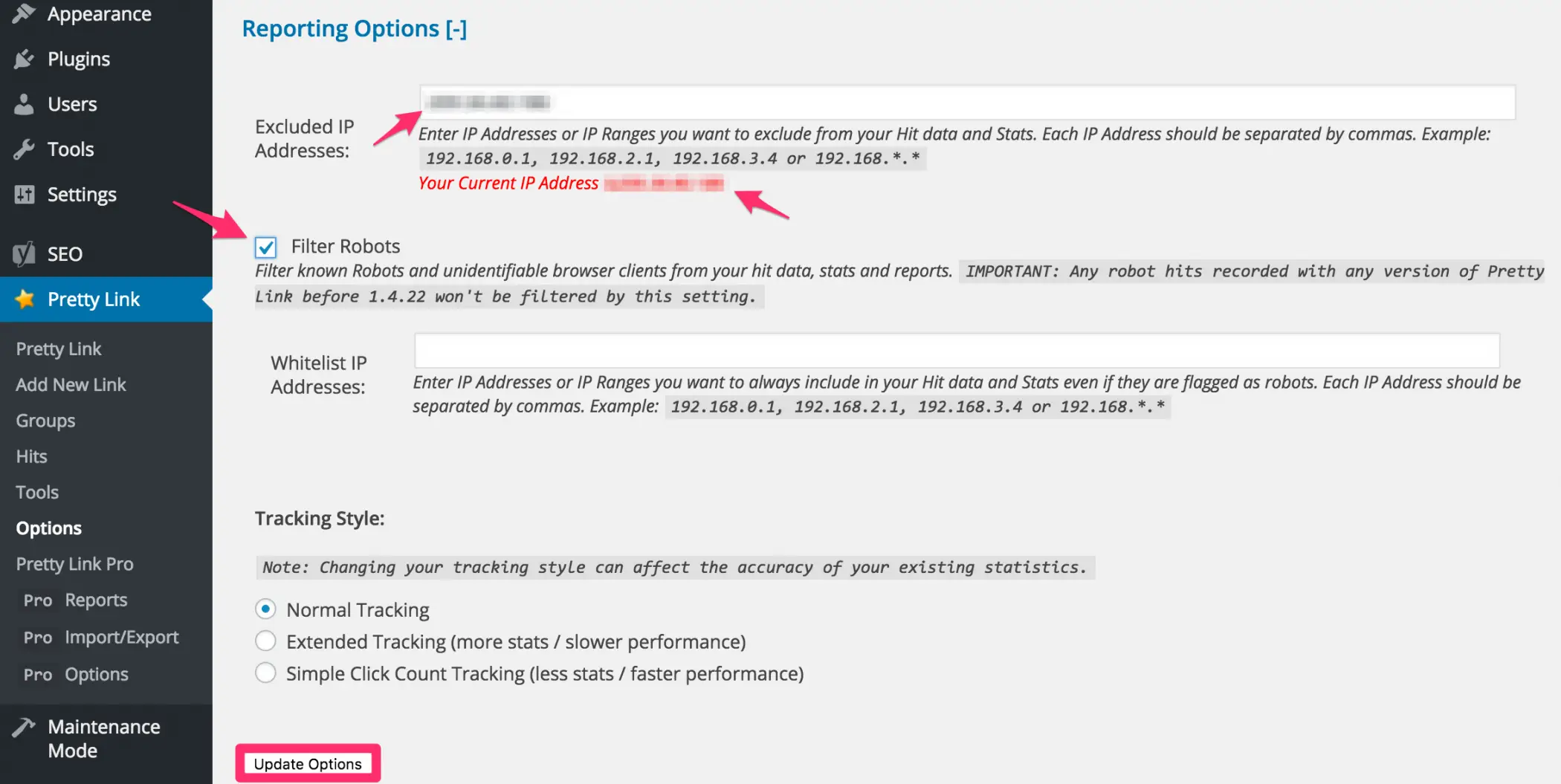
Click tracking can easily be skewed by automated web crawlers, uptime monitors, or internal link-checking plugins.
- The Broken Link Checker Conflict: If your site runs automated plugins like Broken Link Checker, these tools constantly crawl internal links to check for HTTP 404 errors. Pretty Link will log these crawl requests as legitimate user clicks, heavily skewing your analytics data.
- The Solution: Locate your website’s server IP address using a domain lookup tool and input it into the Excluded IP Addresses field within Pretty Link’s Reporting Options. This ensures internal system tests and automated crawlers do not pollute your affiliate metrics.
Phase 3: Securing Pro Options and FTC Compliance
The Pro version of the plugin offers advanced automation features, but professional publishers must exercise caution regarding which features they activate.
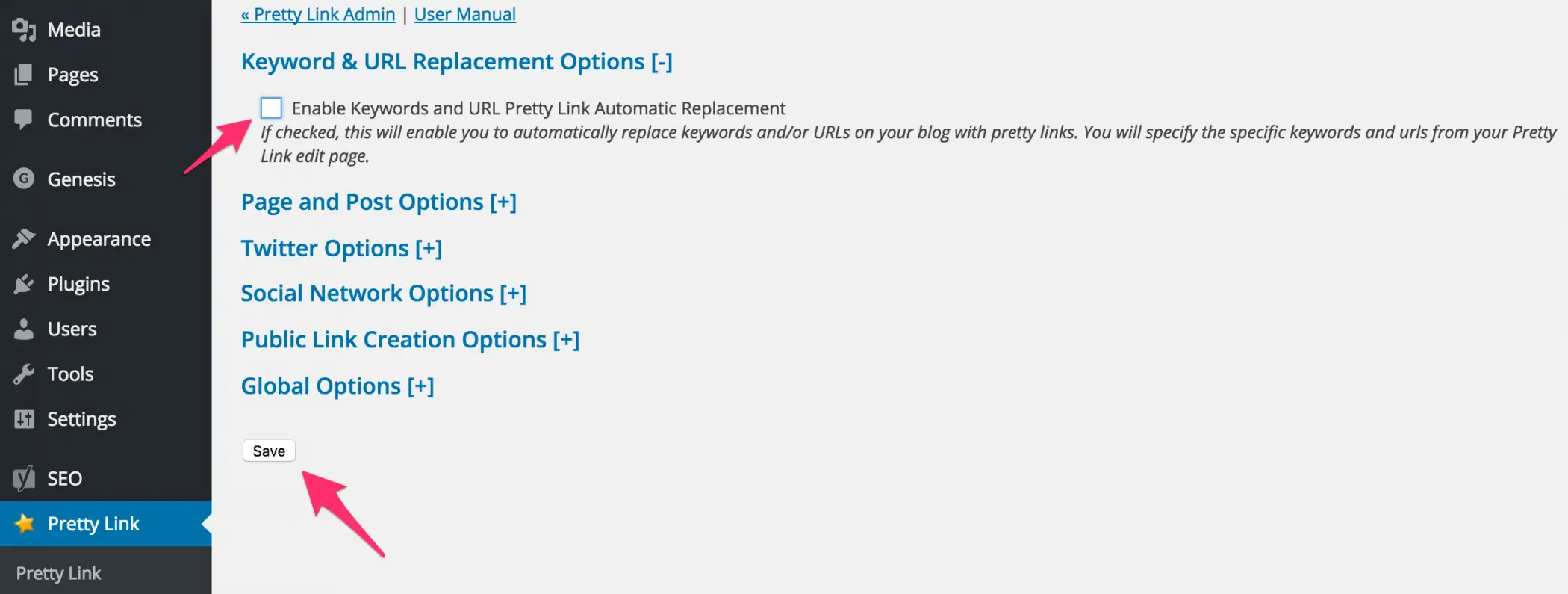
Keyword & URL Replacement Options
- The Feature: Pretty Link Pro allows publishers to designate specific keywords or phrases (e.g., "hosting", "email marketing software") so the plugin automatically hyperlinks every instance of that word across your site to the corresponding affiliate URL.
- The Compliance Risk: Automated keyword replacement frequently results in unannounced, hidden, or poorly contextualized affiliate links appearing throughout historical archive content. This directly violates FTC Disclosure Guidelines, which mandate that commercial relationships must be clearly and conspicuously disclosed adjacent to the link itself.
- Operational Directive: Disable automatic keyword replacement. Uncheck the box next to Keywords and URL Pretty Link Automatic Replacement and save changes. Hard-code your Pretty Links manually within your content editor to guarantee absolute compliance alongside explicit, visible affiliate disclaimers.
Global Options: Custom Base Slugs
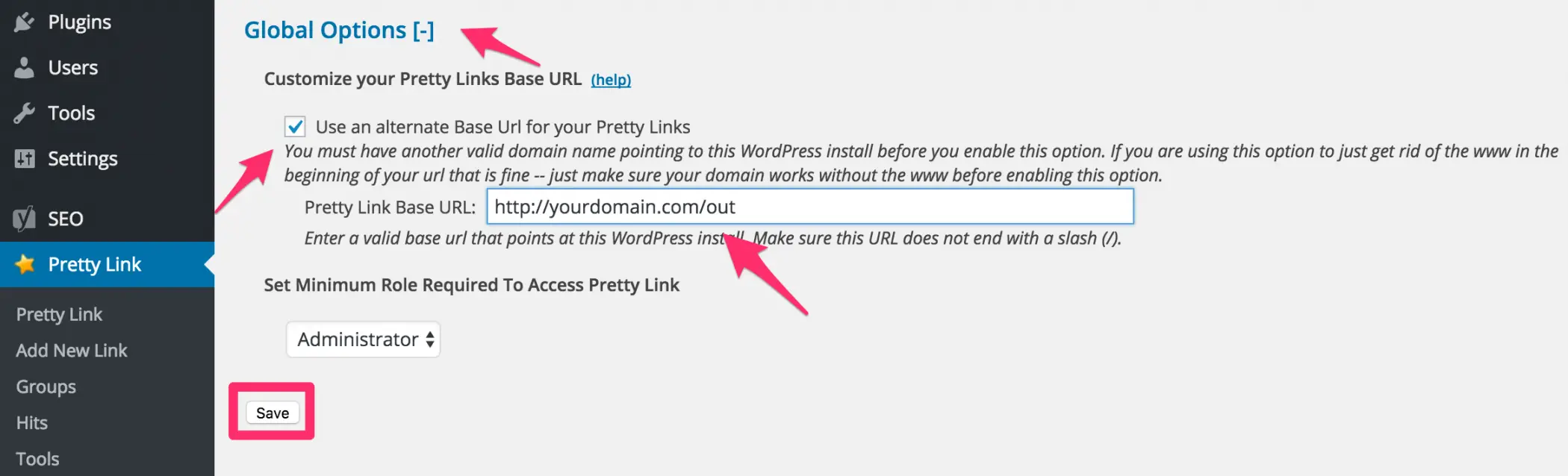
By default, Pretty Link structures URLs as http://yourdomain.com/link-name. To streamline organization and simplify search engine blocking, establish a dedicated subfolder (or base slug) via the Global Options menu.
- Common base slugs include
/out/,/go/,/goto/, or/recommend/. - Configuration Note: Enter your chosen slug (e.g.,
out) into the Base URL field. Never include a trailing slash at the end of the custom slug, as this can break redirect routing protocols on Apache and Nginx servers.
Phase 4: Preventing Search Engine Crawling via robots.txt
Once all affiliate links are routed through a centralized subfolder (e.g., /out/), you must prevent search engine spiders from wasting crawl budgets indexing endless redirect loops.
If you utilize the Yoast SEO plugin:
- Navigate to your WordPress dashboard and select SEO > Tools > File Editor.
- If a
robots.txtfile does not exist, use the interface to generate one. - Insert the following disallow directives into the file (replacing
/out/with your custom base slug):
User-agent: *
Disallow: /out/- Click Save changes to Robots.txt. This ensures search engine bots ignore your redirect directory entirely, preserving your site’s crawl equity for core content pages.
Phase 5: Creating Pretty Links and Leveraging Groups
Creating a New Link
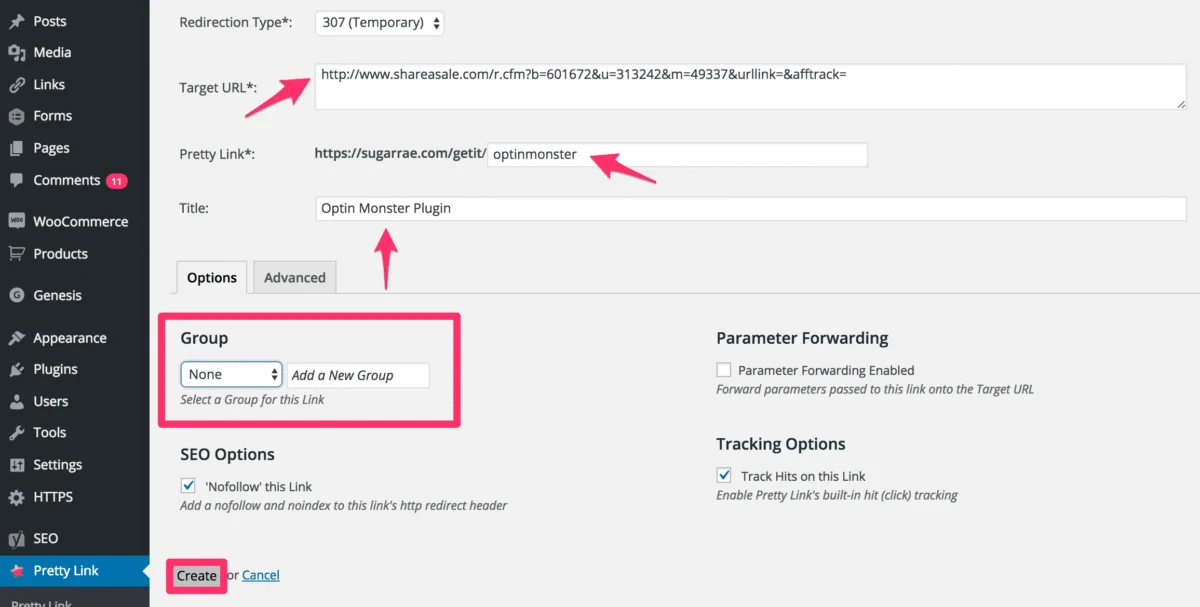
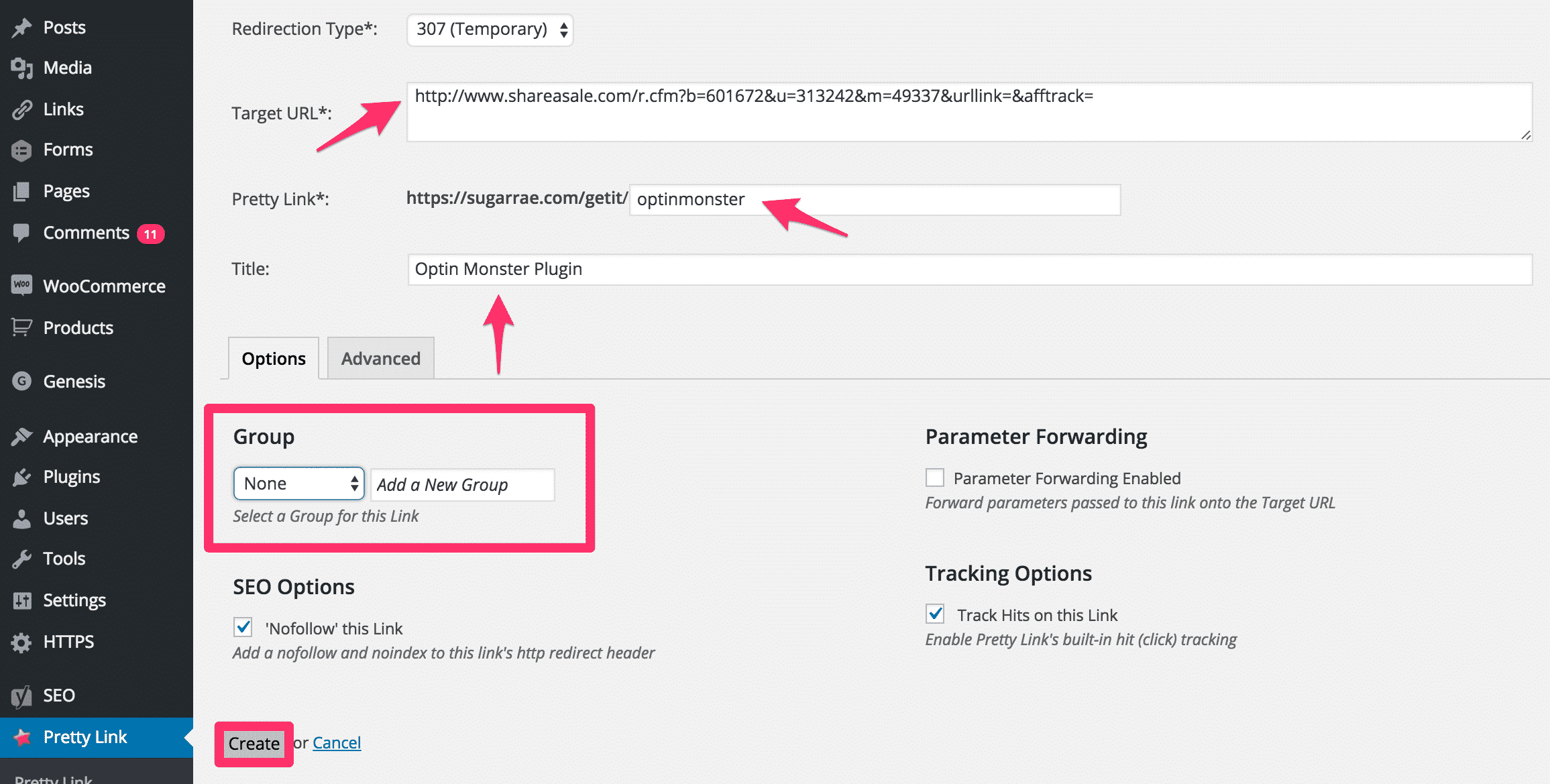
- Navigate to Pretty Link > Add New Link.
- Enter the target destination URL (your raw affiliate link with all necessary tracking sub-IDs).
- Enter the desired Pretty Link Slug (e.g.,
optinmonster). - Parameter Forwarding: Leave Parameter Forwarding Enabled unchecked unless you are a developer intentionally passing dynamic user variables through to the target merchant site.
Pretty Link Groups and Segmented Reporting
Categorizing links into structural groups enhances analytical capabilities:
- Creation Note: Always create your Groups via the dedicated Pretty Link > Groups menu before assigning links to them, as inline group creation can occasionally fail from the individual link editor screen.
- Toolbox Page Tracking: Assign resource-heavy pages (such as a "Tools I Use" or "Resource Directory" page) to a specific group (e.g., "Tools"). By combining Group-level reporting with network-specific SID (Sub-ID) tracking, publishers can isolate the exact financial yield of a single hub page. This allows you to cross-reference internal click volumes directly with merchant payout reports to audit conversion efficiency.
Industry Implications & Best Practices
The operational shift toward rigorous affiliate link management carries several long-term implications for digital publishers:
- Enhanced Data Integrity: By filtering out crawler IP addresses and utilizing segmented group reporting, publishers gain an accurate, unbiased view of click-through performance, enabling data-driven decisions on promotional placement.
- Mitigated Legal Exposure: By intentionally disabling automated keyword insertion and maintaining strict adherence to FTC disclosure rules through manual link placement, publishers insulate themselves against regulatory fines and lawsuits.
- Optimized SEO Health: Directing search engine bots away from redirection directories via precise
robots.txtprotocols ensures that indexation capacity is focused entirely on high-value editorial content rather than low-value utility links.
Official Responses & Expert Commentary
Industry veterans consistently advocate for disciplined link management protocols. According to prominent digital publishing strategists:
"Cloaking is not about hiding the fact that a link is an affiliate link—transparency with your audience remains paramount through clear disclosures. Rather, link cloaking is an essential infrastructure practice. It protects your brand reputation, prevents broken links when merchant programs shift platforms, and grants you internal command over your conversion data."
— Digital Publishing Operations Group
Conclusion
Implementing a professional affiliate link management system is a foundational requirement for any serious WordPress publisher. By combining the powerful redirection and reporting features of Pretty Link Pro with strict adherence to FTC compliance guidelines and clean robots.txt configurations, publishers can protect their domains, respect user trust, and scale their monetization strategies with absolute confidence.