Written by Bharat Bhushan
Published by Infosecurity Magazine
Main Facts: Understanding the Role and Limitations of OST Files
In the modern enterprise environment, Microsoft Outlook remains a cornerstone of corporate communication, seamlessly integrating email, calendars, contacts, and tasks. When configured via Microsoft 365, an Exchange Server, or an IMAP account with cached mode enabled, Outlook automatically generates an Offline Storage Table (OST) file. This local database acts as a secure repository, storing a synchronized copy of a user’s mailbox directly on their local machine.
The primary advantage of the OST file is its resilience against network volatility. It empowers professionals to maintain productivity even in the absence of internet connectivity or during unexpected server outages. Users can draft emails, organize folders, delete unwanted messages, and review past correspondence offline. Once connectivity is re-established, Outlook automatically synchronizes these local changes back to the mail server.
However, this architecture introduces a distinct operational constraint: an OST file is strictly bound to the specific user profile and machine upon which it was created. Because of this cryptographic and structural linkage, an OST file cannot be natively opened, read, or directly imported into any other Outlook profile or independent email client.

For IT administrators, cybersecurity professionals, and end-users alike, this limitation triggers a critical challenge. When migrating data to a new email account, recovering from a corrupted profile, or archiving historical communications, the underlying data trapped within an orphaned OST file becomes inaccessible. To bypass this restriction, the file must be converted into a Personal Storage Table (PST)—the universal Outlook data format that can be seamlessly opened, backed up, or imported into virtually any Outlook profile across different systems.
Traditionally, converting an OST file to a PST format required utilizing Outlook’s native "Import/Export" utility. Yet, this built-in method comes with a major catch: it relies entirely on a functioning, fully accessible Outlook application linked to the original user profile. When a profile is deleted, a server crashes permanently, or an employee departs an organization leaving behind an isolated database, traditional methods fail entirely.
Chronology: Common Scenarios and the Evolution of Recovery Needs
The necessity of converting OST files to PST formats is rarely a scheduled administrative task; rather, it is frequently born out of unexpected digital emergencies, infrastructure failures, or strategic corporate transitions. Understanding the chronological triggers that lead to OST conversion helps IT departments proactively manage data accessibility risks.
Phase 1: Sudden Email Account Deletion or Termination
In corporate environments, employee turnover is a daily reality. When an employee departs, their organizational email account and associated Microsoft 365 or Exchange profile are frequently decommissioned or deleted by system administrators.

- The Problem: The moment an account is deleted from the server, the local OST file on the user’s workstation becomes "orphaned." Because the parent profile no longer exists on the server, Outlook locks the file out.
- The Solution: To preserve historical correspondence, intellectual property, or client communications contained within that mailbox, administrators must extract the data. Converting the orphaned OST file into a standalone PST file serves as the definitive bridge to data recovery.
Phase 2: Enterprise Server Crashes and Prolonged Downtime
While cloud-based architectures like Microsoft 365 have mitigated many traditional infrastructure bottlenecks, on-premises Exchange servers and hybrid environments remain vulnerable to hardware failures, ransomware attacks, power outages, and catastrophic software corruption.
- The Problem: When a mail server goes offline unexpectedly, users lose their live synchronization pipeline. While cached mode allows individuals to read existing emails temporarily, team collaboration, global address lists, and real-time message sending grind to a halt. Furthermore, if a catastrophic server crash corrupts the backend database, recovering communication logs directly from the server becomes impossible.
- The Solution: Organizations rely on the local OST caches distributed across employee endpoints. By converting these local OST files into secure PST archives, IT teams can construct a decentralized backup strategy, ensuring that operational continuity is preserved even while core infrastructure is being rebuilt.
Phase 3: Cross-Platform Migration and Tenant-to-Tenant Transitions
As businesses scale, merge, acquire new entities, or modernize their IT infrastructure, massive data migrations become inevitable. Migrating users from an on-premises Exchange server to a cloud tenant—or executing complex tenant-to-tenant migrations under corporate restructuring—requires meticulous handling of historical data.
- The Problem: Direct server-to-server migrations can occasionally fail, drop metadata, or incur prohibitive bandwidth costs and throttling from cloud providers.
- The Solution: Converting historical OST files into standardized PST files provides a clean, intermediary archive format. These PST files can then be easily audited, filtered, and ingested into the new target environment, ensuring zero data loss during corporate transitions.
Phase 4: Database Bloat and Performance Degradation
Over years of heavy corporate use, mailboxes naturally expand, accumulating thousands of attachments, high-resolution images, and extensive email threads.
- The Problem: When an OST file grows excessively large (often exceeding 20GB to 50GB), Microsoft Outlook begins to exhibit severe performance latency, frequent freezing, synchronization errors, and occasional file corruption due to database structural limits.
- The Solution: To restore optimal application performance, administrators must perform routine database maintenance. This involves converting large OST files into PST format, strategically splitting the data into manageable, smaller archives, and purging redundant historical artifacts.
Supporting Data: The Mechanics of Free, Outlook-Independent Conversion
Given that traditional conversion methods require a working Outlook installation and an active profile, how can IT professionals and individuals recover data when Outlook is completely unusable?
The answer lies in specialized, third-party utility tools designed to parse the binary structure of an OST file independently. Historically, this meant purchasing heavy desktop software licenses. However, the data care landscape has evolved to offer web-based, zero-installation utilities that handle smaller datasets rapidly and securely.
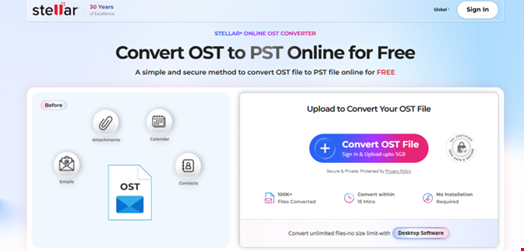
A prime example in this domain is the Online OST to PST Converter by Stellar, a specialized web utility engineered to bridge the gap between inaccessible local databases and usable Outlook archives without requiring any local software installation.
Technical Capabilities of Modern Web-Based Converters
- File Size Thresholds: Free online converters are typically optimized for smaller or moderately sized databases—frequently supporting OST files up to 500MB. This threshold is ideal for quick recovery of specific project folders, recently orphaned profiles, or targeted mailboxes.
- Zero Dependency Architecture: Unlike native Outlook workflows, these online tools operate entirely within modern web browsers. They require no local installation of Microsoft Outlook, Exchange management tools, or complex runtime dependencies.
- Data Integrity and Preview Generation: Upon uploading a secure OST file to a reputable web-based conversion utility, the system parses the internal Extensible Storage Engine (ESE) database structure. It subsequently generates a comprehensive, HTML-based preview of the mailbox item count, metadata, and folder hierarchy. This allows users to verify data integrity before downloading the final converted artifact.
Official Step-by-Step Guide: Converting OST to PST Without Outlook
For users and IT professionals looking to utilize free, web-based conversion tools to recover data from an accessible or orphaned OST file, the process can be broken down into a streamlined, secure workflow.
Step 1: Accessing the Web Utility
Launch any modern, standards-compliant web browser (such as Google Chrome, Mozilla Firefox, Microsoft Edge, or Apple Safari) on your Windows, macOS, or Linux device. Navigate to a trusted, secure online OST to PST conversion portal, such as Stellar’s web-based utility platform.
Step 2: Uploading the Target OST File
Locate the specific OST file stored on your local machine (typically found within the default Outlook file directory under C:UsersusernameAppDataLocalMicrosoftOutlook).
- Click on the upload interface provided by the web tool.
- Select the target OST file (ensure it complies with the platform’s free size limitations, typically $le 500textMB$).
- Initiate the secure upload process. Reputable data care platforms employ encrypted HTTPS channels and strict data privacy protocols, automatically purging uploaded files from their cloud servers shortly after conversion to maintain confidentiality.
+-----------------------------------------------------------------+
|                  OST File Upload & Processing                   |
|                                                                 |
|  [Local OST File] ---> (Secure HTTPS Upload) ---> [Cloud Parser]|
|                                                                 |
|  [Converted PST] <--- (HTML Preview Verified) <--- [Engine]     |
+-----------------------------------------------------------------+
Step 3: Automated Parsing and Processing
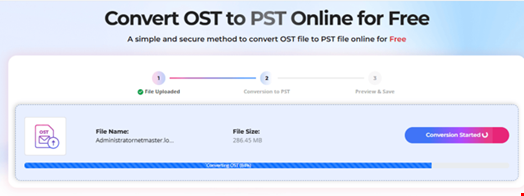
Once the file is uploaded, the cloud-based parsing engine reads the proprietary binary structure of the offline database, extracting emails, attachments, contacts, calendar entries, and tasks while meticulously preserving the original folder hierarchy.
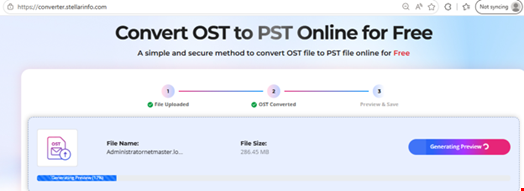
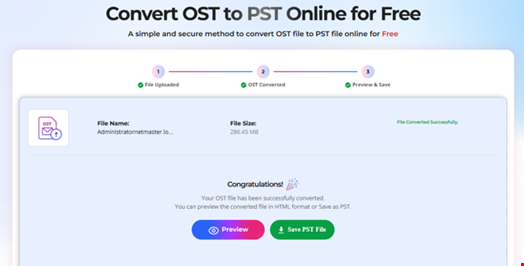
Step 4: Reviewing the HTML Preview
Before committing to the final download, the utility generates a detailed preview interface. Users can inspect:
- Total item counts across different mailbox folders.
- Complete directory trees (Inbox, Sent Items, Drafts, Archive, and custom user-created folders).
- Structural integrity to confirm that no data corruption or truncation has occurred during parsing.
Step 5: Downloading and Storing the Converted PST File
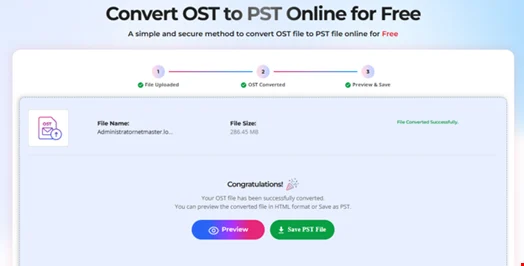
Upon verifying the preview data, initiate the download sequence. The utility compiles the extracted data into a standardized Personal Storage Table (.pst) file. Check the default Downloads folder on your local operating system to retrieve the newly generated PST file, which is now fully ready to be imported into any active Outlook profile.
Implications: Enterprise Security, Advanced Desktop Tools, and Strategic Recommendations
While free web-based converters provide an invaluable, rapid solution for light database recovery and smaller files, enterprise environments often deal with massive, complex challenges that require advanced, heavy-duty mitigation strategies.
1. Data Privacy and Regulatory Compliance
When utilizing online utilities for data conversion, organizations operating under strict regulatory frameworks (such as GDPR, HIPAA, or PCI-DSS) must exercise extreme caution. Uploading sensitive corporate correspondence, proprietary intellectual property, or personally identifiable information (PII) to an external cloud-based web tool can violate compliance mandates.
- Enterprise Best Practice: For confidential or large-scale enterprise migrations, organizations should avoid web-based uploads entirely. Instead, they must deploy licensed, offline, desktop-based applications directly within their secure local network perimeter.
2. Utilizing Advanced Desktop Tools for Heavy Workloads
When dealing with enterprise-grade OST files that exceed standard cloud size limits (often scaling into tens or hundreds of gigabytes), professional desktop software—such as Stellar Converter for OST—becomes indispensable. These robust desktop utilities offer critical enterprise advantages:
- Unrestricted File Size Handling: Capable of scanning, parsing, and converting massive OST files of any size without performance throttling or truncation errors.
- Granular Export Formats: Beyond standard PST generation, advanced desktop tools allow administrators to export mailbox data into a wide array of alternative formats, including MSG, EML, RTF, HTML, and PDF. This versatility is essential for legal e-discovery, compliance archiving, and forensic investigations.
- Advanced Splitting and Filtering: Large OST files can be automatically segmented during conversion. Administrators can split a bloated file into multiple smaller PST files based on date ranges, specific folders, or file size limits, preventing future Outlook performance degradation.
- Direct Microsoft 365 Integration: Enterprise tools often feature direct export capabilities, enabling IT administrators to ingest converted OST data straight into live Microsoft 365 mailboxes or custom Exchange server environments in a single streamlined workflow.
- Batch Processing: For mass migrations involving dozens or hundreds of orphaned user profiles, batch conversion capabilities allow IT teams to automate the queue, saving countless hours of manual labor.
3. Conclusion and Strategic Takeaways
The offline storage table (OST) is a brilliant engineering solution for maintaining productivity during network instability, but its rigid profile-binding architecture makes it a frequent stumbling block during migrations, server failures, and account deactivations.
By understanding the underlying mechanics of OST files and recognizing the scenarios that demand conversion, IT professionals can safeguard corporate data against permanent loss. Whether employing a quick, free web-based converter for lightweight recovery tasks or deploying a comprehensive desktop-grade utility for enterprise-scale migrations, having a clear protocol for converting OST to PST without relying on an active Outlook profile is an essential pillar of modern IT resilience and cybersecurity preparedness.