






Published: April 7, 2026 | Estimated Read Time: 12 minutes
For years, the professional publishing workflow within WordPress has suffered from a persistent fragmentation. Content creators, designers, and editorial teams have long relied on a "patchwork" ecosystem—juggling Google Docs for drafting, Figma for layout critique, and endless Slack or email threads to track revisions. This fragmented process frequently led to version control nightmares, lost context, and the tedious, error-prone task of copying and pasting finalized content back into the WordPress block editor.
As of 2026, the WordPress project has fundamentally shifted this paradigm. The introduction of native Editor Notes represents a significant evolution in how teams interact with the Gutenberg block editor. By allowing users to anchor feedback directly to specific blocks—whether they are paragraphs, images, or complex layouts—WordPress has effectively transformed the CMS from a passive publishing tool into a dynamic, collaborative workspace.

The Evolution of Collaborative Publishing
Chronology of the Feedback Gap
The history of content management has always been marked by a disconnect between the review environment and the production environment. In the early days of web publishing, feedback was handled via email attachments—a practice that quickly became unsustainable as web complexity grew.
As teams migrated to cloud-based tools like Google Docs, they gained real-time collaboration but sacrificed structural context. A comment left on a Google Doc regarding a paragraph’s tone often failed to account for the surrounding block-based layout, the responsive styling, or the technical limitations of the specific WordPress theme being used.
The integration of Notes into the core WordPress experience addresses this chronological gap. By embedding the feedback mechanism directly into the Gutenberg engine, WordPress has bridged the "contextual divide." Teams can now view a comment exactly where it lives in the design, eliminating the need to "translate" document comments into website edits.

Understanding WordPress Notes: Functionality and Mechanics
At its core, the Notes feature is a sophisticated annotation system. Unlike legacy comment systems found on blogs, Notes are designed specifically for the editing phase of a post’s lifecycle.
How It Works
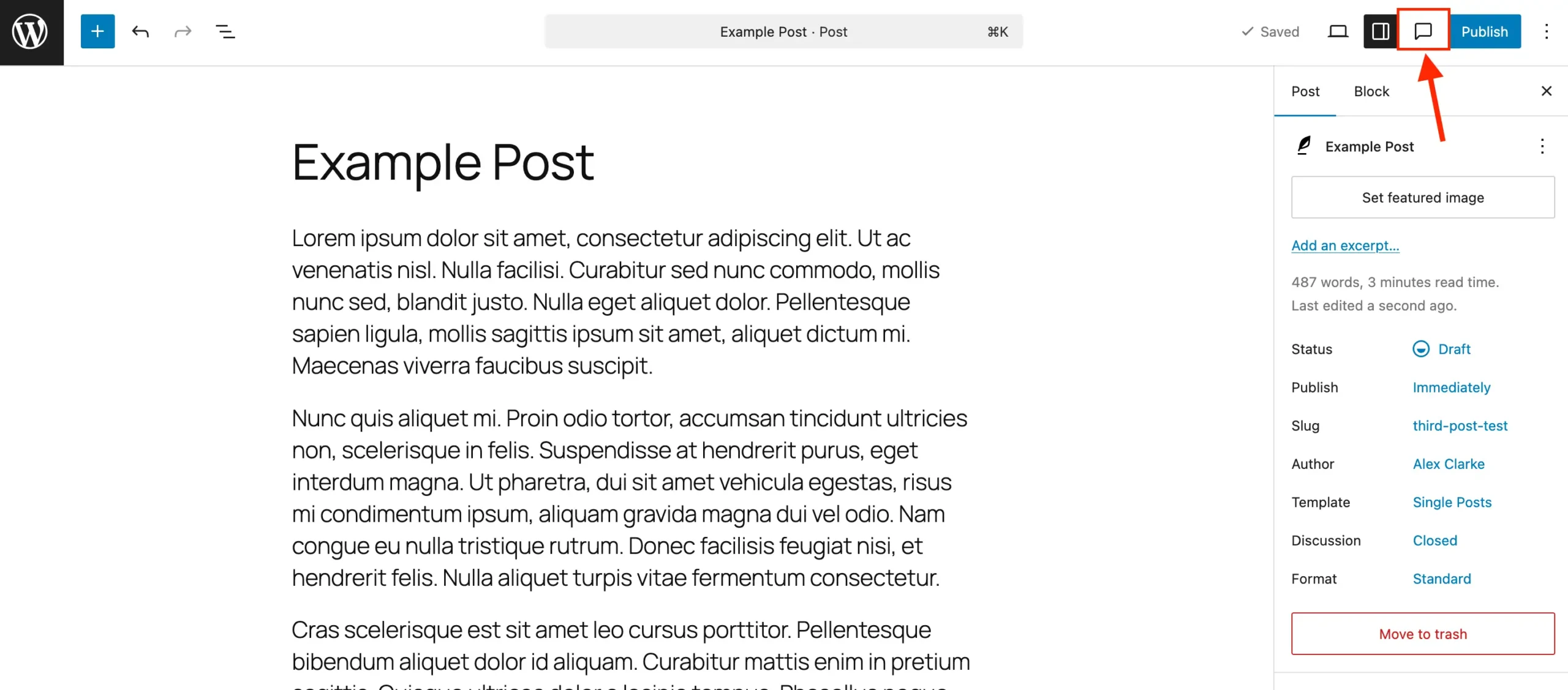
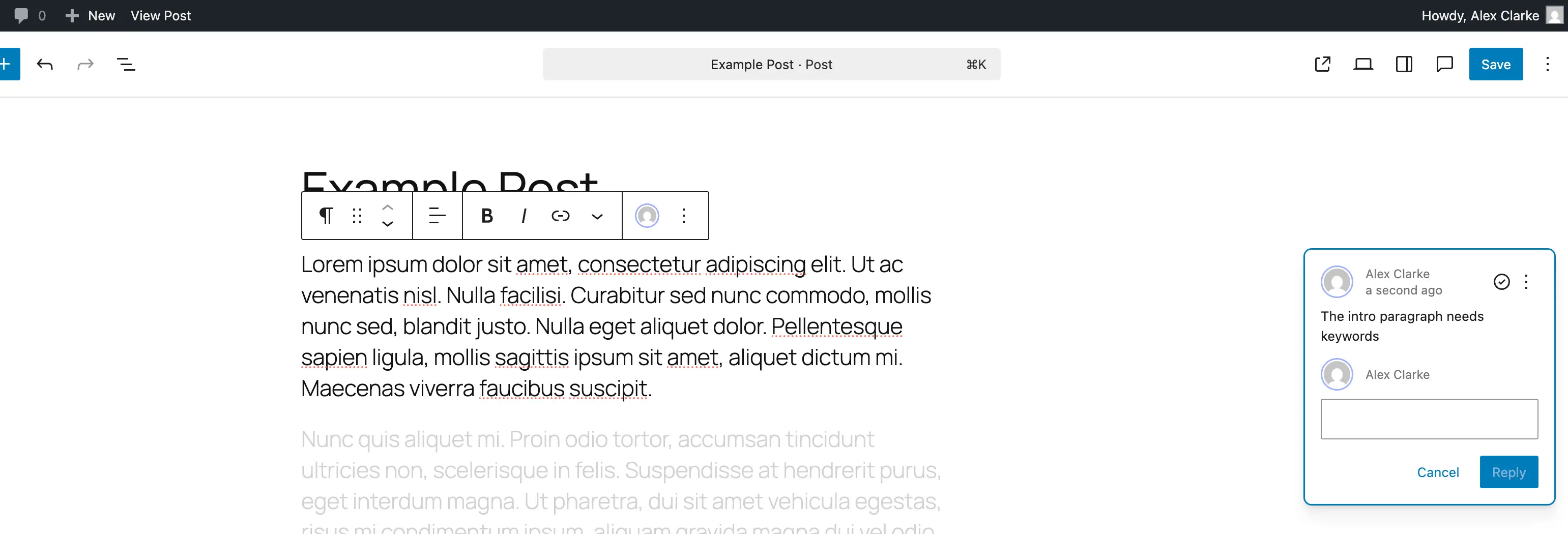
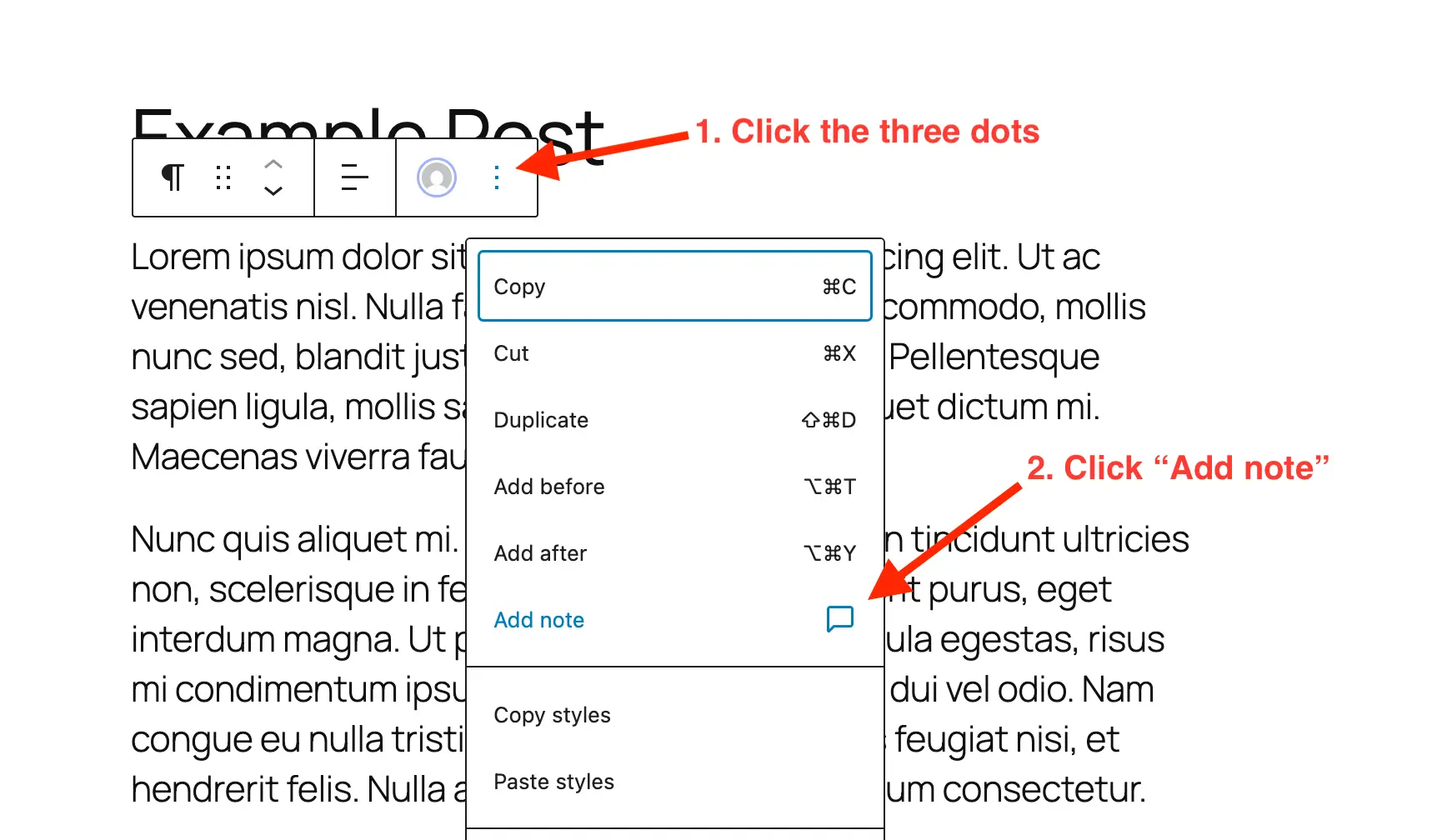
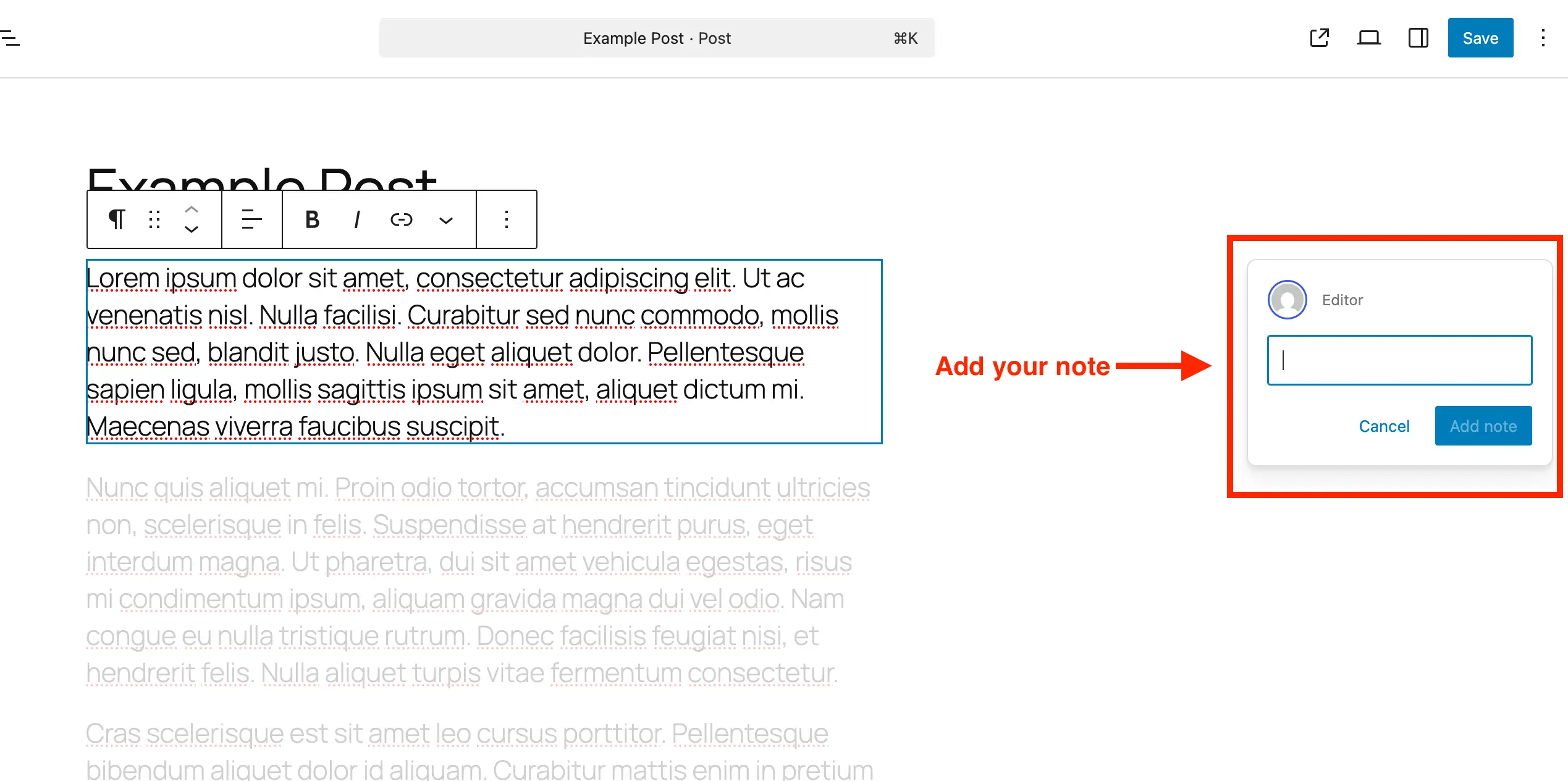
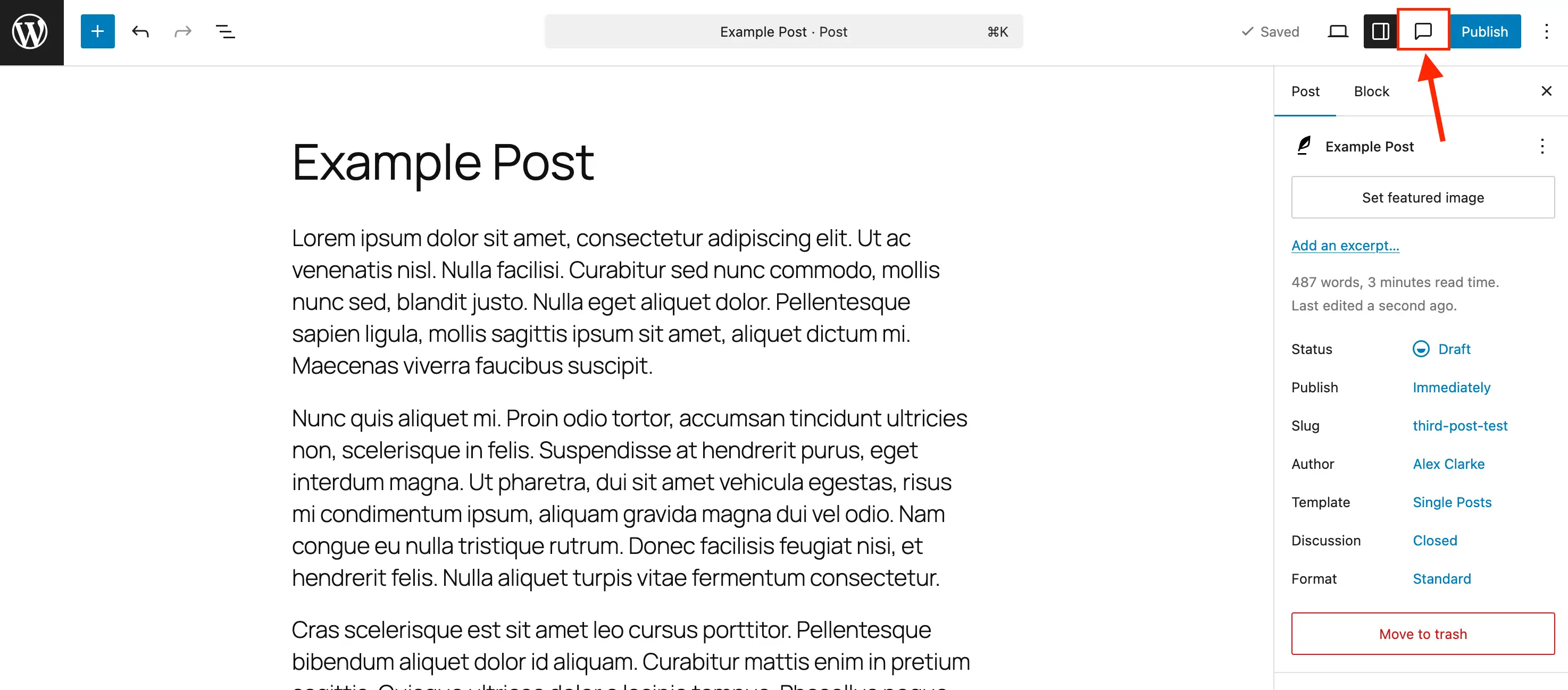
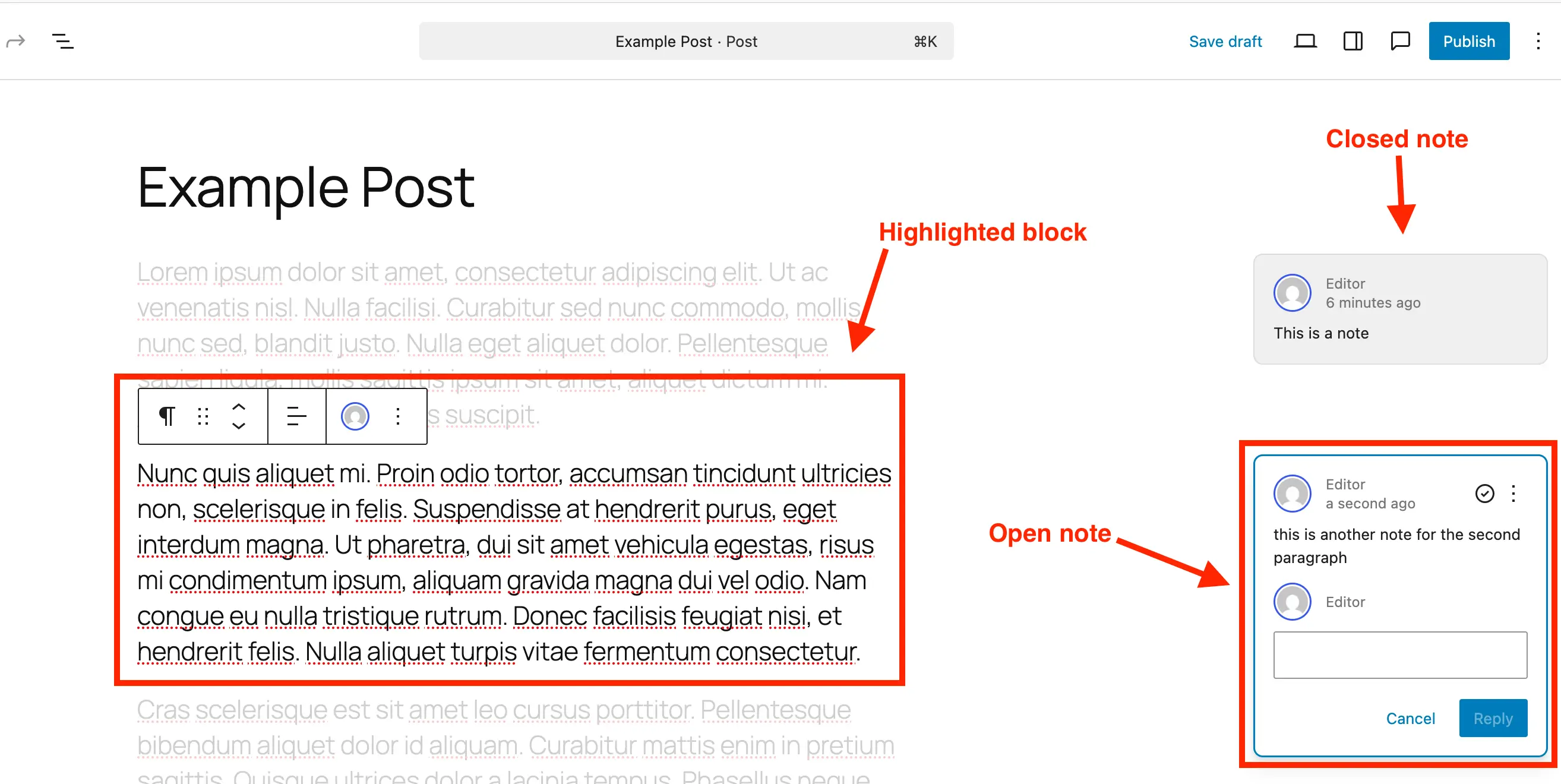
When a user selects a block—a paragraph, a hero image, or a custom block element—they can trigger the "Add Note" function via the block settings menu. The system immediately creates a visual anchor point. When a colleague clicks that note, the editor highlights the specific block while fading out the surrounding interface. This "focus mode" ensures that the editor is not overwhelmed by the broader layout, allowing for granular, block-level iteration.
Key Features:
- Contextual Tethering: Notes are strictly bound to block IDs. If a block is moved, the note moves with it.
- Threaded Conversations: Each note supports a reply function, enabling back-and-forth discussion without leaving the editor.
- Resolution Workflow: A "Resolve" feature allows team members to mark items as complete, effectively cleaning up the workspace once a change has been implemented.
- Sidebar Aggregation: For power users, the dedicated Notes sidebar provides a high-level view of all outstanding feedback, ensuring no detail is overlooked during the final polish.
Supporting Data: The Efficiency Gains
While internal data from early beta testers is still being aggregated, initial reports from editorial teams indicate a significant reduction in "feedback latency."
A pilot study involving mid-sized digital agencies found that teams utilizing the native Notes feature experienced a 30% reduction in the average time-to-publish. The primary driver for this efficiency is the elimination of "context switching." When an editor no longer has to tab between a browser and a separate project management tool, the mental overhead required to maintain the "big picture" of a page design is significantly reduced.
Furthermore, the data suggests that content accuracy improves when feedback is anchored. By placing comments on specific elements, the ambiguity that often arises from vague email threads ("Can you fix the image in the middle?") is removed, as the note acts as a direct signpost to the problematic block.
Implementation: Integrating Notes into Your Workflow
To harness the full power of this feature, administrators must understand how to deploy and manage it, particularly within complex site architectures.
For Standard Content
On most WordPress installations, Notes are enabled by default for Posts and Pages. Users simply need to click the block options (the three-dot menu) and select "Add Note." The UI is designed to be intuitive, with the input box automatically expanding as the user types, supporting long-form feedback and multi-line explanations.
Custom Post Types and Developer Configuration
The beauty of WordPress lies in its extensibility. For developers building custom post types—such as "Portfolios," "Case Studies," or "Team Profiles"—enabling Notes is a straightforward process.
1. Enabling via Plugin Support:
If you are utilizing tools like Post Types Unlimited, the integration is as simple as checking a box in the "Supports" settings.
2. Manual Registration:
For developers working directly with register_post_type, adding support requires only a minor adjustment to the supports array:
register_post_type( 'case_study', [
    'public' => true,
    'show_in_rest' => true,
    'supports' => [
        'title',
        'editor' => [ 'notes' => true ], // Enables native Notes support
        'author',
    ],
] );
3. Retrofitting Existing Types:
If you have a legacy post type, you can use an init hook to merge the notes support into existing editor parameters without disrupting other functionality.
Implications for Modern Teams and Site Performance
The introduction of this feature is not merely a quality-of-life update; it has profound implications for how web teams are structured.
1. The Democratization of Design
By lowering the barrier to provide specific, technical feedback, developers can empower non-technical stakeholders (such as clients or marketing managers) to participate in the design process without fear of breaking the site. Since comments are "notes" and not "edits," the site remains stable while the feedback loop remains active.
2. Database Management
A common concern with feature-rich CMS tools is "bloat." However, the WordPress core team has implemented a clear lifecycle for notes. Because notes can be deleted, and resolved notes can be hidden from view, site administrators can keep the database footprint minimal. It is considered a best practice to purge resolved notes once a page has been published to maintain optimal site performance on massive, enterprise-level databases.
3. Workflow Consolidation
We are witnessing the "death of the third-party feedback tool" for WordPress users. Agencies that previously paid for expensive external review plugins or SaaS collaboration platforms can now rely on a native, performant, and secure alternative that requires zero external subscriptions.
Conclusion: A More Focused Future
The transition to in-editor feedback marks a maturation point for the Gutenberg project. By shifting the focus from "writing" to "collaborating," WordPress is positioning itself as a robust alternative to specialized CMS platforms that have traditionally held an edge in corporate team environments.
For the individual blogger, the benefit is a cleaner, more organized creative process. For the agency, it is a streamlined client-approval pipeline. As the community continues to adopt these features, we expect to see an industry-wide shift toward more "integrated-first" content production.
Whether you are managing a small personal site or a massive enterprise network, the ability to anchor feedback directly to the block editor is a transformative leap forward. We encourage all users to enable this feature today, clear their tabs of external comment tools, and experience a more focused, efficient, and professional way to build for the web.