







Main Facts: The Anatomy of a Modern Web Accessibility Failure
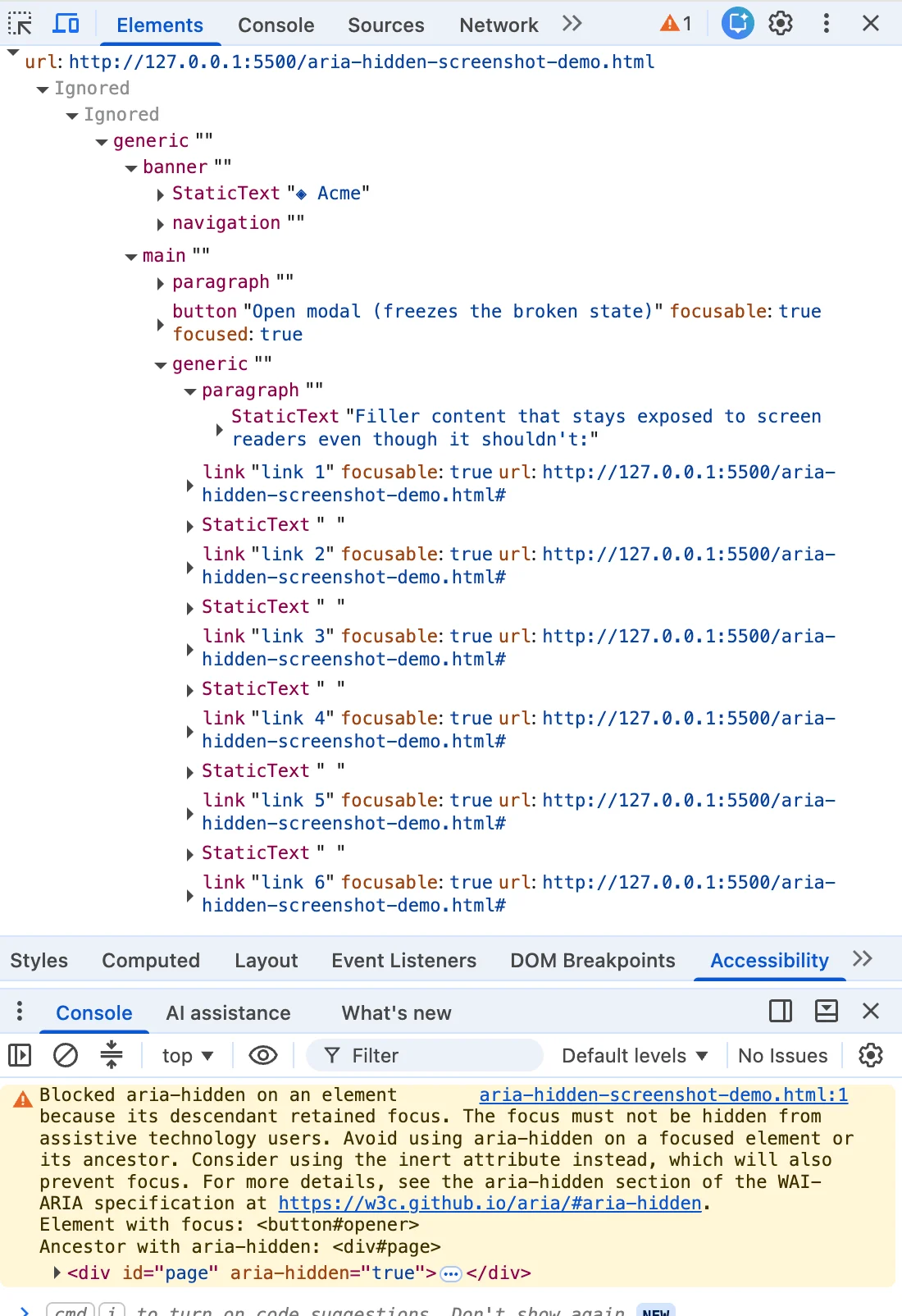
It is one of the most familiar panic loops in modern frontend development. A dialog closes, and the browser console erupts in a sharp, mustard-colored warning. You highlight the message, paste it into a search engine, and instantly join half the developer internet. Whether your stack runs on Angular, Bootstrap, Ionic, or phpMyAdmin, this exact string appears identically, dragging engineers down an algorithmic rabbit hole of conflicting Stack Overflow threads.
The top-ranking search results—the quick-fix one-liners, the timeout shims, and the script snippets that strip out aria-hidden attributes—all share a common goal: they silence the console. They turn the warning red-yellow logs back to green and let teams pass their CI/CD gates.
Yet, they do so by quietly harming the user the browser was trying to protect. Underneath the technical debt and the framework abstractions sits a real human being using a screen reader, whose digital focus is about to drop into an invisible chasm on your web page.
The underlying issue is rooted in a structural paradox within Web APIs. The aria-hidden attribute removes content from the accessibility tree, but it does not remove that content from the keyboard focus order. These two systems run in parallel, and when they drift out of sync, an element can be fully focusable while remaining completely imperceptible to assistive technology.
When a keyboard user tabs into that space, they encounter what engineers call "ghost focus." The screen reader fires a focus event for a node it was explicitly told does not exist, looks it up, finds nothing it is allowed to describe, and falls entirely silent. The user presses a key, the machine acknowledges nothing, and they are left stranded without knowing whether the app broke, their screen reader crashed, or they made a mistake.
For years, browsers papered over this mismatch with silent, automatic repairs. However, beginning with Chromium 127 in mid-2024 and expanding significantly through Chrome 131, the browser engine changed its strategy. Instead of silently patching the accessibility tree behind the scenes, Chrome began to overrule developers directly, throwing loud console warnings to flag the architectural flaw.
Chronology: From Silent Browser Patches to Loud Ecosystem Overhauls
To understand how this crisis materialized across the web ecosystem, it helps to trace the timeline of browser changes and open-source issue trackers.
- Early 2020: Chromium engineers first recognized the dangers of focusable nodes trapped inside
aria-hiddensubtrees. In W3C ARIA working group discussions (such as Issue #1185), engineers proposed exposing these nodes to ensure screen reader users could at least hear where they were tabbing, rather than experiencing total silence. - 2019–2023: Across component libraries like Bootstrap (e.g., Issue #29769), teams routinely slapped
aria-hiddenonto giant wrappers or thebodyelement when opening modals. Because these implementations hid modals incorrectly or left focus stranded, developers relied on ad-hoc workarounds, letting broken teardown patterns persist unchecked. - Summer 2024 (Chrome 127): The first wave of open-time console warnings landed. Developers across major design systems—including Material-UI (Issue #43106), Ant Design (Issue #50170), and Flowbite (Issue #943)—flooded GitHub trackers as Chrome began scolding applications for elements that "just received focus" inside hidden regions.
- Late 2024 (Chrome 131): The second wave arrived, introducing the close-time "retained focus" warning. Bootstrap (Issue #41005) and Angular (Issue #30187) maintainers watched live as beta and nightly builds flagged thousands of legacy modal implementations for leaving focus on close buttons inside fading, hidden overlays.
- 2025–2026: Ecosystem reckonings accelerated. React 19 update cycles amplified deep composition conflicts—such as Radix UI and Shadcn components where nested
<select>dropdowns inside<dialog>primitives caused focus freezes and page-breaking unmount races (Radix Issue #3701). Concurrently, W3C groups debated standardizing these heuristic accessibility interventions, paving the way for frameworks to permanently abandon legacyaria-hiddenworkflows in favor of native primitives and the HTMLinertattribute.
Supporting Data: Four Distinct Manifestations of the Bug
Developers frequently assume the console warning stems from a single, monolithic source. In practice, it emerges from four distinct operational scenarios, each requiring a precise understanding of timing and state.
+--------------------------------------------------------------------------+
|                      THE FOUR PATHS TO "GHOST FOCUS"                     |
+-----------------------------+--------------------------------------------+
| 1. The Close-Time Race      | Overlay fades out, but focus remains on    |
|                             | the close button inside the hidden region. |
+-----------------------------+--------------------------------------------+
| 2. The Open-Time Inversion  | Modal opens, but background focus lingers  |
|                             | briefly on a trigger inside the backdrop.  |
+-----------------------------+--------------------------------------------+
| 3. Nested Composition       | Multiple modal layers (e.g., <select>      |
|                             | inside <dialog>) fight over hiding rights. |
+-----------------------------+--------------------------------------------+
| 4. External Focus Loss      | User Alt-Tabs or changes browser tabs      |
|                             | while an overlay remains active.           |
+-----------------------------+--------------------------------------------+
1. The Close-Time Race (Hidden Mid-Goodbye)
Accounting for roughly 70% of reported instances, this occurs when a user clicks a modal’s close button. The modal initiates a 200-millisecond CSS fade-out transition. During this animation, the close button still owns the keyboard focus, yet the library has already applied aria-hidden="true" to the parent overlay container. Because the focus-restoration logic is tethered to the completion of the transition, a multi-frame window opens where a hidden region contains a live, focused node.
2. The Trigger Left Behind (Open-Time Inversion)
Running the sequence in reverse, an overlay opens and the library marks the background page aria-hidden="true". However, for a fraction of a second, the trigger button clicked by the user remains focused before programmatic focus shifts into the dialog. The browser detects a newly hidden region enclosing a focused element and flags an open-time warning.

3. Nested Composition Conflicts (The Turf War)
When developers nest complex controls—such as a native <select> element or a custom popover—inside a <dialog>, competing component layers clash. Each component contains its own logic for hiding the rest of the page. Under React 19, unmount timing changes mean that closing an inner component can drop focus to the body element momentarily. The parent dialog misinterprets this as an outside click, re-hiding itself while the user’s focus is trapped, rendering keyboard navigation completely unusable.
4. External Focus Loss (The User Walked Out)
In rare edge cases (documented in Material Web Issue #5760 and Ionic Issue #30240), nothing on the page changes structurally. Instead, the user switches browser tabs or utilizes window-level shortcuts (like Alt+Tab) while an overlay is open. The focus bookkeeping state strands an active aria-hidden condition without live focus to reconcile against.
Official Responses: Why Popular Fixes Made Things Worse
Faced with mounting pressure to clear their build logs, developers naturally reached for common internet remedies. Unfortunately, almost every popular workaround introduced worse accessibility regressions.
The blur() One-Liner
// The internet's favorite anti-pattern
element.addEventListener('hide.bs.modal', () =>
    document.activeElement.blur();
);
Calling blur() without specifying a destination forces the browser to dump focus directly onto the body element. While the console warning clears—because no element remains actively focused inside the hidden subtree—keyboard users are abandoned at the top of the document. Every subsequent tab press forces them to navigate through the entire page header and navigation menu from scratch, violating WCAG 2.4.3 (Focus Order).
Timing Shims (setTimeout / requestAnimationFrame)
Injecting artificial delays to stagger focus restoration relies on a race condition. On fast, warm-cache desktop hardware, the render finishes before the focus call executes. But under heavy CPU load, on low-end mobile devices, or within React’s concurrent rendering scheduler, these timeouts fail intermittently, producing flaky bugs that are nearly impossible to reproduce locally.
Stripping aria-hidden or Automating Mutation Observers
Some teams write scripts to strip aria-hidden attributes entirely whenever libraries apply them. While this satisfies automated checkers, it completely breaks the modal contract: users can now tab backward out of the active dialog and interact with background content that is supposed to be blocked.
Implications: The Correct Teardown Contract
The systemic lesson of the mustard console warning is that a clean console was never the true objective. The warning acts as a vital proxy for real user experience.
Solving this problem requires abandoning hacky shortcuts and embracing a strict operational contract: Focus must leave a region before that region becomes hidden or inert.
Implementing this correctly involves four deterministic steps during component teardown:
- Un-inert the background first: Because
inertblocks focus, any background containers must be un-inerted before attempting to focus the trigger element. - Move focus home synchronously: Restore focus to the originating trigger button immediately within the synchronous execution thread, before any CSS transitions or hide states commit.
- Inert the closing shell: Apply the
inertattribute (notaria-hidden) to the closing modal wrapper. This ensures the dying, fading shell remains completely unreachable by keyboard navigation, screen readers, and pointer events during its exit animation. - Unmount cleanly: Listen for transition completion (with proper event target guards and zero-duration fallbacks) to unmount the node from the DOM safely.
The Vanilla JavaScript Reference Pattern
class RobustModalController
  #trigger = null;
  #background = null;

  open(dialog, backgroundEl)
    this.#trigger = document.activeElement;
    this.#background = backgroundEl;
    this.#background.setAttribute('inert', '');
    dialog.hidden = false;
    dialog.querySelector('[autofocus], button, [href], input')?.focus();


  close(dialog)  0;

    if (dur + delay <= 0)
      done();
     else
      dialog.addEventListener('transitionend', finish);
      dialog.addEventListener('transitioncancel', finish);
Conclusion
When the console flares mustard yellow, it is tempting to view the browser as an adversary scolding your codebase over stylistic nitpicks. In reality, the browser is acting as a last line of defense, exposing an invisible architectural failure. By discarding lazy workarounds and adopting rigorous focus-ordering contracts—or migrating entirely to native HTML <dialog> elements—engineering teams can build web applications that satisfy automated tools while remaining genuinely usable for everyone.