







Whether you are crafting a long-form blog post, building a landing page, or managing a high-traffic e-commerce store, the question of whether to include images often arises. In the modern digital landscape, the answer is an emphatic "Yes." Images do more than simply break up walls of text; they serve as critical pillars of user engagement, accessibility, and search engine optimization (SEO).
As search engines shift from text-only indexes to sophisticated, multi-modal systems, images have become primary search results. Failing to optimize your visual assets is akin to leaving a significant portion of your traffic on the table. This guide explores the strategic importance of images, the mechanics of search visibility, and the technical requirements for mastering image SEO in an era dominated by AI and visual discovery.
The Evolution of Visual Search: From Thumbnails to AI
For years, "Image SEO" was relegated to the secondary task of ensuring a file name was descriptive. Today, that perspective is obsolete. The search landscape is no longer just about text—it is about multimedia.

Google Images and the Rise of Lens
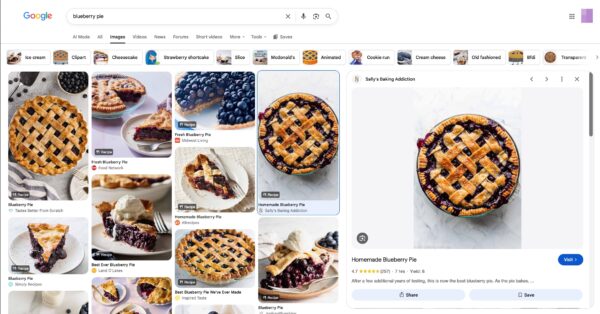
Google Images functions as a massive, organized index of the web’s visual content. When users search for a product or a concept, Google delivers a curated gallery based on relevance, quality, and context. However, the rise of Google Lens has fundamentally changed how users interact with these assets. With over 20 billion monthly searches, Google Lens allows users to point their cameras at real-world objects to identify them, find similar products, or translate text in real-time.
For businesses, this represents a new conversion funnel. If your product images are high-quality, properly labeled, and structurally marked up, your inventory can effectively become a searchable database, bridging the gap between physical reality and your digital store.
AI Search and the Multimodal Shift
The emergence of AI-driven search experiences, such as Google’s AI Overviews, has further elevated the status of images. These systems synthesize information from across the web, and they increasingly rely on images to provide comprehensive answers to user queries. If your content includes original, high-quality images that are contextually relevant, you increase the probability of being cited as a primary source in an AI-generated response.
Strategic Selection: Why Originality Matters
The temptation to rely on generic stock photography is strong, but it is a strategic error. In the eyes of search algorithms—and more importantly, the eyes of your users—originality is a signal of authority.
The Problem with Stock Imagery
Stock photos often lack the context required to rank effectively. When a user lands on a "Team" page and sees a generic, overly polished image of people they have seen on ten other websites, trust evaporates. Conversely, authentic, high-quality photography provides a unique signal to search engines.
Sourcing and Ethics
If you lack the resources to produce custom photography, there are viable alternatives. Platforms like Flickr (Creative Commons) and Unsplash offer unique visuals, but they require strict adherence to attribution rules. When using these, ensure the image serves a distinct purpose—to illustrate a point, provide a chart, or guide the reader. Adding "filler" images solely to satisfy an SEO plugin’s checklist is a practice that yields diminishing returns; always prioritize the user experience.

Technical Optimization: The Foundation of Speed
Visuals are often the heaviest elements on a web page. If not managed correctly, they can destroy your Core Web Vitals, leading to slow loading times that hurt both user experience and search rankings.
File Naming and Formatting
The process begins with the file name. A file titled DSC00123.jpg tells a search engine nothing. A file titled notre-dame-cathedral-sunset.jpg provides immediate context. Pair this with the correct format:
- WebP/AVIF: Preferred for most web use due to superior compression.
- JPEG: Best for complex, colorful photographs.
- PNG: Ideal for images requiring transparency.
- SVG: Perfect for logos, icons, and vector illustrations.
The Importance of Scaling and Responsiveness
Never upload a massive 4000×3000 pixel image if you only intend to display it at 300×200 pixels. While CMS platforms like WordPress may generate thumbnails, the original file weight can still be an issue if not handled with care. Ensure your site utilizes the srcset attribute, which allows the browser to request the appropriately sized version of an image based on the user’s screen width, significantly reducing bandwidth consumption on mobile devices.

Compressing for Efficiency
Even after resizing, compression is non-negotiable. Tools like ImageOptim, Squoosh, or Kraken.io can strip unnecessary metadata (such as EXIF data) and reduce file size without sacrificing visual fidelity. By serving compressed images, you directly improve your site’s Largest Contentful Paint (LCP) score—a core metric in Google’s ranking criteria.
Enhancing Context: Captions, Alt Text, and Schema
Search engines are becoming smarter, but they still rely on the metadata you provide to understand the "why" and "what" of an image.
The Power of Captions
Jakob Nielsen, a pioneer in web usability, noted decades ago that users scan pages by looking at headings and images first. Captions provide a bridge between the image and the surrounding text. When used correctly, they keep the reader engaged and provide an extra layer of semantic context for crawlers.

The Accessibility Imperative: Alt Text
Alt text is not merely an SEO hack; it is a fundamental requirement for web accessibility. It allows screen readers to describe images to visually impaired users. When writing alt text, focus on accuracy. If the image is decorative, skip it; if it provides information (like a graph), describe the data it contains. Avoid "keyword stuffing," as this creates a poor experience for users and can look like spam to search engines.
Structured Data: The Final Piece
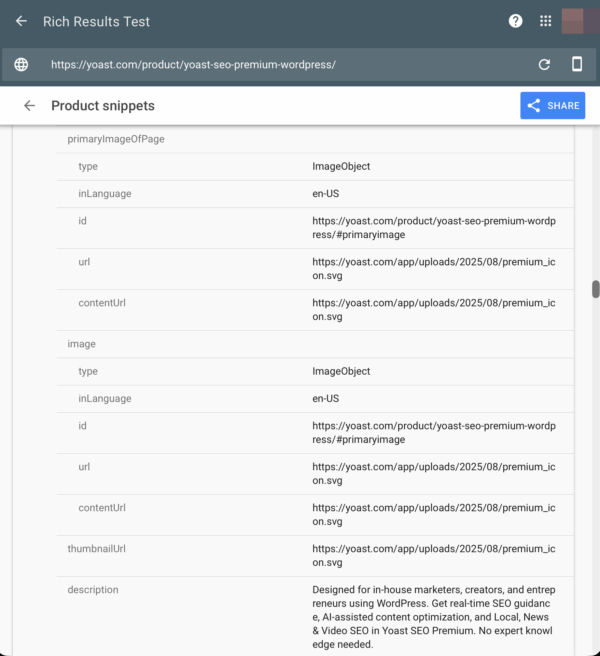
Schema markup, specifically the ImageObject type, is the "Rosetta Stone" for search engines. It explicitly tells Google the image’s dimensions, URL, caption, and relationship to the article. For WordPress users, plugins like Yoast SEO handle much of this automatically, creating a "connected graph" of data that helps search engines understand how your images fit into your broader content strategy.
Advanced Implementation: CDNs and Performance
For large-scale websites, serving images from your primary server can create bottlenecks. An Image Content Delivery Network (CDN) acts as a specialized layer that handles the transformation, optimization, and delivery of your assets. These services can automatically convert images to next-gen formats (like AVIF) on the fly and serve them from servers physically closer to the user, ensuring the fastest possible delivery.
Implications for the Future
The digital landscape is becoming increasingly visual and increasingly automated. As AI systems continue to curate the information we consume, the role of human-made, high-quality, and properly optimized images will only grow in importance.
Key Takeaways for Success:
- Prioritize Originality: Use custom photos whenever possible to build brand authority.
- Optimize for Speed: Compress files, use modern formats, and leverage
srcset. - Provide Context: Write descriptive, human-readable alt text and use relevant captions.
- Implement Schema: Use structured data to help search engines "read" your visual assets.
- Focus on UX: Place images near relevant text to reinforce the narrative and aid in scanability.
By viewing images as an integral part of your technical SEO and content strategy rather than an afterthought, you position your website to thrive in a search environment that rewards clarity, speed, and accessibility. The visual web is here—make sure your content is ready to be seen.