For years, the professional web development and content management lifecycle has been plagued by a persistent fragmentation of effort. When teams collaborate on a WordPress site, the creative process often resembled a digital relay race: copy content into a Google Doc for editorial review, send a Figma link for design critiques, and manage a chaotic trail of email threads or Slack messages to track requested changes. While effective, this "tool-switching" tax creates significant friction, leading to lost context, version control headaches, and the inevitable "where did that comment go?" frustration.
As of April 2026, WordPress has fundamentally shifted this paradigm. By introducing native In-Editor Notes, the platform is effectively consolidating the editorial workflow, allowing teams to leave feedback, suggestions, and design critiques directly on specific content blocks. This evolution transforms the WordPress block editor from a mere construction tool into a centralized hub for collaboration.

Main Facts: The Evolution of Editorial Workflow
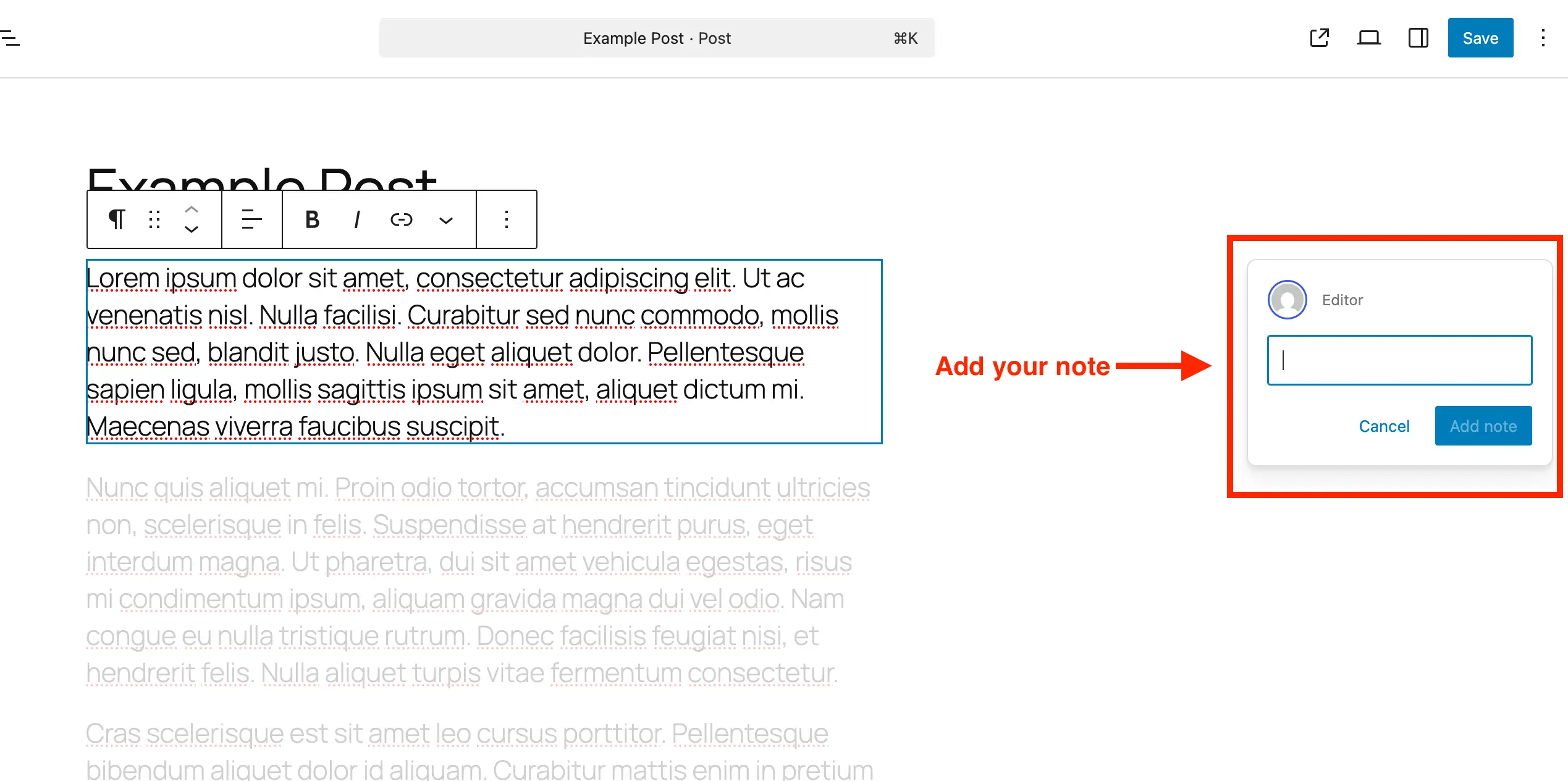
The core functionality of WordPress Notes is deceptively simple but profoundly impactful. Rather than relying on external document management systems, users can now attach feedback directly to any block—be it a paragraph, an image, a heading, or a complex layout container.
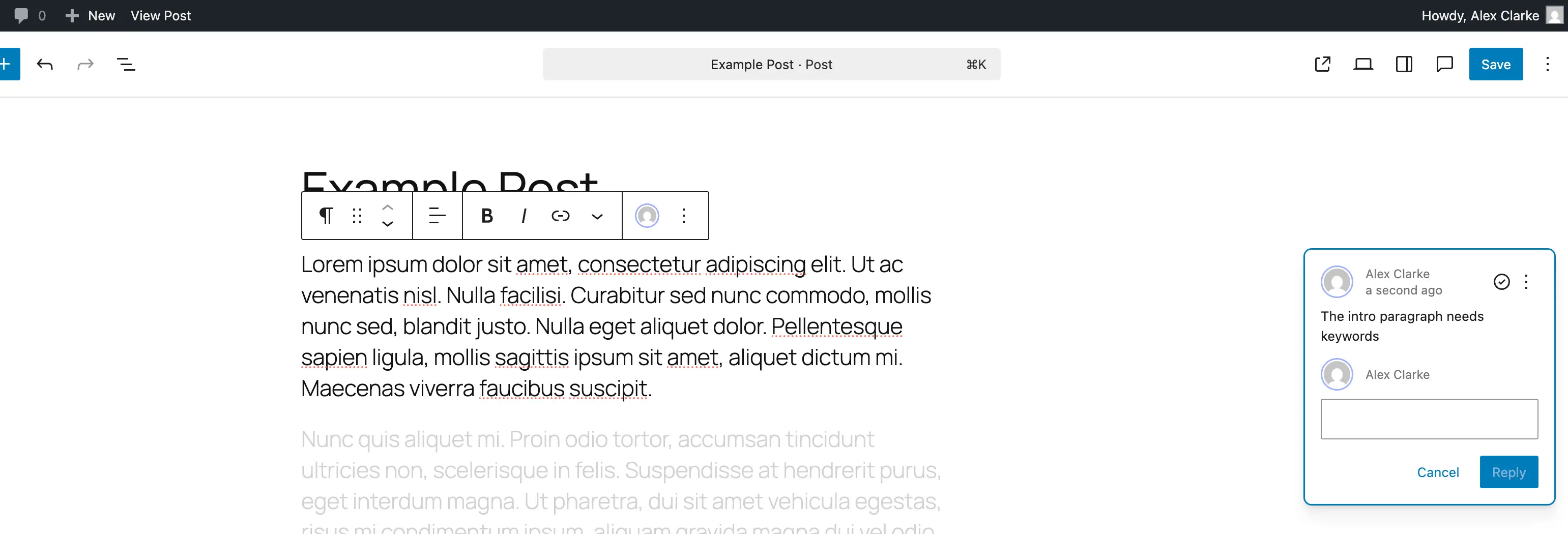
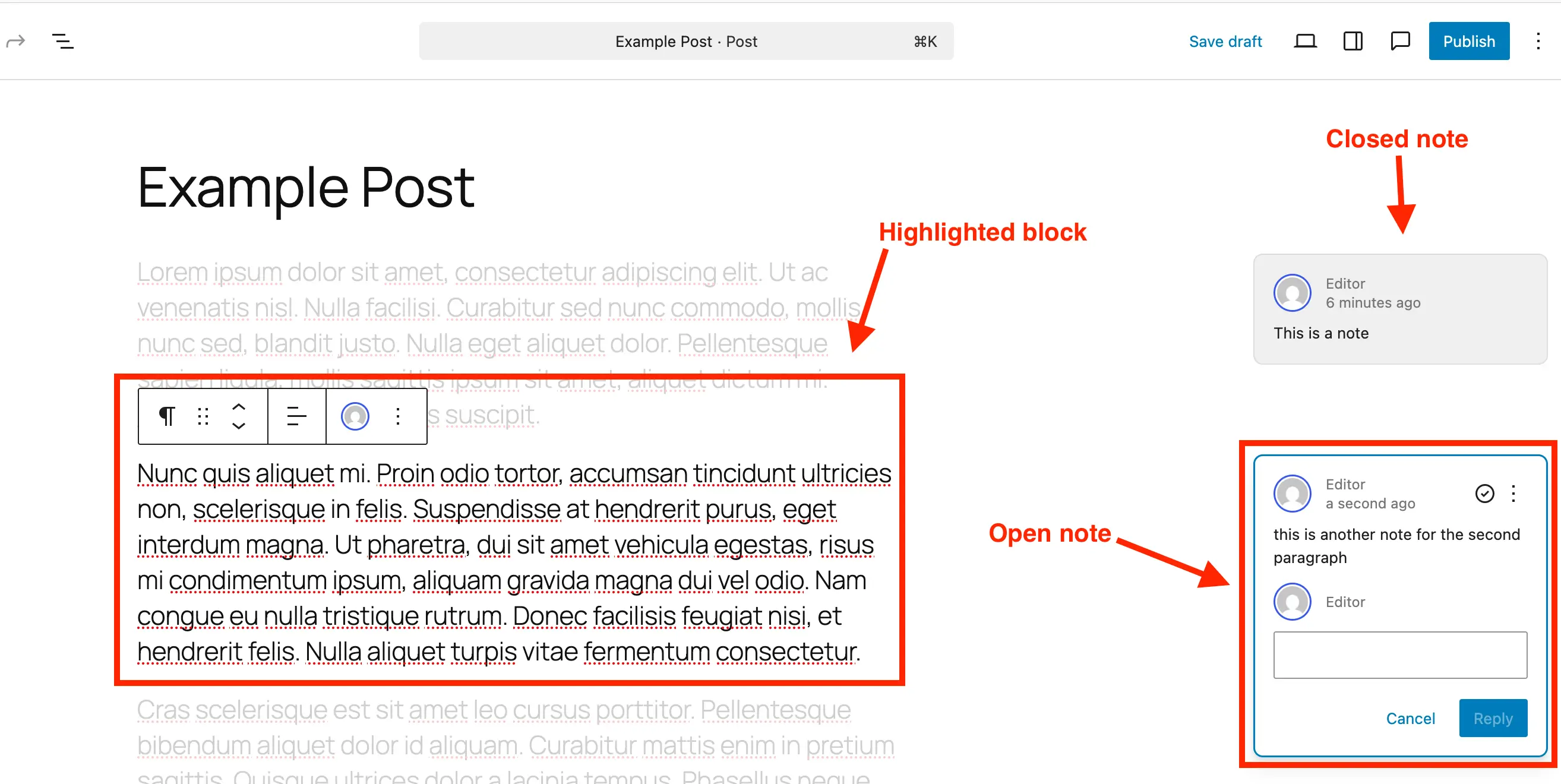
When a note is created, it is tethered to the specific structural element it references. This spatial awareness is the key innovation; by clicking on a note, the editor automatically highlights the relevant block and fades out surrounding elements. This focus-driven design minimizes cognitive load, allowing contributors to address feedback in situ without navigating away from the page.

Key technical attributes include:
- Block-Level Association: Every note is programmatically linked to a specific block ID.
- Threaded Conversations: Each note supports a reply function, enabling iterative discussions within the editor.
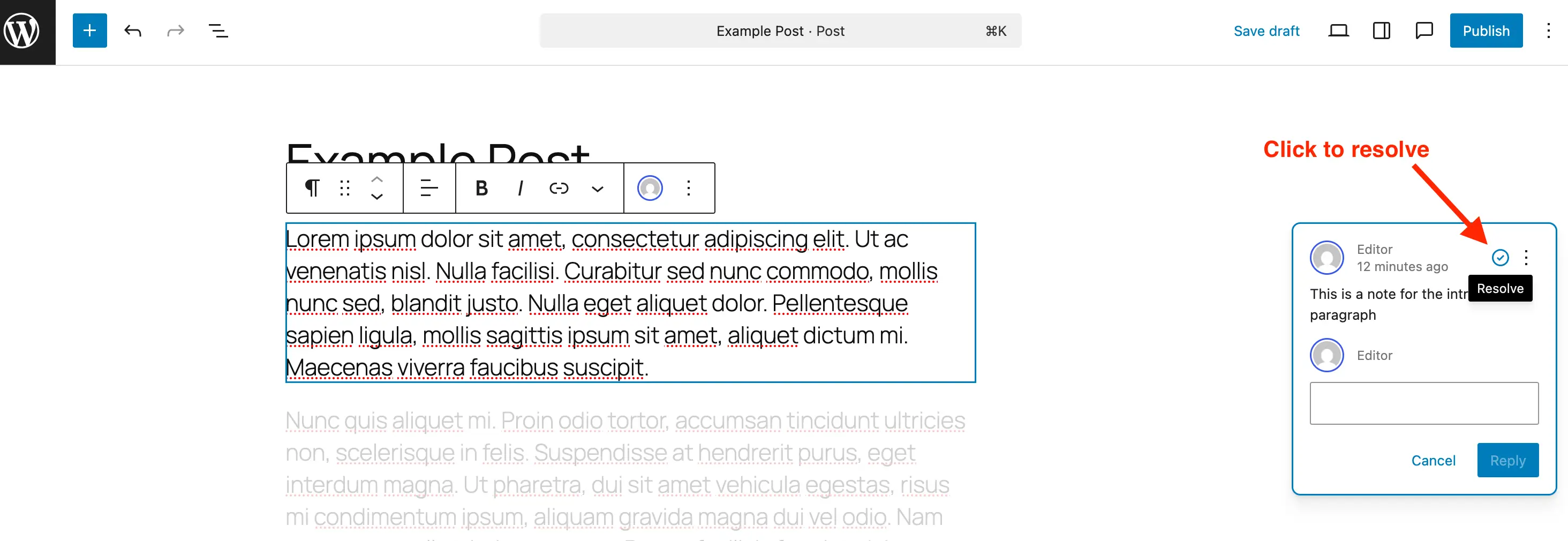
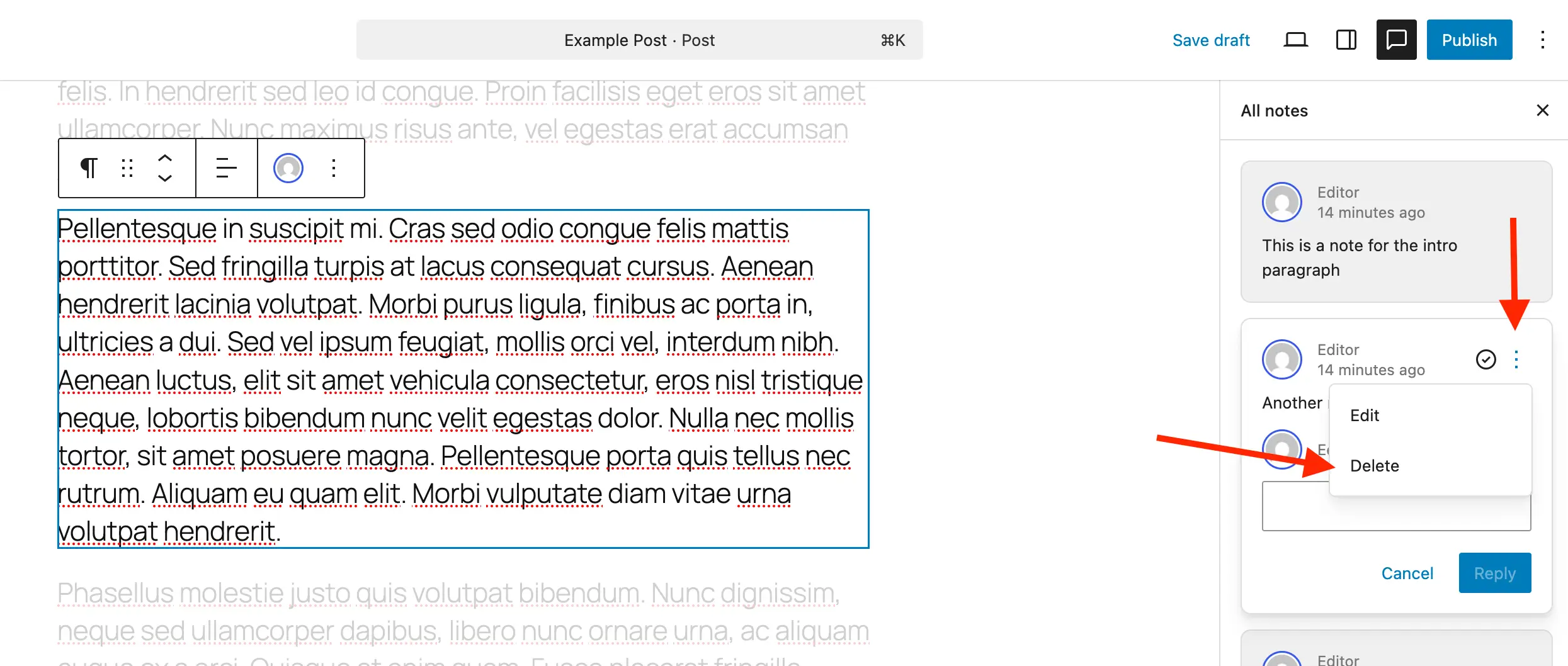
- State Management: Notes can be marked as "Resolved" to clean up the workspace, with the ability to "Reopen" if requirements change.
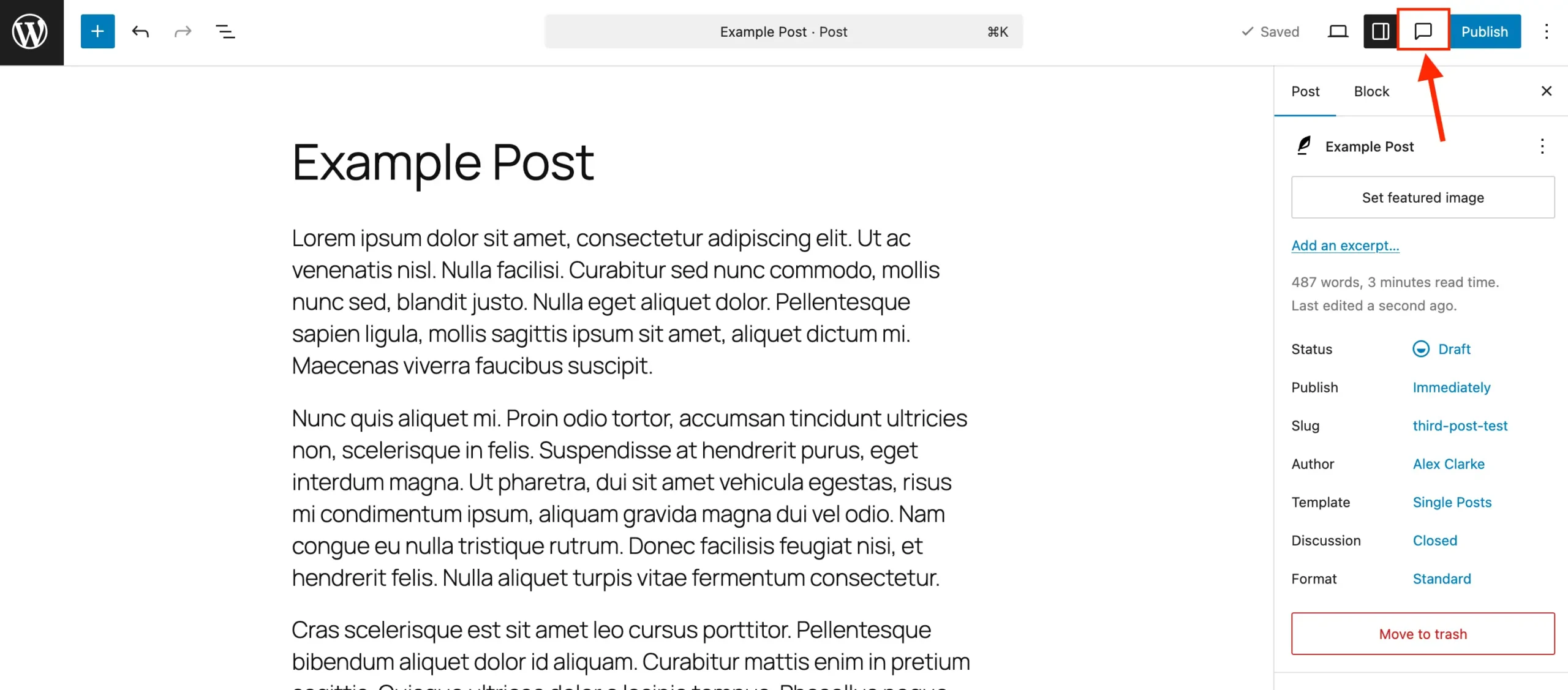
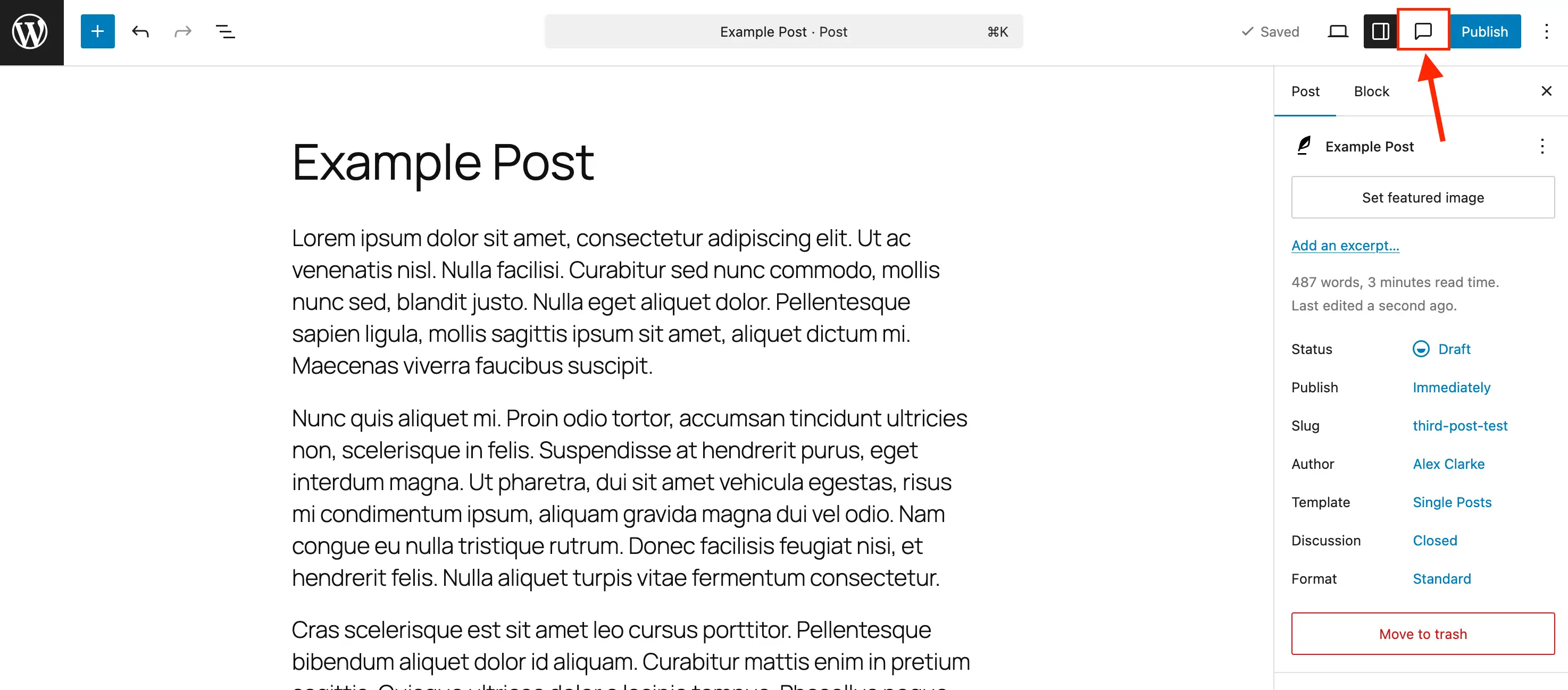
- Unified Sidebar: A dedicated panel provides a bird’s-eye view of all outstanding feedback across the entire page.
A Chronological Shift: From External Tools to Native Integration
The journey toward native in-editor feedback began with the launch of the Gutenberg project years ago, which sought to treat every piece of a webpage as a distinct data object. Historically, this modular approach was primarily for layout purposes. However, developers quickly realized that if every element was a discrete block, it could also be a discrete "target" for metadata.
- Phase 1 (The Fragmented Era): Teams relied on third-party integrations like CommentPress or external collaboration suites. The primary issue was that feedback was "disconnected"—a comment in a Google Doc did not automatically update a WordPress draft.
- Phase 2 (The Plugin Ecosystem): Various community plugins attempted to bridge this gap, but they often suffered from compatibility issues with theme updates and were not universally adopted.
- Phase 3 (Native Implementation, 2026): WordPress integrated the "Notes" feature directly into the core block editor. This shift signaled a strategic move by the WordPress community to prioritize "Editorial Experience" (EX) as a first-class citizen alongside User Experience (UX).
Supporting Data: Why Contextual Feedback Matters
The shift to in-editor feedback is supported by growing trends in content production efficiency. Industry data suggests that content teams spend approximately 20–30% of their production time managing feedback loops—time that is often wasted on re-contextualizing feedback provided in external documents.
- Reduction in Context Switching: Studies on cognitive productivity indicate that switching between applications (e.g., WordPress to Slack) results in a "recovery time" of up to 23 minutes to regain deep focus. By keeping feedback within the editor, teams can potentially reclaim thousands of hours annually.
- Accuracy Improvements: When feedback is attached to the specific element in question, the probability of misinterpreting the "location" of a requested change drops significantly.
- Version Integrity: Because notes exist within the post metadata, they remain persistent. Unlike a Google Doc that might be deleted or moved, these notes remain part of the post’s lifecycle, providing an audit trail for future content updates.
Official Responses and Industry Reception
The response from the WordPress community and enterprise users has been overwhelmingly positive. Lead developers within the WordPress project have described the feature as "the missing piece of the editorial puzzle."
"We wanted to ensure that the WordPress dashboard isn’t just a place where you build, but a place where you refine," says a representative from the WordPress core development team. "By keeping the conversation in the same interface where the content lives, we are empowering teams to act faster and with more clarity."
For agencies managing client projects, the feature is being hailed as a game-changer. Clients who were previously intimidated by the "back-end" of WordPress now have a simplified, intuitive way to leave feedback on a live draft, reducing the need for extensive training on complex project management tools.
Implications for Workflow and Implementation
The introduction of Notes is not merely a UI update; it is an architectural change that demands a shift in how teams operate.
How to Implement and Manage Notes
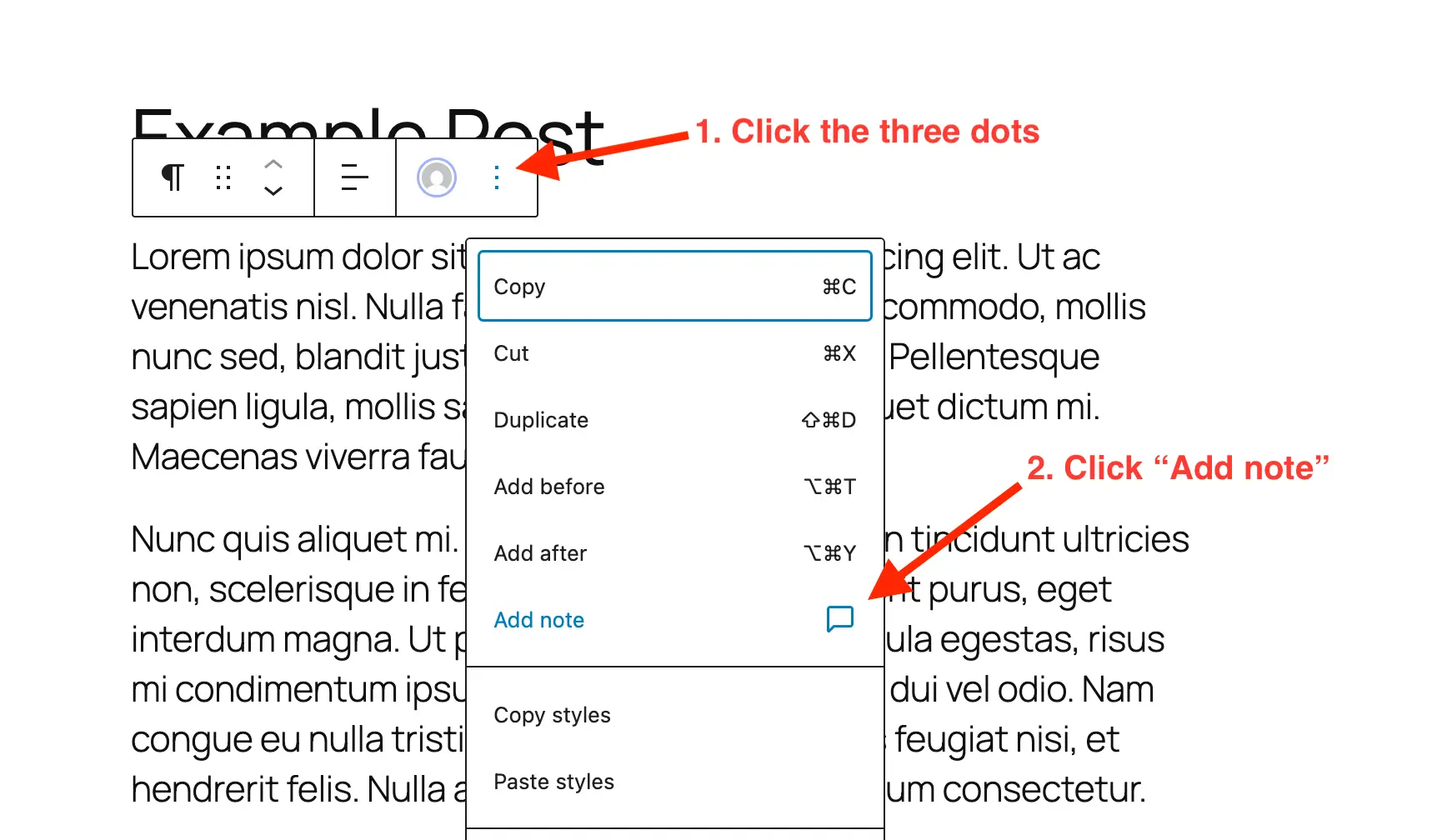
For standard users, the process is straightforward: open the block options (the three-dot menu) and select "Add Note." For power users and developers, however, the implications involve configuration and site health.
Enabling for Custom Post Types
While enabled by default for posts and pages, developers must explicitly support notes for custom post types (CPTs). Using the supports argument in register_post_type is essential:
'supports' => [
    'title',
    'editor' => [ 'notes' => true ],
    'author',
],
This ensures that your custom content types—such as portfolios, testimonials, or product listings—can also benefit from the collaborative power of native notes.
Database Maintenance
A critical implication for large-scale sites is database hygiene. While notes are invaluable during the editing phase, they contribute to database bloat if left unmanaged. It is professional best practice to:
- Resolve: Mark items as complete once the change is implemented.
- Delete: Remove resolved notes periodically.
- Audit: Use the Notes sidebar to ensure no "legacy" feedback remains on published pages.
Customizing the Experience
For those who find the feature intrusive or unnecessary for specific workflows, the ability to disable Notes is a vital safety valve. By filtering register_post_type_args, administrators can maintain a streamlined interface, ensuring the editor remains uncluttered for production-heavy environments where internal feedback is handled differently.
Conclusion: A More Cohesive Future
The arrival of in-editor Notes represents a maturing of the WordPress platform. By integrating communication directly into the construction process, WordPress has effectively removed the "digital wall" that separated the editorial process from the technical execution.
Whether you are a solo blogger looking to keep track of your own revision ideas or a global marketing team managing complex campaigns, this feature provides a robust, centralized, and highly efficient way to manage the lifecycle of content. As we look toward the future, it is clear that the most successful content management systems will be those that minimize the friction between thought and publication—and with the new Notes feature, WordPress has taken a definitive step in that direction.
By embracing these tools, teams can move away from the chaos of fragmented communication and toward a more focused, high-velocity publishing cycle.